
Overview
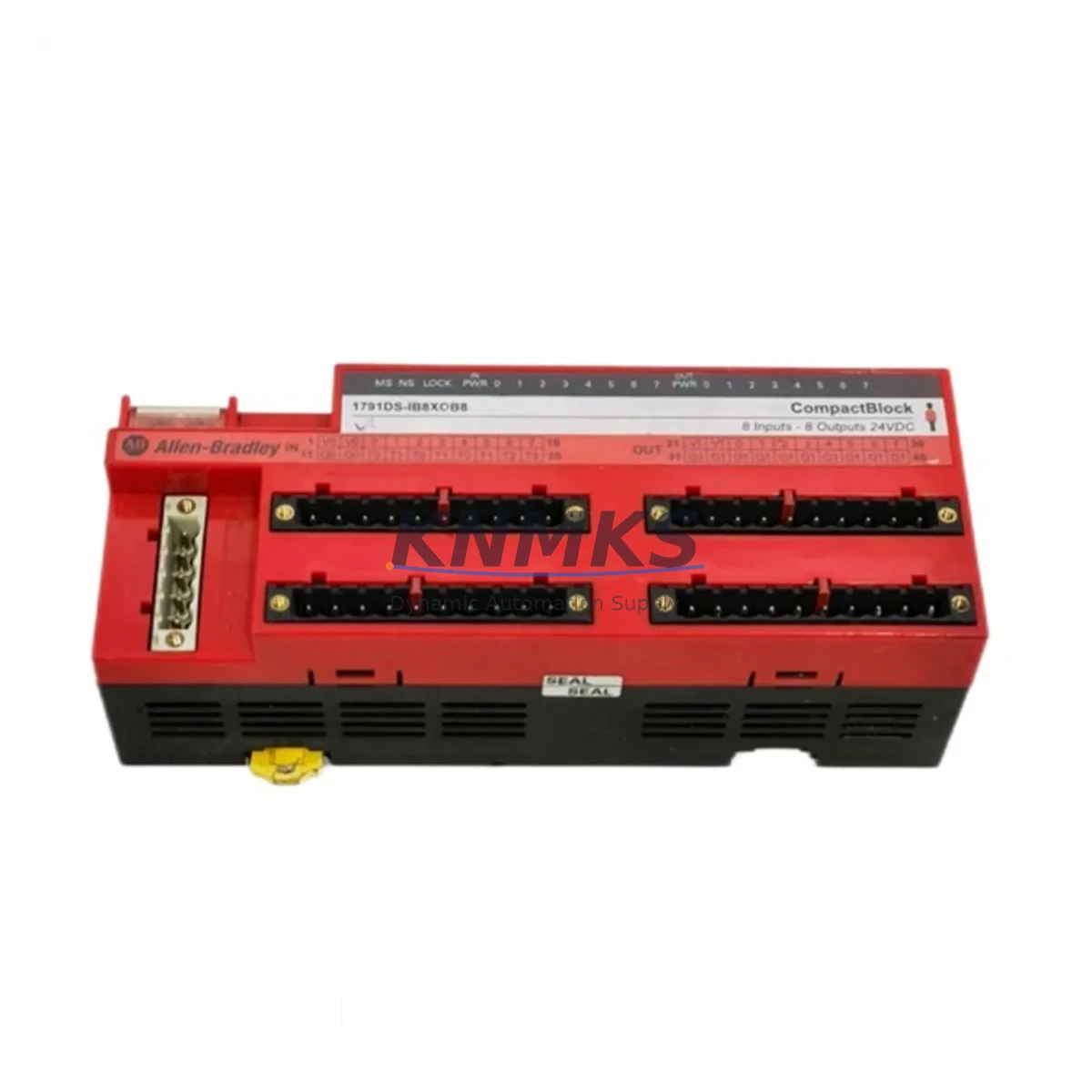
Allen-Bradley 1791DS-IB8XOB8 Migration-Ready Safety I/O Module: Legacy System Retrofit and Compatibility Upgrade
The Allen-Bradley 1791DS-IB8XOB8 is a DeviceNet Safety-compliant ArmorBlock Guard I/O module offering 8 safety digital inputs and 8 safety digital outputs in a compact, IP67-rated enclosure. Designed for machine-level safety integration, this module is a proven migration-ready replacement for aging ArmorBlock and 1791D-series safety nodes deployed across legacy production lines, packaging machinery, press control systems, and automated assembly cells. Whether you are executing a planned safety system upgrade or responding to an end-of-life parts shortage, the 1791DS-IB8XOB8 provides a reliable, in-kind replacement path with minimal disruption to existing wiring, network topology, and safety program logic.
For facilities running legacy GuardLogix or CompactGuardLogix controllers — including the 1756-L61S, 1756-L62S, or 1768-L43S — the 1791DS-IB8XOB8 integrates directly into the existing DeviceNet Safety network without requiring a gateway or protocol bridge. Engineers migrating from older 1791D-IB8XOB8 or 1791DS-IB4XOB4 nodes will find that terminal block pinouts, module addressing, and safety task configuration in Studio 5000 Logix Designer remain largely consistent, significantly reducing re-engineering time and validation scope.
Migration Compatibility Table
| Parameter | 1791DS-IB8XOB8 (This Unit) | Legacy / Predecessor Reference | Retrofit Notes |
|---|---|---|---|
| Network Protocol | DeviceNet Safety (CIP Safety) | DeviceNet Safety | Direct drop-in; no protocol bridge required |
| I/O Configuration | 8 Safety DI / 8 Safety DO | 1791D-IB8XOB8 (standard DI/DO) | Verify safety-rated wiring on all input channels |
| Supply Voltage | 24V DC (18–26.4V DC) | 24V DC | Confirm power supply capacity; add 1606-XLP if needed |
| Enclosure Rating | IP67 / NEMA 6 | IP67 | Mounting footprint identical; gasket inspection recommended |
| Node Address | 0–63 (rotary switch) | 0–63 | Match existing node address before power-up |
| Safety Integrity Level | SIL 2 / PLd Cat. 3 | SIL 2 | Re-validate safety function after replacement per IEC 62061 |
| Communication Connector | 5-pin Mini DeviceNet | 5-pin Mini DeviceNet | Existing trunk/drop cables reusable |
| Firmware Compatibility | Studio 5000 v21+ | RSLogix 5000 v16+ | Update EDS file; re-download safety task if firmware differs |
| Mounting | DIN rail or panel (M5 bolts) | Panel mount | Confirm M5 bolt spacing; 35mm DIN adapter available |
| Support terms | support terms confirmed by quotation — All units ship tested and verified | ||
Retrofit Planning for Existing Automation Systems
Successful integration of the 1791DS-IB8XOB8 into a legacy safety architecture requires a structured pre-replacement assessment. Begin by auditing the existing DeviceNet Safety network segment: confirm the scanner card — typically a 1756-DNB or 1769-SDN — has sufficient node capacity and that the network’s baud rate (125K, 250K, or 500K) matches the replacement module’s configuration. If the existing scanner is operating near its node limit, a network segmentation review may be necessary before proceeding.
Power budget verification is a critical step that is frequently overlooked during rushed maintenance replacements. The 1791DS-IB8XOB8 draws up to 200mA at 24V DC from the auxiliary power supply. If the existing 1606-XLP72E or similar power supply is already loaded near capacity — particularly in cabinets also powering 1734-AENT Point I/O adapters, 1783-BMS10CGN managed switches, or 1492-AIFM analog interface modules — a load calculation must be completed before installation. Overloading the auxiliary bus is a common cause of intermittent safety faults post-retrofit.
Terminal block wiring should be documented in full before disconnecting the legacy module. The 1791DS-IB8XOB8 uses an 18-pin Euro-style terminal block. If the predecessor module used a different pinout — such as the 1791DS-IB4XOB4 with its 12-pin arrangement — a wiring adapter or re-termination will be required. Label all field wires before removal and photograph the existing terminal layout. For installations where the safety I/O feeds directly into a light curtain, safety mat, or two-hand control device, confirm that the new module’s input filter time (configurable from 0 to 126ms) is set to match the original safety response time requirements.
In systems where the 1791DS-IB8XOB8 operates alongside a 1791DS-IB16 or 1791DS-OB8 expansion node on the same DeviceNet Safety segment, verify that the safety controller’s connection ownership table is updated to reflect the new module’s electronic key (vendor ID, product code, and revision). Mismatched electronic keys are the most common cause of connection faults after a module swap. Use the RSNetWorx for DeviceNet tool or Studio 5000’s online browse function to confirm the new module’s identity before going online.
For HMI integration, if the existing PanelView Plus 7 or FactoryTalk View SE screen includes safety status faceplates tied to the replaced node’s I/O tags, verify that tag names and data types remain consistent after the EDS re-import. In most cases, tag structures are preserved when replacing within the same 1791DS product family, but a full HMI screen validation pass is recommended before returning the machine to production.
Downtime Control During System Migration
Minimizing unplanned downtime during a safety I/O module replacement requires preparation that begins well before the maintenance window opens. The 1791DS-IB8XOB8 is stocked and ships within 1–3 business days, allowing maintenance teams to have the replacement unit on-site before scheduling the outage — eliminating the most common source of extended downtime: waiting for parts.
Before the maintenance window, export and archive the current safety task from Studio 5000 or RSLogix 5000. Save the full controller project file, including the safety task signature, to a secure backup location. If the safety task is locked, coordinate with the original system integrator or OEM to obtain the safety task unlock code before the replacement date. Attempting to unlock a safety task during an active outage without the correct credentials is a significant risk to schedule adherence.
During the replacement, follow a structured sequence: de-energize the auxiliary 24V DC supply, disconnect the DeviceNet trunk cable, remove the legacy module, install the 1791DS-IB8XOB8 with the correct node address pre-set on the rotary switch, reconnect all field wiring per the documented terminal layout, and restore power. Do not attempt to go online with the controller until the module’s power LED confirms stable operation. Once online, use the controller’s safety task verification function to confirm that the safety task signature matches the archived version. If the signature has changed — which can occur if the EDS file update altered any I/O connection parameters — a full safety validation cycle must be completed before resuming production.
For facilities with strict change management requirements, the 1791DS-IB8XOB8’s consistent form factor and protocol compatibility with the broader 1791DS family means that the replacement can typically be classified as a like-for-like substitution, reducing the validation scope compared to a cross-family migration. Document the replacement in the machine’s maintenance log, update the spare parts register, and retain the support terms confirmed by quotation certificate for audit purposes.
Retrofit Support FAQ
Q1: Is the 1791DS-IB8XOB8 a direct replacement for the 1791D-IB8XOB8?
The 1791DS-IB8XOB8 is the safety-rated successor to the standard 1791D-IB8XOB8. The DS variant adds CIP Safety protocol support and SIL 2 / PLd Cat. 3 certification. The physical form factor, IP67 enclosure, and DeviceNet connector are identical. However, because the DS variant operates on the DeviceNet Safety network rather than standard DeviceNet, the scanner card must support CIP Safety (e.g., 1756-DNB with safety firmware). Confirm scanner compatibility before ordering.
Q2: Do I need to re-validate the safety function after replacing the module?
Yes. Per IEC 62061 and ISO 13849-1, any replacement of a safety-rated component requires a functional safety validation of the affected safety function. In practice, for a like-for-like 1791DS family replacement, this typically involves a functional test of each safety input and output channel, confirmation of the safety task signature, and documentation of the test results. A full probabilistic recalculation (PFH/PFD) is generally not required for in-family replacements.
Q3: What is included with the unit and what is the support terms coverage?
Each 1791DS-IB8XOB8 ships with the module, terminal block, and a product documentation reference card. All units are tested prior to shipment. A support terms confirmed by quotation cover manufacturing defects and functional failures under normal operating conditions. Support requests are processed via admin@knmks.com with a return authorization issued within 2 business days.
Q4: Can you supply multiple units for a planned maintenance stock program?
Yes. KNMKS maintains inventory of the 1791DS-IB8XOB8 and can fulfill both single-unit emergency orders and multi-unit blanket orders for planned maintenance programs. Lead times for stocked quantities are 1–3 business days. For bulk orders or long-term supply agreements, contact admin@knmks.com or call +86 18359268345 to discuss pricing and delivery scheduling.
© 2026 KNMKS. All rights reserved.
Original Source: https://knmks.com
Contact: admin@knmks.com | +86 18359268345
Product Identification
- Brand / Ecosystem
-
Allen-Bradley
Allen-Bradley - Model / Series
- 1791DS-IB8XOB8
- Product Family
- PLCs & Controllers
- Availability Status
- Available on request after model and quantity confirmation
- Inquiry Type
- B2B RFQ, replacement inquiry and project spare-part request
- Pre-Quote Check
- Exact SKU, brand, series, quantity, nameplate photos and destination country are checked before quotation
System Path
Where this product fits in the KNMKS automation structure.
Specification & Inquiry Focus
- Control platform
- PLC, PAC and modular controllers
- Common needs
- CPU, rack, power and I/O expansion
- Project support
- Replacement, cabinet build and maintenance
Buyer Confirmation
Information KNMKS checks before replying.
- Exact model
- 1791DS-IB8XOB8
- Brand / ecosystem
- Allen-Bradley
- Product family
- PLCs & Controllers
- Application note
- Replacement, maintenance, project build or spare-part list
- Useful photos
- Nameplate, installed unit, cabinet layout or connector side
- Delivery details
- Quantity, destination country and target schedule
Document Support
Files and notes can be confirmed during quotation.
- Product photos or nameplate confirmation when available
- Packing and delivery notes before quotation confirmation
- Support scope and delivery terms confirmed per inquiry
- Export document coordination for qualified B2B requests
Inquiry Support
- Model cross-checking before quotation
- CPU, power, rack and expansion module matching
- Support for replacement and project inquiry
What to Send Us
- Brand and exact model number: Allen-Bradley 1791DS-IB8XOB8
- Quantity and required delivery time
- Application, replacement requirement or nameplate photo
- Destination country and shipping preference
RFQ Preparation
This is a product inquiry page built for RFQ communication.
Fast Model Check
Send this model to KNMKS for confirmation.
Include quantity, destination country and photos if this is a maintenance replacement. The inquiry will be saved with a reference number after submission.
Brand & Compatibility Note
KNMKS displays automation product information for well-known industrial brand ecosystems and compatible replacement references. Brand names are used for product identification and compatibility reference only; final availability and commercial terms are confirmed per quotation.
 Manufacturing
 Machine Tools
 Packaging
 Energy & Power



 HMI & Displays
 Servo Systems
 Variable Frequency Drives
 Sensors