
Overview
Allen-Bradley 1784-PCIS Spare ControlNet PCI Card: Maintenance-Proven Spare Part for Factory Uptime
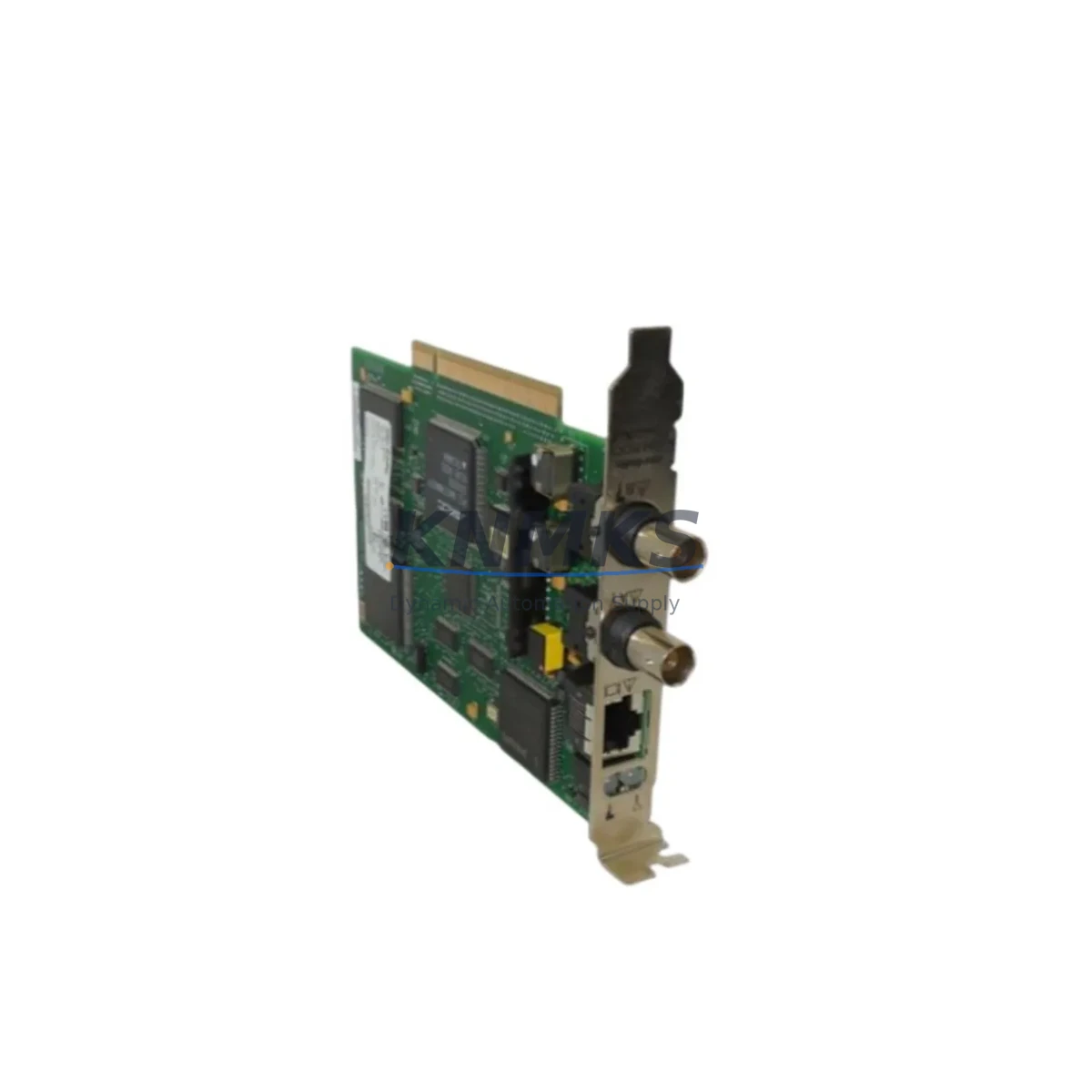
The Allen-Bradley 1784-PCIS is a ControlNet PCI interface card designed for use in PC-based control stations communicating over ControlNet networks within Rockwell Automation environments. As a critical communication link between the host PC and the ControlNet fieldbus, the 1784-PCIS enables real-time data exchange with PLCs, I/O modules, and distributed control nodes across the production floor. For maintenance engineers managing aging 1784 Series infrastructure, keeping a verified spare of the 1784-PCIS on hand is a fundamental element of any uptime protection strategy.
In industrial facilities running continuous or semi-continuous processes — including automotive assembly, food and beverage, chemical processing, and discrete manufacturing — an unexpected failure of the 1784-PCIS can halt communication between the supervisory PC and the ControlNet backbone. This disruption can cascade into loss of HMI visibility, inability to execute program downloads, and interruption of coordinated I/O scanning. Procurement engineers sourcing replacement units should verify card revision compatibility, PCI slot availability in the host workstation, and RSNetWorx for ControlNet software version alignment before committing to a replacement order.
Every 1784-PCIS unit shipped by KNMKS undergoes functional verification prior to dispatch. Units are tested for ControlNet communication initialization, node address assignment, and network scan integrity. A support terms confirmed by quotation is included with every shipment, covering manufacturing defects and functional failures under normal operating conditions.
Spare Maintenance Table
| Parameter | Specification / Recommendation |
|---|---|
| SKU | 1784-PCIS |
| Brand / Series | Allen-Bradley / 1784 Series |
| Product Type | ControlNet PCI Interface Card |
| Interface | PCI Bus (32-bit) |
| Network Protocol | ControlNet (IEEE 802.4-based) |
| Compatible Software | RSNetWorx for ControlNet, RSLogix 5000, Studio 5000 |
| Host Requirement | PC with available 32-bit PCI slot |
| Operating Environment | Industrial control room / engineering workstation |
| Weight | 240 g (approx.) |
| Country of Origin | United States |
| Maintenance Recommendation | Inspect annually; replace on first sign of communication fault or node dropout |
| Support terms | 12 Months — covers manufacturing defects and functional failure under normal use |
Maintenance Planning for Continuous Operation
Effective maintenance planning for a ControlNet-based system requires more than simply stocking the 1784-PCIS. Maintenance engineers should treat the card as one node in a broader communication chain, and any replacement procedure should include a systematic check of adjacent components to prevent secondary failures.
Begin with the ControlNet coaxial trunk cable and BNC tap connectors. Degraded coax or loose taps are a common source of intermittent node dropouts that are frequently misdiagnosed as card failures. If the 1784-PCIS is being replaced due to repeated communication faults, inspect the physical media before installing the new card. Alongside the card, verify the condition of the 1784-PKTX or 1784-PCMK communication adapters if they are present in the same control cabinet for DH+ or DeviceNet segments — cross-network faults can appear to originate from the ControlNet interface when the root cause lies elsewhere.
For the host workstation, confirm that the PCI slot is mechanically sound and that the system BIOS recognizes the card after installation. Driver installation should be performed using the version of RSLinx Classic or RSNetWorx that matches the existing project configuration. Upgrading driver versions without validating compatibility with the current RSLogix 5000 or Studio 5000 project can introduce unexpected behavior during the first scheduled network scan.
On the ControlNet network side, after installing the replacement 1784-PCIS, use RSNetWorx for ControlNet to verify that the node address matches the previous configuration and that the network update time (NUT) is correctly restored. If the system includes 1756-CNB or 1756-CNBR ControlNet bridge modules in a ControlLogix chassis, confirm that the bridge module firmware is compatible with the network configuration file before going live. Power supply stability in the control cabinet should also be verified — a 1606-XLP or equivalent 24 VDC industrial power supply delivering clean, regulated voltage is essential for reliable PCI card operation.
For facilities with legacy SCADA or HMI stations running FactoryTalk View SE or RSView32, confirm that the HMI communication path through the ControlNet network is restored and that all tag subscriptions are active after the card replacement. Signal isolation modules on analog I/O loops connected to ControlNet remote I/O adapters should be checked for drift if the system experienced an uncontrolled shutdown prior to the card failure.
Site Replacement Workflow
A structured replacement workflow minimizes downtime and reduces the risk of introducing new faults during the maintenance window. Follow these steps when replacing the 1784-PCIS in a live production environment:
1. Pre-Replacement Preparation: Export the current RSNetWorx for ControlNet network configuration file and save a backup of the RSLogix 5000 or Studio 5000 project. Document the existing node address, NUT setting, and any scheduled connection parameters. Confirm that a replacement 1784-PCIS with a matching or compatible revision is available and has passed pre-shipment testing.
2. Controlled Shutdown: Coordinate with the production team to schedule a maintenance window. Place the ControlNet network in an unscheduled state if possible to prevent watchdog faults on connected PLCs during the card swap. Power down the host workstation following proper shutdown procedures.
3. Physical Replacement: Remove the faulty 1784-PCIS from the PCI slot. Inspect the slot contacts and the card edge connector for contamination or damage. Install the replacement card, secure the bracket, and reconnect the ControlNet BNC cable.
4. Driver and Software Verification: Power on the workstation and confirm that the operating system detects the new card. Install or verify the correct RSLinx Classic driver. Open RSNetWorx for ControlNet and restore the saved network configuration file. Verify node address assignment and NUT restoration.
5. Communication Validation: Confirm online connectivity to all ControlNet nodes, including 1756-CNB bridge modules, remote I/O adapters, and any ControlNet-connected drives or motion controllers. Verify that the RSLogix 5000 or Studio 5000 project goes online without faults. Restore the network to scheduled mode and monitor for one full production cycle before releasing the system.
Spare Parts Support FAQ
Q1: Is the 1784-PCIS compatible with both RSLogix 5000 and Studio 5000 environments?
Yes. The 1784-PCIS is compatible with both RSLogix 5000 and Studio 5000 Logix Designer when used with the appropriate RSLinx Classic driver version. Confirm the driver version against your software release notes before installation to ensure full compatibility with your existing project configuration.
Q2: How do I verify the card revision before ordering?
The revision code is printed on the card label and is also visible in the RSLinx Classic device properties after installation. When ordering from KNMKS, you may specify your required revision or request a pre-shipment revision confirmation. All units are tested for ControlNet communication functionality before dispatch.
Q3: What is included in the support terms confirmed by quotation?
The support terms confirmed by quotation cover manufacturing defects and functional failures under normal operating conditions from the date of shipment. It does not cover damage resulting from incorrect installation, electrostatic discharge, overvoltage, or physical impact. KNMKS provides replacement or repair support for warranted claims.
Q4: Can KNMKS supply the 1784-PCIS on an ongoing basis for long-term maintenance contracts?
Yes. KNMKS maintains inventory of the 1784-PCIS and related 1784 Series communication cards to support long-term maintenance and spare parts programs. For facilities managing multiple ControlNet nodes or planning multi-year maintenance contracts, contact our sales team to discuss volume pricing, reserved stock arrangements, and lead time commitments.
© 2026 KNMKS. All rights reserved.
Original Source: https://knmks.com
Contact: admin@knmks.com | +86 18359268345
Product Identification
- Brand / Ecosystem
-
Allen-Bradley
Allen-Bradley - Model / Series
- 1784-PCIS
- Product Family
- PLCs & Controllers
- Availability Status
- Available on request after model and quantity confirmation
- Inquiry Type
- B2B RFQ, replacement inquiry and project spare-part request
- Pre-Quote Check
- Exact SKU, brand, series, quantity, nameplate photos and destination country are checked before quotation
System Path
Where this product fits in the KNMKS automation structure.
Specification & Inquiry Focus
- Control platform
- PLC, PAC and modular controllers
- Common needs
- CPU, rack, power and I/O expansion
- Project support
- Replacement, cabinet build and maintenance
Buyer Confirmation
Information KNMKS checks before replying.
- Exact model
- 1784-PCIS
- Brand / ecosystem
- Allen-Bradley
- Product family
- PLCs & Controllers
- Application note
- Replacement, maintenance, project build or spare-part list
- Useful photos
- Nameplate, installed unit, cabinet layout or connector side
- Delivery details
- Quantity, destination country and target schedule
Document Support
Files and notes can be confirmed during quotation.
- Product photos or nameplate confirmation when available
- Packing and delivery notes before quotation confirmation
- Support scope and delivery terms confirmed per inquiry
- Export document coordination for qualified B2B requests
Inquiry Support
- Model cross-checking before quotation
- CPU, power, rack and expansion module matching
- Support for replacement and project inquiry
What to Send Us
- Brand and exact model number: Allen-Bradley 1784-PCIS
- Quantity and required delivery time
- Application, replacement requirement or nameplate photo
- Destination country and shipping preference
RFQ Preparation
This is a product inquiry page built for RFQ communication.
Fast Model Check
Send this model to KNMKS for confirmation.
Include quantity, destination country and photos if this is a maintenance replacement. The inquiry will be saved with a reference number after submission.
Brand & Compatibility Note
KNMKS displays automation product information for well-known industrial brand ecosystems and compatible replacement references. Brand names are used for product identification and compatibility reference only; final availability and commercial terms are confirmed per quotation.
 Manufacturing
 Machine Tools
 Packaging
 Energy & Power



 HMI & Displays
 Servo Systems
 Variable Frequency Drives
 Sensors