
Overview
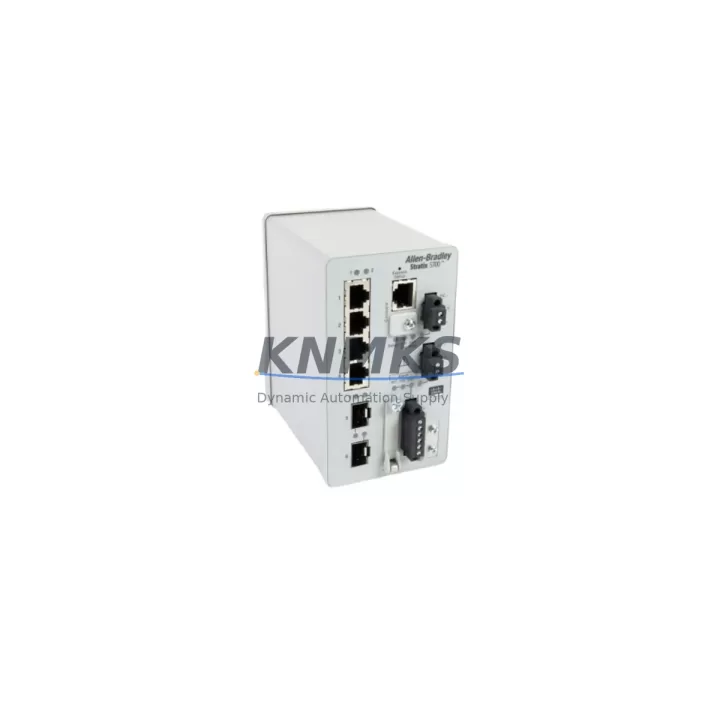
Allen-Bradley 1783-BMS06SA Migration-Ready Managed Switch for Legacy Control Systems
The Allen-Bradley 1783-BMS06SA is a 6-port managed Ethernet switch from the Stratix 5700 series, purpose-built for EtherNet/IP-based industrial automation networks. As legacy control architectures reach end-of-life, the 1783-BMS06SA serves as a proven drop-in replacement and upgrade path for aging unmanaged or semi-managed switches deployed in Rockwell Automation control cabinets, machine cells, and distributed I/O networks. Whether you are migrating from an older Stratix 2000 unmanaged switch, consolidating ring topology with DLR (Device Level Ring) support, or expanding an existing ControlLogix or CompactLogix network, the 1783-BMS06SA delivers the managed switching capability required for modern EtherNet/IP architectures without requiring a full panel redesign.
Each unit supplied by KNMKS is sourced from verified channels, pre-shipment tested for port integrity, VLAN configuration, and EtherNet/IP communication, and backed by a support terms confirmed by quotation. Stock is maintained for immediate dispatch to support urgent retrofit and breakdown replacement scenarios globally.
Migration Compatibility Table
| Parameter | Details |
|---|---|
| SKU / Part Number | 1783-BMS06SA |
| Series | Stratix 5700 |
| Port Configuration | 6 × 10/100 Mbps copper (RJ45) |
| Network Protocol | EtherNet/IP, IEEE 802.3 |
| VLAN Support | Yes — 802.1Q tagged VLANs |
| Ring Topology | DLR (Device Level Ring) capable |
| Power Input | 24 VDC nominal (18–32 VDC range) |
| DIN Rail Mounting | Yes — standard 35 mm DIN rail |
| Operating Temperature | 0 °C to 60 °C |
| Common Replacement For | Stratix 2000 unmanaged switches, third-party 10/100 switches in EtherNet/IP panels |
| Compatible Controllers | ControlLogix, CompactLogix, MicroLogix (EtherNet/IP adapter required) |
| Firmware Compatibility | Managed via Cisco IOS-based CLI or Studio 5000 / RSLinx Classic |
| Installation Footprint | Compact — verify DIN rail space and 24 VDC terminal availability before installation |
| Commissioning Tool | RSLinx Classic, Studio 5000 Logix Designer, or web browser interface |
| Support terms | 12 Months — KNMKS pre-shipment tested |
Retrofit Planning for Existing Automation Systems
Integrating the 1783-BMS06SA into an existing control system requires a structured pre-installation review to avoid communication interruptions and program logic conflicts. Before removing the legacy switch, document all IP address assignments, subnet masks, and gateway configurations currently active on the network segment. If the existing panel uses a 1783-US5T unmanaged switch or a third-party 10/100 hub, the migration to the 1783-BMS06SA introduces managed switching features — including VLAN segmentation and QoS prioritization — that must be configured before the switch goes live to prevent EtherNet/IP I/O connection timeouts.
Power supply verification is a critical first step. The 1783-BMS06SA requires a stable 24 VDC supply with sufficient current headroom. If the existing 1606-XLP power supply or 1606-XLS series unit is already loaded near capacity by the existing I/O modules, communication modules, and HMI panels, a dedicated 24 VDC branch or an additional power supply module should be provisioned before installation. Terminal block wiring for the 24 VDC input follows standard two-wire practice; confirm polarity and verify that the terminal strip in the control cabinet has available positions for the new switch’s power feed.
For systems using a 1756-EN2T or 1756-EN3TR EtherNet/IP communication module in a ControlLogix chassis, the 1783-BMS06SA connects directly to the existing network infrastructure. If DLR ring topology is being introduced for the first time, each EtherNet/IP device on the ring — including 1734-AENT Point I/O adapters, 1769-L33ER CompactLogix controllers, and PowerFlex drives with embedded EtherNet/IP ports — must support DLR supervisor or ring node operation. Verify firmware versions on all ring participants before enabling DLR on the 1783-BMS06SA to avoid ring faults during commissioning.
HMI panels connected to the network segment — such as PanelView Plus 7 terminals communicating via EtherNet/IP — should be tested for screen update continuity after the switch replacement. VLAN configuration on the 1783-BMS06SA can be used to isolate HMI traffic from I/O traffic, improving determinism and reducing the risk of HMI communication timeouts during high I/O scan rate periods. If the existing system uses a 1783-ETAP Ethernet tap for network diagnostics, it can be retained on the new network segment without modification.
Downtime Control During System Migration
Minimizing production downtime during a switch replacement requires pre-staging the 1783-BMS06SA with the correct IP configuration, VLAN assignments, and port settings before the cutover window begins. Use the web browser interface or RSLinx Classic to pre-configure the switch offline, then verify the configuration against the existing network documentation. During the cutover, follow a port-by-port reconnection sequence rather than transferring all cables simultaneously — this allows each EtherNet/IP device to re-establish its connection and confirm I/O data exchange before the next device is reconnected.
For systems where the PLC program uses produced/consumed tags across multiple ControlLogix controllers, confirm that the tag connection paths remain valid after the switch replacement. If the original switch was operating as a simple hub with no VLAN separation, and the new 1783-BMS06SA introduces VLAN boundaries, produced/consumed tag traffic must be permitted across the relevant VLANs or placed on a common untagged VLAN to maintain inter-controller communication.
Backup the PLC program, HMI project, and drive parameter files before beginning any physical work. If the system uses a 1747-UIC USB-to-DH485 interface cable or a 1784-U2DHP USB-to-DH+ cable for legacy serial programming access, ensure these connections are documented and accessible for post-migration verification. After the 1783-BMS06SA is installed and all devices have re-established EtherNet/IP connections, perform a full I/O force test and verify all HMI faceplates are updating correctly before returning the system to production.
Retrofit Support FAQ
Q1: Is the 1783-BMS06SA a direct replacement for the Stratix 2000 unmanaged switch?
The 1783-BMS06SA is a managed switch and provides a functional upgrade path from the Stratix 2000 series. Physical port count and DIN rail mounting are compatible, but the managed switch requires initial configuration via the web interface or CLI before it will pass EtherNet/IP traffic correctly. Pre-configure VLAN and port settings before installation to minimize cutover time.
Q2: What commissioning steps are required after installation?
After physical installation and power-up, assign the management IP address via the console port or DHCP, configure port VLANs to match the existing network segmentation, enable DLR if ring topology is required, and verify EtherNet/IP I/O connections from the controller. Use Studio 5000 Logix Designer to confirm all I/O modules are in the RUN state and producing valid data before releasing the system to production.
Q3: Has the unit been tested before shipment?
Yes. Every 1783-BMS06SA supplied by KNMKS undergoes pre-shipment testing covering port link integrity, power input verification, and basic EtherNet/IP communication validation. Units are shipped with a support terms confirmed by quotation covering manufacturing defects and functional failures under normal industrial operating conditions.
Q4: What is the typical lead time and stock availability?
KNMKS maintains ready stock of the 1783-BMS06SA to support urgent breakdown replacement and planned retrofit projects. Standard orders are dispatched within 1–3 business days. For large-quantity requirements or long-term supply agreements covering 12–36 months of planned consumption, contact the sales team directly to discuss pricing and allocation.
© 2026 KNMKS. All rights reserved.
Original Source: https://knmks.com
Contact: admin@knmks.com | +86 18359268345
Product Identification
- Brand / Ecosystem
-
Allen-Bradley
Allen-Bradley - Model / Series
-
1783-BMS06SA
Assorted Series - Product Family
- PLCs & Controllers
- Availability Status
- Available on request after model and quantity confirmation
- Inquiry Type
- B2B RFQ, replacement inquiry and project spare-part request
- Pre-Quote Check
- Exact SKU, brand, series, quantity, nameplate photos and destination country are checked before quotation
System Path
Where this product fits in the KNMKS automation structure.
Specification & Inquiry Focus
- Control platform
- PLC, PAC and modular controllers
- Common needs
- CPU, rack, power and I/O expansion
- Project support
- Replacement, cabinet build and maintenance
Buyer Confirmation
Information KNMKS checks before replying.
- Exact model
- 1783-BMS06SA
- Brand / ecosystem
- Allen-Bradley
- Product family
- PLCs & Controllers
- Application note
- Replacement, maintenance, project build or spare-part list
- Useful photos
- Nameplate, installed unit, cabinet layout or connector side
- Delivery details
- Quantity, destination country and target schedule
Document Support
Files and notes can be confirmed during quotation.
- Product photos or nameplate confirmation when available
- Packing and delivery notes before quotation confirmation
- Support scope and delivery terms confirmed per inquiry
- Export document coordination for qualified B2B requests
Inquiry Support
- Model cross-checking before quotation
- CPU, power, rack and expansion module matching
- Support for replacement and project inquiry
What to Send Us
- Brand and exact model number: Allen-Bradley 1783-BMS06SA
- Quantity and required delivery time
- Application, replacement requirement or nameplate photo
- Destination country and shipping preference
RFQ Preparation
This is a product inquiry page built for RFQ communication.
Fast Model Check
Send this model to KNMKS for confirmation.
Include quantity, destination country and photos if this is a maintenance replacement. The inquiry will be saved with a reference number after submission.
Brand & Compatibility Note
KNMKS displays automation product information for well-known industrial brand ecosystems and compatible replacement references. Brand names are used for product identification and compatibility reference only; final availability and commercial terms are confirmed per quotation.
 Manufacturing
 Machine Tools
 Packaging
 Energy & Power



 HMI & Displays
 Servo Systems
 Variable Frequency Drives
 Sensors