
Overview
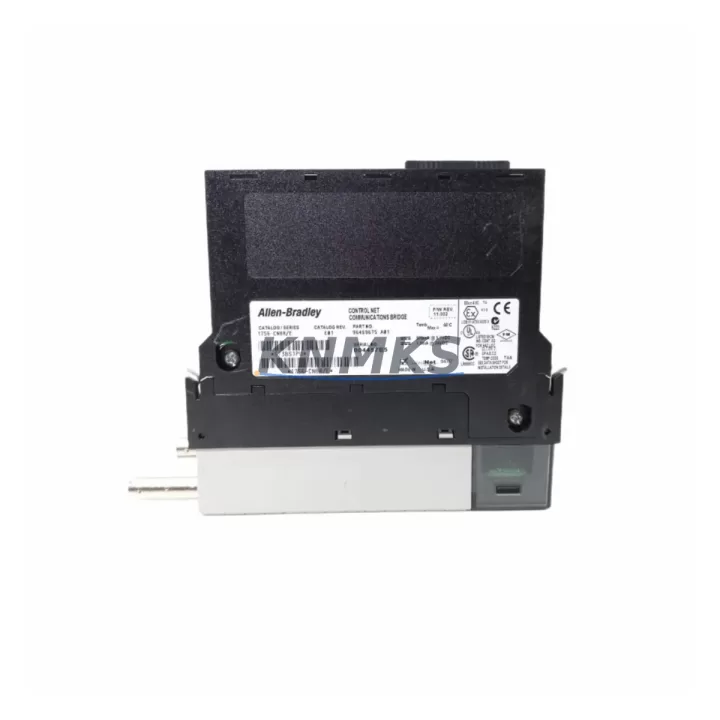
Allen-Bradley 1756-CNBR/E Maintenance-Proven Spare Part for Factory Uptime
The Allen-Bradley 1756-CNBR/E is a ControlNet Bridge Module designed for the ControlLogix 1756 platform — one of the most widely deployed programmable automation controller (PAC) architectures in discrete and process manufacturing. As a bridge module, the 1756-CNBR/E enables seamless ControlNet communication between ControlLogix chassis, allowing distributed I/O, peer-to-peer messaging, and scheduled data transfer across the plant floor. Holding a verified spare of this module is a cornerstone of any serious maintenance strategy for facilities running legacy or active ControlLogix systems.
For maintenance engineers managing aging ControlLogix infrastructure, the 1756-CNBR/E represents a single point of failure that can halt an entire production line. A failed bridge module disrupts ControlNet scheduled transfers, breaks I/O connectivity to remote chassis, and can cascade into unplanned downtime across multiple production cells. Stocking a tested, original replacement unit eliminates the risk of extended lead times from distribution channels and ensures your team can execute a swap within a single maintenance window.
Spare Maintenance Table
| Parameter | Specification |
|---|---|
| Part Number | 1756-CNBR/E |
| Brand | Allen-Bradley (Rockwell Automation) |
| Series | ControlLogix 1756 |
| Module Type | ControlNet Bridge Module |
| Network Protocol | ControlNet (IEC 61158) |
| Backplane Interface | ControlLogix 1756 chassis backplane |
| ControlNet Ports | 2 × BNC (redundant media capable) |
| Scheduled Connections | Supports NUT-based scheduled transfers |
| Unscheduled Messaging | Explicit messaging (CIP) |
| Power Consumption | Supplied via 1756 chassis backplane |
| Operating Temperature | 0°C to 60°C (32°F to 140°F) |
| Compatibility | ControlLogix 1756 series chassis; RSLogix 5000 / Studio 5000 |
| Firmware | Field-upgradeable via RSLogix / ControlFLASH |
| Origin | USA (Rockwell Automation) |
| Condition | Original, tested before shipment |
| Support terms | 12 Months |
| Maintenance Recommendation | Inspect BNC connectors and backplane contacts during annual shutdown; verify ControlNet NUT configuration post-swap |
Maintenance Planning for Continuous Operation
When a 1756-CNBR/E is flagged during a control cabinet inspection or fails during operation, the replacement workflow extends beyond the module itself. A thorough site assessment should include verification of the ControlNet coaxial cable plant — inspect BNC terminators, taps, and trunk cable continuity, as degraded media is a common root cause of intermittent bridge faults that are misdiagnosed as module failure.
The chassis power supply — typically a 1756-PA72 or 1756-PB72 — should be load-tested to confirm it can sustain the full backplane current draw after the new module is seated. Backplane slot integrity matters: inspect the 1756 chassis backplane connector for bent pins or oxidation, particularly in high-humidity or high-vibration environments. If the chassis is a 1756-A7 or 1756-A13, confirm that adjacent modules such as the 1756-L73 or 1756-L74 controller and any 1756-EN2T EtherNet/IP bridge modules are not showing diagnostic faults that could indicate a broader backplane issue.
For facilities running redundant ControlNet media, verify that both coaxial paths are active and that the 1756-CNBR/E firmware revision is consistent with the redundant partner module. Mismatched firmware revisions between bridge modules in a redundant pair are a known source of scheduled transfer instability. Additionally, review the ControlNet network update time (NUT) configuration in RSNetWorx for ControlNet after any module swap — an incorrect NUT can cause I/O connection timeouts even when the hardware is functioning correctly.
Procurement engineers should note that the 1756-CNBR/E is a mature product in the Rockwell Automation lifecycle. Sourcing from a verified industrial spare parts supplier with documented testing procedures and a support terms confirmed by quotation is the most reliable path to avoiding counterfeit or refurbished units that may pass visual inspection but fail under load. Maintaining at least one cold spare per ControlNet segment in your critical production areas is a widely adopted best practice in automotive, food and beverage, and oil and gas facilities running ControlLogix architectures.
Site Replacement Workflow
Step 1 — Pre-Replacement Verification: Document the current ControlNet node address assigned to the 1756-CNBR/E. Export the RSNetWorx for ControlNet network configuration file before powering down. Confirm the replacement module firmware revision matches or is compatible with the existing network configuration.
Step 2 — Safe Removal: Place the ControlLogix controller in Program mode via RSLogix 5000 / Studio 5000. Inhibit the ControlNet bridge module in the I/O tree to gracefully drop scheduled connections before physical removal. Power down the chassis if the installation environment requires it, or perform a hot-swap if the chassis and application support it.
Step 3 — Module Seating and Node Assignment: Seat the 1756-CNBR/E firmly into the designated chassis slot. Set the ControlNet node address using the rotary switches on the module face to match the documented address. Power up and confirm the module status LEDs indicate normal operation (NET LED green, MOD LED green).
Step 4 — Network Re-commissioning: Open RSNetWorx for ControlNet and perform a network scan to confirm the replacement module is visible at the correct node address. Download the saved network configuration to restore scheduled connection parameters. Verify all I/O connections in the RSLogix 5000 / Studio 5000 I/O tree return to Running state.
Step 5 — Post-Swap Validation: Monitor the ControlNet diagnostic counters for 15–30 minutes to confirm zero media errors and stable scheduled transfer rates. Log the replacement in your maintenance management system (CMMS) with the module serial number, firmware revision, and date of installation.
This workflow is applicable whether replacing a failed unit or performing a proactive swap during a planned annual shutdown. The 1756-CNBR/E is a direct form-fit-function replacement for earlier /A through /D revisions in most ControlLogix applications, though firmware compatibility with the installed RSLogix 5000 / Studio 5000 project version should always be confirmed before commissioning.
Spare Parts Support FAQ
Q1: Is the 1756-CNBR/E compatible with all ControlLogix 1756 chassis sizes?
Yes. The 1756-CNBR/E is compatible with all standard ControlLogix 1756 series chassis, including the 1756-A4, 1756-A7, 1756-A10, 1756-A13, and 1756-A17. It occupies a single chassis slot and draws power from the backplane. Confirm that your chassis power supply has sufficient remaining current capacity before adding the module.
Q2: How is the unit tested before shipment?
Each 1756-CNBR/E unit is powered up and functionally tested prior to shipment. Testing includes backplane communication verification and ControlNet port integrity checks. Units that do not pass functional testing are not shipped. A support terms confirmed by quotation cover defects in materials and workmanship from the date of delivery.
Q3: Can this module replace earlier revisions such as the 1756-CNBR/A or 1756-CNBR/C?
In most applications, yes. The /E revision is the latest hardware revision and is generally backward-compatible with earlier revisions in terms of form, fit, and function. However, firmware compatibility with your specific RSLogix 5000 / Studio 5000 project version should be verified. Contact our technical team with your project firmware version for confirmation before ordering if you have concerns.
Q4: What is your long-term supply commitment for this part?
We maintain ongoing inventory of the 1756-CNBR/E and other ControlLogix 1756 series modules to support customers with long-lifecycle automation systems. For facilities requiring guaranteed availability under a maintenance contract or annual blanket order, contact admin@knmks.com to discuss dedicated stock arrangements and volume pricing.
© 2026 KNMKS. All rights reserved.
Original Source: https://knmks.com
Contact: admin@knmks.com | +86 18359268345
Product Identification
- Brand / Ecosystem
-
Allen-Bradley
Allen-Bradley - Model / Series
-
1756-CNBR/E
ControlLogix Series - Product Family
- Other Components
- Availability Status
- Available on request after model and quantity confirmation
- Inquiry Type
- B2B RFQ, replacement inquiry and project spare-part request
- Pre-Quote Check
- Exact SKU, brand, series, quantity, nameplate photos and destination country are checked before quotation
System Path
Where this product fits in the KNMKS automation structure.
Specification & Inquiry Focus
- Component range
- Breakers, terminals and cabinet accessories
- Common needs
- Model, photo and installation requirement
- Project support
- Maintenance and mixed spare-part inquiry
Buyer Confirmation
Information KNMKS checks before replying.
- Exact model
- 1756-CNBR/E
- Brand / ecosystem
- Allen-Bradley
- Product family
- Other Components
- Application note
- Replacement, maintenance, project build or spare-part list
- Useful photos
- Nameplate, installed unit, cabinet layout or connector side
- Delivery details
- Quantity, destination country and target schedule
Document Support
Files and notes can be confirmed during quotation.
- Product photos or nameplate confirmation when available
- Packing and delivery notes before quotation confirmation
- Support scope and delivery terms confirmed per inquiry
- Export document coordination for qualified B2B requests
Inquiry Support
- Mixed automation spare parts inquiry
- Cabinet component and accessory support
- Model identification from photos or labels
What to Send Us
- Brand and exact model number: Allen-Bradley 1756-CNBR/E
- Quantity and required delivery time
- Application, replacement requirement or nameplate photo
- Destination country and shipping preference
RFQ Preparation
This is a product inquiry page built for RFQ communication.
Fast Model Check
Send this model to KNMKS for confirmation.
Include quantity, destination country and photos if this is a maintenance replacement. The inquiry will be saved with a reference number after submission.
Brand & Compatibility Note
KNMKS displays automation product information for well-known industrial brand ecosystems and compatible replacement references. Brand names are used for product identification and compatibility reference only; final availability and commercial terms are confirmed per quotation.
 Manufacturing
 Machine Tools
 Packaging
 Energy & Power
 PLCs & Controllers
 HMI & Displays
 Servo Systems
 Variable Frequency Drives