
Overview
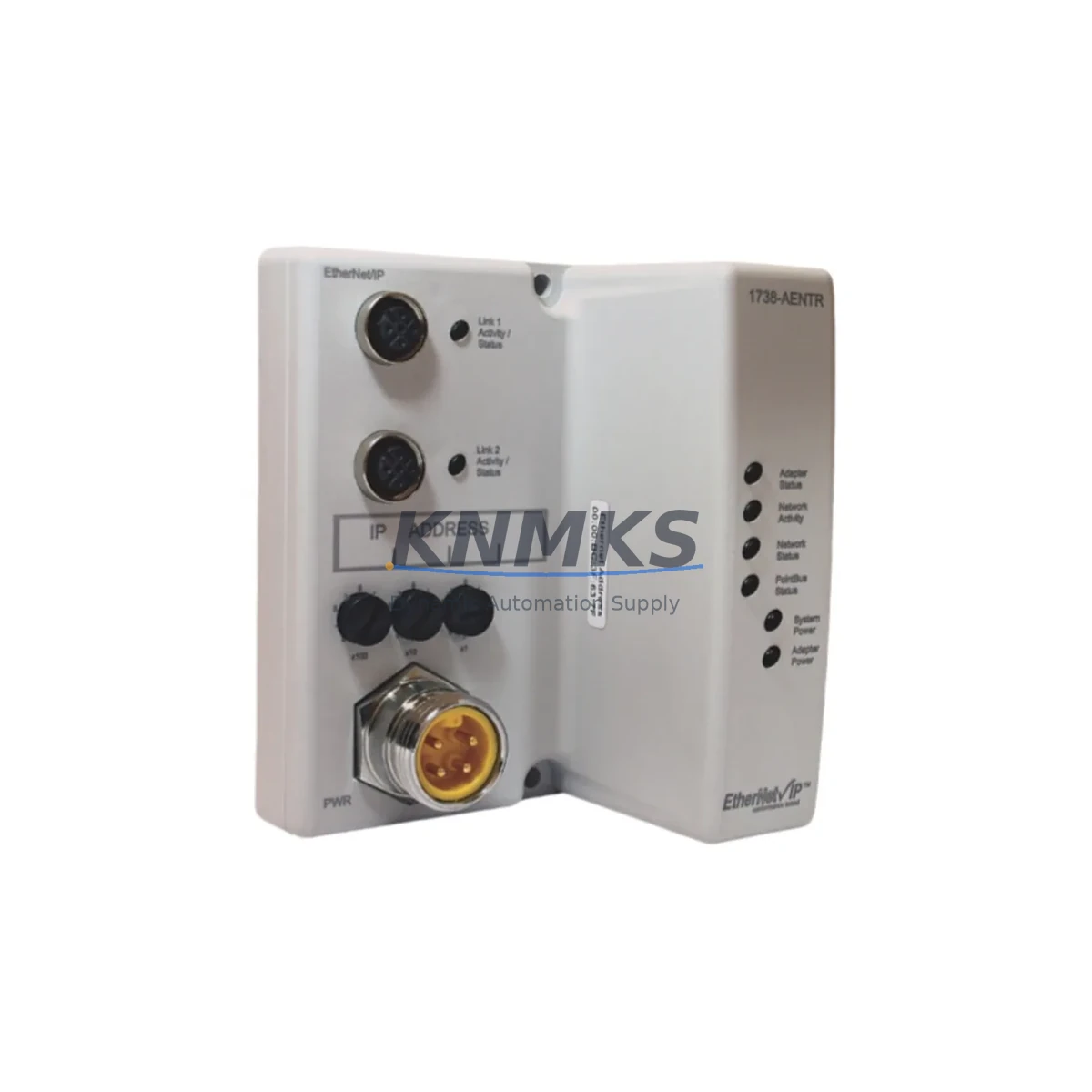
Allen-Bradley 1738-AENTR Maintenance-Proven Spare Part for Factory Uptime
The Allen-Bradley 1738-AENTR is a dual-port EtherNet/IP I/O Adaptor designed for the ArmorPoint distributed I/O platform. As a critical node in machine-level and panel-level control architectures, this adaptor bridges the ArmorPoint I/O backplane to an EtherNet/IP network, enabling real-time data exchange with Logix-based controllers. For maintenance engineers managing aging ArmorPoint installations, keeping a verified 1738-AENTR spare on the shelf is a non-negotiable element of any uptime strategy. A failed adaptor can isolate an entire I/O segment from the controller, triggering a full line stop within seconds. With a tested, original-source replacement unit available, recovery time is measured in minutes rather than hours.
At KNMKS, every 1738-AENTR unit is sourced from verified supply channels, electrically tested prior to shipment, and backed by a support terms confirmed by quotation. We support both emergency replacement orders and long-term blanket purchase agreements for facilities running multiple ArmorPoint nodes across production lines, packaging systems, material handling conveyors, and process control panels.
Spare Maintenance Table
| Parameter | Specification |
|---|---|
| Part Number | 1738-AENTR |
| Brand | Allen-Bradley (Rockwell Automation) |
| Series | ArmorPoint 1738 |
| Product Type | EtherNet/IP Dual-Port I/O Adaptor |
| Network Protocol | EtherNet/IP (Device Level Ring – DLR capable) |
| Communication Ports | 2 × RJ-45 (dual-port, ring topology support) |
| Controller Compatibility | ControlLogix, CompactLogix, GuardLogix (Logix 5000 platform) |
| I/O Backplane | ArmorPoint 1738 series I/O modules |
| Supply Voltage | 24V DC (system bus powered) |
| Operating Temperature | -20°C to +60°C |
| Protection Rating | IP67 (panel-mount, harsh environment rated) |
| Mounting | ArmorPoint backplane rail mount |
| Origin | United States |
| Condition | Original, new or tested-serviceable |
| Pre-shipment Test | Yes – electrically tested before dispatch |
| Support terms | 12 Months |
| Lead Time | availability confirmed by RFQ – ships within 1–3 business days |
Maintenance Planning for Continuous Operation
The 1738-AENTR adaptor sits at the heart of the ArmorPoint I/O segment. When planning a replacement or conducting a scheduled cabinet inspection, maintenance engineers should treat this unit as part of a broader system health check rather than an isolated swap. The EtherNet/IP network feeding the adaptor should be verified for correct IP addressing, subnet configuration, and ring topology integrity — particularly if the installation uses Device Level Ring (DLR) for redundancy. A faulty managed switch port or a degraded Cat5e/Cat6 cable run can cause intermittent adaptor faults that mimic hardware failure.
On the I/O side, the ArmorPoint backplane modules connected downstream of the 1738-AENTR — including digital input modules such as the 1738-IB8, digital output modules such as the 1738-OB8, and analog modules such as the 1738-IE4 — should be inspected for connector corrosion, loose backplane seating, and correct module keying. A failed adaptor often masks underlying I/O module faults that only become visible once the adaptor is restored to service.
Power integrity is equally critical. The 24V DC bus supplying the ArmorPoint system should be checked at the terminal block level using a calibrated multimeter. If the installation includes a 1738-EP24DC ArmorPoint power supply module, verify its output voltage and current capacity against the total I/O load. Undersized or degraded power supplies are a common root cause of adaptor resets and communication timeouts.
For facilities running Logix-based controllers, the 1756-EN2TR ControlLogix EtherNet/IP communication module or the 1769-L33ER CompactLogix controller should be reviewed for firmware compatibility with the 1738-AENTR. Mismatched firmware revisions between the controller and the adaptor can prevent successful connection establishment after a replacement. Always confirm the RSLogix 5000 or Studio 5000 project revision and the adaptor’s firmware version before commissioning a replacement unit.
Where the ArmorPoint system interfaces with safety circuits, the associated safety relay modules and GuardLogix safety task configuration should be validated post-replacement to ensure the safety I/O map remains intact. Procurement engineers sourcing the 1738-AENTR for annual maintenance kits should also consider stocking the associated 1738-AENTRXT (extended temperature variant) if the installation environment exceeds standard operating ranges.
Site Replacement Workflow
Replacing a 1738-AENTR in a live ArmorPoint installation follows a structured sequence to minimize downtime and avoid configuration loss. Before removing the failed unit, document the existing IP address, subnet mask, gateway, and DLR ring configuration using RSLinx Classic or Studio 5000 Logix Designer. Export the controller project and save the I/O configuration as a reference baseline.
Power down the ArmorPoint segment at the 24V DC supply — do not rely solely on the controller inhibit function. Remove the failed 1738-AENTR from the backplane rail, noting the orientation and any keying inserts. Install the replacement unit, ensuring the backplane connector seats fully and the locking mechanism engages. Restore 24V DC power and verify the adaptor’s status LEDs: the Network Status (NS) LED should cycle to solid green, and the Module Status (MS) LED should indicate normal operation.
Re-enter the IP configuration using the adaptor’s built-in web server or via RSLinx. Download the controller project and verify that all I/O modules in the ArmorPoint segment are recognized and reporting correctly in the Studio 5000 I/O tree. Perform a functional test of all connected I/O points before returning the line to production. Total replacement time for a prepared maintenance team with a pre-configured spare is typically under 30 minutes, compared to 4–8 hours when sourcing a replacement reactively.
Spare Parts Support FAQ
Q1: Is the 1738-AENTR compatible with both ControlLogix and CompactLogix systems?
Yes. The 1738-AENTR communicates over standard EtherNet/IP and is compatible with any Logix 5000 platform controller that supports EtherNet/IP I/O connections, including ControlLogix (1756), CompactLogix (1769), and GuardLogix safety controllers. Verify the Studio 5000 project revision and adaptor firmware version for full compatibility confirmation.
Q2: How do you verify the unit before shipment?
Every 1738-AENTR dispatched from KNMKS undergoes electrical power-on testing and communication verification prior to packaging. Units are inspected for physical integrity, connector condition, and correct firmware. A test report is available upon request for critical maintenance applications.
Q3: Can I place a blanket order for long-term supply?
Yes. KNMKS supports blanket purchase agreements for facilities requiring guaranteed stock of the 1738-AENTR over a 6–24 month horizon. This is particularly relevant for plants operating legacy ArmorPoint installations where the original manufacturer has moved to successor platforms. Contact admin@knmks.com to discuss volume pricing and scheduled release terms.
Q4: What does the support terms confirmed by quotation cover?
The support terms confirmed by quotation cover manufacturing defects and functional failure under normal operating conditions. It does not cover damage resulting from incorrect installation, overvoltage events, or physical mishandling. In the event of a support terms claim, KNMKS provides a replacement unit or documented resolution support within the confirmed support period. Contact our technical team at admin@knmks.com or +86 18359268345 to initiate a claim.
© 2026 KNMKS. All rights reserved.
Original Source: https://knmks.com
Contact: admin@knmks.com | +86 18359268345
Product Identification
- Brand / Ecosystem
-
Allen-Bradley
Allen-Bradley - Model / Series
- 1738-AENTR
- Product Family
- PLCs & Controllers
- Availability Status
- Available on request after model and quantity confirmation
- Inquiry Type
- B2B RFQ, replacement inquiry and project spare-part request
- Pre-Quote Check
- Exact SKU, brand, series, quantity, nameplate photos and destination country are checked before quotation
System Path
Where this product fits in the KNMKS automation structure.
Specification & Inquiry Focus
- Control platform
- PLC, PAC and modular controllers
- Common needs
- CPU, rack, power and I/O expansion
- Project support
- Replacement, cabinet build and maintenance
Buyer Confirmation
Information KNMKS checks before replying.
- Exact model
- 1738-AENTR
- Brand / ecosystem
- Allen-Bradley
- Product family
- PLCs & Controllers
- Application note
- Replacement, maintenance, project build or spare-part list
- Useful photos
- Nameplate, installed unit, cabinet layout or connector side
- Delivery details
- Quantity, destination country and target schedule
Document Support
Files and notes can be confirmed during quotation.
- Product photos or nameplate confirmation when available
- Packing and delivery notes before quotation confirmation
- Support scope and delivery terms confirmed per inquiry
- Export document coordination for qualified B2B requests
Inquiry Support
- Model cross-checking before quotation
- CPU, power, rack and expansion module matching
- Support for replacement and project inquiry
What to Send Us
- Brand and exact model number: Allen-Bradley 1738-AENTR
- Quantity and required delivery time
- Application, replacement requirement or nameplate photo
- Destination country and shipping preference
RFQ Preparation
This is a product inquiry page built for RFQ communication.
Fast Model Check
Send this model to KNMKS for confirmation.
Include quantity, destination country and photos if this is a maintenance replacement. The inquiry will be saved with a reference number after submission.
Brand & Compatibility Note
KNMKS displays automation product information for well-known industrial brand ecosystems and compatible replacement references. Brand names are used for product identification and compatibility reference only; final availability and commercial terms are confirmed per quotation.
 Manufacturing
 Machine Tools
 Packaging
 Energy & Power



 HMI & Displays
 Servo Systems
 Variable Frequency Drives
 Sensors