
Overview
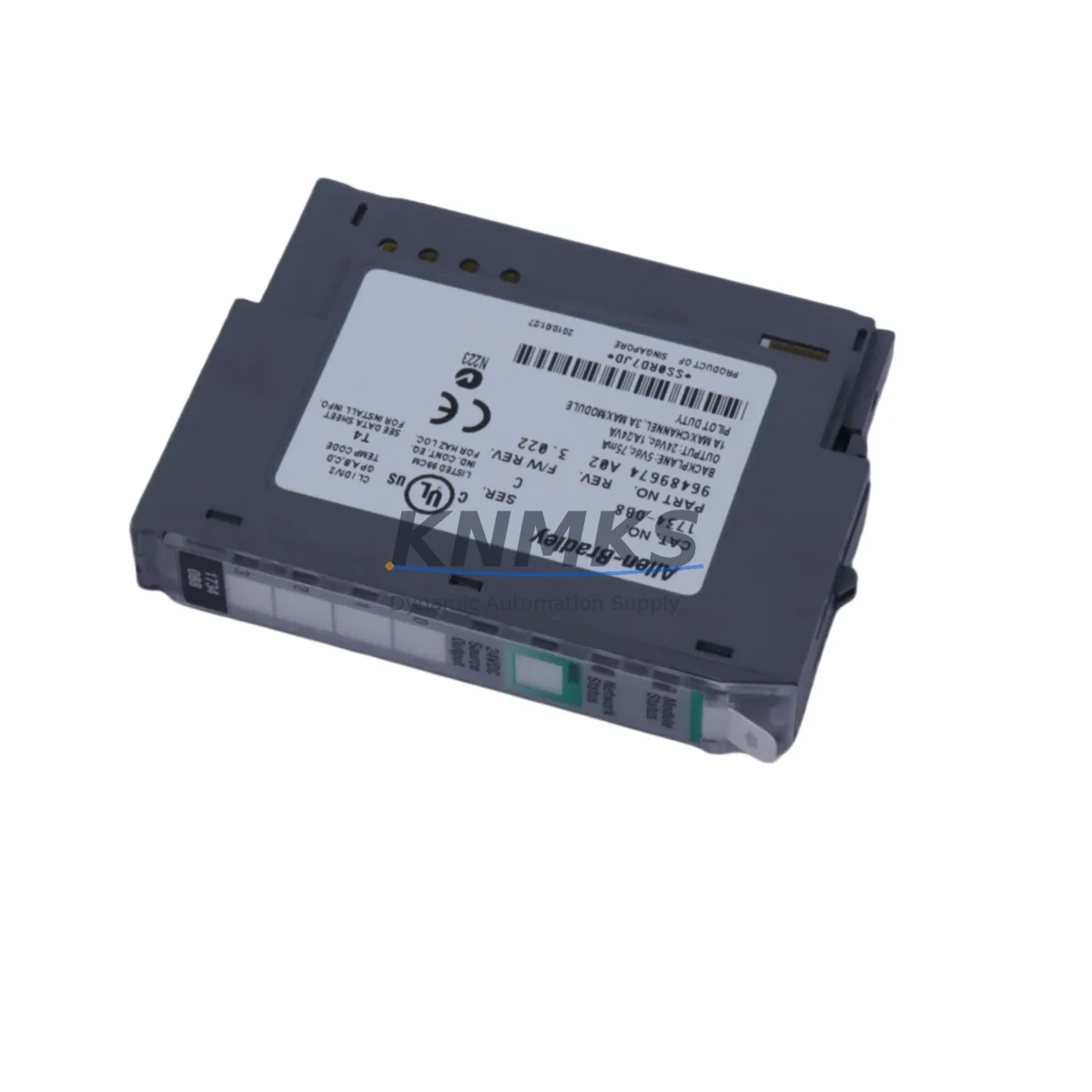
Allen-Bradley 1734-OB8 Maintenance-Proven Spare Part for Factory Uptime
The Allen-Bradley 1734-OB8 is an 8-point 24VDC sourcing digital output module designed for the Rockwell Automation POINT I/O platform. In high-availability manufacturing environments — from automotive assembly lines to food and beverage processing — this module serves as a critical interface between the control system and field actuators such as solenoid valves, motor starters, and indicator lamps. Maintaining a verified, tested spare of the 1734-OB8 in your cabinet inventory is one of the most cost-effective strategies for reducing unplanned downtime and protecting production continuity.
Each unit supplied by KNMKS is sourced from authorized distribution channels, subjected to functional output verification prior to dispatch, and backed by a 12-month replacement support terms. Whether you are managing a scheduled annual shutdown, responding to an emergency fault, or building a blanket-stock program for a multi-site maintenance contract, the 1734-OB8 spare from KNMKS delivers the reliability and traceability your maintenance team requires.
Spare Maintenance Table
| Parameter | Specification |
|---|---|
| Part Number | 1734-OB8 |
| Brand | Allen-Bradley (Rockwell Automation) |
| Series | POINT I/O |
| Module Type | 8-Point 24VDC Sourcing Digital Output |
| Output Voltage | 10–28.8 VDC |
| Output Current per Point | 0.5 A max |
| Total Module Current | 4 A max |
| Communication Interface | POINT I/O Backplane (1734 series) |
| Compatible Adapters | 1734-AENT, 1734-ACNR, 1734-ADN, 1734-APB |
| Compatible Controllers | ControlLogix, CompactLogix, MicroLogix (via adapter) |
| Operating Temperature | 0–55 °C |
| Relative Humidity | 5–95% non-condensing |
| Mounting | DIN Rail via 1734 Terminal Base |
| Required Terminal Base | 1734-TB, 1734-TBS, or equivalent |
| Dimensions (H × W × D) | Approx. 94 × 12 × 54 mm |
| Weight | Approx. 40 g |
| Origin | USA |
| Support terms | 12 Months (KNMKS) |
| Condition | Original, Tested Before Shipment |
| Lead Time | In-Stock / Ships within 3–5 Business Days |
Maintenance Planning for Continuous Operation
When a 1734-OB8 output module fails or is flagged during a routine cabinet inspection, the fault rarely exists in isolation. Experienced maintenance engineers know that a single output module fault can mask upstream power issues, wiring degradation, or adapter communication errors that will resurface if not addressed during the same maintenance window.
Before completing the 1734-OB8 replacement, verify the condition of the 1734-AENT EtherNet/IP adapter — the communication backbone of the POINT I/O node. A degraded adapter can cause intermittent output faults that are misdiagnosed as module failures. Similarly, inspect the 1734-TB or 1734-TBS terminal base for contact wear, corrosion, or mechanical damage; a faulty base will cause the replacement module to exhibit the same fault immediately after installation.
Check the 24VDC field power supply feeding the output circuit. Voltage sag below 10V or ripple exceeding specification will cause erratic output behavior regardless of module condition. If your cabinet uses a 1734-EP24DC POINT I/O power expander, verify its output under load before signing off the repair. For installations where the 1734-OB8 drives inductive loads such as solenoid valves, confirm that suppression diodes or RC snubbers are installed at the load — missing suppression is a leading cause of premature output transistor failure.
In multi-node POINT I/O racks, also inspect adjacent modules such as the 1734-IB8 digital input module and any 1734-OW4 relay output modules in the same cabinet. Shared backplane power faults can degrade multiple modules simultaneously. If the system includes analog I/O, check the 1734-IE4C or 1734-OE4C analog modules for calibration drift that may have been masked by the output fault alarm. Finally, review the 1734-ACNR ControlNet adapter or network switch port statistics if the node is on a managed network — a CRC error spike often precedes module communication faults.
Maintaining a minimum stock of one 1734-OB8 spare per active POINT I/O node, combined with a documented annual inspection checklist covering terminal bases, adapters, and field power supplies, is the most reliable strategy for achieving sub-four-hour MTTR on digital output faults in POINT I/O-based control systems.
Site Replacement Workflow
Step 1 — Fault Isolation: Confirm the fault is module-specific using the controller’s I/O tree in Studio 5000 or RSLogix 5000. A solid red Module Fault LED on the 1734-OB8 with a corresponding Major Fault code (e.g., 16#0001 Connection Failure) confirms the module requires replacement rather than a wiring or load fault.
Step 2 — Safe De-energization: Isolate field power to the output circuit at the cabinet disconnect. Do not rely solely on the controller inhibit function. Verify zero voltage at the output terminals with a calibrated meter before proceeding.
Step 3 — Module Removal: Press the release tab on the 1734-OB8 and slide it off the terminal base. The terminal base and field wiring remain in place — no rewiring is required for a like-for-like replacement.
Step 4 — Compatibility Verification: Confirm the replacement 1734-OB8 firmware revision is compatible with the installed adapter firmware. Mismatched firmware revisions can prevent the module from going online. KNMKS supplies modules with standard production firmware; contact admin@knmks.com if a specific revision is required.
Step 5 — Module Installation and Commissioning: Slide the replacement module onto the terminal base until it clicks. Restore field power and observe the Module Status LED — a solid green LED confirms successful backplane communication. Verify all 8 output points in the controller’s I/O diagnostic screen before returning the system to automatic mode.
Step 6 — Documentation: Record the replacement date, module serial number, and fault code in your CMMS. Schedule a follow-up inspection of the terminal base and field power supply within 30 days to confirm root cause has been addressed.
Spare Parts Support FAQ
Q1: Is the 1734-OB8 supplied by KNMKS an original Allen-Bradley component?
Yes. All 1734-OB8 units are sourced from authorized distribution channels and are original Rockwell Automation production components. Each unit undergoes functional output verification before shipment. A 12-month replacement support terms is included with every order.
Q2: How do I confirm compatibility with my existing POINT I/O node before ordering?
The 1734-OB8 is compatible with all standard 1734-series terminal bases (1734-TB, 1734-TBS, 1734-TBSH) and all POINT I/O communication adapters including the 1734-AENT, 1734-ACNR, 1734-ADN, and 1734-APB. Provide your adapter catalog number and firmware revision to admin@knmks.com for a pre-order compatibility confirmation at no charge.
Q3: What is the recommended spare parts stocking strategy for POINT I/O systems?
For production-critical POINT I/O nodes, KNMKS recommends maintaining a minimum of one 1734-OB8 per active node, with a secondary buffer stock for facilities operating more than three nodes. For multi-site maintenance programs, blanket purchase orders with scheduled quarterly releases provide the best balance of cost control and availability assurance. Contact our team to discuss long-term supply agreements.
Q4: What is included in the support terms confirmed by quotation and what does the pre-shipment test cover?
The support terms confirmed by quotation cover defects in materials and workmanship under normal operating conditions. Pre-shipment testing verifies all 8 output channels for correct switching function, backplane connector integrity, and LED indicator operation. Support requests are processed within 5 business days with advance replacement available for critical production applications. Contact admin@knmks.com to initiate a support terms claim.
© 2026 KNMKS. All rights reserved.
Original Source: https://knmks.com
Contact: admin@knmks.com | +86 18359268345
Product Identification
- Brand / Ecosystem
-
Allen-Bradley
Allen-Bradley - Model / Series
- 1734-OB8
- Product Family
- PLCs & Controllers
- Availability Status
- Available on request after model and quantity confirmation
- Inquiry Type
- B2B RFQ, replacement inquiry and project spare-part request
- Pre-Quote Check
- Exact SKU, brand, series, quantity, nameplate photos and destination country are checked before quotation
System Path
Where this product fits in the KNMKS automation structure.
Specification & Inquiry Focus
- Control platform
- PLC, PAC and modular controllers
- Common needs
- CPU, rack, power and I/O expansion
- Project support
- Replacement, cabinet build and maintenance
Buyer Confirmation
Information KNMKS checks before replying.
- Exact model
- 1734-OB8
- Brand / ecosystem
- Allen-Bradley
- Product family
- PLCs & Controllers
- Application note
- Replacement, maintenance, project build or spare-part list
- Useful photos
- Nameplate, installed unit, cabinet layout or connector side
- Delivery details
- Quantity, destination country and target schedule
Document Support
Files and notes can be confirmed during quotation.
- Product photos or nameplate confirmation when available
- Packing and delivery notes before quotation confirmation
- Support scope and delivery terms confirmed per inquiry
- Export document coordination for qualified B2B requests
Inquiry Support
- Model cross-checking before quotation
- CPU, power, rack and expansion module matching
- Support for replacement and project inquiry
What to Send Us
- Brand and exact model number: Allen-Bradley 1734-OB8
- Quantity and required delivery time
- Application, replacement requirement or nameplate photo
- Destination country and shipping preference
RFQ Preparation
This is a product inquiry page built for RFQ communication.
Fast Model Check
Send this model to KNMKS for confirmation.
Include quantity, destination country and photos if this is a maintenance replacement. The inquiry will be saved with a reference number after submission.
Brand & Compatibility Note
KNMKS displays automation product information for well-known industrial brand ecosystems and compatible replacement references. Brand names are used for product identification and compatibility reference only; final availability and commercial terms are confirmed per quotation.
 Manufacturing
 Machine Tools
 Packaging
 Energy & Power



 HMI & Displays
 Servo Systems
 Variable Frequency Drives
 Sensors