
Overview
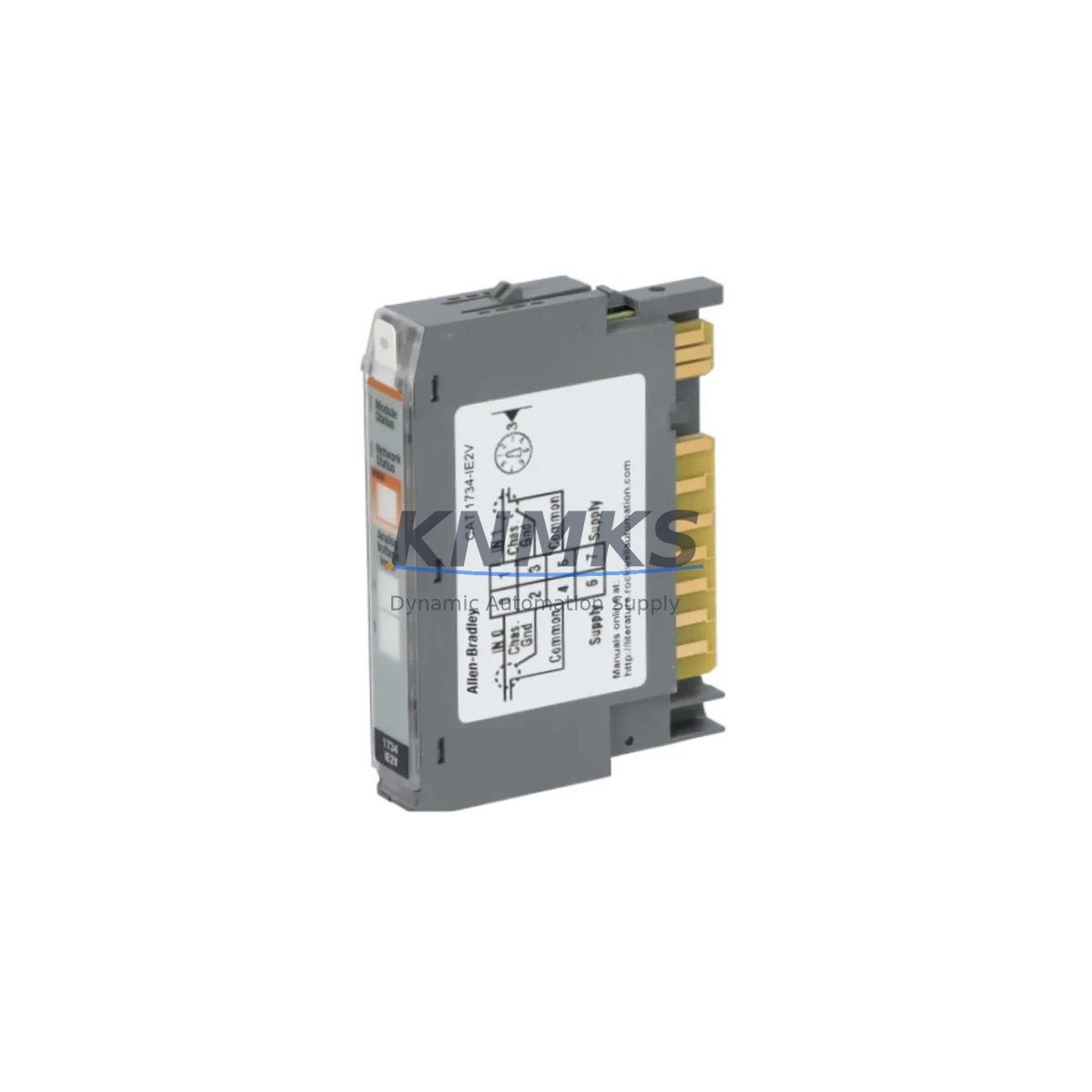
Allen-Bradley 1734-IE2V Maintenance-Proven Spare Part for Factory Uptime
The Allen-Bradley 1734-IE2V is a 2-channel analog voltage input module designed for the POINT I/O platform, widely deployed in ControlLogix, CompactLogix, and FlexLogix control architectures across process, discrete, and hybrid manufacturing environments. As a maintenance-proven spare part, the 1734-IE2V supports uninterrupted factory operation by enabling rapid field replacement of aging or failed analog input channels without requiring system reconfiguration or PLC program modification. Sourced as an original Allen-Bradley component, each unit is tested prior to shipment and backed by a support terms confirmed by quotation, giving maintenance engineers and procurement teams the confidence to stock this module as a critical line-replaceable unit (LRU) in their spare parts inventory.
In facilities running long-lifecycle automation systems, analog input modules are among the highest-risk components for unplanned downtime. Signal drift, connector wear, and firmware incompatibility with aging backplanes can cause intermittent faults that are difficult to isolate without a verified replacement on hand. Stocking the 1734-IE2V as a ready spare eliminates diagnostic delay and reduces mean time to repair (MTTR) during both scheduled shutdowns and emergency callouts.
Spare Maintenance Table
| Parameter | Specification |
|---|---|
| Part Number | 1734-IE2V |
| Brand | Allen-Bradley (Rockwell Automation) |
| Series | POINT I/O |
| Module Type | 2-Channel Analog Voltage Input |
| Input Range | 0–10 VDC / ±10 VDC (configurable) |
| Resolution | 16-bit |
| Communication | POINT I/O backplane (ControlNet, DeviceNet, EtherNet/IP via adapter) |
| Compatible Controllers | ControlLogix, CompactLogix, FlexLogix, SoftLogix |
| Compatible Adapters | 1734-AENT, 1734-ACNR, 1734-ADN |
| Power Consumption | 75 mA @ 5 VDC (backplane) |
| Operating Temperature | 0–55°C |
| Mounting | POINT I/O terminal base (1734-TB, 1734-TBS) |
| Installation | DIN rail via POINT I/O base unit |
| Origin | USA |
| Condition | Original, tested before shipment |
| Support terms | 12 Months |
Maintenance Planning for Continuous Operation
When replacing the 1734-IE2V in the field, a thorough inspection of the surrounding POINT I/O node is essential to prevent repeat failures and ensure signal integrity across the entire analog loop. Begin by verifying the condition of the 1734-AENT EtherNet/IP adapter or the applicable communication adapter (1734-ACNR for ControlNet, 1734-ADN for DeviceNet), as adapter firmware mismatches or corrupted configuration files are a common root cause of analog module faults that appear hardware-related.
Inspect the 1734-TB or 1734-TBS terminal base for signs of corrosion, loose wiring, or mechanical damage. Terminal bases are consumable components in high-vibration or high-humidity environments and should be replaced on a 5–7 year cycle regardless of visible condition. Check field wiring continuity and shielding integrity at the terminal block — unshielded or improperly grounded signal cables are a leading cause of noise-induced analog drift on the 1734-IE2V.
Review the 1734-EP24DC POINT I/O power supply module output voltage under load. Voltage sag below 24 VDC nominal can cause intermittent analog input errors that mimic module failure. If the power supply is more than five years old or shows signs of capacitor aging (output ripple above specification), schedule replacement during the same maintenance window.
For facilities using 1734-IB8 or 1734-OB8 digital I/O modules in the same POINT I/O node, verify that the total backplane current draw does not exceed the adapter’s rated capacity. Overloaded backplanes can cause analog modules to report out-of-range values or drop off the network intermittently. A 1734-TOPS or 1734-TOPNM top cap should be confirmed in place to protect the end of the I/O rail from environmental ingress.
Where the 1734-IE2V is used in process control loops — flow, pressure, temperature, or level measurement — also inspect the associated signal isolator or loop-powered transmitter for calibration drift. A failed transmitter can damage the analog input module through overvoltage, so always verify field device output before installing a replacement module. Fuse protection on the 24 VDC field power circuit should also be confirmed functional.
For sites running legacy RSLogix 5000 or Studio 5000 projects, confirm that the replacement 1734-IE2V module revision is compatible with the existing I/O tree configuration. If the module revision has changed, an inhibit/uninhibit cycle or module profile update may be required to restore normal operation without triggering a major fault on the controller.
Site Replacement Workflow
Step 1 — Pre-replacement verification: Confirm the 1734-IE2V is the source of the fault by reviewing the controller’s I/O fault log in Studio 5000 or RSLogix 5000. Check for module status LED codes (red steady = hardware fault; red flashing = configuration mismatch). Document the current module configuration including input range, filter frequency, and scaling parameters before removal.
Step 2 — Safe isolation: Place the affected POINT I/O node in inhibited mode via the controller I/O tree to prevent nuisance faults during replacement. De-energize field wiring at the terminal base. Do not remove the module under power if the terminal base is not rated for hot-swap in your specific configuration.
Step 3 — Module swap: Remove the 1734-IE2V by pressing the release tab on the terminal base and lifting the module clear. Insert the replacement unit, ensuring the module key aligns with the terminal base key slot. Reconnect field wiring per the original wiring diagram, verifying polarity on each channel.
Step 4 — Configuration restore: Un-inhibit the module in the controller I/O tree. The replacement module will automatically download its configuration from the controller project. Verify analog input values are within expected range for both channels before returning the loop to automatic control.
Step 5 — Post-replacement documentation: Record the replacement date, new module serial number, and any wiring changes in the site maintenance log. Update the spare parts inventory to trigger reorder of a replacement 1734-IE2V to maintain minimum stock levels.
Spare Parts Support FAQ
Q: Is the 1734-IE2V compatible with all POINT I/O adapters?
A: The 1734-IE2V is compatible with all standard POINT I/O communication adapters including the 1734-AENT (EtherNet/IP), 1734-ACNR (ControlNet), and 1734-ADN (DeviceNet). Compatibility with the specific adapter firmware version in your system should be verified against the Rockwell Automation compatibility matrix prior to installation.
Q: What testing is performed before shipment?
A: Each 1734-IE2V unit is functionally tested prior to dispatch to verify analog input accuracy, backplane communication, and LED status indication. Units are shipped with protective packaging to prevent ESD damage and physical shock during transit. A support terms confirmed by quotation cover defects in materials and workmanship from the date of shipment.
Q: How should I manage long-term spare parts inventory for the 1734-IE2V?
A: For facilities with 10 or more POINT I/O nodes, a minimum stock of 2–3 units of the 1734-IE2V is recommended to cover both emergency replacement and scheduled maintenance. Given the extended lead times for some Allen-Bradley POINT I/O components, maintaining a buffer stock reduces procurement risk and protects against supply chain disruptions. Annual inventory reviews aligned with planned shutdowns are best practice.
Q: Can the 1734-IE2V replace older analog input modules in the same POINT I/O family?
A: The 1734-IE2V is the current catalog number for the 2-channel analog voltage input function in the POINT I/O range. If replacing an earlier revision of the same module, the physical installation is identical. If migrating from a different analog input type (e.g., current input 1734-IE2C), the terminal base wiring and controller I/O configuration must be updated to match the voltage input specification of the 1734-IE2V.
© 2026 KNMKS. All rights reserved.
Original Source: https://knmks.com
Contact: admin@knmks.com | +86 18359268345
Product Identification
- Brand / Ecosystem
-
Allen-Bradley
Allen-Bradley - Model / Series
- 1734-IE2V
- Product Family
- PLCs & Controllers
- Availability Status
- Available on request after model and quantity confirmation
- Inquiry Type
- B2B RFQ, replacement inquiry and project spare-part request
- Pre-Quote Check
- Exact SKU, brand, series, quantity, nameplate photos and destination country are checked before quotation
System Path
Where this product fits in the KNMKS automation structure.
Specification & Inquiry Focus
- Control platform
- PLC, PAC and modular controllers
- Common needs
- CPU, rack, power and I/O expansion
- Project support
- Replacement, cabinet build and maintenance
Buyer Confirmation
Information KNMKS checks before replying.
- Exact model
- 1734-IE2V
- Brand / ecosystem
- Allen-Bradley
- Product family
- PLCs & Controllers
- Application note
- Replacement, maintenance, project build or spare-part list
- Useful photos
- Nameplate, installed unit, cabinet layout or connector side
- Delivery details
- Quantity, destination country and target schedule
Document Support
Files and notes can be confirmed during quotation.
- Product photos or nameplate confirmation when available
- Packing and delivery notes before quotation confirmation
- Support scope and delivery terms confirmed per inquiry
- Export document coordination for qualified B2B requests
Inquiry Support
- Model cross-checking before quotation
- CPU, power, rack and expansion module matching
- Support for replacement and project inquiry
What to Send Us
- Brand and exact model number: Allen-Bradley 1734-IE2V
- Quantity and required delivery time
- Application, replacement requirement or nameplate photo
- Destination country and shipping preference
RFQ Preparation
This is a product inquiry page built for RFQ communication.
Fast Model Check
Send this model to KNMKS for confirmation.
Include quantity, destination country and photos if this is a maintenance replacement. The inquiry will be saved with a reference number after submission.
Brand & Compatibility Note
KNMKS displays automation product information for well-known industrial brand ecosystems and compatible replacement references. Brand names are used for product identification and compatibility reference only; final availability and commercial terms are confirmed per quotation.
 Manufacturing
 Machine Tools
 Packaging
 Energy & Power



 HMI & Displays
 Servo Systems
 Variable Frequency Drives
 Sensors