
Overview
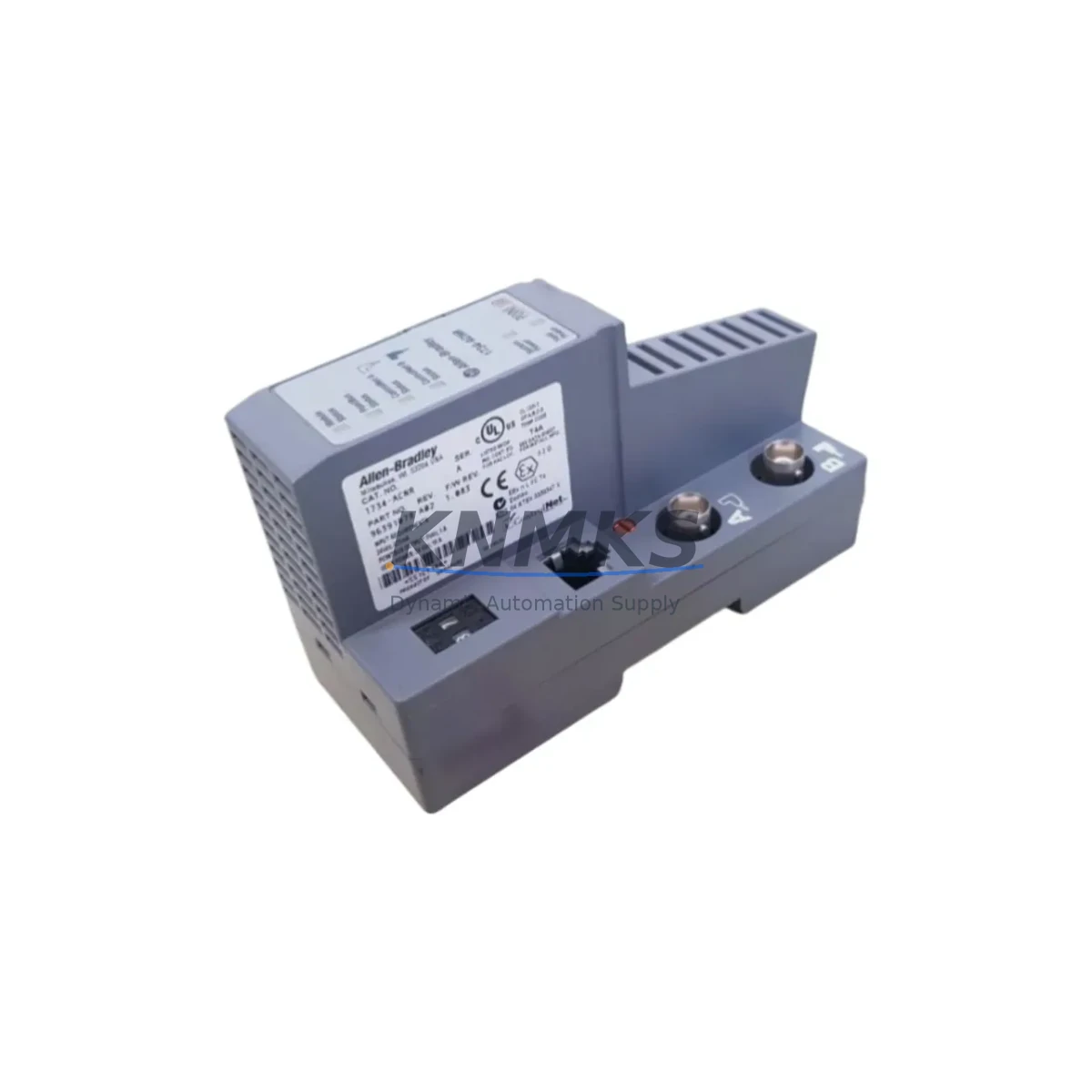
Allen-Bradley 1734-ACNR Migration-Ready ControlNet Adapter: Legacy System Migration and Compatible Upgrade
The Allen-Bradley 1734-ACNR is a ControlNet communication adapter designed for the 1734 Point I/O platform, providing a reliable migration path for facilities operating legacy ControlNet-based control architectures. As industrial plants face the end-of-life cycle of original 1734-ACNR units and the broader discontinuation of certain ControlNet peripheral components, this module serves as a verified drop-in replacement that preserves existing wiring, rack geometry, and network addressing without requiring a full control system redesign.
For maintenance engineers and system integrators managing aging Rockwell Automation infrastructure, the 1734-ACNR bridges the gap between legacy ControlNet topologies and modern operational demands. Whether you are replacing a failed adapter in a running production line, building a spare parts inventory ahead of a planned shutdown, or executing a phased migration from ControlNet to EtherNet/IP, this module provides the compatibility and supply assurance your project requires.
Migration Compatibility Table
| Parameter | Details |
|---|---|
| Compatible Platform | Allen-Bradley 1734 Point I/O |
| Communication Protocol | ControlNet (Coax, redundant media supported) |
| Replaces / Substitutes | 1734-ACNR (direct replacement); compatible migration from 1734-ACNR15 |
| Backplane Interface | 1734 Point I/O backplane; standard DIN rail mounting |
| Node Address Configuration | Rotary switch (hardware); must match original node address to avoid network conflicts |
| Power Requirements | 24V DC via Point I/O power supply (e.g., 1734-EP24DC); verify bus current budget before installation |
| Installation Space | Single-slot Point I/O module; confirm available slot count on existing 1734-TOP or terminal base |
| Firmware Compatibility | Verify RSLogix 5000 / Studio 5000 AOP version matches installed firmware revision |
| Communication Compatibility | ControlNet scheduled and unscheduled messaging; NUT (Network Update Time) must be reconfigured post-swap if changed |
| Commissioning Notes | Re-download I/O configuration via RSNetWorx for ControlNet after replacement; verify connection ownership in controller |
| Support terms | support terms confirmed by quotation — functional test performed prior to shipment |
Retrofit Planning for Existing Automation Systems
Successful replacement of the 1734-ACNR within a live or recently decommissioned control system requires a structured pre-installation review. Before removing the existing adapter, document the current node address set on the rotary switches, the scheduled connection parameters configured in RSNetWorx for ControlNet, and the I/O tree structure in your Studio 5000 project. Failure to capture these parameters before removal is one of the most common causes of extended commissioning time during ControlNet adapter replacements.
Power budget verification is critical. The 1734 Point I/O system distributes 24V DC across the backplane through a dedicated power supply module such as the 1734-EP24DC. Each I/O module and the adapter itself draws a defined current from this bus. When replacing the 1734-ACNR, confirm that the total bus current consumption — including all installed digital and analog I/O modules such as the 1734-IB8 (8-point 24V DC input) or 1734-OB8 (8-point 24V DC output) — does not exceed the power supply rating. If the existing power supply is already near capacity, a supplemental 1734-EP24DC may be required before the new adapter is installed.
Terminal base wiring does not need to be disturbed during an adapter swap, as the 1734-ACNR mounts directly to the terminal base assembly without affecting field wiring connections. However, the ControlNet coaxial cable connections at the BNC ports on the adapter must be carefully transferred. Inspect the coax connectors and terminators for wear, and replace any degraded BNC connectors or coaxial cable segments before reconnecting to the new adapter. In redundant media configurations, both the A and B coax channels must be reconnected and verified.
For facilities planning a longer-term migration from ControlNet to EtherNet/IP, the 1734-ACNR replacement can serve as an interim step while the broader network infrastructure is upgraded. In such scenarios, the 1734-AENT (EtherNet/IP adapter for Point I/O) is the typical target module, and the migration path involves updating the controller’s I/O configuration, replacing the ControlNet adapter with the EtherNet/IP variant, and reconfiguring the network switch port assignments. During the transition period, the 1734-ACNR maintains ControlNet connectivity and production continuity.
If the control system includes a 1756-CNB or 1756-CNBR ControlNet bridge module in the ControlLogix chassis, verify that the scheduled connection to the 1734 Point I/O bank is correctly re-established after the adapter replacement. The connection ownership must be confirmed in the controller’s I/O tree, and the NUT must be validated in RSNetWorx to ensure deterministic scan timing is maintained. HMI screens connected via FactoryTalk View that reference Point I/O tags will continue to function without modification, provided the tag database in the controller project is not altered during the swap.
For programming cable access during commissioning, a 1784-U2CN USB-to-ControlNet interface or an existing ControlNet-connected programming workstation can be used to run RSNetWorx for ControlNet and verify the network schedule post-replacement. Ensure the programming software version is compatible with the firmware revision of the replacement 1734-ACNR before beginning the commissioning sequence.
Downtime Control During System Migration
Minimizing unplanned downtime during a ControlNet adapter replacement requires preparation that begins well before the maintenance window. The most effective approach is to pre-stage the replacement 1734-ACNR with the correct node address set on the rotary switches, matching the original unit exactly. This eliminates one of the most common commissioning errors — node address conflicts — that can prevent the network from scheduling correctly after the swap.
Before the maintenance window opens, export the RSNetWorx for ControlNet network schedule file and save a backup of the Studio 5000 controller project. These backups allow rapid restoration if the replacement introduces unexpected behavior. If the controller is a 1756-L7x or 1756-L8x ControlLogix processor, the project can be saved to the SD card installed in the controller for on-site recovery without a programming workstation.
During the swap, inhibit the I/O connection to the 1734 Point I/O bank in the controller’s I/O tree before physically removing the adapter. This prevents the controller from faulting on a lost connection during the hardware exchange and allows the rest of the control system to continue operating normally. After the new 1734-ACNR is installed and the coax connections are secured, re-enable the connection and monitor the controller’s I/O status indicators to confirm the connection is established before returning the system to automatic mode.
Post-replacement, verify all field I/O points are responding correctly by cycling through the HMI diagnostic screens and confirming that input status matches field device states. Document the firmware revision of the installed replacement module and update the site’s spare parts register accordingly. With proper preparation, a 1734-ACNR replacement can typically be completed within a planned maintenance window of 30 to 60 minutes, preserving production continuity and minimizing exposure to unplanned downtime.
Retrofit Support FAQ
Q: Is the 1734-ACNR a direct drop-in replacement for a failed unit on an existing Point I/O bank?
A: Yes. The 1734-ACNR is a direct replacement for existing 1734-ACNR units installed on 1734 Point I/O terminal bases. No field wiring changes are required. Set the rotary node address switches to match the original unit before installation, and re-download the ControlNet network schedule via RSNetWorx after the swap to restore scheduled connections.
Q: What commissioning steps are required after replacing the adapter?
A: After physical installation, reconnect both ControlNet coax channels (A and B if redundant media is used), re-enable the inhibited I/O connection in the controller, and run RSNetWorx for ControlNet to verify the network schedule is intact. Confirm the adapter’s node address appears correctly on the network map and that all scheduled connections are re-established before returning to production.
Q: How is wiring compatibility confirmed before ordering?
A: The 1734-ACNR mounts to the standard 1734 Point I/O terminal base and does not require any field wiring modifications. ControlNet coax connections use standard BNC connectors. Confirm the existing terminal base model (e.g., 1734-TOP or equivalent) is compatible with the adapter footprint, and verify the backplane power budget as described in the retrofit planning section above.
Q: What does the support terms confirmed by quotation cover, and how is stock availability confirmed?
A: Every 1734-ACNR unit shipped by KNMKS undergoes a functional test prior to dispatch and is covered by a support terms confirmed by quotation against manufacturing defects and operational failure. Stock availability is confirmed at the time of order. For urgent replacement requirements or bulk spare parts procurement, contact our sales team directly to confirm lead time and reserve inventory.
© 2026 KNMKS. All rights reserved.
Original Source: https://knmks.com
Contact: admin@knmks.com | +86 18359268345
Product Identification
- Brand / Ecosystem
-
Allen-Bradley
Allen-Bradley - Model / Series
- 1734-ACNR
- Product Family
- PLCs & Controllers
- Availability Status
- Available on request after model and quantity confirmation
- Inquiry Type
- B2B RFQ, replacement inquiry and project spare-part request
- Pre-Quote Check
- Exact SKU, brand, series, quantity, nameplate photos and destination country are checked before quotation
System Path
Where this product fits in the KNMKS automation structure.
Specification & Inquiry Focus
- Control platform
- PLC, PAC and modular controllers
- Common needs
- CPU, rack, power and I/O expansion
- Project support
- Replacement, cabinet build and maintenance
Buyer Confirmation
Information KNMKS checks before replying.
- Exact model
- 1734-ACNR
- Brand / ecosystem
- Allen-Bradley
- Product family
- PLCs & Controllers
- Application note
- Replacement, maintenance, project build or spare-part list
- Useful photos
- Nameplate, installed unit, cabinet layout or connector side
- Delivery details
- Quantity, destination country and target schedule
Document Support
Files and notes can be confirmed during quotation.
- Product photos or nameplate confirmation when available
- Packing and delivery notes before quotation confirmation
- Support scope and delivery terms confirmed per inquiry
- Export document coordination for qualified B2B requests
Inquiry Support
- Model cross-checking before quotation
- CPU, power, rack and expansion module matching
- Support for replacement and project inquiry
What to Send Us
- Brand and exact model number: Allen-Bradley 1734-ACNR
- Quantity and required delivery time
- Application, replacement requirement or nameplate photo
- Destination country and shipping preference
RFQ Preparation
This is a product inquiry page built for RFQ communication.
Fast Model Check
Send this model to KNMKS for confirmation.
Include quantity, destination country and photos if this is a maintenance replacement. The inquiry will be saved with a reference number after submission.
Brand & Compatibility Note
KNMKS displays automation product information for well-known industrial brand ecosystems and compatible replacement references. Brand names are used for product identification and compatibility reference only; final availability and commercial terms are confirmed per quotation.
 Manufacturing
 Machine Tools
 Packaging
 Energy & Power



 HMI & Displays
 Servo Systems
 Variable Frequency Drives
 Sensors