
Overview
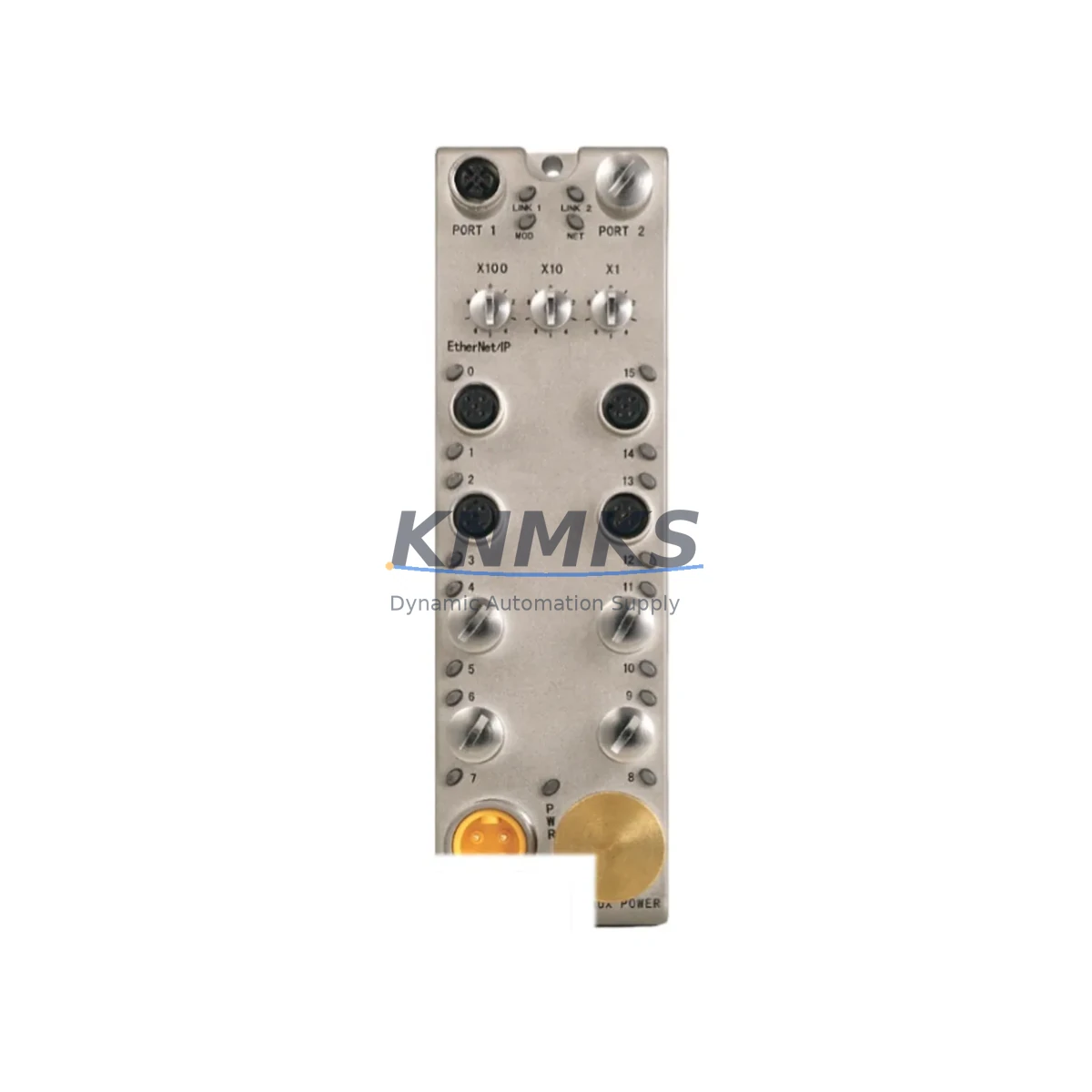
Allen-Bradley 1732E-16CFGM12P5QCWR Spare Part for Factory Uptime
The Allen-Bradley 1732E-16CFGM12P5QCWR is a 16-point EtherNet/IP ArmorBlock digital input module engineered for demanding industrial environments. Designed for IP67-rated distributed I/O applications, this module delivers reliable field-level connectivity directly on the machine frame — eliminating the need for a traditional control cabinet. For maintenance engineers managing aging Rockwell Automation control architectures, keeping a verified spare of the 1732E-16CFGM12P5QCWR on the shelf is a proven strategy to minimize unplanned downtime and accelerate fault recovery on the production floor.
KNMKS supplies this module as an original, tested spare part with a support terms confirmed by quotation, pre-shipment functional verification, and long-term stock availability to support both emergency replacement and planned annual maintenance cycles.
Spare Maintenance Table
| Parameter | Specification |
|---|---|
| Part Number / SKU | 1732E-16CFGM12P5QCWR |
| Brand | Allen-Bradley (Rockwell Automation) |
| Series | ArmorBlock 1732E EtherNet/IP |
| Product Type | Digital Input Module |
| Number of Input Points | 16 Points |
| Communication Protocol | EtherNet/IP |
| Connector Type | M12 (5-pin, Q-style, Quick Connect) |
| Protection Rating | IP67 (Sealed, Machine-Mount) |
| Supply Voltage | 24V DC |
| Input Voltage Range | 10–30V DC |
| Operating Temperature | -20°C to +55°C |
| Housing Color | White (Standard ArmorBlock) |
| Country of Origin | United States |
| Compatibility | Rockwell Automation ControlLogix, CompactLogix, Studio 5000, RSLogix 5000 |
| Typical Application | Distributed I/O, Machine-Level Control, Conveyor, Assembly Line, Packaging |
| Maintenance Recommendation | Inspect M12 connectors and sealing gaskets annually; verify EtherNet/IP node address and subnet configuration after replacement |
| Support terms | 12 Months from shipment date |
| Pre-Shipment Test | Functional verification performed on every unit |
| Stock Status | Available — Long-Term Supply Supported |
Maintenance Planning for Continuous Operation
When a 1732E-16CFGM12P5QCWR fails or is flagged during a routine control cabinet inspection, the fault rarely exists in isolation. Experienced maintenance engineers know that a distributed I/O node failure on an EtherNet/IP segment can cascade into broader communication faults across the control architecture. Before returning the line to production, a structured inspection of the surrounding electrical circuit is essential.
Start with the 24V DC power supply feeding the ArmorBlock segment — a degraded or undersized power supply is a common root cause of intermittent I/O faults that are misdiagnosed as module failures. Verify output voltage stability under load and check for ripple or voltage sag. If the system uses a 1606-XLP power supply or similar Rockwell-compatible DIN-rail unit, inspect its status LEDs and output terminals before condemning the input module.
Next, audit the M12 field wiring and connector seals. The 1732E-16CFGM12P5QCWR uses M12 quick-connect ports, and in high-vibration or washdown environments, connector backshells can loosen and allow moisture ingress — even on IP67-rated hardware. Inspect each M12 port for corrosion, bent pins, or damaged O-rings. Replacement M12 cordsets and field-wireable connectors should be stocked alongside the module itself.
On the network side, verify the EtherNet/IP managed switch port assignment and confirm the module’s IP address, subnet mask, and gateway settings match the original configuration. In systems running Studio 5000 / RSLogix 5000, check the I/O tree for any connection faults or inhibited modules that may have been masked by the original failure. If the system uses a 1783-BMS series managed switch, review port diagnostics for CRC errors or link-speed mismatches that could indicate a network-layer issue rather than a module fault.
For systems with 1732E-16CFGM12P5QCWR modules deployed across multiple machine zones, it is good practice to maintain at least one spare per production line segment. Pair this with a spare 1732E-16CFGM12P5QCW (standard version without the White housing designation) if your facility operates mixed ArmorBlock variants, ensuring cross-compatibility during emergency replacements. Additionally, inspect any 1492-CABLE series I/O wiring systems or terminal block assemblies connected downstream — loose terminations at the field device level are a frequent source of false input signals that can trigger nuisance faults on the module.
For facilities running older Rockwell architectures, consider whether the 1734 POINT I/O platform or 1756 ControlLogix I/O modules in the same control cabinet require concurrent inspection. A systematic cabinet walkthrough during any ArmorBlock replacement event reduces the risk of secondary failures within the same maintenance window.
Site Replacement Workflow
Step 1 — Isolate and Document: Before removing the 1732E-16CFGM12P5QCWR, capture the module’s current EtherNet/IP node configuration (IP address, subnet, gateway) from the controller’s I/O tree in Studio 5000. Photograph the M12 connector layout and label each cordset to ensure correct re-termination on the replacement unit.
Step 2 — Power Down Safely: De-energize the 24V DC supply to the ArmorBlock segment following your site’s lockout/tagout (LOTO) procedure. Confirm zero voltage at the module’s power ports before disconnecting any M12 connectors.
Step 3 — Remove and Inspect: Disconnect all M12 field connectors and the EtherNet/IP network cable. Remove the module from its mounting surface. Inspect the mounting gasket and housing for physical damage. If the gasket is compressed or cracked, replace it to maintain IP67 integrity on the new unit.
Step 4 — Install Replacement: Mount the new 1732E-16CFGM12P5QCWR, reconnect all M12 field connectors in the documented order, and reconnect the EtherNet/IP network cable. Apply power and verify the module’s status LEDs indicate normal operation (solid green Network and Module status indicators).
Step 5 — Verify in Controller: From Studio 5000, confirm the replacement module is online and communicating. Run a forced I/O test on each of the 16 input points to validate field device connectivity before releasing the line to production.
Step 6 — Update Maintenance Records: Log the replacement event, record the new module’s serial number, and update your spare parts inventory. Reorder a replacement spare immediately to restore your buffer stock — do not allow your facility to operate without a verified spare on the shelf.
Spare Parts Support FAQ
Q1: Is the 1732E-16CFGM12P5QCWR compatible with both ControlLogix and CompactLogix platforms?
Yes. The 1732E ArmorBlock EtherNet/IP series is compatible with any Rockwell Automation controller that supports EtherNet/IP I/O connections, including ControlLogix (1756), CompactLogix (1769), and GuardLogix platforms. The module is configured via Studio 5000 or RSLogix 5000 using standard Add-On Profiles (AOPs). No hardware modification is required when migrating between compatible controller families.
Q2: How do you verify a spare unit before shipment?
Every 1732E-16CFGM12P5QCWR unit supplied by KNMKS undergoes a pre-shipment functional test that includes power-on verification, EtherNet/IP communication check, and input point continuity testing. Units that do not pass all test criteria are not shipped. A test report is available upon request for quality-critical procurement processes.
Q3: What is the recommended spare parts stocking strategy for the 1732E series?
For facilities with 5 or more 1732E ArmorBlock nodes deployed, we recommend maintaining a minimum of 1 spare unit per 5 installed nodes, with a floor of 2 spares per facility. For critical production lines where downtime cost exceeds USD 5,000/hour, a 1:3 spare ratio is advisable. KNMKS supports blanket order agreements and consignment stock arrangements for high-volume maintenance programs.
Q4: What support terms and long-term supply commitment does KNMKS provide?
All units carry a support terms confirmed by quotation from the date of shipment, covering manufacturing defects and functional failures under normal operating conditions. KNMKS maintains long-term stock of the 1732E-16CFGM12P5QCWR and related ArmorBlock variants to support legacy system maintenance beyond the product’s official Rockwell Automation lifecycle. Contact our team for multi-year supply agreements and priority allocation for critical infrastructure customers.
© 2026 KNMKS. All rights reserved.
Original Source: https://knmks.com
Contact: admin@knmks.com | +86 18359268345
Product Identification
- Brand / Ecosystem
-
Allen-Bradley
Allen-Bradley - Model / Series
- 1732E-16CFGM12P5QCWR
- Product Family
- PLCs & Controllers
- Availability Status
- Available on request after model and quantity confirmation
- Inquiry Type
- B2B RFQ, replacement inquiry and project spare-part request
- Pre-Quote Check
- Exact SKU, brand, series, quantity, nameplate photos and destination country are checked before quotation
System Path
Where this product fits in the KNMKS automation structure.
Specification & Inquiry Focus
- Control platform
- PLC, PAC and modular controllers
- Common needs
- CPU, rack, power and I/O expansion
- Project support
- Replacement, cabinet build and maintenance
Buyer Confirmation
Information KNMKS checks before replying.
- Exact model
- 1732E-16CFGM12P5QCWR
- Brand / ecosystem
- Allen-Bradley
- Product family
- PLCs & Controllers
- Application note
- Replacement, maintenance, project build or spare-part list
- Useful photos
- Nameplate, installed unit, cabinet layout or connector side
- Delivery details
- Quantity, destination country and target schedule
Document Support
Files and notes can be confirmed during quotation.
- Product photos or nameplate confirmation when available
- Packing and delivery notes before quotation confirmation
- Support scope and delivery terms confirmed per inquiry
- Export document coordination for qualified B2B requests
Inquiry Support
- Model cross-checking before quotation
- CPU, power, rack and expansion module matching
- Support for replacement and project inquiry
What to Send Us
- Brand and exact model number: Allen-Bradley 1732E-16CFGM12P5QCWR
- Quantity and required delivery time
- Application, replacement requirement or nameplate photo
- Destination country and shipping preference
RFQ Preparation
This is a product inquiry page built for RFQ communication.
Fast Model Check
Send this model to KNMKS for confirmation.
Include quantity, destination country and photos if this is a maintenance replacement. The inquiry will be saved with a reference number after submission.
Brand & Compatibility Note
KNMKS displays automation product information for well-known industrial brand ecosystems and compatible replacement references. Brand names are used for product identification and compatibility reference only; final availability and commercial terms are confirmed per quotation.
 Manufacturing
 Machine Tools
 Packaging
 Energy & Power



 HMI & Displays
 Servo Systems
 Variable Frequency Drives
 Sensors