
Overview
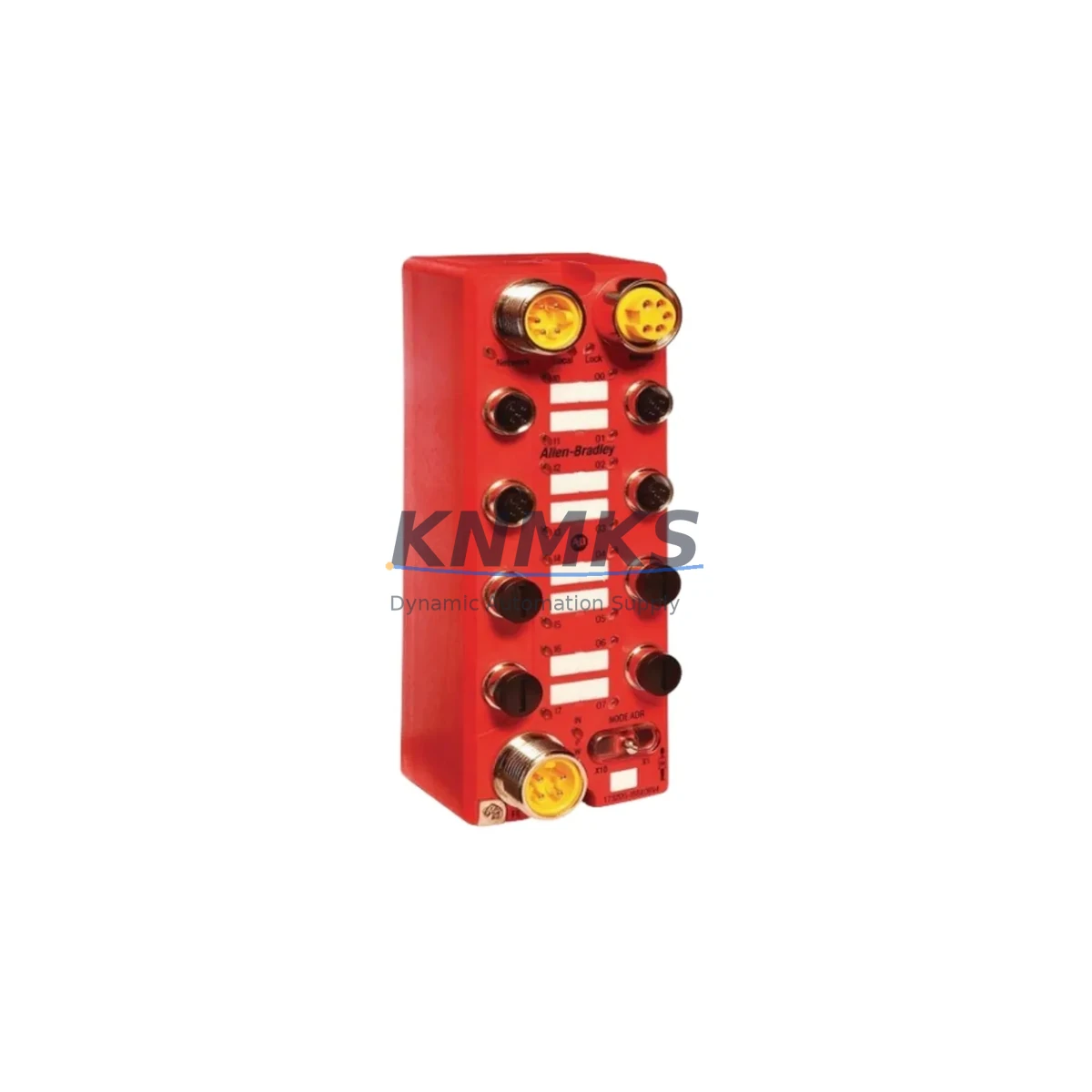
Allen-Bradley 1732DS-IB8XOBV4 Spare ArmorBlock Guard I/O Safety Module
The Allen-Bradley 1732DS-IB8XOBV4 is a field-proven ArmorBlock Guard I/O safety module designed for distributed safety architectures in demanding industrial environments. As a maintenance-proven spare part, it supports continuous factory uptime by enabling fast, validated replacement of failed or aging safety I/O nodes without requiring system redesign or protocol migration. This module provides 8 safety digital inputs and 4 safety digital outputs over DeviceNet Safety, and is rated for SIL 2 applications in compliance with IEC 61508. Its IP67-rated housing makes it suitable for direct installation in wet, dusty, or chemically aggressive production environments including automotive assembly, food processing, packaging lines, and machine safety systems.
For maintenance engineers managing aging Rockwell Automation safety networks, the 1732DS-IB8XOBV4 is a direct replacement for failed ArmorBlock Guard I/O nodes without requiring changes to the DeviceNet Safety network configuration, node addressing, or GuardLogix safety program. The module’s compact block design eliminates the need for a separate enclosure, reducing installation footprint and simplifying field replacement during scheduled or emergency maintenance windows.
Spare Maintenance Table
| Parameter | Specification |
|---|---|
| Part Number | 1732DS-IB8XOBV4 |
| Brand / Manufacturer | Allen-Bradley / Rockwell Automation |
| Series | ArmorBlock Guard I/O — 1732DS Series |
| Product Type | Safety I/O Module (Distributed Block) |
| Safety Inputs | 8 × Safety Digital Inputs (24 VDC) |
| Safety Outputs | 4 × Safety Digital Outputs (Bipolar, 0.5 A each) |
| Communication Protocol | DeviceNet Safety (CIP Safety) |
| Safety Rating | SIL 2 (IEC 61508), PLd (ISO 13849) |
| Enclosure Rating | IP67 — Dust-tight and water-immersion resistant |
| Supply Voltage | 24 VDC (±10%) |
| Operating Temperature | -25°C to +70°C |
| Mounting | Direct panel or machine-frame mounting (no enclosure required) |
| Connector Type | M12 micro-style connectors (DeviceNet + I/O) |
| Country of Origin | United States |
| Compatibility | GuardLogix, SmartGuard 600, 1756-DNB DeviceNet Scanner |
| Replacement Scope | Direct drop-in for 1732DS-IB8XOBV4 in existing DeviceNet Safety networks |
| Support terms | support terms confirmed by quotation — Tested before shipment |
Maintenance Planning for Continuous Operation
Effective spare parts planning for a DeviceNet Safety network requires more than stocking the 1732DS-IB8XOBV4 module itself. Maintenance engineers should conduct a full inspection of the surrounding electrical circuit and communication chain before and after replacement to avoid secondary failures and ensure system integrity.
Begin by verifying the 24 VDC supply rail feeding the ArmorBlock node. A dedicated 1606-XLP power supply or equivalent Rockwell-compatible DIN-rail power supply should be checked for output voltage stability and load capacity, particularly if multiple ArmorBlock nodes share the same supply branch. Voltage sag under load is a common cause of intermittent safety I/O faults that are misdiagnosed as module failure.
Inspect the DeviceNet Safety trunk cable and drop cable connections at the M12 connectors. Corroded or loose M12 micro-style connectors are a frequent source of node communication loss in high-vibration or wet environments. If the network uses a 1788-DN2DN DeviceNet-to-DeviceNet linking device or a 1756-DNB scanner card in the GuardLogix chassis, verify that the node address assigned to the replacement 1732DS-IB8XOBV4 matches the original configuration before powering up.
For systems using a GuardLogix 5570 or 5580 safety controller, confirm that the safety task signature and I/O connection parameters in Studio 5000 Logix Designer are compatible with the replacement module’s firmware revision. If the firmware version differs from the original, a safety signature reset and re-validation may be required before the system can return to run mode. Keep a copy of the original RSLogix 5000 or Studio 5000 project file accessible on-site to accelerate this step.
Where the 1732DS-IB8XOBV4 is used to monitor safety light curtains, two-hand control stations, or emergency stop circuits, verify that the input wiring polarity and dual-channel configuration are correctly restored after replacement. A 1732DS-IBAMS8XOB4 or similar ArmorBlock variant may be present elsewhere on the same network — confirm that node addresses are not duplicated after the swap. Additionally, check the status of any 1734-AENT or 1734-PDN POINT I/O adapter modules in the same control cabinet, as these may share the same safety network segment and can be affected by network reconfiguration during the replacement process.
For facilities running periodic annual shutdowns, the 1732DS-IB8XOBV4 should be included in the standard spare parts kit alongside DeviceNet termination resistors, M12 connector caps, and a spare 1788-DNBO DeviceNet bus-off recovery tool. Proactive stocking of this module reduces emergency procurement lead times and supports a predictable maintenance budget cycle.
Site Replacement Workflow
Replacing the 1732DS-IB8XOBV4 in a live DeviceNet Safety network requires a structured workflow to minimize downtime and avoid safety system faults. Follow these steps to ensure a controlled, validated replacement:
Step 1 — Pre-Replacement Documentation: Record the existing node address, I/O connection status, and safety task signature from the GuardLogix controller before disconnecting the failed module. Photograph the M12 connector wiring layout and label all field cables before removal.
Step 2 — Network Isolation: Place the GuardLogix safety task in a safe state or inhibit the I/O connection to the failed node in Studio 5000 before physically removing the module. This prevents nuisance faults from propagating to other safety zones on the network.
Step 3 — Physical Replacement: Disconnect the DeviceNet drop cable and all I/O M12 connectors from the failed module. Mount the replacement 1732DS-IB8XOBV4 in the same position and reconnect all cables in the documented order. Verify that the node address rotary switches on the replacement module are set to match the original node address before reconnecting the DeviceNet trunk.
Step 4 — Firmware and Configuration Verification: Power up the replacement module and confirm that it appears on the DeviceNet network in RSNetWorx for DeviceNet. Verify firmware revision compatibility with the existing GuardLogix project. If a firmware update is required, perform it before re-enabling the safety I/O connection.
Step 5 — Safety Validation: Re-enable the I/O connection in Studio 5000 and perform a functional test of all 8 safety inputs and 4 safety outputs. Confirm that the safety task signature is accepted by the GuardLogix controller and that no safety faults are present before returning the system to automatic operation.
This structured workflow typically allows a trained maintenance technician to complete the replacement and validation within 2–4 hours, minimizing production downtime while maintaining full safety system integrity.
Spare Parts Support FAQ
Q1: Is the 1732DS-IB8XOBV4 a direct drop-in replacement for the existing module in my DeviceNet Safety network?
Yes. The 1732DS-IB8XOBV4 is a direct replacement for the same part number in any existing DeviceNet Safety network. No changes to the network configuration, node address, or GuardLogix safety program are required, provided the replacement module’s firmware revision is compatible with the existing project. Firmware compatibility should be verified in Studio 5000 before re-enabling the safety I/O connection.
Q2: How do I verify compatibility with my GuardLogix controller before ordering?
Confirm the DeviceNet Safety scanner used in your system — typically a 1756-DNB or 1788-DN2DN — and check that the existing Studio 5000 project includes a 1732DS-IB8XOBV4 I/O module definition. If the project was created with an older firmware revision, a minor revision update may be required. Contact our technical team with your controller catalog number and project firmware version for pre-order compatibility confirmation.
Q3: What pre-shipment testing is performed on this spare part?
Each 1732DS-IB8XOBV4 unit is functionally tested before shipment to verify DeviceNet Safety communication, input channel response, output switching, and power supply integrity. A test report is available upon request. All units are shipped with a support terms confirmed by quotation covering manufacturing defects and functional failures under normal operating conditions.
Q4: Can you support long-term supply for annual maintenance programs?
Yes. We maintain stock of the 1732DS-IB8XOBV4 and can support blanket purchase orders, annual maintenance contracts, and multi-site spare parts programs. Long-term supply agreements are available for facilities requiring guaranteed stock availability over 12–36 month maintenance cycles. Contact admin@knmks.com to discuss volume pricing and supply scheduling.
© 2026 KNMKS. All rights reserved.
Original Source: https://knmks.com
Contact: admin@knmks.com | +86 18359268345
Product Identification
- Brand / Ecosystem
-
Allen-Bradley
Allen-Bradley - Model / Series
- 1732DS-IB8XOBV4
- Product Family
- PLCs & Controllers
- Availability Status
- Available on request after model and quantity confirmation
- Inquiry Type
- B2B RFQ, replacement inquiry and project spare-part request
- Pre-Quote Check
- Exact SKU, brand, series, quantity, nameplate photos and destination country are checked before quotation
System Path
Where this product fits in the KNMKS automation structure.
Specification & Inquiry Focus
- Control platform
- PLC, PAC and modular controllers
- Common needs
- CPU, rack, power and I/O expansion
- Project support
- Replacement, cabinet build and maintenance
Buyer Confirmation
Information KNMKS checks before replying.
- Exact model
- 1732DS-IB8XOBV4
- Brand / ecosystem
- Allen-Bradley
- Product family
- PLCs & Controllers
- Application note
- Replacement, maintenance, project build or spare-part list
- Useful photos
- Nameplate, installed unit, cabinet layout or connector side
- Delivery details
- Quantity, destination country and target schedule
Document Support
Files and notes can be confirmed during quotation.
- Product photos or nameplate confirmation when available
- Packing and delivery notes before quotation confirmation
- Support scope and delivery terms confirmed per inquiry
- Export document coordination for qualified B2B requests
Inquiry Support
- Model cross-checking before quotation
- CPU, power, rack and expansion module matching
- Support for replacement and project inquiry
What to Send Us
- Brand and exact model number: Allen-Bradley 1732DS-IB8XOBV4
- Quantity and required delivery time
- Application, replacement requirement or nameplate photo
- Destination country and shipping preference
RFQ Preparation
This is a product inquiry page built for RFQ communication.
Fast Model Check
Send this model to KNMKS for confirmation.
Include quantity, destination country and photos if this is a maintenance replacement. The inquiry will be saved with a reference number after submission.
Brand & Compatibility Note
KNMKS displays automation product information for well-known industrial brand ecosystems and compatible replacement references. Brand names are used for product identification and compatibility reference only; final availability and commercial terms are confirmed per quotation.
 Manufacturing
 Machine Tools
 Packaging
 Energy & Power



 HMI & Displays
 Servo Systems
 Variable Frequency Drives
 Sensors