
Overview
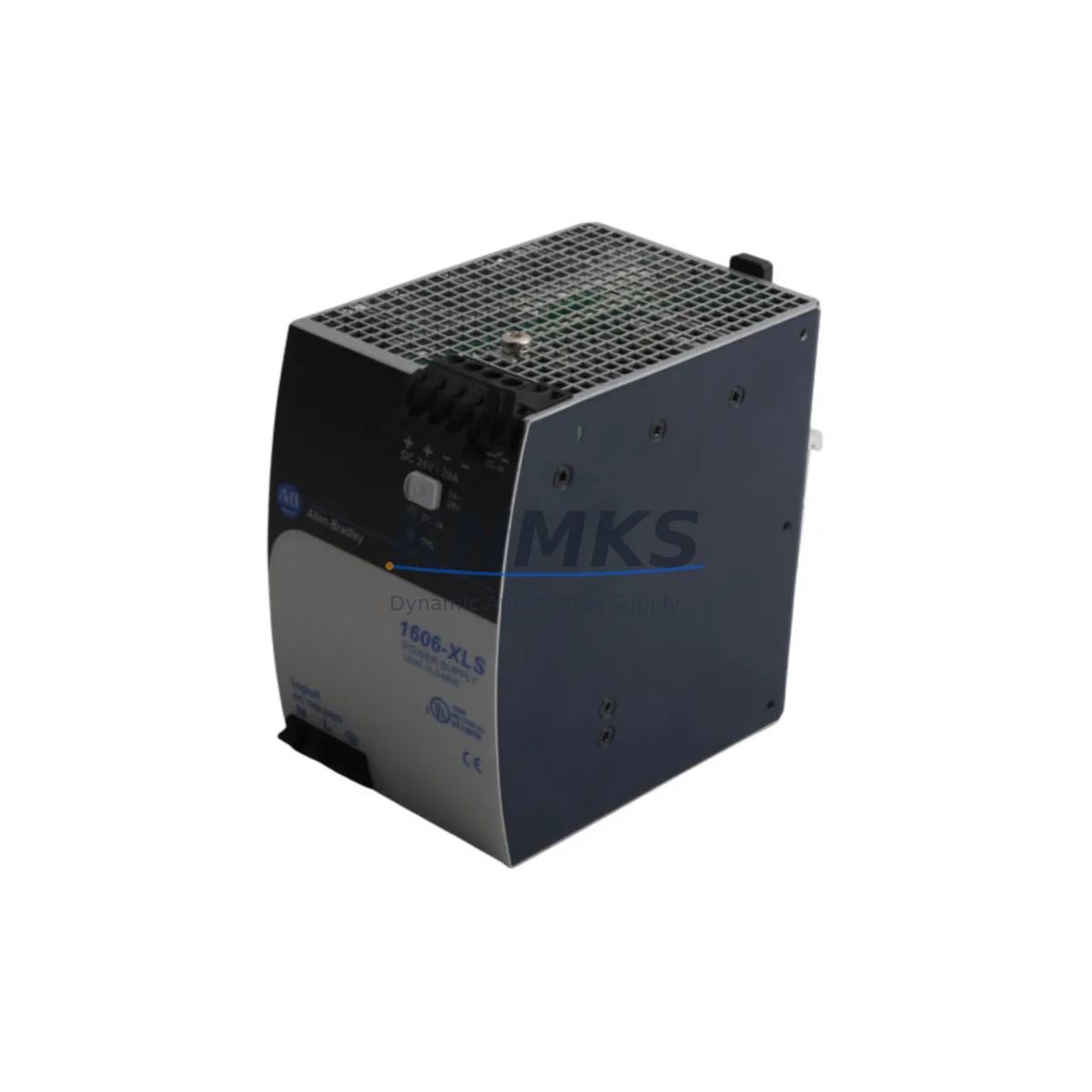
Allen-Bradley 1606-XLS480E Spare Part for Factory Uptime
The Allen-Bradley 1606-XLS480E is a 480W single-output DIN rail power supply from Rockwell Automation’s XLS Series, engineered for continuous-duty industrial environments. Delivering a regulated 24 VDC output at up to 20A, this unit is a critical power backbone for ControlLogix, CompactLogix, and MicroLogix control cabinets operating in manufacturing, process automation, and discrete motion applications. Maintaining a verified stock of the 1606-XLS480E is a foundational element of any serious spare parts program — power supply failure is among the top causes of unplanned PLC downtime, and lead times on new units from distribution can extend 8–16 weeks during supply constraints.
For maintenance engineers, the 1606-XLS480E supports wide-range AC input (85–264 VAC), making it compatible with both 120 VAC and 240 VAC panel configurations without rewiring. Its built-in output voltage adjustment, DC-OK signal relay, and parallel operation capability simplify integration into redundant power architectures. Procurement engineers should note that this model carries a direct form-fit-function relationship with earlier XLS Series variants, enabling drop-in replacement without panel modification in most installations.
Every unit dispatched by KNMKS undergoes pre-shipment functional verification including output voltage check, load regulation test, and visual inspection for capacitor condition and terminal integrity. Units are shipped with original or equivalent protective packaging to prevent transit damage to the terminal block and DIN clip assembly.
Spare Maintenance Table
| Parameter | Specification |
|---|---|
| SKU / Part Number | 1606-XLS480E |
| Brand / OEM | Allen-Bradley (Rockwell Automation) |
| Series | XLS Series |
| Output Power | 480W |
| Output Voltage | 24 VDC (adjustable 24–28 VDC) |
| Output Current | 20A continuous |
| Input Voltage Range | 85–264 VAC, 47–63 Hz (universal input) |
| Input Current | ≤ 6.5A @ 120 VAC / ≤ 3.5A @ 240 VAC |
| Efficiency | ≥ 91% @ full load |
| Mounting | DIN rail (EN 60715 TS35) |
| Protection | OVP, OCP, OTP, short-circuit |
| DC-OK Signal | Relay contact output (potential-free) |
| Parallel Operation | Supported (redundancy / increased current) |
| Operating Temperature | -25°C to +70°C (derated above 60°C) |
| Certifications | UL 508, CE, cULus, ATEX Zone 2 |
| Compatibility | ControlLogix, CompactLogix, MicroLogix, SLC 500 panels |
| Product Type | Industrial Power Supply |
| Origin | United States |
| Support terms | 12 Months — KNMKS Spare Parts Support terms |
| Condition | Original / Surplus / Tested |
| Dispatch | Pre-shipment tested; ships within 1–3 business days |
Maintenance Planning for Continuous Operation
When a 1606-XLS480E fails or is flagged during a scheduled cabinet inspection, the replacement scope should extend beyond the power supply itself. A thorough site assessment reduces the risk of repeat failures and ensures the restored system meets original design intent.
Begin by inspecting the upstream AC feed: verify the circuit breaker rating, check for loose connections at the terminal block, and confirm that input voltage is within the 85–264 VAC operating range using a calibrated meter. If the cabinet uses a 1606-XLS240E or 1606-XLS120E in a parallel redundancy configuration, test both units simultaneously — a degraded secondary unit may have been masking the primary failure for weeks.
On the DC output side, check the 24 VDC bus for voltage ripple and confirm that downstream loads — including 1756-PA75 or 1756-PA72 ControlLogix power supplies, 1734 POINT I/O modules, and 1492 terminal block assemblies — are within rated current draw. Overloaded output buses are a common root cause of premature power supply failure and should be documented in the maintenance log.
For cabinets running Ethernet/IP or DeviceNet communication, inspect the 1783-US5T or 1783-ETAP network switches and confirm that the 1756-EN2T or 1756-EN3TR communication modules are receiving stable 24 VDC. Communication module resets caused by power instability are frequently misdiagnosed as firmware or network faults.
If the cabinet includes a 2711P PanelView Plus HMI, verify that its dedicated 24 VDC feed is isolated from the PLC I/O bus — shared power rails increase the risk of HMI lockup during I/O surge events. Signal isolators on analog input channels should also be checked for drift, as power supply ripple can introduce offset errors in 4–20 mA loops.
Finally, inspect the 1492-SP fuse blocks and 1492-GH ground bus bars for signs of corrosion or thermal discoloration. Fuse holders adjacent to the power supply are subject to elevated thermal cycling and should be replaced on a 3–5 year preventive schedule regardless of apparent condition.
Site Replacement Workflow
Step 1 — Isolation: De-energize the cabinet at the upstream breaker. Verify zero voltage on the AC input terminals of the 1606-XLS480E using a CAT III-rated meter. Lock out / tag out per site LOTO procedure.
Step 2 — Documentation: Photograph the existing wiring layout, terminal labels, and DIN rail position before removal. Note the output voltage trim setting on the adjustment potentiometer.
Step 3 — Removal: Disconnect AC input wiring (L, N, PE) and DC output wiring (+V, -V, DC-OK relay). Release the DIN rail clip and slide the unit off the rail.
Step 4 — Inspection: Inspect the DIN rail segment and adjacent components for heat damage, corrosion, or mechanical stress. Replace the rail section if deformation is observed.
Step 5 — Installation: Mount the replacement 1606-XLS480E on the DIN rail. Reconnect wiring per the documented layout. Set the output voltage trim to match the original setting (typically 24.0–24.5 VDC for most ControlLogix applications).
Step 6 — Commissioning: Energize the cabinet and verify DC-OK relay closure. Measure output voltage under load. Confirm all downstream I/O modules, communication modules, and HMI units have resumed normal operation. Log the replacement in the site CMMS with the unit serial number and installation date.
Compatibility Note: The 1606-XLS480E is a direct replacement for earlier XLS Series 480W variants. For cabinets originally fitted with 1606-XLS480E-3 or regional variants, confirm terminal block pinout compatibility before energizing.
Spare Parts Support FAQ
Q1: What is the recommended spare parts holding quantity for the 1606-XLS480E?
For production lines with 3 or more ControlLogix or CompactLogix cabinets, a minimum of 1 unit per 3 cabinets is recommended, with a 12-month forward stock horizon. High-criticality lines (continuous process, automotive, food & beverage) should maintain at least 2 units on-site given the potential for extended OEM lead times.
Q2: How is compatibility with my existing ControlLogix or CompactLogix system verified?
The 1606-XLS480E is compatible with any 24 VDC-powered Allen-Bradley control system. Verify the total DC load current of your cabinet (sum of all 24 VDC consumers) does not exceed 20A continuous. If load exceeds this threshold, consider parallel operation with a second 1606-XLS480E unit or upgrade to the 1606-XLS960E.
Q3: What pre-shipment testing does KNMKS perform on the 1606-XLS480E?
Each unit is tested for correct output voltage (24 VDC ±1%), load regulation under 50% and 100% rated load, DC-OK relay function, and absence of visible damage to terminals, housing, and DIN clip. Test results are logged internally and available on request for quality-critical procurement.
Q4: Does KNMKS offer long-term supply agreements for the 1606-XLS480E?
Yes. KNMKS supports annual blanket order arrangements and buffer stock programs for maintenance teams managing multi-site or multi-line installations. Contact our technical sales team to discuss volume pricing, reserved stock allocation, and support terms confirmed by quotation coverage for scheduled releases.
© 2026 KNMKS. All rights reserved.
Original Source: https://knmks.com
Contact: admin@knmks.com | +86 18359268345
Product Identification
- Brand / Ecosystem
-
Allen-Bradley
Allen-Bradley - Model / Series
- 1606-XLS480E
- Product Family
- Power Supplies
- Availability Status
- Available on request after model and quantity confirmation
- Inquiry Type
- B2B RFQ, replacement inquiry and project spare-part request
- Pre-Quote Check
- Exact SKU, brand, series, quantity, nameplate photos and destination country are checked before quotation
System Path
Where this product fits in the KNMKS automation structure.
Specification & Inquiry Focus
- Power range
- DIN rail and switching power supplies
- Common needs
- Voltage, current and mounting style
- Project support
- Control cabinet and panel-builder inquiries
Buyer Confirmation
Information KNMKS checks before replying.
- Exact model
- 1606-XLS480E
- Brand / ecosystem
- Allen-Bradley
- Product family
- Power Supplies
- Application note
- Replacement, maintenance, project build or spare-part list
- Useful photos
- Nameplate, installed unit, cabinet layout or connector side
- Delivery details
- Quantity, destination country and target schedule
Document Support
Files and notes can be confirmed during quotation.
- Product photos or nameplate confirmation when available
- Packing and delivery notes before quotation confirmation
- Support scope and delivery terms confirmed per inquiry
- Export document coordination for qualified B2B requests
Inquiry Support
- 24VDC and cabinet power selection support
- Stable power support for PLC and HMI systems
- Batch inquiry support for panel builders
What to Send Us
- Brand and exact model number: Allen-Bradley 1606-XLS480E
- Quantity and required delivery time
- Application, replacement requirement or nameplate photo
- Destination country and shipping preference
RFQ Preparation
This is a product inquiry page built for RFQ communication.
Fast Model Check
Send this model to KNMKS for confirmation.
Include quantity, destination country and photos if this is a maintenance replacement. The inquiry will be saved with a reference number after submission.
Brand & Compatibility Note
KNMKS displays automation product information for well-known industrial brand ecosystems and compatible replacement references. Brand names are used for product identification and compatibility reference only; final availability and commercial terms are confirmed per quotation.
 Manufacturing
 Machine Tools
 Packaging
 Energy & Power
 PLCs & Controllers
 HMI & Displays
 Servo Systems
 Variable Frequency Drives