
Overview
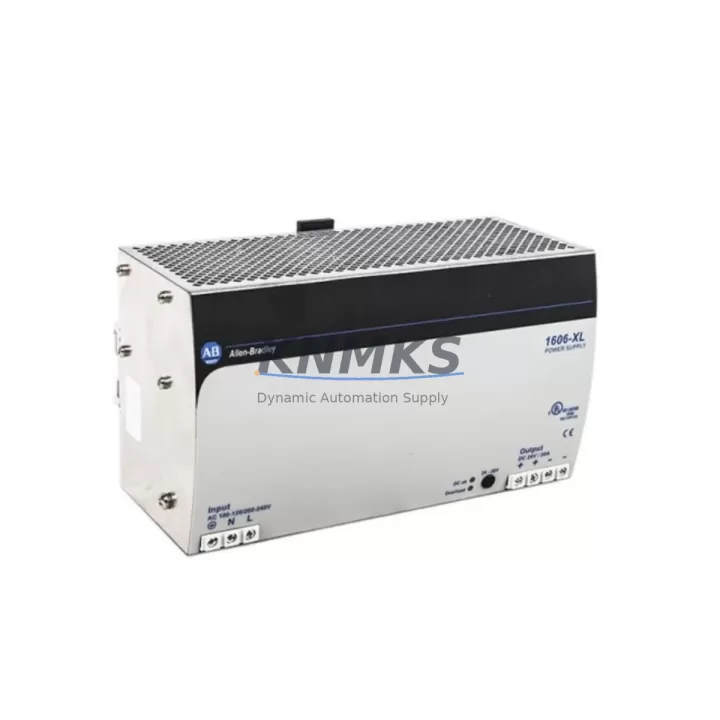
Allen-Bradley 1606-XL480EP Migration-Ready 480W Power Supply for Legacy Control Systems
The Allen-Bradley 1606-XL480EP is a 480W, 24VDC DIN Rail-mount power supply from Rockwell Automation’s Bulletin 1606 XL EP Series — one of the most widely deployed power supply platforms in industrial control cabinets across manufacturing, oil & gas, water treatment, and discrete automation. As legacy control architectures age and OEM support windows close, the 1606-XL480EP has become a critical retrofit component for engineers tasked with extending system life, replacing discontinued units, and modernizing control panels without full-line shutdowns.
Whether you are replacing a failed unit in an aging Allen-Bradley SLC 500 control cabinet, upgrading the power infrastructure of a legacy PLC-5 rack, or standardizing power supply specifications across a multi-panel ControlLogix or CompactLogix installation, the 1606-XL480EP delivers the output stability, form factor compatibility, and terminal layout required for drop-in or near-drop-in replacement scenarios.
Migration Compatibility Table
| Parameter | 1606-XL480EP Specification | Retrofit / Migration Notes |
|---|---|---|
| Output Voltage | 24VDC | Verify downstream 24VDC load compatibility before swap |
| Output Power | 480W (20A @ 24VDC) | Confirm total panel load does not exceed 80% of rated output |
| Input Voltage | 85–264VAC / 90–375VDC | Wide-range input supports both 110VAC and 220VAC legacy panels |
| Mounting | DIN Rail (35mm) | Confirm DIN rail depth and clearance in existing enclosure |
| Terminal Type | Screw terminal, removable | Match wire gauge (AWG) from legacy unit; re-torque to spec |
| Dimensions (W×H×D) | ~60×130×125mm | Measure available cabinet space; compare with outgoing unit |
| Communication | None (standalone DC supply) | No protocol migration required; verify upstream PLC I/O power bus |
| Replacement Path | 1606-XL480, 1606-XL480E, legacy 24VDC panel supplies | Direct replacement for same-series units; verify suffix differences |
| Firmware | N/A (hardware-only module) | No firmware update required post-installation |
| Support terms | 12 Months | Covered from date of shipment; includes functional verification |
| Pre-shipment Test | Yes | Output voltage, load regulation, and ripple tested before dispatch |
Retrofit Planning for Existing Automation Systems
Successful integration of the 1606-XL480EP into a legacy control system requires a structured pre-installation review. Begin by auditing the existing power budget: calculate the combined current draw of all 24VDC consumers in the panel — including PLC I/O modules, relay coils, solenoid valves, HMI backlight circuits, and communication modules — and confirm the 1606-XL480EP’s 20A output provides adequate headroom (target ≤80% utilization under peak load).
Terminal wiring is the most common source of commissioning delays. The 1606-XL480EP uses removable screw terminals, which simplifies pre-wiring on a bench before installation. When migrating from an older Bulletin 1606 unit or a third-party 24VDC supply, document the existing terminal assignments — L, N, PE on the AC input side, and +24V, 0V, and PE on the DC output side — before disconnecting. Retain the original wiring diagram or photograph the terminal block before removal.
In ControlLogix and CompactLogix installations, the 1606-XL480EP typically powers the 24VDC field I/O bus rather than the backplane itself. The 1756-PA75 or 1756-PB75 chassis power supply handles backplane power; the 1606-XL480EP feeds discrete I/O modules, safety relays, and field devices. Confirm this architecture in your panel documentation before replacement to avoid misrouting DC power to backplane-powered circuits.
For legacy SLC 500 or PLC-5 panels, the 1606-XL480EP is frequently used to replace aging third-party 24VDC supplies that powered the I/O field side. In these cases, also inspect the 1746-P4 or 1746-P7 SLC power supply for signs of capacitor aging — a common co-failure mode in panels over 15 years old. Replacing both the field-side DC supply and the rack power supply in the same maintenance window reduces the risk of a second unplanned outage.
If the panel includes a 1769-L30ER or similar CompactLogix controller with embedded EtherNet/IP communication, verify that the 24VDC supply to the communication module and any 1769-SDN DeviceNet scanner or 1769-ASCII serial module is stable under load. Voltage sag during motor starts or solenoid switching can cause communication faults that are difficult to diagnose without a power quality baseline.
For panels incorporating a 2711P PanelView Plus HMI, confirm that the HMI’s 24VDC input is on a dedicated branch from the 1606-XL480EP output, protected by a 24VDC-rated miniature circuit breaker. Sharing the HMI supply with high-inrush loads such as contactors or solenoids can cause display resets that operators may misinterpret as PLC faults.
Downtime Control During System Migration
Minimizing unplanned downtime is the primary constraint in any live-panel power supply replacement. The 1606-XL480EP’s wide-input voltage range and DIN rail form factor support a pre-staged swap strategy: mount and wire the new unit on a temporary DIN rail section or a spare panel, verify output voltage under a bench load, then transfer field wiring terminal-by-terminal during a planned maintenance window.
Before disconnecting the failed or end-of-life supply, export and archive the current PLC program from the controller using RSLogix 5000 or Studio 5000 Logix Designer. Even if the program is not expected to change, having a verified backup on a local engineering workstation and a network share eliminates recovery risk if the controller loses power unexpectedly during the swap.
For systems where a cold shutdown is not acceptable, consider using a 24VDC UPS module — such as a 1606-XLSRED40C or equivalent — to bridge the field I/O bus during the supply changeover. This approach keeps discrete inputs and outputs energized, preserving HMI screen state and preventing nuisance alarms from propagating to the SCADA or DCS layer during the transition.
After installation, perform a structured commissioning check: verify output voltage at the terminal block (24.0–24.5VDC under load), check for LED status indication on the 1606-XL480EP front panel, confirm all downstream I/O modules report healthy in the controller’s I/O tree, and cycle the process through at least one full operating sequence before returning the system to production. Document the replacement in the panel’s maintenance log with the new unit’s serial number and installation date to support future support requests and lifecycle planning.
Retrofit Support FAQ
Q1: Is the 1606-XL480EP a direct replacement for the 1606-XL480E?
The 1606-XL480EP and 1606-XL480E are closely related variants within the Bulletin 1606 XL EP Series. The primary difference is the output power rating and terminal configuration. Before substituting, verify the output current requirement of your panel and confirm terminal pitch compatibility. In most cases, the 1606-XL480EP is a functional replacement, but always cross-reference the original unit’s nameplate data against the replacement datasheet.
Q2: What pre-shipment testing is performed on the 1606-XL480EP?
Each unit is tested for output voltage accuracy, load regulation under rated current, and output ripple before dispatch. A functional test report is available upon request. Units are shipped in anti-static packaging with protective terminal covers to prevent transit damage.
Q3: How do I confirm wiring compatibility with my existing panel?
The 1606-XL480EP uses standard removable screw terminals. Confirm the wire gauge used in your existing installation (typically 1.5–4mm² for 24VDC output circuits) is within the terminal’s rated range. Re-torque all terminals to the manufacturer’s specified torque value after installation. If your legacy unit used a different terminal pitch or connector type, a short adapter harness may be required.
Q4: What does the support terms confirmed by quotation cover?
The support terms confirmed by quotation cover manufacturing defects and functional failures under normal operating conditions from the date of shipment. It does not cover damage caused by incorrect installation, overvoltage, reverse polarity, or environmental conditions outside the rated specification. Support requests are processed via email with proof of purchase and a fault description. Replacement or repair is completed within an agreed lead time.
© 2026 KNMKS. All rights reserved.
Original Source: https://knmks.com
Contact: admin@knmks.com | +86 18359268345
Product Identification
- Brand / Ecosystem
-
Allen-Bradley
Allen-Bradley - Model / Series
-
1606-XL480EP
ControlLogix Series - Product Family
- Power Supplies
- Availability Status
- Available on request after model and quantity confirmation
- Inquiry Type
- B2B RFQ, replacement inquiry and project spare-part request
- Pre-Quote Check
- Exact SKU, brand, series, quantity, nameplate photos and destination country are checked before quotation
System Path
Where this product fits in the KNMKS automation structure.
Specification & Inquiry Focus
- Power range
- DIN rail and switching power supplies
- Common needs
- Voltage, current and mounting style
- Project support
- Control cabinet and panel-builder inquiries
Buyer Confirmation
Information KNMKS checks before replying.
- Exact model
- 1606-XL480EP
- Brand / ecosystem
- Allen-Bradley
- Product family
- Power Supplies
- Application note
- Replacement, maintenance, project build or spare-part list
- Useful photos
- Nameplate, installed unit, cabinet layout or connector side
- Delivery details
- Quantity, destination country and target schedule
Document Support
Files and notes can be confirmed during quotation.
- Product photos or nameplate confirmation when available
- Packing and delivery notes before quotation confirmation
- Support scope and delivery terms confirmed per inquiry
- Export document coordination for qualified B2B requests
Inquiry Support
- 24VDC and cabinet power selection support
- Stable power support for PLC and HMI systems
- Batch inquiry support for panel builders
What to Send Us
- Brand and exact model number: Allen-Bradley 1606-XL480EP
- Quantity and required delivery time
- Application, replacement requirement or nameplate photo
- Destination country and shipping preference
RFQ Preparation
This is a product inquiry page built for RFQ communication.
Fast Model Check
Send this model to KNMKS for confirmation.
Include quantity, destination country and photos if this is a maintenance replacement. The inquiry will be saved with a reference number after submission.
Brand & Compatibility Note
KNMKS displays automation product information for well-known industrial brand ecosystems and compatible replacement references. Brand names are used for product identification and compatibility reference only; final availability and commercial terms are confirmed per quotation.
 Manufacturing
 Machine Tools
 Packaging
 Energy & Power
 PLCs & Controllers
 HMI & Displays
 Servo Systems
 Variable Frequency Drives