
Overview
Allen-Bradley 1408-EM3A-ENT Maintenance-Proven Spare Part for Factory Uptime
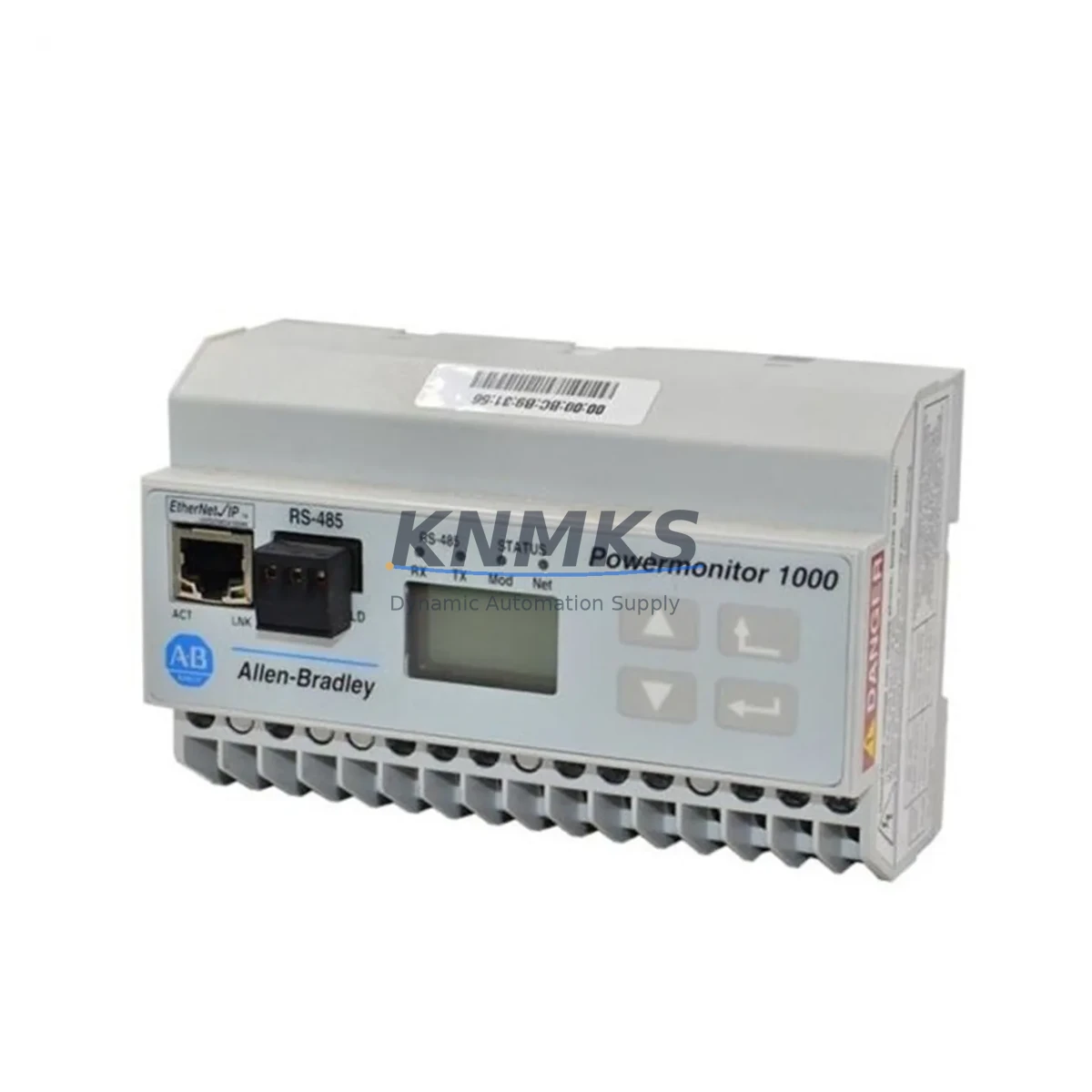
The Allen-Bradley 1408-EM3A-ENT is a PowerMonitor 1000 EtherNet/IP energy metering module designed for continuous industrial power monitoring in demanding factory environments. As a critical component within Rockwell Automation control architectures, this module provides real-time measurement of voltage, current, power factor, energy consumption, and demand data — all accessible via EtherNet/IP communication directly integrated into your existing ControlLogix, CompactLogix, or MicroLogix PLC network. Maintaining a verified spare of the 1408-EM3A-ENT in your parts inventory is a proven strategy for minimizing unplanned downtime and protecting production continuity.
For maintenance engineers managing aging Rockwell systems, the 1408-EM3A-ENT represents a high-priority spare. Energy metering modules are often overlooked during routine inspections until a fault event triggers a full line stoppage. Sourcing a tested, original replacement unit in advance — rather than reactively — is the single most effective way to reduce mean time to repair (MTTR) when this module fails in service.
Each unit supplied by KNMKS is sourced from verified industrial channels, functionally tested prior to dispatch, and backed by a support terms confirmed by quotation. Fast international shipping ensures your facility can restore operations without extended lead times from OEM distribution.
Spare Maintenance Table
| Parameter | Specification |
|---|---|
| Part Number | 1408-EM3A-ENT |
| Brand | Allen-Bradley (Rockwell Automation) |
| Series | PowerMonitor 1000 |
| Communication Protocol | EtherNet/IP |
| Measured Parameters | Voltage, Current, Power Factor, kWh, kVAh, Demand |
| Input Voltage Range | 100–600V AC (3-phase) |
| Current Input | Via external CT (5A secondary) |
| Power Supply | 85–265V AC / 100–300V DC |
| Operating Temperature | 0°C to +60°C |
| Mounting | DIN rail or panel mount |
| Enclosure Rating | IP20 (panel installation) |
| Compatibility | ControlLogix, CompactLogix, MicroLogix, RSLogix 5000, Studio 5000 |
| Replaces / Interchangeable With | 1408-EM3A-ENT (direct replacement) |
| Origin | United States |
| Condition | Original, tested before shipment |
| Support terms | 12 Months |
Maintenance Planning for Continuous Operation
When the 1408-EM3A-ENT is flagged during a control cabinet inspection or fails during a fault event, experienced maintenance engineers know that the energy metering module rarely fails in isolation. A thorough site assessment should include inspection of the following associated components to prevent repeat failures and ensure a complete restoration of the monitoring circuit.
Begin with the power supply feeding the 1408-EM3A-ENT — verify that the 85–265V AC input is stable and within tolerance. Fluctuating supply voltage is a common root cause of premature module failure. If your cabinet uses a dedicated 24V DC rail for instrumentation, inspect the 1606-XLP power supply or equivalent Rockwell 24V DC SMPS for output ripple and load capacity.
Next, verify the current transformer (CT) wiring connected to the module’s current input terminals. Open CT secondary circuits can generate dangerous voltage spikes and corrupt metering data. Inspect terminal blocks — particularly Allen-Bradley 1492-series terminal blocks — for loose connections, corrosion, or insulation degradation, especially in high-vibration or high-humidity environments.
Check the EtherNet/IP network infrastructure: the managed switch port serving the 1408-EM3A-ENT, patch cable integrity, and IP address configuration. In multi-device EtherNet/IP topologies, a failed energy monitor can sometimes cause CIP connection timeouts that affect adjacent devices. If your system uses a Stratix 5700 or 1783-series managed switch, review port diagnostics and VLAN assignments.
For facilities running RSLogix 5000 or Studio 5000, confirm that the Add-On Profile (AOP) for the 1408-EM3A-ENT is correctly installed and that the controller tag mapping is intact after module replacement. If the system also includes a PowerMonitor 5000 (1426-series) at the main incomer, verify that sub-metering hierarchy and energy rollup logic remain consistent after the swap.
Finally, review the protective fusing on the voltage sensing inputs. Blown fuses on the voltage measurement circuit are a frequent and easily overlooked cause of zero-reading faults. Stocking a set of replacement fuses alongside the 1408-EM3A-ENT spare is standard practice in well-managed maintenance programs.
Site Replacement Workflow
Step 1 — Isolation and Safety: De-energize the panel section containing the 1408-EM3A-ENT. Apply LOTO (Lockout/Tagout) per site safety procedures. Confirm CT secondary circuits are shorted before disconnecting current input wiring to prevent open-CT hazards.
Step 2 — Documentation: Record the existing IP address, subnet mask, gateway, and device name configured on the outgoing module. Photograph terminal wiring before disconnection. Export or note the current RSLogix/Studio 5000 tag configuration for the module.
Step 3 — Physical Removal: Disconnect voltage sensing leads, CT secondary wiring, power supply connections, and the EtherNet/IP patch cable. Remove the module from DIN rail or panel mount. Note the firmware revision label if visible.
Step 4 — New Module Preparation: Before installation, configure the replacement 1408-EM3A-ENT with the recorded IP address and network parameters using RSLinx Classic or the module’s front-panel interface. Verify firmware compatibility with your controller revision — update if required using ControlFLASH.
Step 5 — Installation and Commissioning: Mount the replacement module, reconnect all wiring per the original documentation, and restore power. Confirm EtherNet/IP connection status in Studio 5000. Verify live metering data — voltage, current, and power factor — against known reference values from a clamp meter to validate correct CT polarity and phase assignment.
Step 6 — System Validation: Run the line under normal load for a minimum of 15 minutes. Confirm energy accumulation registers are incrementing correctly. Document the replacement in the site maintenance log with date, technician name, and new module serial number.
This workflow applies equally when upgrading from an older 1408-EM1A or 1408-EM2A variant to the ENT (EtherNet/IP) model, enabling facilities to modernize legacy metering infrastructure without replacing the entire control cabinet.
Spare Parts Support FAQ
Q1: Is the 1408-EM3A-ENT still available as a new original part?
Yes. KNMKS maintains stock of original Allen-Bradley 1408-EM3A-ENT units sourced from verified industrial supply channels. Each unit is inspected and functionally tested before shipment. We recommend confirming availability directly with our sales team for time-sensitive procurement requirements.
Q2: What is the support terms coverage and what does it include?
All 1408-EM3A-ENT units supplied by KNMKS carry a support terms confirmed by quotation from the date of shipment. Coverage includes functional failure under normal operating conditions. Units are tested prior to dispatch; in the event of a DOA (dead on arrival) or early-life failure, KNMKS will arrange priority replacement to minimize your downtime exposure.
Q3: How do I verify compatibility with my existing Rockwell system before ordering?
The 1408-EM3A-ENT is compatible with all ControlLogix, CompactLogix, and MicroLogix controllers running RSLogix 5000 or Studio 5000 with EtherNet/IP communication enabled. Confirm your controller firmware revision and AOP version. If you are replacing an older 1408-EM1A or 1408-EM2A, note that the ENT variant requires an EtherNet/IP port on your network infrastructure — a serial or DeviceNet variant cannot be substituted directly. Contact admin@knmks.com with your system details for a compatibility confirmation before ordering.
Q4: Can KNMKS support long-term or blanket purchase orders for this part?
Yes. For facilities managing multiple PowerMonitor 1000 installations or operating under a planned maintenance schedule, KNMKS supports blanket purchase agreements and scheduled delivery programs. This ensures guaranteed stock availability, locked pricing, and reduced procurement lead times — particularly important for parts with constrained OEM availability. Contact our team to discuss a supply arrangement aligned with your annual maintenance calendar.
© 2026 KNMKS. All rights reserved.
Original Source: https://knmks.com
Contact: admin@knmks.com | +86 18359268345
Product Identification
- Brand / Ecosystem
-
Allen-Bradley
Allen-Bradley - Model / Series
- 1408-EM3A-ENT
- Product Family
- PLCs & Controllers
- Availability Status
- Available on request after model and quantity confirmation
- Inquiry Type
- B2B RFQ, replacement inquiry and project spare-part request
- Pre-Quote Check
- Exact SKU, brand, series, quantity, nameplate photos and destination country are checked before quotation
System Path
Where this product fits in the KNMKS automation structure.
Specification & Inquiry Focus
- Control platform
- PLC, PAC and modular controllers
- Common needs
- CPU, rack, power and I/O expansion
- Project support
- Replacement, cabinet build and maintenance
Buyer Confirmation
Information KNMKS checks before replying.
- Exact model
- 1408-EM3A-ENT
- Brand / ecosystem
- Allen-Bradley
- Product family
- PLCs & Controllers
- Application note
- Replacement, maintenance, project build or spare-part list
- Useful photos
- Nameplate, installed unit, cabinet layout or connector side
- Delivery details
- Quantity, destination country and target schedule
Document Support
Files and notes can be confirmed during quotation.
- Product photos or nameplate confirmation when available
- Packing and delivery notes before quotation confirmation
- Support scope and delivery terms confirmed per inquiry
- Export document coordination for qualified B2B requests
Inquiry Support
- Model cross-checking before quotation
- CPU, power, rack and expansion module matching
- Support for replacement and project inquiry
What to Send Us
- Brand and exact model number: Allen-Bradley 1408-EM3A-ENT
- Quantity and required delivery time
- Application, replacement requirement or nameplate photo
- Destination country and shipping preference
RFQ Preparation
This is a product inquiry page built for RFQ communication.
Fast Model Check
Send this model to KNMKS for confirmation.
Include quantity, destination country and photos if this is a maintenance replacement. The inquiry will be saved with a reference number after submission.
Brand & Compatibility Note
KNMKS displays automation product information for well-known industrial brand ecosystems and compatible replacement references. Brand names are used for product identification and compatibility reference only; final availability and commercial terms are confirmed per quotation.
 Manufacturing
 Machine Tools
 Packaging
 Energy & Power



 HMI & Displays
 Servo Systems
 Variable Frequency Drives
 Sensors