
Overview
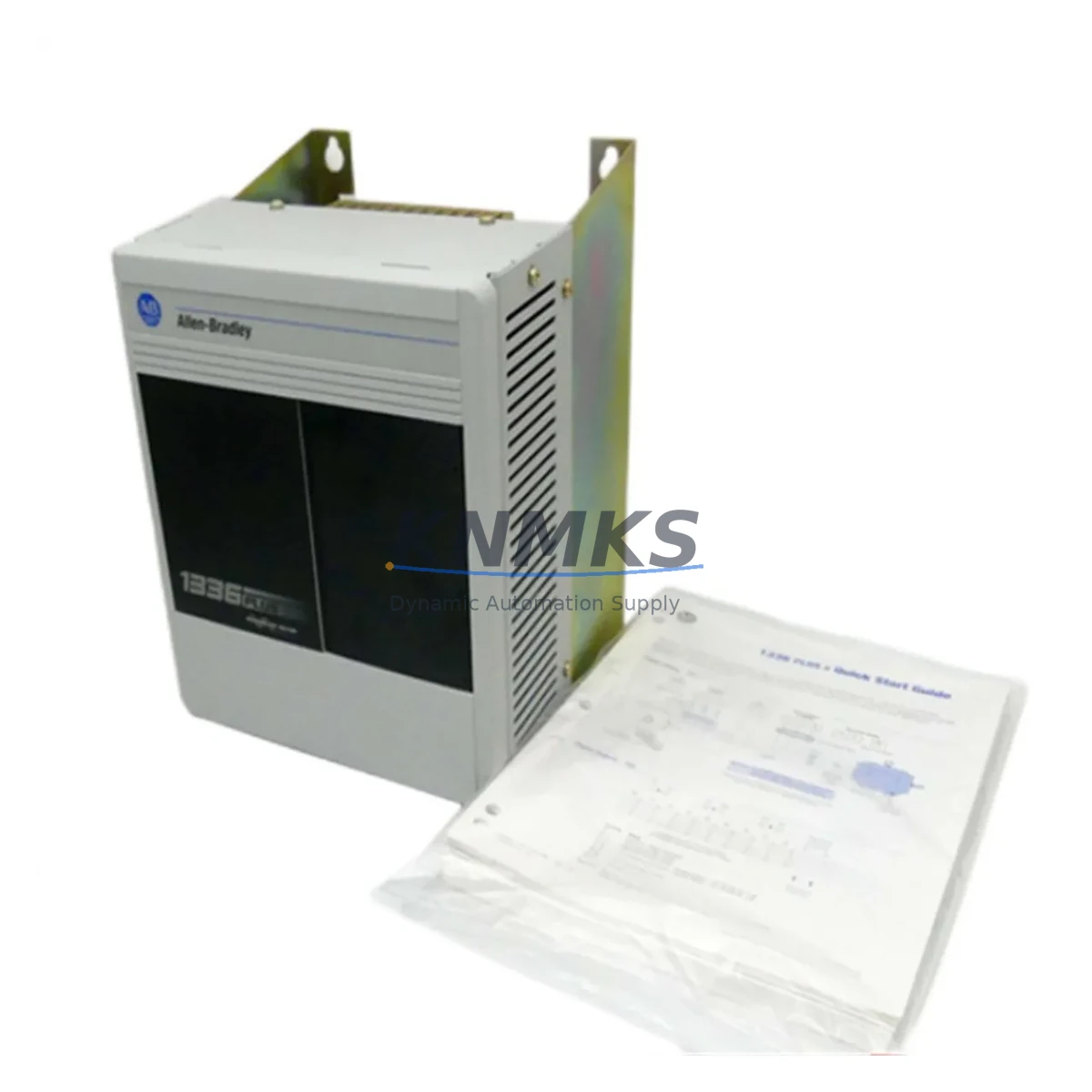
Allen-Bradley 1336F-BRF50-AA-EN Migration-Ready AC Drive for Legacy Control Systems
The Allen-Bradley 1336F-BRF50-AA-EN is a 5HP, 460V AC variable frequency drive from the 1336 FORCE series, purpose-built for demanding industrial motion control applications. As legacy 1336 FORCE installations age and original spare parts become increasingly scarce, this unit serves as a verified drop-in replacement for facilities managing aging production lines, retrofitting control cabinets, or executing phased system modernization programs. Whether you are replacing a failed drive in a running plant or pre-positioning inventory ahead of a scheduled shutdown, the 1336F-BRF50-AA-EN delivers the electrical and mechanical compatibility required to minimize engineering risk and reduce commissioning time.
Industrial facilities operating legacy Allen-Bradley 1336 FORCE platforms face a common challenge: the original drives are discontinued, certified repair centers are shrinking, and unplanned downtime carries significant production cost. The 1336F-BRF50-AA-EN addresses this directly by maintaining the same power terminal layout, control wiring interface, and parameter structure as the original factory configuration, allowing maintenance engineers to execute a like-for-like swap without rewriting PLC logic or reconfiguring HMI screens.
Migration Compatibility Table
| Parameter | Specification / Compatibility Detail |
|---|---|
| SKU / Part Number | 1336F-BRF50-AA-EN |
| Series | Allen-Bradley 1336 FORCE |
| Power Rating | 5HP (3.7kW) |
| Input Voltage | 460V AC, 3-Phase |
| Output Frequency | 0–400 Hz |
| Control Interface | Compatible with 1336 FORCE standard control terminal block; no rewiring required for direct replacement |
| Communication | Supports DH+ and Remote I/O (RIO) network integration; compatible with existing SLC 500 and PLC-5 control platforms |
| Mounting / Enclosure | Panel-mount; verify cabinet depth and airflow clearance before installation |
| Firmware Compatibility | Verify firmware revision against existing 1336 FORCE parameter file before power-up |
| Replacement Recommendation | Direct replacement for discontinued 1336F-BRF50-AA-EN units; cross-reference with 1336 FORCE selection guide for alternate frame sizes |
| Commissioning Notes | Upload saved parameter file via DriveExplorer or DriveExecutive; verify motor nameplate data, accel/decel ramps, and fault history before restart |
| Support terms | support terms confirmed by quotation — covers manufacturing defects and functional failure under normal operating conditions |
Retrofit Planning for Existing Automation Systems
A successful 1336F-BRF50-AA-EN retrofit begins well before the replacement unit arrives on site. Engineers should start by auditing the existing control cabinet for available power capacity. The drive’s 460V three-phase input must be confirmed against the panel’s upstream breaker rating and bus bar capacity, particularly in older installations where load growth may have pushed the distribution system close to its limits.
Terminal block compatibility is the next critical checkpoint. The 1336 FORCE series uses a defined control wiring scheme for analog reference signals, digital I/O, and enable/fault relay outputs. Before disconnecting the failed unit, photograph and document all wiring connections. In many retrofit projects, the original wiring labels have faded or been modified over years of field service, making as-built documentation essential for a clean swap.
For facilities running SLC 500 or PLC-5 controllers communicating over Remote I/O (RIO) or DH+ networks, the drive’s node address and rack/slot configuration must be preserved exactly. Any change to the drive’s logical address will cause the PLC program to fault on the first scan after power-up. If the original drive’s parameter file was saved using DriveExplorer or DriveExecutive software, upload it to the replacement unit before commissioning to restore all tuning parameters, speed references, and protection thresholds in a single operation.
In multi-drive control cabinets, the 1336F-BRF50-AA-EN often operates alongside companion components such as the 1336 FORCE 1336-GM1 Human Interface Module (HIM) for local parameter access, 1492 terminal blocks for structured I/O wiring, and 1606-XLP power supplies supporting 24VDC control circuits. Where the cabinet also hosts a 1336 FORCE 1336-L10E Ethernet communication adapter or a 1203-GU6 Universal Serial Bus module, verify that the adapter firmware is compatible with the replacement drive’s base firmware revision before reconnecting the network.
For I/O-intensive applications, the drive’s analog and digital I/O capacity should be cross-checked against the existing program logic. If the original installation used an external 1734 POINT I/O or 1746 SLC I/O module to supplement the drive’s onboard I/O, confirm that the module addressing and rack configuration remain unchanged after the swap. Physical installation space must also be verified: confirm the replacement unit’s frame dimensions match the cutout and mounting hole pattern in the existing panel, and that minimum airflow clearances specified in the 1336 FORCE installation manual are maintained.
Downtime Control During System Migration
Unplanned downtime during a drive replacement is one of the highest-cost events in industrial production environments. A structured pre-swap checklist reduces the risk of extended outages and protects the integrity of the existing control program.
Before initiating the physical swap, back up the existing drive’s parameter file using DriveExplorer or DriveExecutive and store a copy both locally and on a network share. If the original drive is still partially functional, use the software to capture the full parameter set including motor data, speed references, accel/decel profiles, and any application-specific tuning values. This file becomes the single most important asset in the retrofit — it eliminates the need to manually re-enter dozens of parameters under time pressure during a production shutdown.
During the physical replacement, maintain control circuit continuity where possible. In systems where the PLC continues to scan during the drive swap, ensure the drive’s enable input is held in the disabled state to prevent an unexpected start command from reaching the motor. After the replacement unit is wired and the parameter file is uploaded, perform a no-load test run at low speed before reconnecting the mechanical load. Verify that the drive’s output frequency, current, and fault status are correctly reflected in the PLC program and on any associated HMI screens before returning the system to automatic mode.
For facilities with strict change management requirements, document the firmware revision of the replacement unit, the date and time of the swap, the technician’s name, and the post-commissioning test results. This record supports both internal maintenance logs and any future support requests under the support terms confirmed by quotation coverage included with every unit shipped from our inventory.
Retrofit Support FAQ
Q1: Is the 1336F-BRF50-AA-EN a direct replacement for my existing 1336 FORCE drive?
Yes. The 1336F-BRF50-AA-EN is a like-for-like replacement for the original Allen-Bradley 1336 FORCE unit of the same part number. Power terminal layout, control wiring interface, and parameter structure are identical to the factory original. No PLC program changes or HMI screen modifications are required for a standard swap.
Q2: How do I verify firmware compatibility before installation?
Check the firmware revision label on the replacement unit’s nameplate and compare it against the revision recorded in your existing maintenance documentation or the DriveExplorer parameter file. If the revisions differ, review the 1336 FORCE firmware release notes for any parameter changes that may affect your application before uploading the saved parameter file.
Q3: What pre-shipment testing is performed on each unit?
Every 1336F-BRF50-AA-EN unit undergoes functional power-on testing prior to shipment. Output voltage, frequency response, and fault relay operation are verified. Units are shipped with original or equivalent packaging to prevent transit damage. A test report is available upon request.
Q4: What does the support terms confirmed by quotation cover, and what is the claims process?
The support terms confirmed by quotation cover manufacturing defects and functional failure under normal operating conditions from the date of shipment. To initiate a support terms claim, contact our sales team with the order number, unit serial number, and a description of the fault condition. We will arrange return shipping and provide a replacement or repair within an agreed lead time to minimize your production impact.
© 2026 KNMKS. All rights reserved.
Original Source: https://knmks.com
Contact: admin@knmks.com | +86 18359268345
Product Identification
- Brand / Ecosystem
-
Allen-Bradley
Allen-Bradley - Model / Series
- 1336F-BRF50-AA-EN
- Product Family
- PLCs & Controllers
- Availability Status
- Available on request after model and quantity confirmation
- Inquiry Type
- B2B RFQ, replacement inquiry and project spare-part request
- Pre-Quote Check
- Exact SKU, brand, series, quantity, nameplate photos and destination country are checked before quotation
System Path
Where this product fits in the KNMKS automation structure.
Specification & Inquiry Focus
- Control platform
- PLC, PAC and modular controllers
- Common needs
- CPU, rack, power and I/O expansion
- Project support
- Replacement, cabinet build and maintenance
Buyer Confirmation
Information KNMKS checks before replying.
- Exact model
- 1336F-BRF50-AA-EN
- Brand / ecosystem
- Allen-Bradley
- Product family
- PLCs & Controllers
- Application note
- Replacement, maintenance, project build or spare-part list
- Useful photos
- Nameplate, installed unit, cabinet layout or connector side
- Delivery details
- Quantity, destination country and target schedule
Document Support
Files and notes can be confirmed during quotation.
- Product photos or nameplate confirmation when available
- Packing and delivery notes before quotation confirmation
- Support scope and delivery terms confirmed per inquiry
- Export document coordination for qualified B2B requests
Inquiry Support
- Model cross-checking before quotation
- CPU, power, rack and expansion module matching
- Support for replacement and project inquiry
What to Send Us
- Brand and exact model number: Allen-Bradley 1336F-BRF50-AA-EN
- Quantity and required delivery time
- Application, replacement requirement or nameplate photo
- Destination country and shipping preference
RFQ Preparation
This is a product inquiry page built for RFQ communication.
Fast Model Check
Send this model to KNMKS for confirmation.
Include quantity, destination country and photos if this is a maintenance replacement. The inquiry will be saved with a reference number after submission.
Brand & Compatibility Note
KNMKS displays automation product information for well-known industrial brand ecosystems and compatible replacement references. Brand names are used for product identification and compatibility reference only; final availability and commercial terms are confirmed per quotation.
 Manufacturing
 Machine Tools
 Packaging
 Energy & Power



 HMI & Displays
 Servo Systems
 Variable Frequency Drives
 Sensors