
Overview
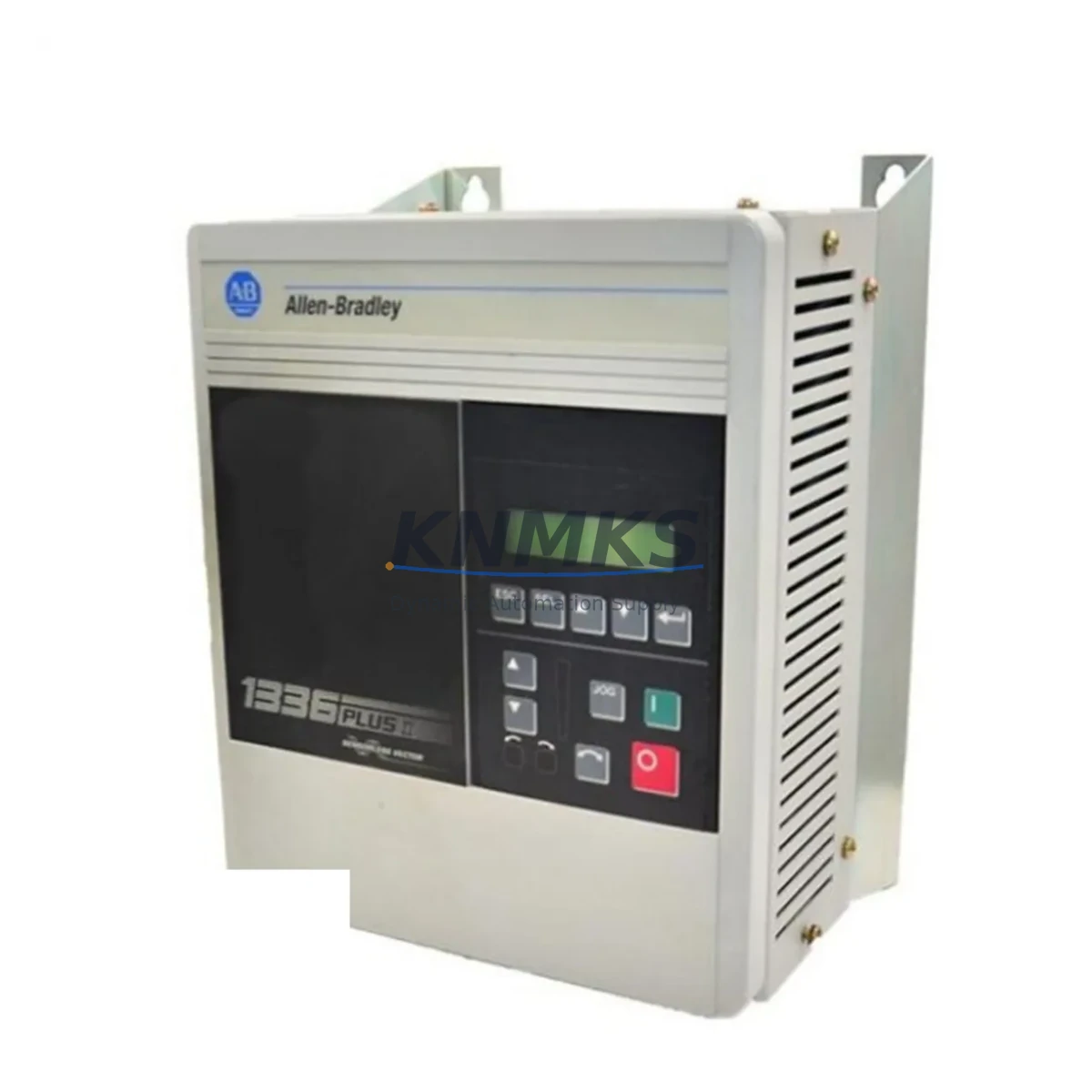
Allen-Bradley 1336F-BRF20-AA-EN Migration-Ready AC Drive for Legacy Control Systems
The Allen-Bradley 1336F-BRF20-AA-EN is a 2 HP / 1.5 kW AC variable frequency drive from the 1336 FORCE series, engineered for direct integration into existing 1336 Plus II and 1336 IMPACT control architectures. As legacy automation systems approach end-of-life and OEM support windows close, the 1336F-BRF20-AA-EN has become a critical stocking component for maintenance engineers managing retrofit projects, unplanned downtime recovery, and phased control system upgrades across manufacturing, water treatment, HVAC, and material handling applications.
Before committing to a replacement installation, engineers must verify several key parameters against the existing drive bay and control cabinet. Power supply compatibility is the first checkpoint: confirm that the incoming AC supply voltage (200–240 V AC, single or three-phase) and frequency (50/60 Hz) match the drive’s rated input. Terminal block wiring must be mapped carefully — the 1336F-BRF20-AA-EN uses a standard TB1 control terminal layout, but legacy installations may have custom jumper configurations for analog reference inputs (0–10 V or 4–20 mA), digital I/O assignments, and relay output wiring that must be documented before the old drive is removed.
Backplane and rack interface requirements are not applicable to this standalone drive, but DPI (Drive Peripheral Interface) port availability is essential if the existing system uses a 1203-USB or 1203-GU6 communication adapter for remote parameter access or network integration. If the original installation relied on a DeviceNet or Remote I/O communication module — such as the 1336-GM6 or 1336-BDN — verify that the replacement drive’s firmware revision supports the same network node addressing and baud rate settings to avoid communication faults on the ControlLogix or SLC 500 controller side.
Program logic compatibility is another migration-critical factor. If the host PLC — whether a MicroLogix 1100, SLC 5/05, or ControlLogix L6x — uses MSG instructions or explicit messaging to read/write drive parameters, the parameter file structure and data table addresses must be validated against the replacement drive’s parameter set. HMI screen mappings on PanelView or PanelView Plus terminals that display drive status, fault codes, speed references, or output current should be tested in simulation before live cutover to prevent operator interface errors during commissioning.
Migration Compatibility Table
| Parameter | Specification / Requirement |
|---|---|
| SKU / Part Number | 1336F-BRF20-AA-EN |
| Series | Allen-Bradley 1336 FORCE |
| Power Rating | 2 HP / 1.5 kW |
| Input Voltage | 200–240 V AC, 1Ø / 3Ø, 50/60 Hz |
| Output Voltage | 0–240 V AC, 3Ø |
| Communication Interface | DPI Port (1203-USB / 1203-GU6 compatible) |
| Network Compatibility | DeviceNet, Remote I/O (via adapter modules) |
| Replaces / Compatible With | 1336 Plus II, 1336 IMPACT legacy drives |
| Control Terminal Layout | TB1 standard; verify analog/digital I/O jumpers |
| Mounting / Installation | Panel mount; verify enclosure depth and airflow clearance |
| Firmware Compatibility | Verify revision against existing network node settings |
| Commissioning Requirement | Parameter restore, motor nameplate entry, I/O verification |
| Support terms | support terms confirmed by quotation — covered from date of shipment |
Retrofit Planning for Existing Automation Systems
A successful retrofit begins with a complete audit of the existing control cabinet. For systems built around a SLC 5/04 or SLC 5/05 processor with a 1746-A13 rack, the drive typically receives speed reference signals from a 1746-NI4 analog input module or a 1746-FIO4I combination I/O module. These signal sources must remain intact during the drive swap to avoid process interruptions. If the cabinet also houses a 1336-MOD-HA2 dynamic braking module or a 1336-BDN DeviceNet adapter, confirm that these accessories are mechanically and electrically compatible with the replacement unit before removal.
For installations where the 1336F-BRF20-AA-EN is integrated into a ControlLogix system via a 1756-DNB DeviceNet bridge module, the EDS file for the replacement drive must be loaded into RSNetWorx for DeviceNet and the node address must match the original configuration. If the system uses a 1203-GU6 Universal Gateway for Ethernet/IP connectivity, verify that the gateway firmware supports the drive’s DPI parameter set. In multi-drive panels, the 1336F-BRF20-AA-EN may share a common DC bus with adjacent drives — confirm bus sizing and precharge circuit compatibility before energizing.
Installation space confirmation is often overlooked in retrofit planning. The 1336F-BRF20-AA-EN requires adequate vertical and horizontal clearance for convection cooling. If the original drive was a different frame size, panel cutout dimensions and DIN rail or back-panel mounting hole patterns must be re-evaluated. Cable entry points for power wiring (R/L1, S/L2, T/L3 input; U/T1, V/T2, W/T3 output) and control wiring must be accessible without rerouting conduit runs.
Downtime Control During System Migration
Minimizing production downtime during a drive replacement requires a structured pre-cutover checklist. Before the maintenance window opens, upload and save all existing drive parameters using DriveExplorer or Studio 5000 Drive Executive. Document the motor nameplate data (voltage, current, frequency, RPM, power factor) that is stored in the drive’s parameter file, as these values must be re-entered or restored to the replacement unit before the first test run.
During the cutover window, label all control wiring at TB1 before disconnecting — particularly the analog speed reference (terminals 1–3), digital input assignments (terminals 16–22), and relay output wiring (terminals 26–28). Power wiring should be de-energized, locked out, and verified with a meter before any terminal work begins. After the 1336F-BRF20-AA-EN is mounted and wired, perform a no-load motor rotation test at low speed (5–10 Hz) to confirm correct phase rotation and I/O response before returning the system to automatic control.
If the host controller uses a PLC program with fault-handling rungs that monitor drive status bits via the communication network, verify that the drive’s fault code table matches the expected bit mapping in the PLC data file. Mismatched fault codes can trigger nuisance shutdowns or mask real faults during the first hours of operation. Pre-testing the HMI fault display pages against the replacement drive’s fault list before live startup reduces commissioning risk and protects the original program logic from unintended modifications.
Retrofit Support FAQ
Q: Is the 1336F-BRF20-AA-EN a direct drop-in replacement for the 1336 Plus II drives?
A: The 1336F-BRF20-AA-EN is from the 1336 FORCE series and shares the same power rating and voltage class as many 1336 Plus II variants. Terminal wiring layouts are similar but not always identical — always compare the TB1 wiring diagram of both units and verify analog reference and digital I/O jumper settings before installation.
Q: What communication adapters are compatible with this drive?
A: The drive supports DPI-based communication adapters including the 1203-USB (for parameter programming via PC) and the 1203-GU6 (for Ethernet/IP or DeviceNet network integration). If the existing system uses a legacy Remote I/O adapter such as the 1336-GM6, confirm firmware and hardware revision compatibility before reuse.
Q: How do I verify the unit before installation?
A: All units shipped from our inventory undergo pre-shipment functional testing including power-on verification, parameter access confirmation, and visual inspection for terminal and housing integrity. A test report is available upon request. The support terms confirmed by quotation cover manufacturing defects and functional failures from the date of shipment.
Q: What is the typical lead time and stock availability?
A: The 1336F-BRF20-AA-EN is stocked and available for same-day or next-business-day dispatch for urgent maintenance and retrofit requirements. Contact our team to confirm current inventory levels and expedited shipping options for critical downtime situations.
© 2026 KNMKS. All rights reserved.
Original Source: https://knmks.com
Contact: admin@knmks.com | +86 18359268345
Product Identification
- Brand / Ecosystem
-
Allen-Bradley
Allen-Bradley - Model / Series
- 1336F-BRF20-AA-EN
- Product Family
- PLCs & Controllers
- Availability Status
- Available on request after model and quantity confirmation
- Inquiry Type
- B2B RFQ, replacement inquiry and project spare-part request
- Pre-Quote Check
- Exact SKU, brand, series, quantity, nameplate photos and destination country are checked before quotation
System Path
Where this product fits in the KNMKS automation structure.
Specification & Inquiry Focus
- Control platform
- PLC, PAC and modular controllers
- Common needs
- CPU, rack, power and I/O expansion
- Project support
- Replacement, cabinet build and maintenance
Buyer Confirmation
Information KNMKS checks before replying.
- Exact model
- 1336F-BRF20-AA-EN
- Brand / ecosystem
- Allen-Bradley
- Product family
- PLCs & Controllers
- Application note
- Replacement, maintenance, project build or spare-part list
- Useful photos
- Nameplate, installed unit, cabinet layout or connector side
- Delivery details
- Quantity, destination country and target schedule
Document Support
Files and notes can be confirmed during quotation.
- Product photos or nameplate confirmation when available
- Packing and delivery notes before quotation confirmation
- Support scope and delivery terms confirmed per inquiry
- Export document coordination for qualified B2B requests
Inquiry Support
- Model cross-checking before quotation
- CPU, power, rack and expansion module matching
- Support for replacement and project inquiry
What to Send Us
- Brand and exact model number: Allen-Bradley 1336F-BRF20-AA-EN
- Quantity and required delivery time
- Application, replacement requirement or nameplate photo
- Destination country and shipping preference
RFQ Preparation
This is a product inquiry page built for RFQ communication.
Fast Model Check
Send this model to KNMKS for confirmation.
Include quantity, destination country and photos if this is a maintenance replacement. The inquiry will be saved with a reference number after submission.
Brand & Compatibility Note
KNMKS displays automation product information for well-known industrial brand ecosystems and compatible replacement references. Brand names are used for product identification and compatibility reference only; final availability and commercial terms are confirmed per quotation.
 Manufacturing
 Machine Tools
 Packaging
 Energy & Power



 HMI & Displays
 Servo Systems
 Variable Frequency Drives
 Sensors