
Overview
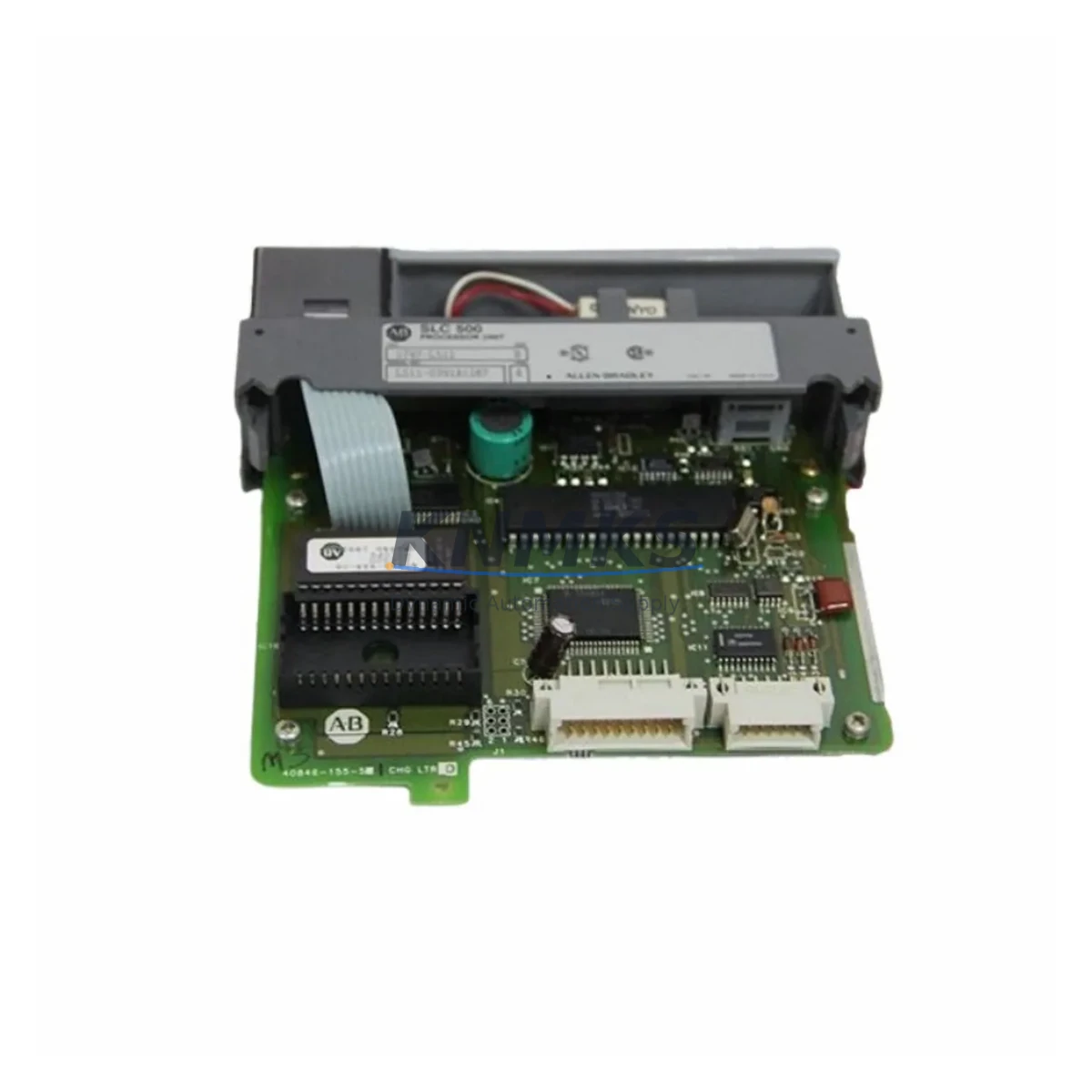
Allen-Bradley 1336-MCB-SP2D Maintenance-Proven Spare Part for Factory Uptime
The Allen-Bradley 1336-MCB-SP2D is the main control board for the 1336 PLUS II series AC variable frequency drives, one of the most widely deployed drive platforms in North American industrial automation. Designed for demanding continuous-duty environments including conveyor systems, pump stations, compressor drives, and multi-axis motion control panels, this board governs all core drive logic: speed reference processing, fault diagnostics, parameter storage, and communication interface management. Maintaining a verified spare of the 1336-MCB-SP2D in your critical spare parts inventory is a proven strategy for reducing unplanned downtime and protecting production continuity.
At KNMKS, every 1336-MCB-SP2D unit is sourced from authorized supply channels, individually inspected, and function-tested prior to shipment. Each board ships with a support terms confirmed by quotation covering manufacturing defects and operational failures under normal industrial use conditions. Our technical team supports compatibility verification, installation guidance, and post-sale troubleshooting to ensure your replacement goes smoothly the first time.
Spare Maintenance Table
| SKU / Part Number | 1336-MCB-SP2D |
| Brand | Allen-Bradley (Rockwell Automation) |
| Series | 1336 PLUS II AC Drive |
| Component Type | Main Control Board (MCB) |
| Compatible Drive Ratings | 1336 PLUS II series, multiple horsepower ratings (verify frame size before ordering) |
| Communication Support | DPI / SCANport interface compatible; supports 1203-USB, 1203-GU6, and remote I/O adapters |
| Parameter Storage | Onboard EEPROM; parameter backup recommended via DriveExplorer or DriveExecutive prior to swap |
| Operating Temperature | 0°C to 50°C (32°F to 122°F) ambient |
| Humidity | 5% to 95% non-condensing |
| Installation Environment | IP20 enclosure minimum; NEMA 1 or NEMA 12 drive enclosure recommended |
| Mounting | Internal drive chassis; ESD precautions required during handling |
| Condition | Original spare — new or factory-refurbished, tested before shipment |
| Support terms | 12 months from date of shipment |
| Lead Time | In-stock units ship within 1–3 business days |
Maintenance Planning for Continuous Operation
When a 1336 PLUS II drive trips on a fault code pointing to control board failure — common indicators include F002 (Auxiliary Input), F012 (HW OverCurrent), or persistent parameter loss after power cycling — the 1336-MCB-SP2D is typically the first board-level component to evaluate. However, experienced maintenance engineers know that a control board fault rarely occurs in isolation. A thorough site inspection should extend to the surrounding electrical ecosystem before and after the board swap.
Start with the 1336-PB (Power Base) and gate driver board: control board faults are sometimes triggered by upstream power irregularities rather than board failure itself. Verify DC bus voltage stability and check for capacitor bulge or leakage on the drive’s internal DC bus capacitor bank. Next, inspect the 1336-MOD-L2E or 1336-GM1 communication adapter seated on the SCANport interface — a loose or corroded adapter can generate intermittent communication faults that mimic control board failure.
Check the 24VDC control power supply feeding the drive’s logic section. Voltage sag below 21VDC under load is a known cause of spurious resets on the 1336 PLUS II platform. If the drive is integrated into a DeviceNet or Remote I/O network, also inspect the 1203-GU6 or 1203-SM1 network adapter for firmware version compatibility with the replacement MCB.
For drives installed in NEMA 12 enclosures, inspect the panel cooling fan and filter mat: thermal stress is the leading cause of premature control board degradation. Verify that the thermistor input (TB3) wiring is intact and that motor PTC sensors are within specification. Finally, review the 1336-BRF (brake resistor) circuit if dynamic braking is in use — a shorted brake resistor can back-feed transients into the control section.
Procurement engineers should consider stocking the 1336-MCB-SP2D alongside the 1336-PB power base board and a spare SCANport communication module as a minimum critical spare set for any facility running multiple 1336 PLUS II drives. This three-part kit covers the majority of field-replaceable failure modes and enables same-shift restoration in most scenarios.
Site Replacement Workflow
Step 1 — Parameter Backup: Before powering down the drive, connect a laptop running DriveExplorer or DriveExecutive via a 1203-USB adapter and upload the full parameter file. Save to a named file with the drive tag, date, and firmware version. This backup is critical — the replacement 1336-MCB-SP2D ships with factory default parameters.
Step 2 — Safe Isolation: Follow LOTO (Lockout/Tagout) procedures. Confirm DC bus voltage has discharged below 50VDC using a calibrated meter before opening the drive enclosure. The 1336 PLUS II bus capacitors can hold dangerous charge for several minutes after power removal.
Step 3 — Board Removal: Photograph all ribbon cable and connector positions before disconnecting. The MCB connects to the power base via a multi-pin edge connector and several ribbon cables. Handle the replacement board only by its edges — ESD damage is not covered under support terms.
Step 4 — Installation and Parameter Restore: Seat the 1336-MCB-SP2D firmly, reconnect all cables in reverse order, and restore the parameter file via DriveExplorer. Verify firmware version compatibility. If the replacement board carries a different firmware revision, consult Rockwell’s firmware compatibility matrix before restoring parameters.
Step 5 — Commissioning Check: Power up in local control mode first. Confirm no fault codes are present, verify speed reference response, and check communication adapter status LEDs before returning the drive to automatic/remote control. Log the replacement in your CMMS with the new board serial number and support terms expiry date.
This workflow typically enables same-shift restoration for a trained maintenance technician, minimizing production impact and avoiding the extended lead times associated with drive-level RMA returns.
Spare Parts Support FAQ
Q1: Is the 1336-MCB-SP2D compatible with all 1336 PLUS II drive frame sizes?
The 1336-MCB-SP2D is designed for specific frame sizes within the 1336 PLUS II family. Compatibility depends on the drive’s catalog number suffix and firmware revision. Please provide your full drive catalog number when ordering so our team can confirm fitment before shipment.
Q2: What testing is performed before shipment?
Each 1336-MCB-SP2D unit undergoes visual inspection, connector integrity check, and functional bench testing prior to packaging. Units that do not pass our outgoing quality check are not shipped. A test report is available upon request for critical applications.
Q3: Can you support long-term supply for facilities with multiple 1336 PLUS II drives?
Yes. KNMKS maintains ongoing inventory of 1336 PLUS II spare components and can support blanket purchase orders, annual supply agreements, and scheduled replenishment programs. Contact our sales team to discuss volume pricing and reserved stock arrangements.
Q4: What does the support terms confirmed by quotation cover?
The support terms covers manufacturing defects and functional failures under normal operating conditions for 12 months from the date of shipment. It does not cover damage resulting from incorrect installation, overvoltage events, ESD mishandling, or use outside the specified environmental ratings. Support requests are processed with return authorization; our team targets a 5-business-day resolution for verified support terms cases.
© 2026 KNMKS. All rights reserved.
Original Source: https://knmks.com
Contact: admin@knmks.com | +86 18359268345
Product Identification
- Brand / Ecosystem
-
Allen-Bradley
Allen-Bradley - Model / Series
- 1336-MCB-SP2D
- Product Family
- PLCs & Controllers
- Availability Status
- Available on request after model and quantity confirmation
- Inquiry Type
- B2B RFQ, replacement inquiry and project spare-part request
- Pre-Quote Check
- Exact SKU, brand, series, quantity, nameplate photos and destination country are checked before quotation
System Path
Where this product fits in the KNMKS automation structure.
Specification & Inquiry Focus
- Control platform
- PLC, PAC and modular controllers
- Common needs
- CPU, rack, power and I/O expansion
- Project support
- Replacement, cabinet build and maintenance
Buyer Confirmation
Information KNMKS checks before replying.
- Exact model
- 1336-MCB-SP2D
- Brand / ecosystem
- Allen-Bradley
- Product family
- PLCs & Controllers
- Application note
- Replacement, maintenance, project build or spare-part list
- Useful photos
- Nameplate, installed unit, cabinet layout or connector side
- Delivery details
- Quantity, destination country and target schedule
Document Support
Files and notes can be confirmed during quotation.
- Product photos or nameplate confirmation when available
- Packing and delivery notes before quotation confirmation
- Support scope and delivery terms confirmed per inquiry
- Export document coordination for qualified B2B requests
Inquiry Support
- Model cross-checking before quotation
- CPU, power, rack and expansion module matching
- Support for replacement and project inquiry
What to Send Us
- Brand and exact model number: Allen-Bradley 1336-MCB-SP2D
- Quantity and required delivery time
- Application, replacement requirement or nameplate photo
- Destination country and shipping preference
RFQ Preparation
This is a product inquiry page built for RFQ communication.
Fast Model Check
Send this model to KNMKS for confirmation.
Include quantity, destination country and photos if this is a maintenance replacement. The inquiry will be saved with a reference number after submission.
Brand & Compatibility Note
KNMKS displays automation product information for well-known industrial brand ecosystems and compatible replacement references. Brand names are used for product identification and compatibility reference only; final availability and commercial terms are confirmed per quotation.
 Manufacturing
 Machine Tools
 Packaging
 Energy & Power



 HMI & Displays
 Servo Systems
 Variable Frequency Drives
 Sensors