
Overview
Allen-Bradley 1203-CN1 Maintenance-Proven Spare Part for Factory Uptime
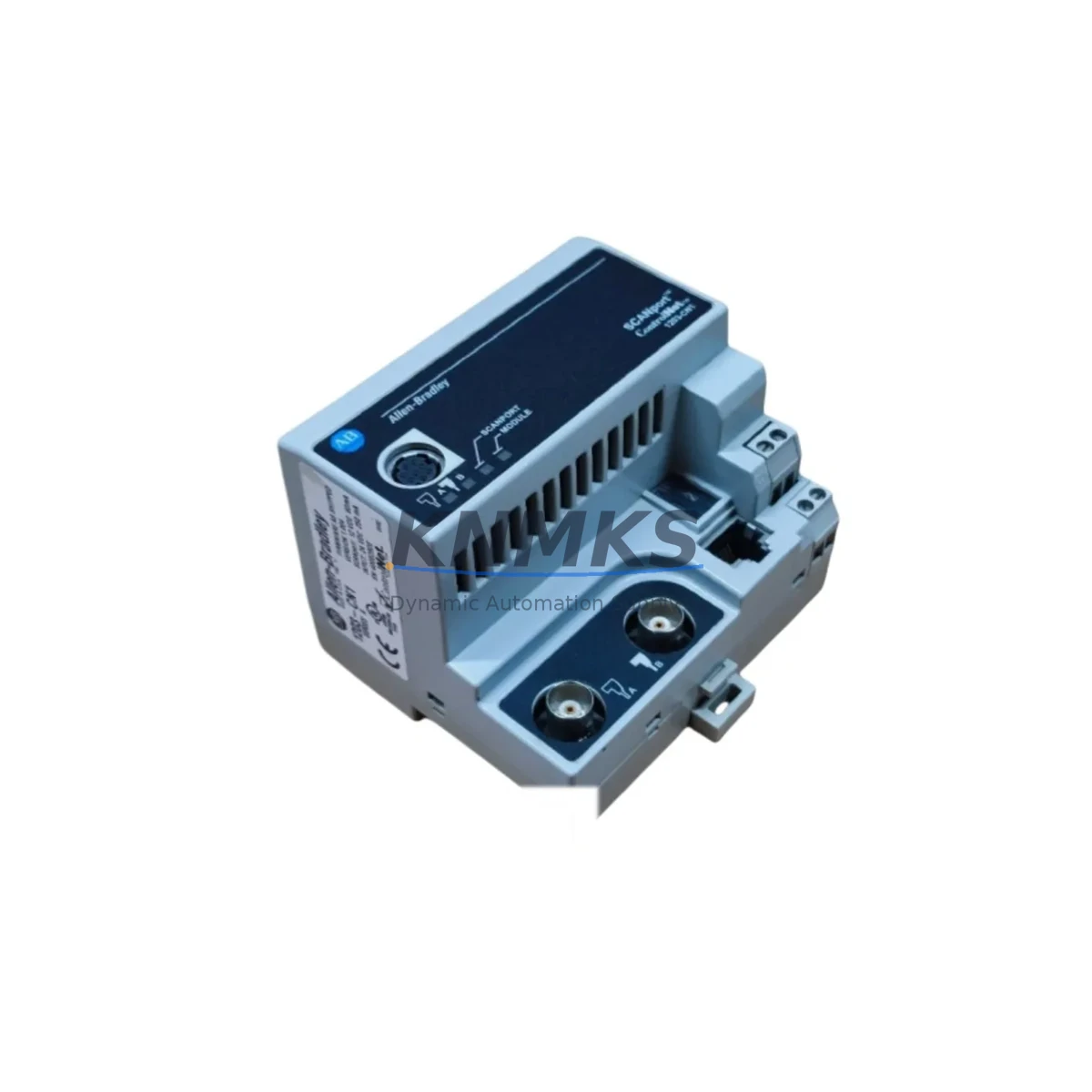
The Allen-Bradley 1203-CN1 is a ControlNet SCANport communication adapter designed for integration with Allen-Bradley variable frequency drives and motor control devices that feature the SCANport interface. As a critical node in ControlNet-based automation architectures, the 1203-CN1 enables deterministic, high-speed communication between the drive and the PLC or DCS controller — making it an essential spare for any maintenance team responsible for continuous production uptime.
In industrial environments where unplanned downtime translates directly into production loss, holding a verified, tested 1203-CN1 in your spare parts inventory is a fundamental risk mitigation strategy. Whether you are managing a legacy PowerFlex 70, PowerFlex 700, or 1336 PLUS II drive system, the 1203-CN1 remains the original-specification adapter for restoring ControlNet communication without reconfiguration overhead or compatibility risk.
Each unit supplied by KNMKS is sourced from verified channels, functionally tested prior to shipment, and backed by a support terms confirmed by quotation. We support long-term supply continuity for maintenance teams and procurement engineers who require reliable access to Allen-Bradley 1203 Series communication components.
Spare Maintenance Table
| Part Number | 1203-CN1 |
| Brand | Allen-Bradley (Rockwell Automation) |
| Series | 1203 SCANport Communication Adapter Series |
| Product Type | ControlNet Communication Adapter |
| Interface | SCANport (drive-side) / ControlNet (network-side) |
| Compatible Drives | PowerFlex 70, PowerFlex 700, 1336 PLUS II, 1336 IMPACT, 1336 FORCE |
| Network Protocol | ControlNet (CTDIX / CTDOX deterministic I/O) |
| Power Supply | Powered via SCANport interface (no external supply required) |
| Operating Temperature | 0°C to 50°C (32°F to 122°F) |
| Mounting | Direct SCANport port connection on drive front panel |
| Origin | United States |
| Condition | Original spare, functionally tested before shipment |
| Support terms | 12 Months |
| Application | Factory automation, process control, motor drive networks, ControlNet topology |
| Maintenance Role | Emergency replacement, planned overhaul spare, inventory buffer |
Maintenance Planning for Continuous Operation
When a 1203-CN1 adapter fails or is flagged during a scheduled drive inspection, the communication link between the ControlNet network and the SCANport drive is severed — resulting in loss of remote speed reference, torque command, and status feedback. Restoring this link quickly requires a pre-staged replacement unit and a clear understanding of the surrounding electrical circuit.
Before replacing the 1203-CN1, maintenance engineers should verify the integrity of the ControlNet coaxial cable and BNC connectors at both the adapter tap and the nearest repeater. A degraded cable segment or a loose BNC terminator can cause the same communication fault symptoms as a failed adapter, leading to unnecessary part replacement. Inspect the ControlNet media — including any 1786-RPA or 1786-RPFM repeater modules in the segment — before condemning the adapter itself.
On the drive side, confirm that the SCANport port on the host drive (e.g., PowerFlex 700 or 1336 PLUS II) is undamaged and that the SCANport cable connecting the adapter to the drive port is seated correctly. A bent pin or cracked connector housing on the SCANport interface can prevent the replacement 1203-CN1 from initializing even when the adapter itself is fully functional.
Simultaneously, check the drive’s internal 24VDC control power supply and the associated fusing on the control board. If control power is marginal, the SCANport peripheral may fail to enumerate on the network even after a successful physical replacement. For drives housed in a shared MCC or control cabinet, also inspect the 1492-series terminal blocks and wiring associated with the drive’s digital I/O — a loose reference signal or a failed 700-CF relay in the drive’s output circuit can mask a communication recovery after the adapter swap.
For sites running a mixed ControlNet topology with both 1203-CN1 adapters and 1203-GU6 or 1203-USB gateway modules, ensure that the network node address on the replacement adapter is configured to match the original before reconnecting. Node address conflicts on a ControlNet segment will prevent the PLC (such as a 1756-CNB or 1756-CNBR ControlNet bridge module in a ControlLogix chassis) from re-establishing scheduled connections to the drive.
Procurement engineers managing spare parts for multi-drive installations should consider stocking the 1203-CN1 alongside related SCANport peripherals such as the 1203-GK5 (DeviceNet adapter) and 1203-SSS (serial converter) if the facility operates mixed-protocol drive networks. Maintaining a minimum buffer of two 1203-CN1 units per ControlNet segment is a practical baseline for sites with four or more networked drives on a single production line.
Site Replacement Workflow
Step 1 — Isolate and de-energize. Follow your site LOTO procedure for the affected drive. Confirm zero energy state on the drive’s DC bus before touching any SCANport peripheral.
Step 2 — Record node address and network parameters. Before disconnecting the failed 1203-CN1, photograph or record the rotary node address switches on the adapter. If the drive’s RSLogix 5000 or Studio 5000 project is accessible, confirm the scheduled connection parameters (RPI, connection size) for this node in the 1756-CNB module’s I/O tree.
Step 3 — Disconnect and remove. Unplug the ControlNet coaxial tap from the adapter’s BNC port. Disconnect the SCANport cable from the drive port. Remove the failed adapter.
Step 4 — Install replacement 1203-CN1. Set the node address switches on the replacement unit to match the recorded values. Connect the SCANport cable to the drive port, then reconnect the ControlNet coaxial tap. Ensure the BNC connector is fully seated and the tap is properly torqued.
Step 5 — Re-energize and verify. Restore control power and observe the adapter’s status LEDs. A solid green NET LED indicates a healthy ControlNet connection. Confirm that the PLC controller has re-established the scheduled I/O connection to the drive node in RSLogix/Studio 5000. Run the drive at low speed under no-load conditions to verify speed reference and feedback are operating correctly before returning the drive to production.
Step 6 — Document and replenish. Log the replacement in your CMMS, update the spare parts inventory record, and initiate a replenishment order for the consumed 1203-CN1 unit to restore your buffer stock.
Spare Parts Support FAQ
Q1: Is the 1203-CN1 still available as a new original spare, or is it only available as refurbished?
KNMKS supplies the 1203-CN1 as an original spare part sourced from verified industrial channels. Each unit undergoes functional testing prior to shipment. We do not supply uncertified refurbished units. All parts are shipped with a support terms confirmed by quotation covering manufacturing defects and functional failures under normal operating conditions.
Q2: How do I confirm compatibility between the 1203-CN1 and my specific drive model before ordering?
The 1203-CN1 is compatible with all Allen-Bradley drives that feature a standard SCANport interface, including the PowerFlex 70, PowerFlex 700, 1336 PLUS II, 1336 IMPACT, and 1336 FORCE series. If your drive model is not listed or you are unsure whether your drive’s SCANport port is the standard 8-pin RJ45 type, contact our technical team at admin@knmks.com with your drive catalog number and firmware revision for confirmation before ordering.
Q3: What is the lead time for the 1203-CN1, and can KNMKS support long-term supply for multi-site maintenance contracts?
In-stock units are typically shipped within 1–3 business days. For maintenance contracts requiring scheduled quarterly or annual deliveries of 1203-CN1 adapters across multiple sites, KNMKS offers long-term supply agreements with reserved inventory allocation. Contact our procurement team to discuss volume pricing and delivery scheduling.
Q4: What testing is performed on each 1203-CN1 before shipment?
Each 1203-CN1 unit is tested for SCANport enumeration, ControlNet node address configuration, and basic I/O communication functionality prior to packaging. Units that do not pass functional verification are not shipped. Test records are available upon request for quality-critical procurement processes.
© 2026 KNMKS. All rights reserved.
Original Source: https://knmks.com
Contact: admin@knmks.com | +86 18359268345
Product Identification
- Brand / Ecosystem
-
Allen-Bradley
Allen-Bradley - Model / Series
- 1203-CN1
- Product Family
- Communication Modules
- Availability Status
- Available on request after model and quantity confirmation
- Inquiry Type
- B2B RFQ, replacement inquiry and project spare-part request
- Pre-Quote Check
- Exact SKU, brand, series, quantity, nameplate photos and destination country are checked before quotation
System Path
Where this product fits in the KNMKS automation structure.
Specification & Inquiry Focus
- Network range
- Ethernet, fieldbus and gateway modules
- Common needs
- Protocol, port and controller family
- Project support
- Machine networking and data integration
Buyer Confirmation
Information KNMKS checks before replying.
- Exact model
- 1203-CN1
- Brand / ecosystem
- Allen-Bradley
- Product family
- Communication Modules
- Application note
- Replacement, maintenance, project build or spare-part list
- Useful photos
- Nameplate, installed unit, cabinet layout or connector side
- Delivery details
- Quantity, destination country and target schedule
Document Support
Files and notes can be confirmed during quotation.
- Product photos or nameplate confirmation when available
- Packing and delivery notes before quotation confirmation
- Support scope and delivery terms confirmed per inquiry
- Export document coordination for qualified B2B requests
Inquiry Support
- Industrial Ethernet and fieldbus module inquiry
- Protocol compatibility review
- Integration project inquiry support
What to Send Us
- Brand and exact model number: Allen-Bradley 1203-CN1
- Quantity and required delivery time
- Application, replacement requirement or nameplate photo
- Destination country and shipping preference
RFQ Preparation
This is a product inquiry page built for RFQ communication.
Fast Model Check
Send this model to KNMKS for confirmation.
Include quantity, destination country and photos if this is a maintenance replacement. The inquiry will be saved with a reference number after submission.
Brand & Compatibility Note
KNMKS displays automation product information for well-known industrial brand ecosystems and compatible replacement references. Brand names are used for product identification and compatibility reference only; final availability and commercial terms are confirmed per quotation.
 Manufacturing
 Machine Tools
 Packaging
 Energy & Power
 PLCs & Controllers
 HMI & Displays
 Servo Systems
 Variable Frequency Drives