
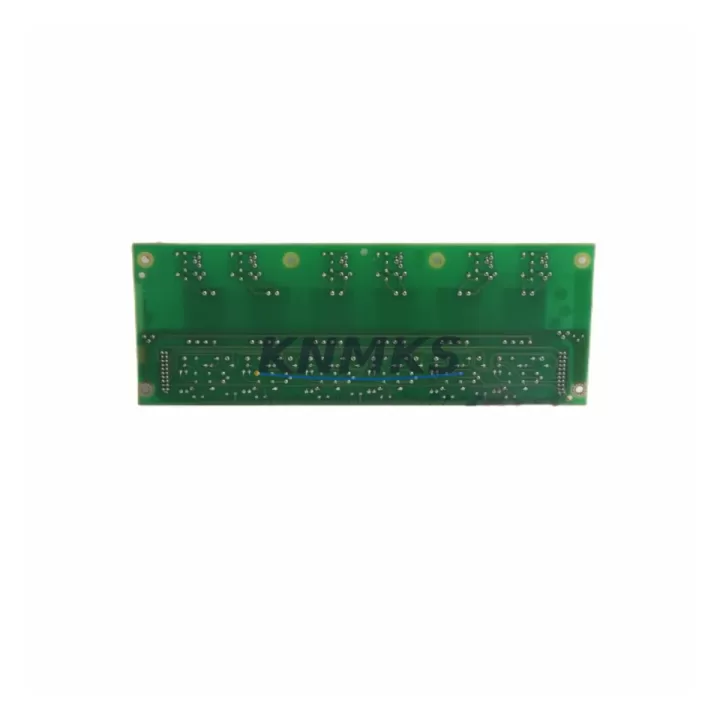
Overview
ABB ZINT-7B1C Migration-Ready Interface for Legacy Control Systems
The ABB ZINT-7B1C is a field-proven interface module engineered for seamless integration into aging AC500 control architectures. As industrial facilities face increasing pressure to extend the operational life of legacy automation platforms while maintaining safety and uptime, the ZINT-7B1C provides a validated, drop-in migration path that eliminates the need for full PLC replacement. Whether you are retrofitting a petrochemical control cabinet, upgrading a power generation SCADA loop, or restoring a discontinued spare parts chain in a water treatment facility, this module delivers the electrical and protocol compatibility required for confident system modernization.
The ZINT-7B1C interfaces directly with the AC500 backplane, maintaining the original rack geometry and terminal wiring layout. Engineers migrating from earlier ABB CS31 or S500 series controllers will find that the module preserves existing I/O addressing conventions, reducing the scope of program logic changes required during cutover. Before installation, technicians should verify the power supply capacity of the existing cabinet — the ZINT-7B1C draws from the 24 VDC bus and must be accounted for alongside co-installed modules such as the ABB TU515 or TU516 terminal units. Backplane slot assignment and module addressing must be confirmed against the existing PM573 or PM583 CPU configuration to avoid address conflicts during commissioning.
Terminal wiring compatibility is a critical checkpoint in any retrofit project. The ZINT-7B1C uses the standard AC500 spring-clamp terminal interface, which is mechanically compatible with existing field cable harnesses in most legacy installations. However, engineers should audit conductor cross-sections and shielding continuity before re-termination, particularly in high-noise environments such as variable frequency drive (VFD) panels or motor control centers. Signal isolation requirements should also be reviewed — in applications where the legacy system used external signal conditioners or isolators between field devices and the PLC rack, those components may need to be retained or replaced with equivalent DIN-rail mounted signal isolators to maintain measurement accuracy.
Communication protocol migration is another key consideration. The ZINT-7B1C supports the AC500 internal communication bus and is compatible with PROFIBUS DP and Modbus RTU configurations commonly found in legacy ABB installations. If the existing system relied on CS31 serial communication, a protocol gateway or communication coupler may be required to bridge the legacy bus to the modernized rack. HMI screen mapping should be reviewed in parallel — operator panels connected via CP600 or CP620 series HMIs will require tag re-mapping if the module address or data block structure changes during migration. Firmware version alignment between the ZINT-7B1C and the host CPU is mandatory; mismatched firmware revisions are a leading cause of initialization failures during first power-up after retrofit.
Physical installation space must be confirmed before ordering. The ZINT-7B1C occupies a single slot in the AC500 modular rack and is compatible with standard TA526 and TA527 rack assemblies. In compact control cabinets where rack space is constrained, engineers should audit available slots alongside other planned additions such as communication modules, I/O expansion cards, or redundancy modules. Thermal derating must also be considered if the cabinet operates in ambient temperatures above 40°C — consult the AC500 system manual for slot-level power dissipation limits.
All ZINT-7B1C units supplied by KNMKS are sourced from verified supply chains, individually inspected, and subjected to pre-shipment functional testing to confirm electrical integrity and communication handshake with AC500 host CPUs. Each unit ships with a support terms confirmed by quotation covering manufacturing defects and functional failures under normal operating conditions. In-stock inventory supports urgent spare parts requirements and planned maintenance windows, with global shipping available to support multi-site refurbishment programs.
Migration Compatibility Table
| Parameter | Detail |
|---|---|
| Compatible Platform | ABB AC500 Series (PM573, PM583, PM591, PM595) |
| Legacy Replacement Path | ABB CS31 / S500 Series Interface Modules |
| Backplane Interface | AC500 Internal Bus (single-slot, TA526/TA527 rack) |
| Terminal Compatibility | Spring-clamp, compatible with TU515 / TU516 terminal units |
| Communication Protocols | PROFIBUS DP, Modbus RTU, AC500 internal bus |
| Power Supply Requirement | 24 VDC from AC500 backplane bus |
| Installation Space | 1 slot, standard AC500 modular rack |
| Firmware Compatibility | Must match host CPU firmware revision — verify before installation |
| Commissioning Notes | Confirm module address, I/O mapping, and HMI tag re-mapping |
| Pre-Shipment Testing | Functional test and communication handshake verified |
| Support terms | 12 months from date of shipment |
| Origin | China (CN) |
Retrofit Planning for Existing Automation Systems
A successful ZINT-7B1C retrofit begins with a structured pre-engineering review. Start by documenting the existing rack configuration — record every occupied slot in the TA526 or TA527 rack, noting module types, addresses, and field wiring assignments. The PM573 or PM583 CPU project file should be exported and archived before any hardware changes are made, preserving the original program logic as a rollback baseline.
Power budget analysis is the next critical step. Sum the current draw of all installed modules — including any co-located DI531, DO531, or AI531 I/O modules — and confirm that the existing PS501 or PS560 power supply can accommodate the ZINT-7B1C without exceeding its rated output. If the power budget is marginal, a supplementary 24 VDC rail or a higher-capacity power supply module should be planned as part of the retrofit scope.
For systems that include PROFIBUS DP networks, the ZINT-7B1C must be assigned a unique station address before installation. Address conflicts with existing DP slaves — such as remote I/O stations, drives, or valve positioners — will prevent the network from initializing correctly. A PROFIBUS network scan using a diagnostic tool or programming cable (such as the ABB TK501 USB programming cable) should be performed to map all active station addresses before the cutover window begins.
HMI integration requires careful attention. Operator panels connected via the CP600 or CP620 series will need their tag databases reviewed and updated to reflect any changes in data block addresses introduced by the new module. Where possible, preserve the original data block structure in the CPU program to minimize HMI rework. Signal isolators installed between field transmitters and the legacy rack should be retained and re-wired to the new terminal unit to maintain loop integrity and prevent ground loop interference.
Finally, confirm that the installation space within the control cabinet allows for proper cable management and airflow around the new module. In dense cabinets, the addition of a new module may require re-routing of existing cable bundles or the installation of additional cable duct to maintain IEC 61439 panel wiring standards.
Downtime Control During System Migration
Minimizing unplanned downtime during a ZINT-7B1C retrofit requires a disciplined cutover methodology. Begin by scheduling the migration during a planned maintenance window — ideally during a production shutdown or low-demand period — and communicate the expected outage duration to operations and safety teams in advance.
Before powering down the existing system, capture a full snapshot of the running CPU program using the ABB Automation Builder or PS501 Control Builder software. Export all program blocks, data blocks, and hardware configuration files to a secure backup location. This snapshot serves as the recovery baseline if the retrofit encounters unexpected compatibility issues during commissioning.
During the physical swap, work methodically through the terminal wiring — label every conductor before disconnection and photograph the original wiring layout for reference. Re-terminate field cables to the new TU515 or TU516 terminal unit following the original wiring diagram, and verify continuity on each channel before powering up the rack. Once the ZINT-7B1C is seated and the rack is powered, use the programming cable to perform a live diagnostic — confirm that the module is recognized by the CPU, that all configured I/O channels report expected values, and that the PROFIBUS or Modbus network has re-established communication with all downstream devices.
Keep the original module on-site and unmodified until the new installation has completed a full production cycle without alarms or communication faults. This provides a rapid fallback option if a latent compatibility issue emerges during the first hours of operation. Document the completed retrofit in the plant maintenance management system, including firmware versions, module serial numbers, and any program changes made during commissioning.
Retrofit Support FAQ
Q: Is the ZINT-7B1C a direct replacement for legacy ABB CS31 interface modules?
A: The ZINT-7B1C is designed for the AC500 platform and is not a pin-compatible drop-in for CS31 hardware. However, it provides a validated migration path for facilities transitioning from CS31 or S500 architectures to the AC500 platform. A protocol gateway may be required to bridge legacy CS31 bus segments during the transition period.
Q: What commissioning steps are required after installation?
A: After seating the module in the rack, verify the module address in the CPU hardware configuration, confirm firmware version compatibility, perform an I/O channel check against the field wiring schedule, and re-establish communication with all PROFIBUS DP or Modbus RTU devices on the network. HMI tag mapping should be validated before returning the system to automatic control.
Q: Has the unit been tested before shipment?
A: Yes. Every ZINT-7B1C unit supplied by KNMKS undergoes pre-shipment functional testing, including power-up verification, communication handshake with an AC500 host CPU, and electrical integrity checks. A test report is available upon request.
Q: What support terms coverage is provided?
A: All units carry a support terms confirmed by quotation from the date of shipment, covering manufacturing defects and functional failures under normal operating conditions. In-stock inventory is maintained to support urgent spare parts requirements and planned retrofit programs. Contact our team for lead time and availability confirmation.
© 2026 KNMKS. All rights reserved.
Original Source: https://knmks.com
Contact: admin@knmks.com | +86 18359268345
Product Identification
- Brand / Ecosystem
-
ABB
ABB - Model / Series
-
ZINT-7B1C
AC500 Series - Product Family
- PLCs & Controllers
- Availability Status
- Available on request after model and quantity confirmation
- Inquiry Type
- B2B RFQ, replacement inquiry and project spare-part request
- Pre-Quote Check
- Exact SKU, brand, series, quantity, nameplate photos and destination country are checked before quotation
System Path
Where this product fits in the KNMKS automation structure.
Specification & Inquiry Focus
- Control platform
- PLC, PAC and modular controllers
- Common needs
- CPU, rack, power and I/O expansion
- Project support
- Replacement, cabinet build and maintenance
Buyer Confirmation
Information KNMKS checks before replying.
- Exact model
- ZINT-7B1C
- Brand / ecosystem
- ABB
- Product family
- PLCs & Controllers
- Application note
- Replacement, maintenance, project build or spare-part list
- Useful photos
- Nameplate, installed unit, cabinet layout or connector side
- Delivery details
- Quantity, destination country and target schedule
Document Support
Files and notes can be confirmed during quotation.
- Product photos or nameplate confirmation when available
- Packing and delivery notes before quotation confirmation
- Support scope and delivery terms confirmed per inquiry
- Export document coordination for qualified B2B requests
Inquiry Support
- Model cross-checking before quotation
- CPU, power, rack and expansion module matching
- Support for replacement and project inquiry
What to Send Us
- Brand and exact model number: ABB ZINT-7B1C
- Quantity and required delivery time
- Application, replacement requirement or nameplate photo
- Destination country and shipping preference
RFQ Preparation
This is a product inquiry page built for RFQ communication.
Fast Model Check
Send this model to KNMKS for confirmation.
Include quantity, destination country and photos if this is a maintenance replacement. The inquiry will be saved with a reference number after submission.
Brand & Compatibility Note
KNMKS displays automation product information for well-known industrial brand ecosystems and compatible replacement references. Brand names are used for product identification and compatibility reference only; final availability and commercial terms are confirmed per quotation.
 Manufacturing
 Machine Tools
 Packaging
 Energy & Power



 HMI & Displays
 Servo Systems
 Variable Frequency Drives
 Sensors