
Overview
ABB 00045851/E Maintenance-Proven Spare Part for Factory Uptime
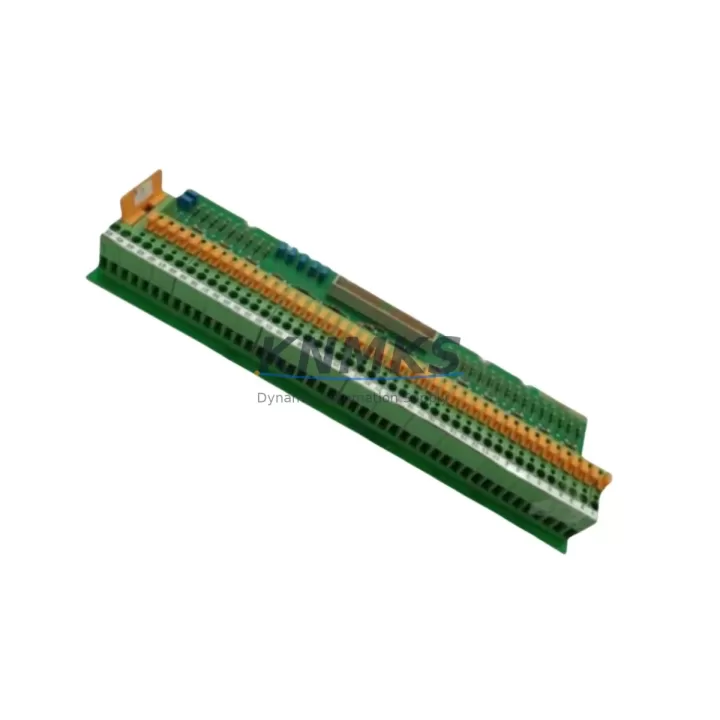
The ABB 00045851/E is an original bus termination module designed for the ABB AC500 programmable logic controller series — one of the most widely deployed PLC platforms in process automation, machine control, and utility infrastructure worldwide. As a bus termination component, the 00045851/E provides the electrical endpoint for the internal communication bus of the AC500 backplane, ensuring signal integrity across all connected I/O modules, CPU units, and communication interfaces. Without a correctly installed and functioning bus termination module, the entire AC500 rack is susceptible to communication errors, spurious faults, and unplanned shutdowns that can cascade into costly production downtime.
For maintenance engineers managing aging AC500 installations, the 00045851/E is a critical line-replaceable unit (LRU). Its compact form factor, tool-free installation, and direct back-to-back compatibility with the AC500 backplane make it an ideal candidate for both emergency replacement and planned preventive maintenance stock. KNMKS supplies the ABB 00045851/E as a tested, original-specification spare with a support terms confirmed by quotation, dispatched after pre-shipment electrical verification to confirm bus impedance, connector integrity, and mechanical fit.
Spare Maintenance Table
| Parameter | Specification |
|---|---|
| Part Number | 00045851/E |
| Brand | ABB |
| Series | AC500 |
| Product Type | Bus Termination Module |
| Function | Internal backplane bus termination for AC500 PLC racks |
| Compatibility | ABB AC500 series backplanes and expansion racks |
| Installation | Tool-free, direct plug-in to AC500 backplane bus connector |
| Origin | Germany (DE) |
| Operating Temperature | -25°C to +70°C (typical AC500 environmental rating) |
| Mounting | DIN rail via AC500 backplane assembly |
| Application Environment | Industrial control panels, process automation, utility SCADA, machine control |
| Maintenance Recommendation | Inspect during annual cabinet overhaul; replace if bus communication errors are logged |
| Pre-Shipment Test | Electrical verification of bus impedance and connector integrity |
| Support terms | 12 months from date of shipment |
| Supply Condition | Original ABB specification, long-term stock available |
Maintenance Planning for Continuous Operation
When a bus termination fault is identified in an AC500 rack, experienced maintenance engineers know that the root cause is rarely isolated to the termination module alone. A systematic inspection of the surrounding control cabinet components is essential to prevent repeat failures and ensure a durable recovery.
Begin with the AC500 CPU module (such as the PM573 or PM591 series) — verify that the CPU is reading all configured I/O addresses correctly after the termination module is replaced. A corrupted I/O map can persist even after the physical fault is cleared. Next, inspect the AC500 I/O expansion modules seated on the same backplane: modules such as the DC532 digital input/output or AI523 analog input cards should be reseated and their status LEDs confirmed green before returning the rack to service.
The AC500 power supply module (PS501 or PS502 series) feeding the backplane should be load-tested to confirm it is delivering stable 24 VDC within tolerance. Voltage sag on the backplane rail is a common secondary cause of bus communication instability that is often misdiagnosed as a termination fault. Check the 24 VDC field power distribution terminals and associated fuse blocks in the same cabinet section — blown or degraded fuses on the field power rail can introduce ground loops that stress the bus termination circuit.
If the AC500 rack communicates with upstream SCADA or DCS systems via Modbus TCP, PROFIBUS DP, or CS31 fieldbus, verify that the communication module (such as the CM572-DP PROFIBUS master or CM589-PNIO PROFINET interface) is re-establishing its network connection cleanly after the replacement. Communication modules that have been running through a bus fault event sometimes require a cold restart to flush error buffers. Additionally, inspect the CS31 bus cable termination resistors at both ends of any CS31 field bus segment connected to the rack — these passive components degrade over time and are frequently overlooked during corrective maintenance.
For cabinets with signal isolators or loop-powered transmitter barriers on the analog I/O channels, confirm that the isolator output signals are within calibrated range after the rack is restored. Bus faults can occasionally cause transient overvoltage events on analog input channels that shift isolator zero points. Finally, review the UPS or battery backup unit supplying the control cabinet — a weakened UPS that allowed a momentary power dip may have been the initiating event that caused the bus termination module to fail in the first place.
Site Replacement Workflow
Replacing the ABB 00045851/E on a live AC500 installation follows a structured sequence designed to minimize downtime and eliminate re-work risk:
Step 1 — Isolate and document: Place the affected AC500 rack in STOP mode via the CPU keyswitch or programming tool (Automation Builder). Export the current project backup and record all I/O module addresses and communication parameters before touching any hardware.
Step 2 — De-energize the backplane: Switch off the AC500 power supply module feeding the affected rack. Confirm zero voltage on the backplane bus rail with a calibrated multimeter before proceeding.
Step 3 — Remove the faulty termination module: The 00045851/E is a plug-in component. Grip the module body firmly and pull straight out from the backplane bus connector. Inspect the connector pins on both the module and the backplane for corrosion, bent contacts, or debris.
Step 4 — Install the replacement 00045851/E: Align the new module with the backplane bus connector and press firmly until fully seated. No tools are required. Confirm the module is flush with the backplane face and the locking tab (if present) is engaged.
Step 5 — Re-energize and verify: Restore power to the AC500 power supply. Observe the CPU status LED sequence — a clean boot with no BUS ERR or I/O FAULT indicators confirms successful replacement. Use Automation Builder to perform an online comparison of the running project against the saved backup to verify configuration integrity.
Step 6 — Return to service: Switch the CPU to RUN mode. Monitor the first 15 minutes of operation for any recurring bus error events in the diagnostic log. Document the replacement in the site maintenance record with the new module serial number and date.
This workflow is compatible with all AC500 backplane variants and does not require firmware updates or re-parameterization of the replacement 00045851/E module.
Spare Parts Support FAQ
Q1: Is the ABB 00045851/E still available as a new original spare, or is it discontinued?
The 00045851/E remains available through KNMKS as an original ABB spare from long-term industrial stock. We maintain buffer inventory specifically for AC500 series components to support customers whose systems are no longer covered by ABB’s active production schedule. All units are supplied with a support terms confirmed by quotation and pre-shipment electrical verification.
Q2: How do I confirm compatibility with my specific AC500 backplane revision?
The 00045851/E is designed for the AC500 backplane bus connector and is compatible across the standard AC500 rack family. To confirm fit for your specific installation, provide your backplane part number or cabinet nameplate data when placing your inquiry. KNMKS technical staff will cross-reference your configuration before shipment to eliminate compatibility risk.
Q3: What testing is performed before the 00045851/E is shipped?
Each unit undergoes pre-shipment inspection covering bus connector pin integrity, mechanical fit verification, and electrical impedance check. Units that do not meet original ABB specification tolerances are quarantined and not dispatched. A test report is available on request for critical applications.
Q4: Can KNMKS support long-term blanket stock agreements for the 00045851/E?
Yes. For customers managing multiple AC500 installations or operating under planned maintenance schedules, KNMKS offers blanket stock arrangements that reserve allocated units against future call-off orders. This eliminates lead-time risk for a component that is critical to backplane bus integrity. Contact our team at admin@knmks.com to discuss volume and delivery terms.
© 2026 KNMKS. All rights reserved.
Original Source: https://knmks.com
Contact: admin@knmks.com | +86 18359268345
Product Identification
- Brand / Ecosystem
-
ABB
ABB - Model / Series
-
00045851/E
AC500 Series - Product Family
- PLCs & Controllers
- Availability Status
- Available on request after model and quantity confirmation
- Inquiry Type
- B2B RFQ, replacement inquiry and project spare-part request
- Pre-Quote Check
- Exact SKU, brand, series, quantity, nameplate photos and destination country are checked before quotation
System Path
Where this product fits in the KNMKS automation structure.
Specification & Inquiry Focus
- Control platform
- PLC, PAC and modular controllers
- Common needs
- CPU, rack, power and I/O expansion
- Project support
- Replacement, cabinet build and maintenance
Buyer Confirmation
Information KNMKS checks before replying.
- Exact model
- 00045851/E
- Brand / ecosystem
- ABB
- Product family
- PLCs & Controllers
- Application note
- Replacement, maintenance, project build or spare-part list
- Useful photos
- Nameplate, installed unit, cabinet layout or connector side
- Delivery details
- Quantity, destination country and target schedule
Document Support
Files and notes can be confirmed during quotation.
- Product photos or nameplate confirmation when available
- Packing and delivery notes before quotation confirmation
- Support scope and delivery terms confirmed per inquiry
- Export document coordination for qualified B2B requests
Inquiry Support
- Model cross-checking before quotation
- CPU, power, rack and expansion module matching
- Support for replacement and project inquiry
What to Send Us
- Brand and exact model number: ABB 00045851/E
- Quantity and required delivery time
- Application, replacement requirement or nameplate photo
- Destination country and shipping preference
RFQ Preparation
This is a product inquiry page built for RFQ communication.
Fast Model Check
Send this model to KNMKS for confirmation.
Include quantity, destination country and photos if this is a maintenance replacement. The inquiry will be saved with a reference number after submission.
Brand & Compatibility Note
KNMKS displays automation product information for well-known industrial brand ecosystems and compatible replacement references. Brand names are used for product identification and compatibility reference only; final availability and commercial terms are confirmed per quotation.
 Manufacturing
 Machine Tools
 Packaging
 Energy & Power


 HMI & Displays
 Servo Systems
 Variable Frequency Drives
 Sensors