
Overview
ABB 07BT62R1 Maintenance-Proven Spare Part for Factory Uptime
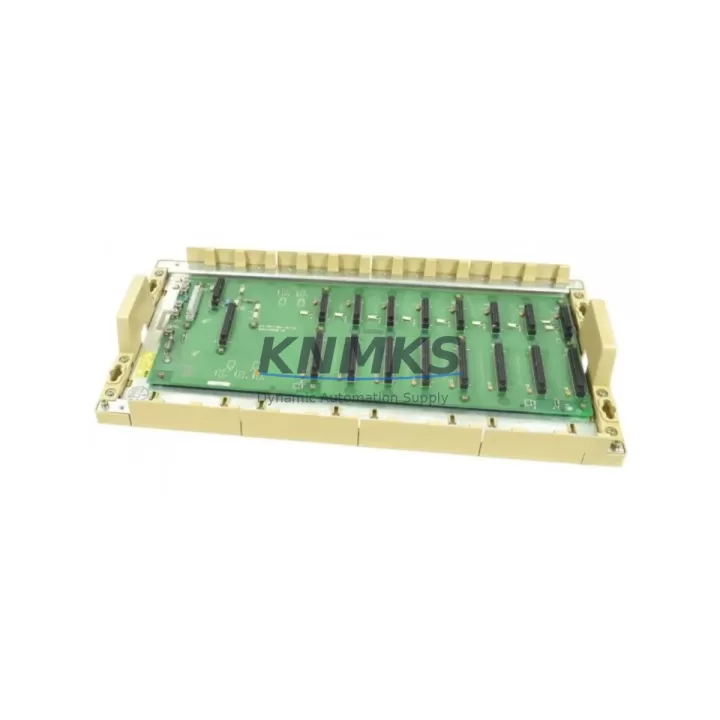
The ABB 07BT62R1 is an 8-slot backplane rack designed for the ABB AC500 PLC platform — one of the most widely deployed modular programmable logic controller systems in process automation, machine control, and utility infrastructure. As a structural backbone of the AC500 control cabinet, the 07BT62R1 hosts CPU modules, I/O modules, communication modules, and power supply units within a single integrated rack assembly. When this component fails or degrades, the entire control node goes offline. Maintaining a verified spare in your parts inventory is not optional — it is a fundamental requirement of any serious industrial maintenance programme.
At KNMKS, every 07BT62R1 unit is sourced from authorised supply channels, inspected against ABB’s original mechanical and electrical specifications, and dispatched with a support terms confirmed by quotation. Whether you are responding to an unplanned shutdown, executing a scheduled annual overhaul, or building a strategic spare parts buffer for a multi-line facility, the 07BT62R1 is available for immediate shipment.
Spare Maintenance Table
| Parameter | Specification |
|---|---|
| Part Number | 07BT62R1 |
| Brand | ABB |
| Series | AC500 |
| Product Type | PLC Backplane Rack |
| Slot Count | 8 slots |
| Compatible CPU Modules | PM571, PM581, PM591, PM595 and AC500 series CPUs |
| Compatible I/O Modules | AC500 DI, DO, AI, AO, and mixed I/O modules |
| Backplane Bus | AC500 internal K-Bus / S-Bus |
| Mounting | DIN rail or panel mount |
| Operating Temperature | -25°C to +70°C |
| Protection Rating | IP20 (cabinet installation) |
| Country of Origin | Germany |
| Weight | Approx. 2,400 g |
| Support terms | 12 Months |
| Condition | Original, New or Tested Surplus |
| Dispatch | In-stock items ship within 1–3 business days |
Maintenance Planning for Continuous Operation
The 07BT62R1 backplane rack sits at the centre of the AC500 control node. When planning a replacement or conducting a cabinet inspection, maintenance engineers should treat the backplane as part of a broader system health check rather than an isolated component swap. A degraded or failed backplane often presents alongside related symptoms in adjacent modules — and addressing only the rack without inspecting the surrounding hardware risks repeat failures and extended downtime.
Begin with the AC500 CPU module (such as the PM581 or PM591) seated in slot 1. Verify firmware version compatibility with the replacement backplane and confirm that the CPU’s internal diagnostics show no persistent fault codes after re-seating. Next, inspect the AC500 power supply module (PS501 or PS502 series) for output voltage stability — a marginal power supply can cause intermittent backplane communication errors that are frequently misdiagnosed as rack failures. Use a calibrated multimeter to verify 24 VDC rail integrity before and after module installation.
Check all AC500 digital and analogue I/O modules installed in the rack. Connector pins on I/O modules can oxidise or sustain mechanical stress during rack removal, particularly in high-vibration environments. Inspect each module’s field wiring terminal block and confirm that signal cables are correctly re-terminated after the backplane swap. For systems using AC500 communication modules — such as CM572-DP for PROFIBUS or CM589-PNIO for PROFINET — verify that network addresses, baud rates, and device configurations are retained in the CPU’s non-volatile memory and that the communication module re-establishes its network connection within the expected timeout window.
In cabinets where signal isolators or loop-powered transmitters feed analogue inputs, confirm that the isolator output ranges remain within the module’s configured input span after the rack replacement. Also inspect miniature circuit breakers and fuse holders on the 24 VDC distribution rail — a backplane replacement is an ideal opportunity to replace any fuses that are approaching their rated service life. Finally, if the control cabinet includes an HMI panel communicating with the AC500 CPU via Modbus TCP or OPC UA, verify that the HMI re-establishes its data connection and that all tag mappings are functioning correctly after the system is powered back on.
Site Replacement Workflow
Before removing the 07BT62R1 from service, perform a full programme backup from the AC500 CPU using ABB Automation Builder or the legacy PS501 Control Builder software. Save the project file, symbol table, and retain data to a secure location. Power down the cabinet following your site’s lockout/tagout procedure and allow capacitors in the power supply module to discharge fully before handling the backplane.
Remove each module from the rack in sequence, labelling slot positions clearly. Disconnect all field wiring terminal blocks from I/O modules before lifting the rack from the DIN rail. Install the replacement 07BT62R1, re-seat all modules in their original slot positions, and reconnect field wiring. Power up the system and allow the CPU to complete its boot sequence. Confirm that all I/O modules are recognised, communication modules have re-established network links, and the HMI is displaying live process data. Run a functional test of all critical I/O points before returning the line to production.
The 07BT62R1 is a direct form-fit-function replacement for earlier AC500 backplane variants. No hardware modification or firmware update is required in most standard AC500 configurations, making it one of the lowest-risk backplane replacements available for this platform. This compatibility profile significantly reduces mean time to repair (MTTR) and supports the extended service life of legacy AC500 installations where full system upgrades are not yet planned.
Spare Parts Support FAQ
Q1: Is the 07BT62R1 compatible with all AC500 CPU and I/O modules?
The 07BT62R1 is designed for the ABB AC500 modular PLC platform and is compatible with the full range of AC500 CPU modules (PM571 through PM595) and standard AC500 I/O and communication modules. For specialised or legacy variants, please contact our technical team with your full system configuration for compatibility confirmation before ordering.
Q2: What support terms and testing does KNMKS provide with this spare part?
Every 07BT62R1 supplied by KNMKS carries a support terms confirmed by quotation covering manufacturing defects and functional failures under normal operating conditions. Units are inspected and functionally tested prior to dispatch. A test report is available upon request for critical infrastructure applications.
Q3: How quickly can the 07BT62R1 be shipped for emergency maintenance situations?
In-stock units are dispatched within 1–3 business days from our warehouse. For urgent breakdown recovery requirements, please contact our sales team directly at admin@knmks.com or +86 18359268345 to confirm real-time stock availability and expedited shipping options.
Q4: Can KNMKS support long-term supply agreements for AC500 spare parts?
Yes. KNMKS supports blanket purchase orders and long-term supply agreements for the 07BT62R1 and related AC500 components. This is particularly suited to facilities managing multiple AC500 nodes or operating under a planned maintenance schedule that requires guaranteed spare availability across multi-year maintenance cycles.
© 2026 KNMKS. All rights reserved.
Original Source: https://knmks.com
Contact: admin@knmks.com | +86 18359268345
Product Identification
- Brand / Ecosystem
-
ABB
ABB - Model / Series
-
07BT62R1
AC500 Series - Product Family
- PLCs & Controllers
- Availability Status
- Available on request after model and quantity confirmation
- Inquiry Type
- B2B RFQ, replacement inquiry and project spare-part request
- Pre-Quote Check
- Exact SKU, brand, series, quantity, nameplate photos and destination country are checked before quotation
System Path
Where this product fits in the KNMKS automation structure.
Specification & Inquiry Focus
- Control platform
- PLC, PAC and modular controllers
- Common needs
- CPU, rack, power and I/O expansion
- Project support
- Replacement, cabinet build and maintenance
Buyer Confirmation
Information KNMKS checks before replying.
- Exact model
- 07BT62R1
- Brand / ecosystem
- ABB
- Product family
- PLCs & Controllers
- Application note
- Replacement, maintenance, project build or spare-part list
- Useful photos
- Nameplate, installed unit, cabinet layout or connector side
- Delivery details
- Quantity, destination country and target schedule
Document Support
Files and notes can be confirmed during quotation.
- Product photos or nameplate confirmation when available
- Packing and delivery notes before quotation confirmation
- Support scope and delivery terms confirmed per inquiry
- Export document coordination for qualified B2B requests
Inquiry Support
- Model cross-checking before quotation
- CPU, power, rack and expansion module matching
- Support for replacement and project inquiry
What to Send Us
- Brand and exact model number: ABB 07BT62R1
- Quantity and required delivery time
- Application, replacement requirement or nameplate photo
- Destination country and shipping preference
RFQ Preparation
This is a product inquiry page built for RFQ communication.
Fast Model Check
Send this model to KNMKS for confirmation.
Include quantity, destination country and photos if this is a maintenance replacement. The inquiry will be saved with a reference number after submission.
Brand & Compatibility Note
KNMKS displays automation product information for well-known industrial brand ecosystems and compatible replacement references. Brand names are used for product identification and compatibility reference only; final availability and commercial terms are confirmed per quotation.
 Manufacturing
 Machine Tools
 Packaging
 Energy & Power



 HMI & Displays
 Servo Systems
 Variable Frequency Drives
 Sensors