
Overview
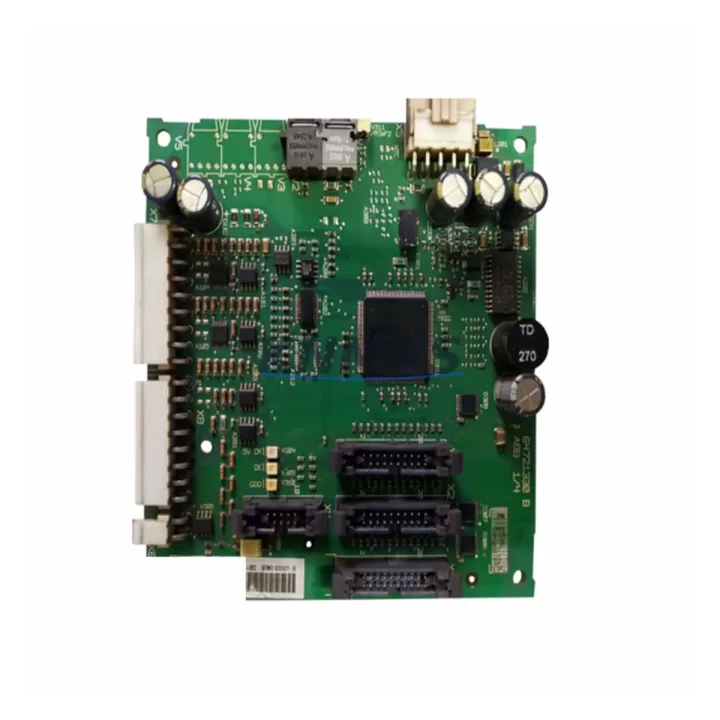
ABB ZINP-571 Migration-Ready Interface Board for Legacy ACS Systems
The ABB ZINP-571 is a main circuit interface board engineered for direct integration into ABB ACS800 and ACS600 series variable frequency drives. As legacy drive platforms approach end-of-life and original spare parts become increasingly scarce, the ZINP-571 serves as a validated, migration-ready replacement that allows maintenance teams to restore full drive functionality without committing to a full drive replacement. This board is particularly critical in petrochemical, power generation, water treatment, and port automation environments where unplanned downtime carries significant operational and safety consequences.
The ZINP-571 interfaces directly with the ACS800 main circuit section, managing gate signal distribution, DC bus feedback, and fault detection logic. Its role in the drive’s power conversion chain makes it one of the most failure-prone components in aging ACS800 installations — and one of the most difficult to source through standard distribution channels once the product reaches end-of-life. KNMKS maintains verified stock of the ZINP-571 with pre-shipment functional testing on every unit, ensuring that the board you receive is ready for immediate installation.
Migration Compatibility Table
| Parameter | Details |
|---|---|
| Compatible Drive Series | ABB ACS800, ACS600 |
| Board Function | Main circuit interface — gate drive signal routing, DC bus monitoring, fault relay |
| Mounting Interface | Direct backplane connector; verify frame size and slot position against original drive documentation |
| Connector Type | Multi-pin ribbon and discrete terminal; confirm against existing ZINP-5xx wiring harness |
| Firmware Dependency | Compatible with standard ACS800 firmware; no firmware reflash required in most configurations |
| Communication Compatibility | Supports DDCS fiber-optic communication link to RDCO-0x adapter boards |
| Installation Space | Standard ACS800 drive cabinet slot; confirm frame size (R2–R8) before ordering |
| Replacement Recommendation | Direct drop-in for failed or degraded ZINP-571; inspect gate resistors and DC bus capacitors during replacement |
| Commissioning Focus | Verify DC bus voltage calibration, gate signal timing, and fault relay output after installation |
| Support terms | support terms confirmed by quotation — all units pre-shipment tested |
Retrofit Planning for Existing Automation Systems
A successful ZINP-571 retrofit begins well before the board arrives on site. Maintenance engineers should pull the existing ACS800 drive documentation and confirm the frame size — R2 through R8 configurations use different internal layouts, and the ZINP-571 must be matched to the correct slot position and backplane connector orientation. In multi-drive installations common in pump stations and compressor trains, it is advisable to audit all ACS800 units simultaneously, as drives of the same vintage often share failure modes.
During the retrofit, teams frequently discover that adjacent components also require attention. The RINT-5611C or RINT-5514C rectifier interface board, which sits upstream of the ZINP-571 in the power conversion chain, should be inspected for thermal stress and capacitor aging. Similarly, the APOW-01 auxiliary power supply board and the RMIO-11C or RMIO-02C main control boards are common co-failure items in ACS800 drives that have been operating in high-ambient or high-cycle environments. If the drive uses a RDCO-02 or RDCO-04 DDCS communication adapter for fieldbus connectivity — common in DCS-integrated applications — verify that the fiber-optic link integrity is maintained after the ZINP-571 swap, as board replacement can disturb the optical connector seating.
For sites running ABB DriveWindow or DriveWindow Light for parameter backup and commissioning, ensure that a full parameter upload is completed before the board is removed. This protects the motor control tuning, speed reference scaling, and fault history that would otherwise be lost. In installations where the ACS800 is paired with an ABB AC500 or AC31 series PLC for process control, confirm that the drive’s fieldbus node address and communication timeout settings are documented before shutdown — these parameters must be re-entered after the board replacement if the RMIO board is also replaced.
Where the retrofit involves a transition from an older ACS600 platform to ACS800 hardware, the ZINP-571 may be part of a broader upgrade that includes new I/O terminal blocks, updated cable glands, and revised earthing arrangements to meet current EMC standards. In these cases, the NIOC-01 I/O extension board and the NINT-41 or NINT-72 fieldbus adapter should be evaluated as part of the same project scope to avoid a second outage window.
Downtime Control During System Migration
Minimizing downtime during a ZINP-571 replacement requires a structured pre-outage preparation protocol. Before the scheduled maintenance window, the engineering team should complete a full parameter backup using DriveWindow, document all terminal wiring with photographs or a wiring schedule, and confirm that a tested spare ZINP-571 is on hand — not in transit. KNMKS ships pre-tested units with same-day dispatch on confirmed stock, which supports just-in-time spare parts strategies for planned outages.
During the outage, the recommended sequence is: isolate the drive from the AC supply and allow the DC bus to discharge fully (verify with a calibrated voltmeter before touching internal components), remove the faulty ZINP-571 by releasing the backplane connector and any retaining hardware, install the replacement board, and reconnect all signal and power connectors in reverse order. After power-up, perform a DC bus voltage check, verify gate signal output with the drive in a no-load test state, and confirm that all fault codes are cleared before returning the drive to process control.
For critical applications where even a brief interruption is unacceptable, consider maintaining a hot-standby ACS800 drive pre-configured with a verified ZINP-571 installed. This approach, common in water treatment and chemical dosing applications, allows the standby drive to be switched in within minutes while the primary unit is repaired offline. KNMKS can supply matched pairs of ZINP-571 boards for redundant drive configurations on request.
Retrofit Support FAQ
Q: Is the ZINP-571 a direct replacement for all ACS800 frame sizes?
A: The ZINP-571 is compatible with specific ACS800 frame sizes. Confirm your drive’s frame size (R2–R8) and internal layout against the ABB ACS800 hardware manual before ordering. KNMKS technical support can assist with cross-referencing your drive serial number to the correct board variant.
Q: What pre-shipment testing is performed on each ZINP-571 unit?
A: Every ZINP-571 shipped by KNMKS undergoes functional verification including gate signal output check, connector integrity inspection, and visual inspection for component damage or thermal stress. Units that do not pass testing are not shipped. A support terms confirmed by quotation is provided on all units from the date of shipment.
Q: Do I need to reconfigure the ACS800 drive parameters after replacing the ZINP-571?
A: In most cases, replacing only the ZINP-571 does not require a full parameter re-entry, as drive parameters are stored on the RMIO control board. However, if the RMIO board is replaced simultaneously, a full parameter restore from backup is required. Always complete a parameter backup before any board replacement.
Q: Can KNMKS supply the ZINP-571 for urgent breakdown situations?
A: Yes. KNMKS maintains warehouse stock of the ZINP-571 and offers same-day dispatch for confirmed orders received before the daily cut-off. Express international shipping is available to most industrial regions. Contact admin@knmks.com or call +86 18359268345 for urgent requirements.
© 2026 KNMKS. All rights reserved.
Original Source: https://knmks.com
Contact: admin@knmks.com | +86 18359268345
Product Identification
- Brand / Ecosystem
-
ABB
ABB - Model / Series
-
ZINP-571
S800 Series - Product Family
- Variable Frequency Drives
- Availability Status
- Available on request after model and quantity confirmation
- Inquiry Type
- B2B RFQ, replacement inquiry and project spare-part request
- Pre-Quote Check
- Exact SKU, brand, series, quantity, nameplate photos and destination country are checked before quotation
System Path
Where this product fits in the KNMKS automation structure.
Specification & Inquiry Focus
- Drive range
- AC drives, VFDs and accessories
- Common needs
- Voltage, kW/HP and load type
- Project support
- Motor control, energy saving and spares
Buyer Confirmation
Information KNMKS checks before replying.
- Exact model
- ZINP-571
- Brand / ecosystem
- ABB
- Product family
- Variable Frequency Drives
- Application note
- Replacement, maintenance, project build or spare-part list
- Useful photos
- Nameplate, installed unit, cabinet layout or connector side
- Delivery details
- Quantity, destination country and target schedule
Document Support
Files and notes can be confirmed during quotation.
- Product photos or nameplate confirmation when available
- Packing and delivery notes before quotation confirmation
- Support scope and delivery terms confirmed per inquiry
- Export document coordination for qualified B2B requests
Inquiry Support
- Input/output voltage and kW/HP confirmation
- Energy-saving motor control inquiry
- Accessory and spare-unit support
What to Send Us
- Brand and exact model number: ABB ZINP-571
- Quantity and required delivery time
- Application, replacement requirement or nameplate photo
- Destination country and shipping preference
RFQ Preparation
This is a product inquiry page built for RFQ communication.
Fast Model Check
Send this model to KNMKS for confirmation.
Include quantity, destination country and photos if this is a maintenance replacement. The inquiry will be saved with a reference number after submission.
Brand & Compatibility Note
KNMKS displays automation product information for well-known industrial brand ecosystems and compatible replacement references. Brand names are used for product identification and compatibility reference only; final availability and commercial terms are confirmed per quotation.
 Manufacturing
 Machine Tools
 Packaging
 Energy & Power
 PLCs & Controllers
 HMI & Displays
 Servo Systems
 Sensors