
Overview
ABB 0YPP110A Maintenance-Proven Spare Part for Factory Uptime
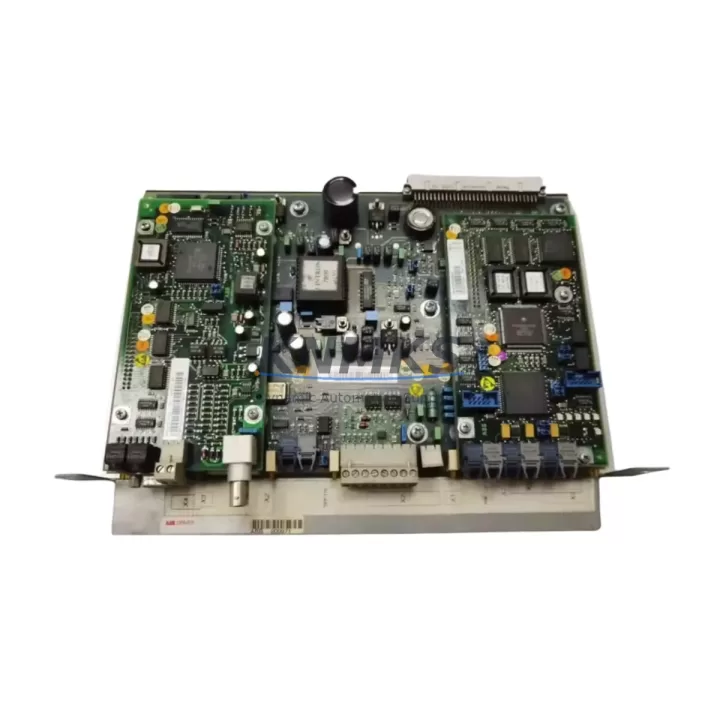
The ABB 0YPP110A (also referenced as 3ASD573001A1 and YPK112A / 3ASD573001A13) is the RMIO (Relay, Motor, I/O) control board at the heart of the ABB ACS800 series variable-speed drive. As the primary interface between the drive’s power stage and the control system, this board manages motor control logic, digital and analog I/O, fieldbus communication, and relay outputs. When this board fails or degrades, the entire drive becomes inoperable — making a verified, pre-tested replacement unit an essential item in any industrial spare parts inventory for facilities running ACS800 drives in continuous-process, conveyor, pump, fan, or compressor applications.
Our 0YPP110A units are sourced as original ABB components, individually inspected, and subjected to pre-shipment functional testing before dispatch. Each unit ships with a support terms confirmed by quotation and is supported by rapid global logistics to minimize your downtime window.
Spare Maintenance Table
| Part Number | 0YPP110A / 3ASD573001A1 / YPK112A / 3ASD573001A13 |
| Brand | ABB |
| Compatible Drive Series | ABB ACS800 (all frame sizes using RMIO board) |
| Board Function | RMIO — Relay, Motor control, I/O interface board |
| I/O Capacity | 6 DI, 3 DO (relay), 2 AI, 2 AO (standard RMIO configuration) |
| Fieldbus Support | Compatible with RDCO, RPBA, RETA, RCAN fieldbus adapter modules |
| Supply Voltage | 24 VDC (internal from drive SMPS) |
| Operating Temperature | -10°C to +50°C (drive cabinet ambient) |
| Mounting | Direct backplane mount within ACS800 control section |
| Application Environment | Industrial: pumps, fans, compressors, conveyors, process lines |
| Condition | Original ABB spare — pre-shipment tested |
| Support terms | 12 Months |
| Dispatch | Global express shipping available |
Maintenance Planning for Continuous Operation
A failed 0YPP110A RMIO board rarely occurs in isolation. During any ACS800 drive fault investigation or planned board replacement, maintenance engineers should conduct a systematic inspection of the surrounding electrical circuit to prevent repeat failures and ensure full drive restoration.
Begin with the SMPS (Switch-Mode Power Supply) board within the ACS800 — this unit supplies the 24 VDC rail that powers the RMIO board directly. A degraded SMPS can cause intermittent RMIO faults, corrupted parameter memory, or communication dropouts that mimic a board failure. Inspect and test the SMPS output voltage before installing a replacement RMIO.
Next, verify the RDCO (Drive-to-Drive Communication) module or any installed fieldbus adapter (RPBA-01 for PROFIBUS, RETA-01 for Ethernet, RCAN-01 for CANopen). These modules connect directly to the RMIO board’s communication port. A damaged connector or failed adapter can cause the new RMIO board to report communication faults immediately after installation. Inspect the adapter module, its ribbon cable, and the connector pins on the RMIO slot.
The I/O terminal block wiring on the RMIO board should be carefully documented before removal and re-verified after installation. Incorrect wiring of digital inputs (DI1–DI6), analog inputs (AI1–AI2), or relay outputs (RO1–RO3) is a common source of post-replacement commissioning errors. Use the ACS800 firmware manual to confirm terminal assignments match the site-specific parameter configuration.
For drives integrated into a DCS or PLC control loop — such as those communicating via Modbus RTU, PROFIBUS DP, or Ethernet/IP — confirm that the fieldbus node address, baud rate, and drive profile settings stored in the ACS800 parameter set are backed up before board replacement. The RMIO board holds drive parameters in non-volatile memory; a replacement board will require full parameter restoration from a backup or manual re-entry.
Additionally, inspect the ACS800 main contactor, input fuses, and DC bus capacitors during any extended maintenance window. Capacitor degradation in aging ACS800 drives can cause DC bus overvoltage faults that stress the RMIO board’s protection circuits. Replacing the RMIO board without addressing capacitor health may result in premature failure of the new unit.
Finally, check the encoder feedback module (RTAC or RAIO) if the drive is operating in closed-loop speed or torque control mode. A faulty encoder interface can generate fault codes that appear to originate from the RMIO board, leading to misdiagnosis. Confirm encoder signal integrity and cable shielding continuity as part of the replacement workflow.
Site Replacement Workflow
Step 1 — Fault Isolation: Record all active fault codes from the ACS800 control panel (CDP or ACS800 keypad). Document the fault history log. Confirm whether the fault is persistent or intermittent, as intermittent faults may indicate SMPS instability rather than a failed RMIO board.
Step 2 — Parameter Backup: Before powering down the drive, upload the full parameter set to the CDP control panel memory or to a PC using DriveWindow software. This backup is critical — the replacement 0YPP110A board will not retain the previous drive’s parameter configuration.
Step 3 — Safe Isolation: Isolate the drive from mains supply, lock out / tag out (LOTO), and wait a minimum of 5 minutes for DC bus capacitors to discharge. Verify DC bus voltage is below 50 VDC using a calibrated meter before opening the drive cabinet.
Step 4 — Board Removal and Inspection: Disconnect all I/O wiring from the RMIO terminal block (photograph or label each wire). Disconnect the fieldbus adapter and any ribbon cables. Remove the RMIO board from its backplane slot. Inspect the board for visible burn marks, damaged capacitors, or corroded connectors that may indicate the root cause of failure.
Step 5 — Replacement Installation: Install the 0YPP110A replacement board into the backplane slot. Reconnect all I/O wiring per the documented terminal layout. Reconnect the fieldbus adapter. Restore the parameter set from backup using the CDP panel or DriveWindow.
Step 6 — Commissioning and Test: Power up the drive and verify no fault codes are active. Run the drive in local control mode at low speed to confirm motor rotation direction and I/O response. Return to remote/DCS control and confirm fieldbus communication is re-established. Log the replacement in the site maintenance record.
Spare Parts Support FAQ
Q1: Is the 0YPP110A compatible with all ACS800 frame sizes?
The 0YPP110A RMIO board is the standard control board used across the ACS800 series. Compatibility depends on the specific ACS800 variant and firmware version. We recommend confirming the existing board part number (printed on the board label) matches 0YPP110A or 3ASD573001A1 before ordering. Our technical team can assist with compatibility verification based on your drive nameplate data.
Q2: Does the replacement board come with parameters pre-loaded?
No. The 0YPP110A replacement board ships with factory default parameters. A full parameter restore from your site backup is required after installation. This is standard ABB procedure for all RMIO board replacements. We strongly recommend completing a parameter backup before removing the original board.
Q3: What is the support terms coverage and what does it include?
Each 0YPP110A unit is covered by a support terms confirmed by quotation from the date of dispatch. The support terms covers manufacturing defects and functional failures under normal operating conditions. It does not cover damage caused by incorrect installation, overvoltage events, or operation outside the specified environmental range. Our team provides post-sale technical support for installation and commissioning queries.
Q4: Can you support long-term or repeat supply of the 0YPP110A for multi-site maintenance programs?
Yes. We maintain stock of the 0YPP110A and related ACS800 spare components to support planned maintenance schedules, annual shutdowns, and emergency replacement programs. For facilities operating multiple ACS800 drives, we recommend holding at least one RMIO board as a critical spare. Contact our team to discuss volume pricing, reserved stock agreements, and scheduled delivery programs tailored to your maintenance calendar.
© 2026 KNMKS. All rights reserved.
Original Source: https://knmks.com
Contact: admin@knmks.com | +86 18359268345
Product Identification
- Brand / Ecosystem
-
ABB
ABB - Model / Series
-
0YPP110A-3ASD573001A1-YPK112A-3ASD573001A13
S800 Series - Product Family
- Variable Frequency Drives
- Availability Status
- Available on request after model and quantity confirmation
- Inquiry Type
- B2B RFQ, replacement inquiry and project spare-part request
- Pre-Quote Check
- Exact SKU, brand, series, quantity, nameplate photos and destination country are checked before quotation
System Path
Where this product fits in the KNMKS automation structure.
Specification & Inquiry Focus
- Drive range
- AC drives, VFDs and accessories
- Common needs
- Voltage, kW/HP and load type
- Project support
- Motor control, energy saving and spares
Buyer Confirmation
Information KNMKS checks before replying.
- Exact model
- 0YPP110A-3ASD573001A1-YPK112A-3ASD573001A13
- Brand / ecosystem
- ABB
- Product family
- Variable Frequency Drives
- Application note
- Replacement, maintenance, project build or spare-part list
- Useful photos
- Nameplate, installed unit, cabinet layout or connector side
- Delivery details
- Quantity, destination country and target schedule
Document Support
Files and notes can be confirmed during quotation.
- Product photos or nameplate confirmation when available
- Packing and delivery notes before quotation confirmation
- Support scope and delivery terms confirmed per inquiry
- Export document coordination for qualified B2B requests
Inquiry Support
- Input/output voltage and kW/HP confirmation
- Energy-saving motor control inquiry
- Accessory and spare-unit support
What to Send Us
- Brand and exact model number: ABB 0YPP110A-3ASD573001A1-YPK112A-3ASD573001A13
- Quantity and required delivery time
- Application, replacement requirement or nameplate photo
- Destination country and shipping preference
RFQ Preparation
This is a product inquiry page built for RFQ communication.
Fast Model Check
Send this model to KNMKS for confirmation.
Include quantity, destination country and photos if this is a maintenance replacement. The inquiry will be saved with a reference number after submission.
Brand & Compatibility Note
KNMKS displays automation product information for well-known industrial brand ecosystems and compatible replacement references. Brand names are used for product identification and compatibility reference only; final availability and commercial terms are confirmed per quotation.
 Manufacturing
 Machine Tools
 Packaging
 Energy & Power
 PLCs & Controllers
 HMI & Displays
 Servo Systems
 Sensors