
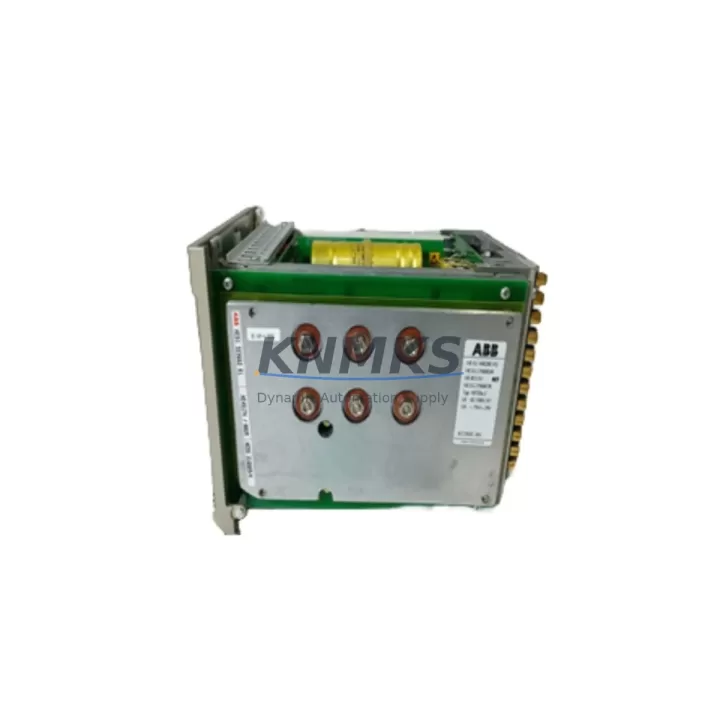
Overview
ABB YXU202A-3ASD510001C10 Spare Part for AC500 Uptime: Maintenance-Proven PLC CPU for Continuous Factory Operation
The ABB YXU202A-3ASD510001C10 is a CPU module designed for the ABB AC500 programmable logic controller platform — one of the most widely deployed automation architectures in process industries, discrete manufacturing, and infrastructure control. When this module fails or degrades, the entire control loop it governs goes offline. Sourcing a verified, tested replacement quickly is not optional — it is the difference between a scheduled swap and an unplanned production halt that cascades across shifts.
At KNMKS, every YXU202A-3ASD510001C10 unit is sourced from authorized supply chains, inspected against OEM electrical specifications, and function-tested prior to shipment. Each unit ships with a support terms confirmed by quotation covering manufacturing defects and operational failure under normal industrial conditions. Our logistics infrastructure supports same-day dispatch for in-stock units, with regional hubs serving Europe, North America, and Asia-Pacific to minimize lead time for critical maintenance windows.
Whether you are executing a planned annual overhaul, responding to a fault alarm, or building a strategic spare parts buffer for a multi-line facility, the YXU202A-3ASD510001C10 is available with full documentation support, compatibility confirmation, and post-sale technical assistance.
Spare Maintenance Table
| Parameter | Specification |
|---|---|
| Part Number / SKU | YXU202A-3ASD510001C10 |
| Brand | ABB |
| Series | AC500 |
| Module Type | PLC CPU Module |
| Country of Origin | Germany (DE) |
| Communication Interface | Ethernet, serial (RS-232/RS-485), fieldbus-ready per AC500 platform |
| Programming Standard | IEC 61131-3 (LD, FBD, ST, IL, SFC) |
| Operating Temperature | 0°C to +60°C (standard industrial enclosure) |
| Power Supply Compatibility | AC500 backplane bus; requires compatible PS501/PS502 power supply module |
| Mounting | AC500 backplane / DIN rail via AC500 base unit |
| Firmware | Compatible with Automation Builder / PS501 Control Builder Plus |
| Replacement Compatibility | Direct replacement within AC500 V2/V3 CPU family |
| Support terms | 12 Months — covers manufacturing defects and operational failure |
| Pre-Shipment Testing | Function-tested; power-on verified before dispatch |
| Condition | New / Surplus New (OEM-equivalent) |
Maintenance Planning for Continuous Operation
A CPU module replacement in an AC500 system is rarely an isolated event. Maintenance engineers and procurement teams who have managed AC500 cabinets know that the CPU interfaces with a tightly coupled set of components — and a fault in one often signals stress or wear in adjacent modules. When replacing the YXU202A-3ASD510001C10, a thorough site inspection should include the following:
Power Supply Module (e.g., ABB PS501-DISP or PS502): The AC500 CPU draws regulated DC power from the backplane power supply. If the CPU failed due to voltage irregularity or power cycling, the power supply module should be tested for output stability and ripple before the new CPU is commissioned. A degraded power supply will shorten the service life of the replacement unit.
I/O Expansion Modules (e.g., ABB DC532 Digital I/O, AI523 Analog Input): The AC500 architecture supports modular I/O expansion via the backplane. After a CPU swap, verify that all I/O modules are recognized in the configuration and that field wiring terminations are intact. Loose terminal connections on I/O modules are a common source of intermittent faults post-replacement.
Communication Modules (e.g., ABB CM572-DP PROFIBUS, CM589-PNIO PROFINET): If the AC500 system communicates with SCADA, DCS, or field devices via PROFIBUS, PROFINET, or Modbus, the communication module configuration must be re-validated after the CPU is replaced. Node addresses, baud rates, and network topology settings stored in the CPU project file must be reloaded correctly.
Backplane and Base Unit: Inspect the AC500 backplane bus connector for oxidation, bent pins, or mechanical damage. A compromised backplane connection can cause intermittent CPU faults that are difficult to diagnose without physical inspection. If the backplane shows wear, replacement of the base unit should be scheduled during the same maintenance window.
Signal Isolation and Relay Output Modules: For applications where the AC500 controls high-current loads via relay output modules (e.g., ABB DO531 or DO532), verify relay contact integrity and coil resistance. Signal isolators in analog loops should also be checked for drift, particularly in high-temperature or high-vibration environments.
Fuses and Circuit Protection: Cabinet-level fuses protecting the 24VDC supply rail to the AC500 system should be inspected and replaced if they show signs of thermal stress. Fuse holders with intermittent contact are a known cause of unexplained CPU resets in field installations.
Building a spare parts kit that includes the YXU202A-3ASD510001C10 alongside a PS501 power supply module, one or two I/O expansion modules, and a communication module appropriate to your network topology is a recognized best practice for facilities operating AC500-based lines with low tolerance for downtime.
Site Replacement Workflow
Replacing the YXU202A-3ASD510001C10 in a live AC500 installation follows a structured sequence to minimize downtime and avoid configuration loss:
Step 1 — Backup the CPU Project: Before powering down, connect to the AC500 via Automation Builder or PS501 Control Builder Plus and perform a full project upload from the CPU. Save the project file with a version-stamped filename. Confirm that all I/O configurations, communication parameters, and PID tuning values are captured.
Step 2 — Controlled Shutdown: Place the process in a safe state (manual mode or hold position). Isolate the AC500 cabinet from field power where possible. Document the current CPU LED status and any active fault codes before de-energizing.
Step 3 — Physical Swap: Remove the faulty YXU202A-3ASD510001C10 by releasing the backplane locking mechanism. Insert the replacement unit, ensuring full seating on the backplane connector. Verify that the module locking tab engages correctly.
Step 4 — Project Download and Commissioning: Power up the cabinet and connect via programming software. Download the backed-up project to the new CPU. Verify I/O module recognition, communication link status, and program execution. Perform a controlled test cycle before returning the line to automatic operation.
Step 5 — Documentation Update: Record the replacement in the equipment maintenance log with the new module serial number, installation date, and technician sign-off. Update the spare parts inventory to trigger reorder of a replacement buffer unit.
This workflow is compatible with hot-standby AC500 redundancy configurations where applicable, and can be adapted for systems running older AC500 V1 hardware where firmware compatibility must be verified before download.
Spare Parts Support FAQ
Q: What is the support terms coverage for the YXU202A-3ASD510001C10 supplied by KNMKS?
A: Every unit carries a support terms confirmed by quotation from the date of shipment. Coverage includes manufacturing defects and operational failure under normal industrial operating conditions. Units that fail within the confirmed support period are replaced or refunded subject to inspection. Support requests are processed within 5 business days of receipt of the returned unit.
Q: How do I confirm compatibility before ordering?
A: The YXU202A-3ASD510001C10 is a direct replacement within the ABB AC500 CPU module family. Compatibility is confirmed by matching the backplane connector type, firmware version range, and Automation Builder project configuration. If you are replacing an older AC500 V1 CPU with a V2/V3 unit, contact our technical team at admin@knmks.com with your existing CPU part number and firmware version for a compatibility assessment before ordering.
Q: What pre-shipment testing is performed on each unit?
A: Each YXU202A-3ASD510001C10 is powered on and function-tested against AC500 platform specifications before dispatch. Testing includes power-on self-test (POST) verification, backplane communication check, and LED status confirmation. A test report is available on request for units destined for critical infrastructure or regulated industries.
Q: Can KNMKS support long-term supply for multi-year maintenance contracts?
A: Yes. KNMKS maintains strategic stock of AC500 CPU modules and associated components to support annual maintenance contracts, multi-site procurement programs, and emergency buffer stocking. Contact admin@knmks.com or call +86 18359268345 to discuss volume pricing, reserved stock agreements, and scheduled delivery programs tailored to your facility’s maintenance calendar.
© 2026 KNMKS. All rights reserved.
Original Source: https://knmks.com
Contact: admin@knmks.com | +86 18359268345
Product Identification
- Brand / Ecosystem
-
ABB
ABB - Model / Series
-
YXU202A-3ASD510001C10
AC500 Series - Product Family
- PLCs & Controllers
- Availability Status
- Available on request after model and quantity confirmation
- Inquiry Type
- B2B RFQ, replacement inquiry and project spare-part request
- Pre-Quote Check
- Exact SKU, brand, series, quantity, nameplate photos and destination country are checked before quotation
System Path
Where this product fits in the KNMKS automation structure.
Specification & Inquiry Focus
- Control platform
- PLC, PAC and modular controllers
- Common needs
- CPU, rack, power and I/O expansion
- Project support
- Replacement, cabinet build and maintenance
Buyer Confirmation
Information KNMKS checks before replying.
- Exact model
- YXU202A-3ASD510001C10
- Brand / ecosystem
- ABB
- Product family
- PLCs & Controllers
- Application note
- Replacement, maintenance, project build or spare-part list
- Useful photos
- Nameplate, installed unit, cabinet layout or connector side
- Delivery details
- Quantity, destination country and target schedule
Document Support
Files and notes can be confirmed during quotation.
- Product photos or nameplate confirmation when available
- Packing and delivery notes before quotation confirmation
- Support scope and delivery terms confirmed per inquiry
- Export document coordination for qualified B2B requests
Inquiry Support
- Model cross-checking before quotation
- CPU, power, rack and expansion module matching
- Support for replacement and project inquiry
What to Send Us
- Brand and exact model number: ABB YXU202A-3ASD510001C10
- Quantity and required delivery time
- Application, replacement requirement or nameplate photo
- Destination country and shipping preference
RFQ Preparation
This is a product inquiry page built for RFQ communication.
Fast Model Check
Send this model to KNMKS for confirmation.
Include quantity, destination country and photos if this is a maintenance replacement. The inquiry will be saved with a reference number after submission.
Brand & Compatibility Note
KNMKS displays automation product information for well-known industrial brand ecosystems and compatible replacement references. Brand names are used for product identification and compatibility reference only; final availability and commercial terms are confirmed per quotation.
 Manufacturing
 Machine Tools
 Packaging
 Energy & Power



 HMI & Displays
 Servo Systems
 Variable Frequency Drives
 Sensors