
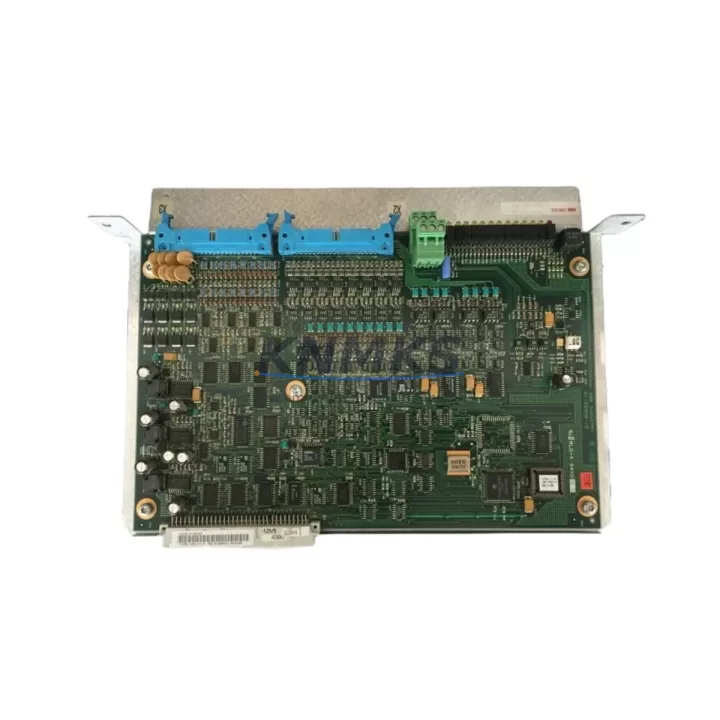
Overview
ABB YPQ111A 61161007 Spare Part for Factory Uptime
The ABB YPQ111A (61161007) is an original extension I/O module designed for the ABB AC500 PLC series — one of the most widely deployed programmable logic controller platforms in industrial automation, process control, and critical infrastructure applications. Maintaining an on-hand stock of the YPQ111A is a proven strategy for maintenance engineers who need to minimize unplanned downtime and protect production continuity in facilities running AC500-based control architectures.
In daily inspection routines, the YPQ111A is a key component to verify during control cabinet walkthroughs. Its I/O signal integrity directly affects the reliability of field device feedback loops, including sensors, actuators, and safety interlocks. When a fault is traced to an I/O channel — whether through diagnostic LEDs, PLC error codes, or field signal loss — having a pre-tested replacement module on the shelf allows maintenance teams to execute a swap within a single shift rather than waiting days or weeks for emergency procurement.
For procurement engineers, the YPQ111A represents a high-priority line item in any AC500 spare parts program. Given ABB’s product lifecycle management policies and the long operational lifespans typical of industrial PLC installations, sourcing verified original modules from a reliable distributor with confirmed stock and a support terms confirmed by quotation is essential to avoiding counterfeit risk and ensuring system compatibility. Our inventory is pre-shipment tested and dispatched with full traceability documentation.
Spare Maintenance Table
| Part Number | YPQ111A |
| Catalog Number | 61161007 |
| Brand | ABB |
| Series | AC500 |
| Module Type | Extension I/O Module |
| Compatible PLC Platform | ABB AC500 (PM5xx, PM5xx-ETH, PM5xx-2ETH series CPUs) |
| I/O Bus Interface | AC500 internal I/O bus (proprietary backplane) |
| Supply Voltage | 24 VDC (via backplane / terminal base) |
| Operating Temperature | -25°C to +60°C |
| Protection Rating | IP20 (control cabinet installation) |
| Mounting | DIN rail via AC500 terminal base (TA5xx series) |
| Origin | Germany |
| Condition | Original, new / surplus stock |
| Pre-Shipment Test | Yes — functional verification before dispatch |
| Support terms | 12 Months |
| Lead Time | availability confirmed by RFQ — same/next business day dispatch |
Maintenance Planning for Continuous Operation
When replacing the YPQ111A in an AC500 control cabinet, a thorough maintenance workflow should extend beyond the module itself. The AC500 architecture distributes I/O across extension modules mounted on terminal bases (TA5xx series), and a failure in one module can mask or trigger faults in adjacent components. Maintenance engineers should inspect the following during any YPQ111A replacement event:
Terminal Base (TA5xx): The YPQ111A seats into an AC500 terminal base. Inspect the base connector for bent pins, oxidation, or mechanical damage before installing the replacement module. A damaged terminal base will cause intermittent faults even with a new module installed.
CPU Module (PM5xx series): Verify the AC500 CPU — such as the PM554-T or PM564-R — is running the correct firmware version for compatibility with the YPQ111A. Firmware mismatches can prevent proper I/O bus enumeration after module replacement.
24 VDC Power Supply Module (PS5xx series): The AC500 system power supply feeds the backplane bus. Confirm output voltage is within tolerance (24 VDC ±5%) and that the power supply has sufficient current headroom for the full I/O module complement. An undersized or aging PS501 or PS560 can cause random module resets.
I/O Bus Coupler / Communication Module (CM5xx series): If the cabinet uses PROFIBUS, PROFINET, or Modbus TCP communication modules alongside the YPQ111A, verify their status LEDs and diagnostic registers after the I/O module swap. A bus reset during replacement can temporarily disrupt fieldbus communication.
Field Wiring and Terminal Blocks: Inspect all field wiring connected to the terminal base associated with the YPQ111A. Loose terminals, corroded conductors, or incorrect wire gauges are common root causes of I/O signal degradation that may have been misdiagnosed as a module fault.
Fuses and Circuit Protection: Check the fuse holders and miniature circuit breakers protecting the I/O circuits served by the YPQ111A. Blown fuses on output channels are a frequent companion fault when an I/O module fails due to field-side short circuits.
Stocking the YPQ111A alongside related AC500 components — including a spare CPU module, a power supply, and at least one communication module — creates a resilient spare parts kit that covers the most common failure scenarios in AC500-based control systems.
Site Replacement Workflow
Step 1 — Isolate and document: Before removing the YPQ111A, record the current I/O channel assignments, tag addresses, and any active diagnostic alarms from the AC500 engineering tool (Automation Builder or PS501 Control Builder). Take a photograph of the wiring layout on the terminal base.
Step 2 — Power down safely: Follow your site’s lockout/tagout (LOTO) procedure. The AC500 terminal base can be de-energized independently if the system supports hot-swap; verify this in your system documentation before attempting a live swap.
Step 3 — Remove and inspect: Slide the YPQ111A out of the terminal base. Inspect the base connector and the module edge connector for contamination or damage. Clean with isopropyl alcohol if required.
Step 4 — Install replacement: Seat the new YPQ111A firmly into the terminal base until the locking tab engages. Restore power and observe the module’s status LEDs — a solid green RUN LED confirms successful initialization on the I/O bus.
Step 5 — Verify in Automation Builder: Go online with the AC500 CPU and confirm the YPQ111A appears correctly in the hardware configuration. Check that all I/O channel values are reading as expected and that no diagnostic alarms are active.
Step 6 — Restore and document: Return the system to normal operation, update your maintenance log with the replacement date and module serial number, and replenish your spare parts stock to maintain buffer inventory.
This workflow is compatible with both legacy AC500 V1 systems and current AC500 V2 / AC500-S safety PLC installations, making the YPQ111A a versatile spare that supports long-term system continuity without requiring hardware redesign.
Spare Parts Support FAQ
Q1: Is the YPQ111A 61161007 compatible with both AC500 V1 and V2 systems?
The YPQ111A is designed for the ABB AC500 platform. Compatibility with specific CPU generations (V1 vs. V2) depends on the terminal base version and firmware level of the CPU module. We recommend confirming your CPU part number and firmware version before installation. Our technical team can assist with compatibility verification prior to shipment.
Q2: What does the support terms confirmed by quotation cover?
Our support terms confirmed by quotation cover manufacturing defects and functional failures under normal operating conditions. Each unit is pre-shipment tested before dispatch. The confirmed support period begins from the date of delivery. Damage caused by incorrect installation, overvoltage, or field-side short circuits is excluded.
Q3: How quickly can the YPQ111A be dispatched, and what documentation is included?
In-stock units are dispatched same or next business day. Each shipment includes a packing list with the catalog number (61161007), quantity, and test confirmation. Export documentation and customs declarations are available on request for international shipments.
Q4: Can you support long-term supply agreements for the YPQ111A?
Yes. For facilities running multiple AC500 systems or managing annual maintenance budgets, we offer long-term supply agreements with reserved stock allocation, fixed pricing, and priority dispatch. Contact our sales team to discuss volume requirements and lead-time commitments.
© 2026 KNMKS. All rights reserved.
Original Source: https://knmks.com
Contact: admin@knmks.com | +86 18359268345
Product Identification
- Brand / Ecosystem
-
ABB
ABB - Model / Series
-
YPQ111A 61161007
AC500 Series - Product Family
- PLCs & Controllers
- Availability Status
- Available on request after model and quantity confirmation
- Inquiry Type
- B2B RFQ, replacement inquiry and project spare-part request
- Pre-Quote Check
- Exact SKU, brand, series, quantity, nameplate photos and destination country are checked before quotation
System Path
Where this product fits in the KNMKS automation structure.
Specification & Inquiry Focus
- Control platform
- PLC, PAC and modular controllers
- Common needs
- CPU, rack, power and I/O expansion
- Project support
- Replacement, cabinet build and maintenance
Buyer Confirmation
Information KNMKS checks before replying.
- Exact model
- YPQ111A 61161007
- Brand / ecosystem
- ABB
- Product family
- PLCs & Controllers
- Application note
- Replacement, maintenance, project build or spare-part list
- Useful photos
- Nameplate, installed unit, cabinet layout or connector side
- Delivery details
- Quantity, destination country and target schedule
Document Support
Files and notes can be confirmed during quotation.
- Product photos or nameplate confirmation when available
- Packing and delivery notes before quotation confirmation
- Support scope and delivery terms confirmed per inquiry
- Export document coordination for qualified B2B requests
Inquiry Support
- Model cross-checking before quotation
- CPU, power, rack and expansion module matching
- Support for replacement and project inquiry
What to Send Us
- Brand and exact model number: ABB YPQ111A 61161007
- Quantity and required delivery time
- Application, replacement requirement or nameplate photo
- Destination country and shipping preference
RFQ Preparation
This is a product inquiry page built for RFQ communication.
Fast Model Check
Send this model to KNMKS for confirmation.
Include quantity, destination country and photos if this is a maintenance replacement. The inquiry will be saved with a reference number after submission.
Brand & Compatibility Note
KNMKS displays automation product information for well-known industrial brand ecosystems and compatible replacement references. Brand names are used for product identification and compatibility reference only; final availability and commercial terms are confirmed per quotation.
 Manufacturing
 Machine Tools
 Packaging
 Energy & Power



 HMI & Displays
 Servo Systems
 Variable Frequency Drives
 Sensors