
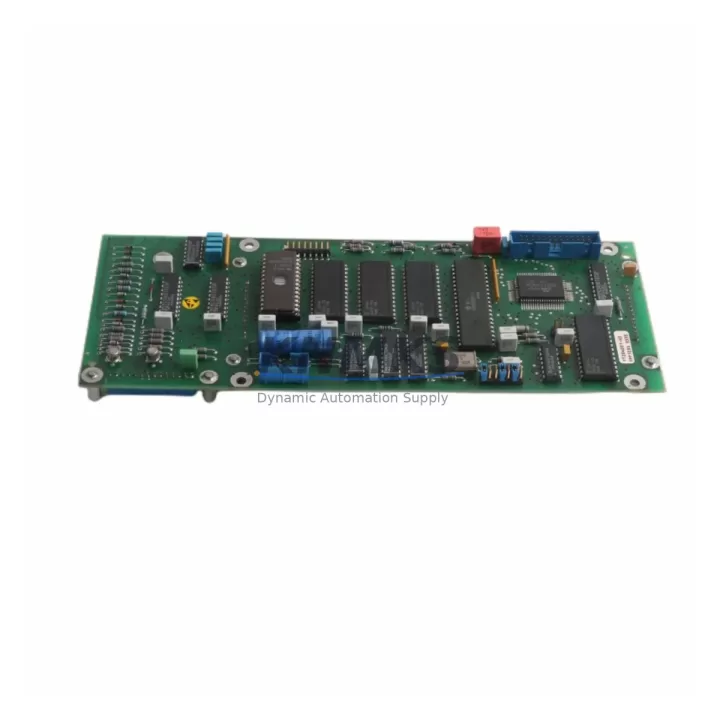
Overview
ABB YPP109A Migration-Ready Digital Input Module: Legacy System Retrofit & Compatibility Upgrade
The ABB YPP109A is a migration-ready digital input module engineered for direct replacement in legacy ABB IRC5 and DSQC-series robot control systems. As automation facilities face increasing pressure to extend the operational life of installed control cabinets while managing obsolescence risk, the YPP109A provides a verified drop-in solution that eliminates the need for full controller replacement. Whether you are restoring a production line after an unplanned failure, executing a planned retrofit of aging I/O infrastructure, or building a strategic spare parts inventory, the YPP109A delivers the signal integrity, backplane compatibility, and firmware alignment required for a controlled, low-risk migration.
Before committing to a replacement, engineers should confirm the following parameters against the existing installation: power supply rail capacity on the IRC5 controller backplane, terminal wiring configuration (24 VDC sourcing or sinking logic), module slot address assignment in the robot configuration file, I/O signal mapping in the RAPID program, DeviceNet or EtherNet/IP communication link integrity, and available installation clearance within the control cabinet. Each of these factors directly affects commissioning time and the risk of introducing logic errors during the swap.
The YPP109A is fully compatible with the ABB IRC5 single-cabinet and dual-cabinet controller platforms. It interfaces with the DSQC 652 digital I/O board family and can be installed alongside the DSQC 651 analog I/O module without backplane address conflicts when slot assignments are correctly configured in RobotStudio or the FlexPendant teach pendant. For facilities running coordinated multi-robot cells, the module integrates cleanly with DSQC 1000 main computer configurations, preserving existing RAPID task structures and I/O signal tables without requiring program recompilation.
Migration Compatibility Table
| Parameter | YPP109A Specification | Retrofit Note |
|---|---|---|
| Compatible Platform | ABB IRC5 Single & Dual Cabinet | Verify controller firmware version ≥ 6.x |
| Replaces | DSQC-series legacy digital input boards | Confirm slot address before installation |
| Signal Type | Digital Input, 24 VDC | Match sourcing/sinking wiring to field devices |
| Backplane Interface | IRC5 standard backplane connector | No adapter required for direct slot replacement |
| Communication | DeviceNet / EtherNet/IP compatible | Retain existing network node address settings |
| Installation Clearance | Standard IRC5 module form factor | Confirm cabinet rail space before ordering |
| Firmware Compatibility | RobotWare 6.x / 7.x | Test I/O signal table after installation |
| Commissioning Requirement | I/O configuration reload via FlexPendant | Back up system parameters before swap |
| Support terms | 12 Months | Covers manufacturing defects; includes pre-shipment functional test |
Retrofit Planning for Existing Automation Systems
A successful YPP109A retrofit begins with a structured pre-installation audit of the control cabinet. Start by documenting the existing DSQC backplane slot layout and recording all module addresses currently active in the IRC5 system configuration. This prevents address conflicts when the new module is seated and the controller performs its boot-time I/O scan.
Power budget verification is a critical and frequently overlooked step. The IRC5 backplane distributes 24 VDC across all installed modules; adding or replacing a digital input module requires confirming that the DSQC 609 power supply unit or equivalent installed power module has sufficient headroom. If the cabinet is already running near capacity — common in legacy installations where modules have been added incrementally over years — a power audit must precede the physical swap.
Terminal wiring should be mapped and labeled before the old module is removed. The YPP109A uses the same terminal block pitch as the DSQC-series predecessors, but field wiring polarity and common reference points must be verified against the original electrical schematic. In installations where the original documentation has been lost, a point-by-point continuity check using a signal isolation tester is recommended before energizing the new module.
For facilities that also need to upgrade HMI visibility during the retrofit, the YPP109A’s I/O signals can be mapped directly to existing ABB Panel 800 or CP600 HMI screen objects without requiring new tag definitions, provided the signal names in the RAPID I/O configuration are preserved. This is particularly valuable in food, automotive, and pharmaceutical lines where HMI screen validation is a regulated step in the change management process.
If the retrofit scope extends to communication protocol migration — for example, moving from legacy DeviceNet to EtherNet/IP — the YPP109A should be installed alongside a DSQC 688 fieldbus adapter to bridge the protocol transition without disrupting the existing field device wiring. This approach allows the new communication backbone to be validated in parallel with the legacy network before cutover, significantly reducing the risk of unplanned downtime.
For multi-axis robot cells, the YPP109A can be installed in the same control cabinet as the DSQC 668 drive module without interference, provided the backplane slot sequence follows the IRC5 hardware configuration guide. Engineers managing large-scale retrofits across multiple robot cells should standardize on a single slot assignment template to simplify spare parts management and reduce commissioning variability between cells.
Downtime Control During System Migration
Minimizing production downtime during a digital input module replacement requires a disciplined pre-swap preparation protocol. Before the maintenance window opens, the full IRC5 system backup — including system parameters, RAPID programs, I/O configuration, and safety configuration — must be exported to an external storage device using RobotStudio or the FlexPendant backup function. This backup is the single most important risk mitigation step in the entire retrofit process.
During the physical swap, the controller should be powered down following the IRC5 shutdown sequence to prevent backplane voltage spikes that can damage adjacent modules. The YPP109A should be seated firmly in the target slot and the backplane connector engagement confirmed before power is restored. On first boot after installation, the IRC5 will perform an automatic I/O scan; if the module address matches the configuration file, the system will recognize the new module without manual intervention.
Post-installation verification should include a full I/O signal test using the FlexPendant I/O panel, confirming that each digital input channel responds correctly to field device signals. Any discrepancy between expected and actual signal states should be traced to wiring polarity, common reference voltage, or address configuration before the robot is returned to automatic mode. A structured commissioning checklist — covering power-on sequence, I/O verification, RAPID program execution test, and HMI signal confirmation — reduces the risk of returning a robot to production with an undetected fault.
For facilities with strict OEE targets, the entire YPP109A swap process — from power-down to verified automatic mode — can typically be completed within a single planned maintenance shift when pre-swap preparation is thorough. Every unit shipped by KNMKS undergoes a pre-shipment functional test to confirm module operability before dispatch, reducing the risk of receiving a non-functional unit and extending the unplanned downtime window.
Retrofit Support FAQ
Q1: Is the ABB YPP109A a direct drop-in replacement for the original DSQC digital input module in my IRC5 cabinet?
A: Yes, the YPP109A is designed as a direct backplane-compatible replacement for the DSQC-series digital input boards used in ABB IRC5 single and dual-cabinet controllers. No mechanical adapter or wiring modification is required in standard installations. Confirm the slot address in your IRC5 system configuration file matches the module position before powering on.
Q2: What commissioning steps are required after installing the YPP109A?
A: After seating the module and restoring power, use the FlexPendant I/O panel to verify that all digital input channels are recognized and responding correctly. Reload the system parameters from your pre-swap backup if the controller does not automatically detect the module. Perform a full I/O signal test before returning the robot to automatic mode. No firmware flashing is required for RobotWare 6.x or 7.x installations.
Q3: Does KNMKS provide pre-shipment testing, and what does the support terms confirmed by quotation cover?
A: Every YPP109A unit is functionally tested before dispatch to confirm module operability. The support terms confirmed by quotation cover manufacturing defects and component failures under normal operating conditions. It does not cover damage resulting from incorrect installation, overvoltage, or physical impact. Support requests are processed through admin@knmks.com with proof of purchase and a fault description.
Q4: What is the typical lead time, and do you maintain stock for urgent replacement orders?
A: KNMKS maintains inventory of the YPP109A to support urgent spare parts and unplanned failure replacement scenarios. Lead time for in-stock units is typically 1–3 business days for domestic shipments. For international orders or large-quantity procurement, contact admin@knmks.com or call +86 18359268345 for availability confirmation and shipping options.
© 2026 KNMKS. All rights reserved.
Original Source: https://knmks.com
Contact: admin@knmks.com | +86 18359268345
Product Identification
- Brand / Ecosystem
-
ABB
ABB - Model / Series
-
YPP109A
IRC5 Series - Product Family
- PLCs & Controllers
- Availability Status
- Available on request after model and quantity confirmation
- Inquiry Type
- B2B RFQ, replacement inquiry and project spare-part request
- Pre-Quote Check
- Exact SKU, brand, series, quantity, nameplate photos and destination country are checked before quotation
System Path
Where this product fits in the KNMKS automation structure.
Specification & Inquiry Focus
- Control platform
- PLC, PAC and modular controllers
- Common needs
- CPU, rack, power and I/O expansion
- Project support
- Replacement, cabinet build and maintenance
Buyer Confirmation
Information KNMKS checks before replying.
- Exact model
- YPP109A
- Brand / ecosystem
- ABB
- Product family
- PLCs & Controllers
- Application note
- Replacement, maintenance, project build or spare-part list
- Useful photos
- Nameplate, installed unit, cabinet layout or connector side
- Delivery details
- Quantity, destination country and target schedule
Document Support
Files and notes can be confirmed during quotation.
- Product photos or nameplate confirmation when available
- Packing and delivery notes before quotation confirmation
- Support scope and delivery terms confirmed per inquiry
- Export document coordination for qualified B2B requests
Inquiry Support
- Model cross-checking before quotation
- CPU, power, rack and expansion module matching
- Support for replacement and project inquiry
What to Send Us
- Brand and exact model number: ABB YPP109A
- Quantity and required delivery time
- Application, replacement requirement or nameplate photo
- Destination country and shipping preference
RFQ Preparation
This is a product inquiry page built for RFQ communication.
Fast Model Check
Send this model to KNMKS for confirmation.
Include quantity, destination country and photos if this is a maintenance replacement. The inquiry will be saved with a reference number after submission.
Brand & Compatibility Note
KNMKS displays automation product information for well-known industrial brand ecosystems and compatible replacement references. Brand names are used for product identification and compatibility reference only; final availability and commercial terms are confirmed per quotation.
 Manufacturing
 Machine Tools
 Packaging
 Energy & Power



 HMI & Displays
 Servo Systems
 Variable Frequency Drives
 Sensors