
Overview
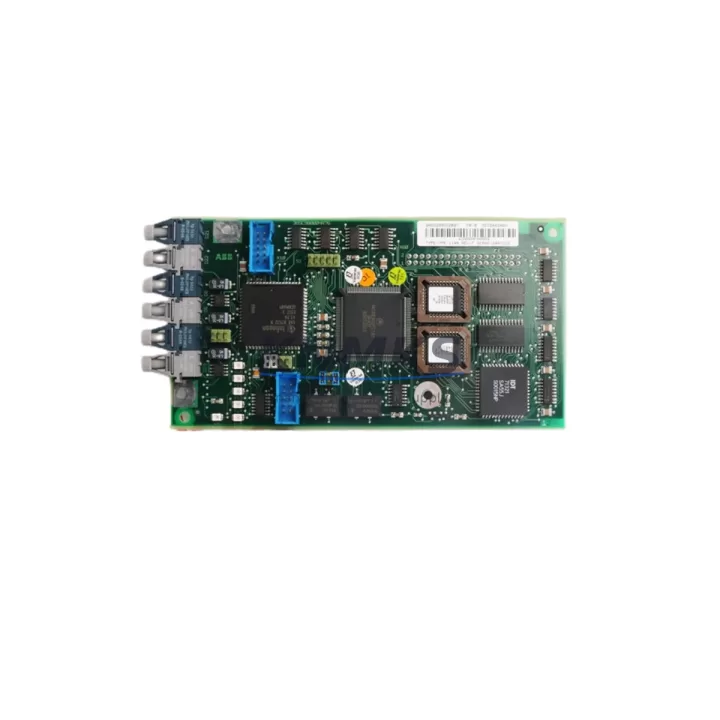
ABB YPK114A 3ASD399002B20 Spare Part for Factory Uptime
The ABB YPK114A (part number 3ASD399002B20) is an original communications module designed for the ABB AC500 PLC platform and Symphony Plus distributed control systems. As a maintenance-proven spare part, it is a critical component for facilities that depend on continuous process communication between controllers, I/O stations, and supervisory systems. Stocking a verified replacement of the YPK114A is a fundamental step in any proactive maintenance strategy for AC500-based control architectures.
For maintenance engineers managing aging AC500 cabinets, the YPK114A serves as the backbone of fieldbus and inter-module communication. Its failure can result in complete loss of process visibility, unplanned shutdowns, and extended recovery times. Procurement engineers sourcing this module should prioritize OEM-origin units with documented pre-shipment testing to avoid compatibility issues and reduce commissioning risk on the plant floor.
Each unit supplied by KNMKS is sourced from verified OEM channels, subjected to pre-shipment functional testing, and backed by a support terms confirmed by quotation. Fast global dispatch ensures that emergency replacement orders can be fulfilled with minimal lead time, supporting your plant’s uptime objectives.
Spare Maintenance Table
| Part Number | YPK114A |
| Reference Number | 3ASD399002B20 |
| Brand | ABB |
| Series / Platform | AC500 / Symphony Plus |
| Product Type | Communications Module |
| Origin | Germany (OEM) |
| Communication Role | Inter-module / fieldbus communications for AC500 PLC systems |
| Compatibility | ABB AC500 CPU modules, Symphony Plus DCS, AC500-eCo variants (verify rack slot compatibility) |
| Installation | Backplane-mounted; slot-specific installation per AC500 system configuration |
| Operating Environment | Industrial control cabinet; standard IEC 61131-2 environmental ratings |
| Maintenance Recommendation | Inspect during annual cabinet overhaul; replace proactively if communication errors or CRC faults are logged |
| Support terms | 12 Months |
| Pre-Shipment Test | Yes — functional verification before dispatch |
| Supply Lead Time | Fast global dispatch; emergency orders supported |
Maintenance Planning for Continuous Operation
When replacing the YPK114A in an AC500 control cabinet, a thorough site inspection of adjacent components is essential to prevent repeat failures and ensure full system restoration. Maintenance engineers should begin by verifying the AC500 CPU module — such as the PM573 or PM591 series — for firmware version compatibility with the replacement communications module, as mismatched firmware can cause initialization failures even with a new OEM part.
The 24 VDC backplane power supply feeding the AC500 rack should be measured under load before and after module replacement. Voltage sags or ripple on the backplane rail are a common root cause of communications module degradation and should be addressed with a replacement industrial power supply unit if deviations are found. Simultaneously, inspect the TB523 or equivalent terminal base for signs of oxidation or mechanical damage at the module interface contacts.
I/O expansion modules connected via the internal bus — including digital input modules such as the DC532 and analog output modules such as the AO523 — should be checked for communication fault flags in the diagnostic log. If the YPK114A failure was preceded by intermittent I/O errors, the fault may have propagated from a degraded I/O module rather than originating in the communications layer itself.
For systems integrated with PROFIBUS DP or Modbus TCP networks, the associated communication coupler modules and network termination resistors should be inspected. A failed or improperly terminated fieldbus segment can place excessive load on the communications module and accelerate wear. Fuse protection on the 24 VDC supply rail serving the communications rack should also be verified — blown or weakened fuses are frequently overlooked during fault isolation.
Where the AC500 system interfaces with an ABB CP600 or CP620 HMI panel, confirm that the HMI communication parameters remain correctly configured after module replacement, as some HMI configurations store the module’s network identity locally. Finally, if the control system includes signal isolators between field instruments and the AC500 I/O, verify isolator output levels are within specification to prevent false diagnostics after the communications module is restored to service.
Site Replacement Workflow
Before removing the YPK114A from service, document the current system configuration using the ABB Automation Builder engineering tool, including all communication parameters, node addresses, and diagnostic settings. This configuration backup is essential for rapid recommissioning and eliminates the risk of parameter loss during the swap.
Power down the affected rack section following your site’s lockout/tagout procedure. Remove the YPK114A by releasing the module latch and sliding it clear of the terminal base. Inspect the terminal base contacts for contamination or deformation before installing the replacement unit. Insert the new YPK114A firmly until the latch engages, then restore power and observe the module’s status LEDs during initialization.
After power-up, use Automation Builder to verify that the replacement module is recognized by the CPU and that all configured communication channels are active. Check the diagnostic buffer for any residual fault entries and clear them once normal operation is confirmed. For systems where the YPK114A supports peer-to-peer communication with remote AC500 stations, verify end-to-end data exchange before returning the line to production.
This workflow minimizes downtime by ensuring that the replacement is fully validated before the process is restarted, reducing the risk of a second unplanned shutdown caused by incomplete commissioning.
Spare Parts Support FAQ
Q: Is the YPK114A 3ASD399002B20 compatible with all AC500 CPU generations?
A: The YPK114A is designed for the ABB AC500 platform, including Symphony Plus DCS applications. Compatibility with specific CPU generations (PM571, PM573, PM591, PM595) should be verified against the ABB AC500 system manual and firmware release notes. KNMKS can assist with compatibility confirmation prior to order placement.
Q: What pre-shipment testing is performed on each unit?
A: Every YPK114A unit dispatched by KNMKS undergoes functional verification testing before shipment. This includes power-on initialization checks and communication interface validation to confirm the module is operational. Test records are available upon request.
Q: Can KNMKS support long-term or repeat supply of the YPK114A?
A: Yes. KNMKS maintains ongoing sourcing relationships for ABB AC500 series spare parts, including the YPK114A. We support blanket orders, scheduled deliveries, and emergency procurement to align with your planned maintenance and inventory replenishment cycles.
Q: What does the support terms confirmed by quotation cover?
A: The support terms confirmed by quotation cover manufacturing defects and functional failures under normal operating conditions as specified in the ABB product documentation. Support requests are supported with direct technical assistance and replacement dispatch to minimize impact on your production schedule.
© 2026 KNMKS. All rights reserved.
Original Source: https://knmks.com
Contact: admin@knmks.com | +86 18359268345
Product Identification
- Brand / Ecosystem
-
ABB
ABB - Model / Series
-
YPK114A 3ASD399002B20
AC500 Series - Product Family
- PLCs & Controllers
- Availability Status
- Available on request after model and quantity confirmation
- Inquiry Type
- B2B RFQ, replacement inquiry and project spare-part request
- Pre-Quote Check
- Exact SKU, brand, series, quantity, nameplate photos and destination country are checked before quotation
System Path
Where this product fits in the KNMKS automation structure.
Specification & Inquiry Focus
- Control platform
- PLC, PAC and modular controllers
- Common needs
- CPU, rack, power and I/O expansion
- Project support
- Replacement, cabinet build and maintenance
Buyer Confirmation
Information KNMKS checks before replying.
- Exact model
- YPK114A 3ASD399002B20
- Brand / ecosystem
- ABB
- Product family
- PLCs & Controllers
- Application note
- Replacement, maintenance, project build or spare-part list
- Useful photos
- Nameplate, installed unit, cabinet layout or connector side
- Delivery details
- Quantity, destination country and target schedule
Document Support
Files and notes can be confirmed during quotation.
- Product photos or nameplate confirmation when available
- Packing and delivery notes before quotation confirmation
- Support scope and delivery terms confirmed per inquiry
- Export document coordination for qualified B2B requests
Inquiry Support
- Model cross-checking before quotation
- CPU, power, rack and expansion module matching
- Support for replacement and project inquiry
What to Send Us
- Brand and exact model number: ABB YPK114A 3ASD399002B20
- Quantity and required delivery time
- Application, replacement requirement or nameplate photo
- Destination country and shipping preference
RFQ Preparation
This is a product inquiry page built for RFQ communication.
Fast Model Check
Send this model to KNMKS for confirmation.
Include quantity, destination country and photos if this is a maintenance replacement. The inquiry will be saved with a reference number after submission.
Brand & Compatibility Note
KNMKS displays automation product information for well-known industrial brand ecosystems and compatible replacement references. Brand names are used for product identification and compatibility reference only; final availability and commercial terms are confirmed per quotation.
 Manufacturing
 Machine Tools
 Packaging
 Energy & Power



 HMI & Displays
 Servo Systems
 Variable Frequency Drives
 Sensors