
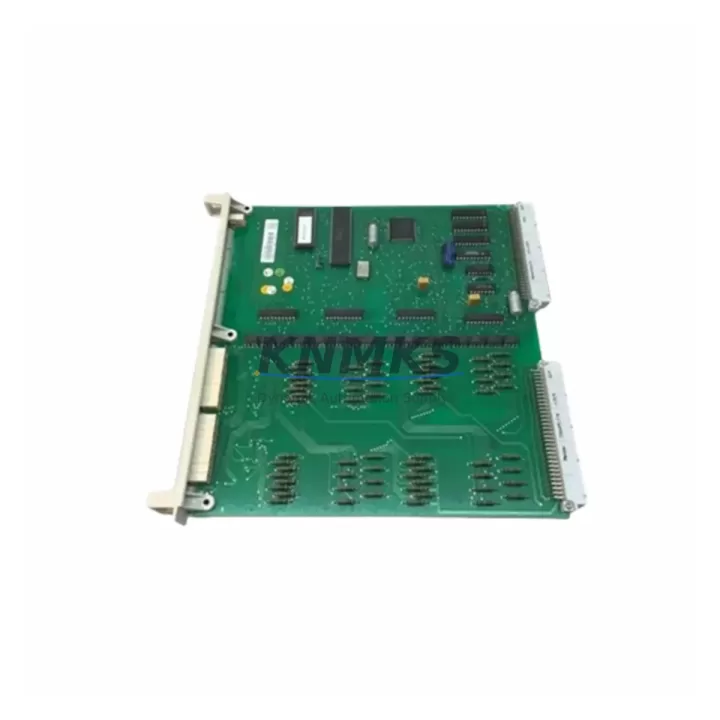
Overview
ABB YPK112A Maintenance-Proven Spare Part for Factory Uptime
The ABB YPK112A is an original communication module designed for the ABB AC500 PLC platform — one of the most widely deployed programmable logic controller families in process automation, discrete manufacturing, and utility control environments. Maintaining an available stock of the YPK112A is a critical element of any proactive spare parts strategy for facilities running AC500-based control architectures. Whether your plant operates continuous batch processes, discrete assembly lines, or hybrid SCADA-integrated systems, the YPK112A plays a direct role in sustaining communication integrity between the CPU, I/O subsystems, and field devices.
For maintenance engineers, the YPK112A is most commonly encountered during fault isolation routines when communication loss is detected between the AC500 CPU module and downstream I/O expansion racks or remote communication nodes. Its failure mode is typically non-destructive — the module ceases to pass data rather than causing cascading electrical damage — but the downstream effect on production uptime can be immediate and severe. Having a verified, pre-tested replacement unit on the shelf eliminates the multi-day lead time that often extends unplanned downtime into a full production loss event.
Procurement engineers sourcing the YPK112A should prioritize suppliers who can confirm original ABB manufacture, provide pre-shipment functional testing documentation, and offer a minimum support terms confirmed by quotation against defects in materials and workmanship. Counterfeit or refurbished communication modules in PLC backplanes are a known risk in the industrial spare parts market and can introduce intermittent faults that are significantly harder to diagnose than a clean module failure.
Spare Maintenance Table
| Part Number | YPK112A |
| Brand | ABB |
| Series | AC500 |
| Module Type | PLC Communication Module |
| Platform Compatibility | ABB AC500 PLC Family (PM5xx, PM5xx-ETH CPU series) |
| Communication Interface | Serial / fieldbus communication (AC500 backplane compatible) |
| Mounting | AC500 backplane slot installation |
| Operating Temperature | 0°C to +60°C (standard industrial range) |
| Country of Origin | Germany |
| Application Environment | Process automation, discrete manufacturing, utility control, SCADA integration |
| Maintenance Role | Communication integrity between CPU and I/O expansion / remote nodes |
| Replacement Scenario | Communication loss, fault isolation, annual overhaul, emergency standby stock |
| Pre-Shipment Testing | Yes — functional verification prior to dispatch |
| Support terms | 12 Months |
| Dispatch | global delivery details confirmed by RFQ from multi-region stock |
Maintenance Planning for Continuous Operation
When replacing the YPK112A in an AC500 control cabinet, a thorough site inspection should extend beyond the module itself. The communication module operates within a tightly integrated backplane environment, and adjacent components are subject to the same thermal cycling, vibration, and electrical stress that may have contributed to the original failure.
Begin by inspecting the AC500 CPU module (such as the PM554 or PM564 series) for firmware version compatibility with the replacement YPK112A. Mismatched firmware between the CPU and communication module is a common source of post-replacement instability. Next, verify the condition of the AC500 backplane bus connector — worn or oxidized backplane contacts can cause intermittent communication errors that mimic module failure and will recur even after a new YPK112A is installed.
Inspect all DC 24V power supply rails feeding the AC500 rack. Voltage sag or ripple on the 24VDC bus is a leading cause of communication module resets and should be measured under full load before the replacement module is commissioned. If the cabinet includes an ABB CI502-PNIO or CI504-PNIO PROFINET communication interface module, verify that its configuration parameters remain intact after the YPK112A swap, as some AC500 configurations store communication mapping data across multiple module slots.
For systems with remote I/O expansion, check the TB723 or TB724 terminal base units associated with the I/O modules downstream of the YPK112A. Loose terminal connections or degraded signal wiring at these bases can generate communication alarms that are incorrectly attributed to the communication module. Similarly, inspect any signal isolators or surge protection devices on fieldbus lines connected through or adjacent to the YPK112A’s communication path.
Finally, review the cabinet’s fuse and circuit protection inventory. Blown or weakened fuses on the 24VDC distribution board are frequently overlooked during emergency replacements and can cause the new module to fail prematurely. A complete annual maintenance checklist for AC500 cabinets should include the YPK112A alongside CPU modules, I/O expansion modules, power supplies, and communication interface cards as a standard stocked spare category.
Site Replacement Workflow
Step 1 — Preparation: Before removing the YPK112A, export the current AC500 project configuration from Automation Builder or PS501 Control Builder. Confirm the replacement module’s part number matches the installed unit exactly. Do not substitute with a different YPK-series variant without first verifying backplane slot compatibility and firmware support.
Step 2 — Safe Isolation: Follow your site’s lockout/tagout (LOTO) procedure. De-energize the AC500 rack. For hot-swap capable configurations, consult the AC500 system manual to confirm whether the YPK112A slot supports live replacement — not all AC500 backplane configurations permit this.
Step 3 — Module Removal and Inspection: Remove the YPK112A by releasing the module locking mechanism and sliding it clear of the backplane. Inspect the backplane connector pins for damage or contamination. Clean with appropriate contact cleaner if required before installing the replacement.
Step 4 — Installation and Commissioning: Seat the replacement YPK112A firmly into the backplane slot. Re-energize the rack and observe the module status LEDs. Confirm communication re-establishment via the AC500 CPU diagnostic interface or connected HMI panel. Validate all downstream I/O signals and fieldbus node responses before returning the system to production.
Step 5 — Documentation: Record the replacement date, module serial number, and post-installation test results in your maintenance management system (CMMS). Update your spare parts inventory to trigger reorder of a replacement YPK112A unit to restore your on-hand buffer stock.
Spare Parts Support FAQ
Q: Is the YPK112A available as a new original ABB part or only as refurbished stock?
A: We supply the YPK112A as an original ABB spare part. Each unit undergoes pre-shipment functional testing and is dispatched with a support terms confirmed by quotation. We do not supply uncertified refurbished units for safety-critical communication module positions.
Q: How do I confirm YPK112A compatibility with my specific AC500 CPU version?
A: Compatibility is determined by your AC500 CPU model (PM5xx series) and the installed firmware version. Provide your CPU part number and firmware revision when placing your order and our technical team will confirm compatibility before dispatch. In most standard AC500 configurations, the YPK112A is compatible across the PM554, PM564, and PM583 CPU families.
Q: What is the recommended stock quantity for the YPK112A in a multi-cabinet facility?
A: For facilities operating more than three AC500 racks, we recommend maintaining a minimum of one YPK112A per four installed units as on-hand emergency stock, with a secondary reorder point triggered when the buffer falls to one unit. Communication module failures are low-frequency but high-impact events — the cost of a single unplanned production stoppage typically exceeds the cost of maintaining a two-unit buffer by a significant margin.
Q: Does the support terms confirmed by quotation cover field installation failures as well as manufacturing defects?
A: The support terms confirmed by quotation cover defects in materials and workmanship under normal operating conditions consistent with ABB AC500 installation specifications. Failures resulting from incorrect installation, overvoltage events, or physical damage are assessed case by case. Our technical support team is available to assist with failure analysis documentation if a support terms claim is required.
© 2026 KNMKS. All rights reserved.
Original Source: https://knmks.com
Contact: admin@knmks.com | +86 18359268345
Product Identification
- Brand / Ecosystem
-
ABB
ABB - Model / Series
-
YPK112A
AC500 Series - Product Family
- PLCs & Controllers
- Availability Status
- Available on request after model and quantity confirmation
- Inquiry Type
- B2B RFQ, replacement inquiry and project spare-part request
- Pre-Quote Check
- Exact SKU, brand, series, quantity, nameplate photos and destination country are checked before quotation
System Path
Where this product fits in the KNMKS automation structure.
Specification & Inquiry Focus
- Control platform
- PLC, PAC and modular controllers
- Common needs
- CPU, rack, power and I/O expansion
- Project support
- Replacement, cabinet build and maintenance
Buyer Confirmation
Information KNMKS checks before replying.
- Exact model
- YPK112A
- Brand / ecosystem
- ABB
- Product family
- PLCs & Controllers
- Application note
- Replacement, maintenance, project build or spare-part list
- Useful photos
- Nameplate, installed unit, cabinet layout or connector side
- Delivery details
- Quantity, destination country and target schedule
Document Support
Files and notes can be confirmed during quotation.
- Product photos or nameplate confirmation when available
- Packing and delivery notes before quotation confirmation
- Support scope and delivery terms confirmed per inquiry
- Export document coordination for qualified B2B requests
Inquiry Support
- Model cross-checking before quotation
- CPU, power, rack and expansion module matching
- Support for replacement and project inquiry
What to Send Us
- Brand and exact model number: ABB YPK112A
- Quantity and required delivery time
- Application, replacement requirement or nameplate photo
- Destination country and shipping preference
RFQ Preparation
This is a product inquiry page built for RFQ communication.
Fast Model Check
Send this model to KNMKS for confirmation.
Include quantity, destination country and photos if this is a maintenance replacement. The inquiry will be saved with a reference number after submission.
Brand & Compatibility Note
KNMKS displays automation product information for well-known industrial brand ecosystems and compatible replacement references. Brand names are used for product identification and compatibility reference only; final availability and commercial terms are confirmed per quotation.
 Manufacturing
 Machine Tools
 Packaging
 Energy & Power



 HMI & Displays
 Servo Systems
 Variable Frequency Drives
 Sensors