
Overview
ABB YPK107E Migration-Ready Axis Computer for IRC5 Legacy Robot Systems
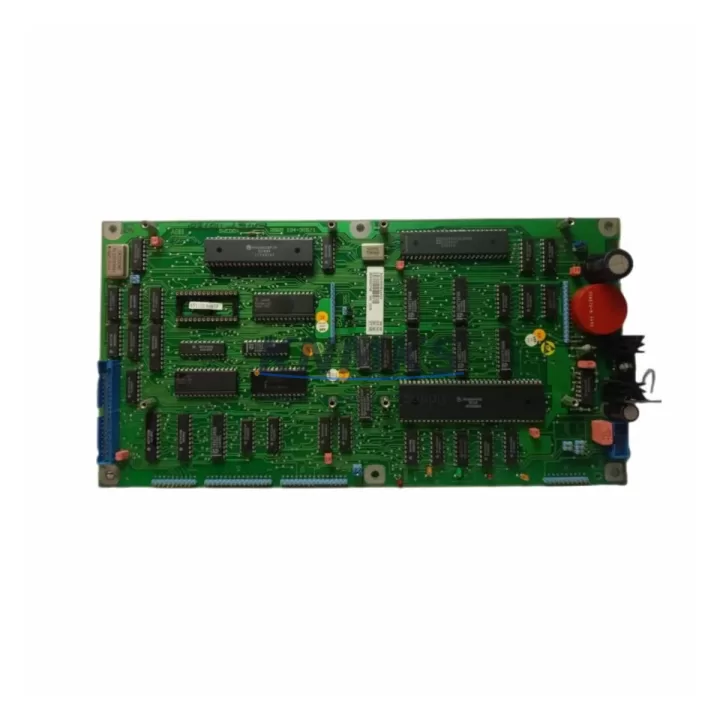
The ABB YPK107E is a migration-ready Axis Computer Board engineered for direct replacement and retrofit deployment within ABB IRC5 and S4C+ robot controller platforms. As legacy robot control systems approach end-of-life and original spare parts become increasingly scarce, the YPK107E provides a verified, drop-in solution that restores full axis control functionality without requiring controller cabinet redesign or software re-engineering. Whether you are managing a planned upgrade cycle or responding to an unplanned axis board failure on a production line, the YPK107E is stocked, tested, and ready for immediate dispatch with a support terms confirmed by quotation.
The YPK107E serves as the central axis computation unit within the IRC5 drive system architecture. It interfaces directly with the IRC5 Drive Module and communicates with the IRC5 Main Computer (DSQC639 or equivalent) via the internal INTERBUS or proprietary ABB backplane bus. During a retrofit, engineers must confirm that the drive module firmware version is compatible with the replacement board revision, as mismatched firmware between the axis computer and the drive unit can result in axis initialization faults or SafeMove configuration errors. Firmware alignment is a critical pre-commissioning step that should be completed before powering the cabinet.
Before installation, the replacement planning checklist should include verification of the cabinet backplane slot assignment, axis board address configuration (typically set via DIP switch or jumper on legacy S4C+ variants), and the integrity of the 24VDC logic power supply rail feeding the axis computer. A degraded DSQC604 power supply or an aging DSQC609 power distribution board can cause intermittent axis faults that are incorrectly attributed to the axis computer itself. Replacing the YPK107E without addressing upstream power quality issues will not resolve persistent fault codes.
Migration Compatibility Table
| Parameter | Details |
|---|---|
| SKU | YPK107E |
| Brand | ABB |
| Series | IRC5 / S4C+ Robot Controller |
| Function | Axis Computer Board — axis motion control and drive communication |
| Compatible Controllers | ABB IRC5 Single Cabinet, IRC5 Compact, IRC5 Panel Mounted; ABB S4C+ (select variants) |
| Backplane Interface | IRC5 internal drive bus / ABB proprietary backplane connector |
| Communication Protocol | ABB internal INTERBUS / IRC5 drive communication link |
| Logic Supply Voltage | 24 VDC (from cabinet power distribution board) |
| Installation Space | Standard IRC5 Drive Module slot — confirm physical clearance before installation |
| Firmware Compatibility | Align axis computer firmware with IRC5 system software version (RobotWare 5.x / 6.x) |
| Replacement Recommendation | Direct drop-in for failed or end-of-life YPK107E; verify drive module revision match |
| Commissioning Focus | Axis initialization, SafeMove re-validation, drive firmware sync, I/O signal verification |
| Support terms | 12 Months — all units pre-tested before shipment |
Retrofit Planning for Existing Automation Systems
A successful YPK107E retrofit within an IRC5 robot controller requires a structured approach that accounts for the interdependencies between the axis computer and surrounding cabinet components. The IRC5 Drive Module, which houses the YPK107E, must be de-energized and isolated before the board is removed. Engineers should document the existing axis parameter set from the FlexPendant or RobotStudio before any hardware change, as axis calibration data and motor configuration files are stored in the IRC5 Main Computer and may need to be re-applied after the board swap.
The DSQC639 Main Computer Board (or its successor DSQC1000 in newer IRC5 variants) manages the high-level program execution and communicates axis commands to the YPK107E via the internal bus. If the main computer is also approaching end-of-life, it is advisable to plan both replacements within the same maintenance window to minimize repeat downtime. Similarly, the DSQC604 power supply unit should be inspected and load-tested during the same intervention — a marginal power supply is a common root cause of axis computer faults in aging IRC5 cabinets.
For systems that include external safety circuits, the SafeMove safety controller board (DSQC647 or equivalent) must be re-validated after any axis computer replacement, as SafeMove stores axis-specific safety parameters that are linked to the physical drive hardware. Skipping SafeMove re-validation after a YPK107E swap is a common commissioning error that results in safety stop faults during the first production cycle.
Where the robot is integrated into a broader PLC-controlled production cell, the communication link between the IRC5 controller and the cell PLC — typically via DeviceNet, PROFIBUS, or EtherNet/IP using an ABB DSQC651 or DSQC688 fieldbus adapter — should be verified after the axis board replacement to confirm that the robot’s I/O signal mapping and program triggers remain intact. HMI screens that display robot status or axis position data should also be checked for correct signal refresh after the retrofit.
Downtime Control During System Migration
Minimizing production downtime during an IRC5 axis computer replacement begins with pre-staging the YPK107E replacement unit and completing all preparatory steps before the maintenance window opens. The following sequence is recommended for controlled migration:
1. Pre-maintenance backup: Export the full system backup from the IRC5 controller via RobotStudio or the FlexPendant. This backup includes RAPID programs, I/O configuration, axis parameters, and SafeMove settings. Store the backup on an external device independent of the controller.
2. Power isolation and ESD precautions: De-energize the IRC5 cabinet following the lockout/tagout procedure. The YPK107E is sensitive to electrostatic discharge — use an ESD wrist strap and anti-static mat during handling.
3. Board swap and physical verification: Remove the failed YPK107E and install the replacement unit. Confirm that all backplane connectors are fully seated and that no connector pins are bent or damaged. Verify that the drive module slot address matches the original configuration.
4. Firmware and software alignment: Before powering up, confirm that the replacement board’s firmware revision is compatible with the installed RobotWare version. If a firmware update is required, complete it before the first axis initialization attempt.
5. Controlled power-up and axis test: Restore power and perform a controlled axis initialization sequence in manual reduced speed mode. Verify that all axes respond correctly and that no axis fault codes are present before switching to automatic mode.
6. SafeMove re-validation and production handover: Complete SafeMove re-validation per the ABB SafeMove commissioning procedure. Once validated, perform a full production cycle test at reduced speed before returning the robot to full production speed.
Following this sequence, most IRC5 axis computer replacements can be completed within a 4–8 hour maintenance window, significantly reducing the risk of extended unplanned downtime.
Retrofit Support FAQ
Q1: Is the YPK107E a direct replacement for the original ABB axis computer in IRC5 systems?
Yes. The YPK107E is a direct replacement for the original axis computer board in compatible IRC5 and S4C+ robot controllers. All units are pre-tested for functional compatibility before shipment. Confirm the drive module revision and firmware version match before installation.
Q2: What wiring or connector changes are required during installation?
No external wiring changes are required for a standard YPK107E replacement. The board connects via the IRC5 backplane connector. Inspect the backplane connector on the drive module for wear or contamination before installing the replacement board.
Q3: How is compatibility verified before shipment?
Each YPK107E unit undergoes functional testing on an IRC5-compatible test bench prior to dispatch. Test records are available upon request. The support terms confirmed by quotation cover all verified compatibility failures attributable to the supplied unit.
Q4: What is the lead time and support terms coverage?
In-stock units are dispatched within 1–3 business days. All YPK107E units carry a support terms confirmed by quotation from the date of shipment. Support terms support includes technical commissioning assistance and, where applicable, unit exchange for confirmed hardware failures.
© 2026 KNMKS. All rights reserved.
Original Source: https://knmks.com
Contact: admin@knmks.com | +86 18359268345
Product Identification
- Brand / Ecosystem
-
ABB
ABB - Model / Series
-
YPK107E
IRC5 Series - Product Family
- PLCs & Controllers
- Availability Status
- Available on request after model and quantity confirmation
- Inquiry Type
- B2B RFQ, replacement inquiry and project spare-part request
- Pre-Quote Check
- Exact SKU, brand, series, quantity, nameplate photos and destination country are checked before quotation
System Path
Where this product fits in the KNMKS automation structure.
Specification & Inquiry Focus
- Control platform
- PLC, PAC and modular controllers
- Common needs
- CPU, rack, power and I/O expansion
- Project support
- Replacement, cabinet build and maintenance
Buyer Confirmation
Information KNMKS checks before replying.
- Exact model
- YPK107E
- Brand / ecosystem
- ABB
- Product family
- PLCs & Controllers
- Application note
- Replacement, maintenance, project build or spare-part list
- Useful photos
- Nameplate, installed unit, cabinet layout or connector side
- Delivery details
- Quantity, destination country and target schedule
Document Support
Files and notes can be confirmed during quotation.
- Product photos or nameplate confirmation when available
- Packing and delivery notes before quotation confirmation
- Support scope and delivery terms confirmed per inquiry
- Export document coordination for qualified B2B requests
Inquiry Support
- Model cross-checking before quotation
- CPU, power, rack and expansion module matching
- Support for replacement and project inquiry
What to Send Us
- Brand and exact model number: ABB YPK107E
- Quantity and required delivery time
- Application, replacement requirement or nameplate photo
- Destination country and shipping preference
RFQ Preparation
This is a product inquiry page built for RFQ communication.
Fast Model Check
Send this model to KNMKS for confirmation.
Include quantity, destination country and photos if this is a maintenance replacement. The inquiry will be saved with a reference number after submission.
Brand & Compatibility Note
KNMKS displays automation product information for well-known industrial brand ecosystems and compatible replacement references. Brand names are used for product identification and compatibility reference only; final availability and commercial terms are confirmed per quotation.
 Manufacturing
 Machine Tools
 Packaging
 Energy & Power



 HMI & Displays
 Servo Systems
 Variable Frequency Drives
 Sensors