
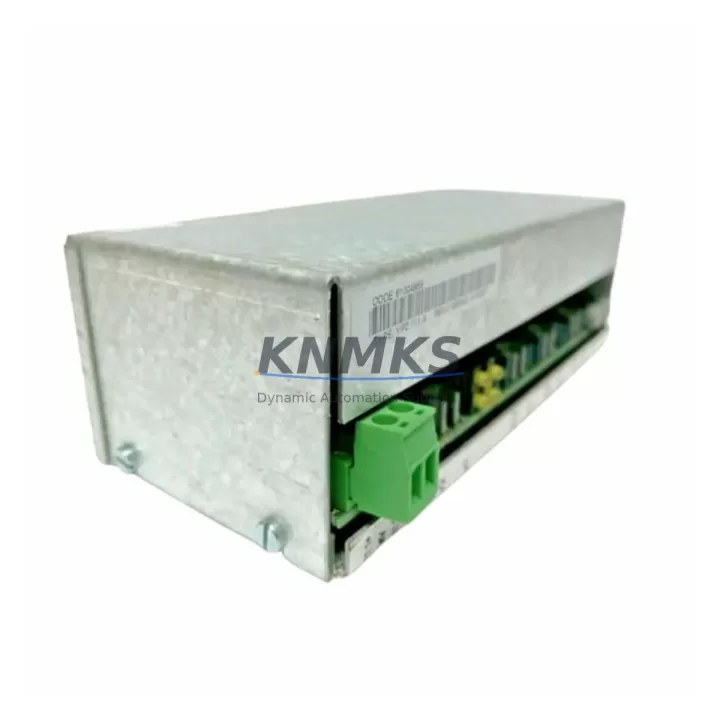
Overview
ABB YPC111A Maintenance-Proven Spare for AC500 Uptime
The ABB YPC111A is an output distributor module designed for the ABB AC500 PLC platform, one of the most widely deployed modular programmable logic controller families in continuous manufacturing, utilities, and process automation. For maintenance engineers managing aging control cabinets or executing scheduled overhauls, the YPC111A represents a critical spare that directly supports factory uptime, output signal integrity, and control loop continuity.
In industrial environments where unplanned downtime carries significant operational and financial consequences, having a verified, tested, and immediately available YPC111A in your spare parts inventory is a fundamental risk mitigation strategy. Whether you are responding to an emergency output failure, conducting a planned annual inspection, or extending the service life of an existing AC500 installation, this module delivers the compatibility, reliability, and traceability that maintenance and procurement engineers require.
Every unit shipped by KNMKS undergoes pre-shipment functional verification. The YPC111A is supplied with a support terms confirmed by quotation, ensuring that your replacement investment is protected from the moment of installation through your next scheduled maintenance cycle.
Spare Maintenance Table
| Parameter | Specification |
|---|---|
| Part Number | YPC111A |
| Manufacturer | ABB |
| Series | AC500 |
| Module Type | Output Distributor Module |
| Product Category | PLC Output Module |
| Country of Origin | Germany (DE) |
| Compatibility | ABB AC500 PLC family; compatible with standard AC500 backplane and I/O bus |
| Output Type | Digital output distribution; supports field device wiring consolidation |
| Installation | DIN rail or backplane-mounted; plug-in terminal connection |
| Operating Temperature | 0°C to +60°C (typical AC500 range) |
| Storage Temperature | -25°C to +70°C |
| Protection Rating | IP20 (cabinet-mounted) |
| Application Environment | Industrial control cabinets, process automation panels, utility substations |
| Maintenance Recommendation | Inspect terminal connections and output signal continuity during annual overhaul; replace if output drift or intermittent contact is detected |
| Pre-Shipment Testing | Functional verification performed on every unit |
| Support terms | 12 Months from date of shipment |
| Stock Status | availability confirmed by RFQ — Ready for Immediate Dispatch |
Maintenance Planning for Continuous Operation
Replacing the YPC111A output distributor module is rarely an isolated task. Experienced maintenance engineers know that when an output module shows signs of failure — intermittent signal loss, terminal overheating, or communication errors on the I/O bus — the surrounding components in the same control cabinet deserve equal scrutiny.
During a YPC111A replacement, it is standard practice to inspect the ABB AC500 CPU module (such as the PM573 or PM583 series) for firmware integrity and communication health. The AC500 power supply module (PS501 or PS502 series) should be checked for output voltage stability, as fluctuating supply voltage is a common root cause of output module degradation. If the cabinet includes ABB TB511 or TB521 terminal base units, verify that the backplane connectors are free of oxidation and that the locking mechanism is fully engaged.
For cabinets operating in environments with high electromagnetic interference or frequent load switching, the ABB DI524 digital input module installed in the same rack should be tested for signal accuracy, as EMI-induced noise can affect both input and output modules simultaneously. Where the AC500 system interfaces with field instruments via ABB AI523 analog input modules, confirm that signal isolation is intact and that 4–20 mA loops are within calibration tolerance.
Procurement engineers building a comprehensive spare parts kit for AC500-based systems should also consider stocking ABB TK501 communication cables and relevant bus connectors, as communication link failures between the CPU and I/O modules are a frequent cause of false output faults that are misdiagnosed as module failures. A well-structured spare parts inventory — including the YPC111A alongside power, communication, and I/O components — significantly reduces mean time to repair (MTTR) and supports continuous production targets.
Site Replacement Workflow
Replacing the ABB YPC111A in an active AC500 installation follows a structured workflow designed to minimize control system downtime and ensure safe, compatible restoration of output functionality.
Step 1 — Pre-Replacement Verification: Before removing the existing module, document the current output channel assignments, terminal wiring labels, and any active output states. Confirm that the replacement YPC111A carries the same hardware revision where possible, or verify cross-compatibility with the installed AC500 firmware version.
Step 2 — Safe Isolation: De-energize the relevant output circuits following your site’s lockout/tagout (LOTO) procedure. Do not rely solely on software-commanded output disable — physically isolate field power to the output terminals before removal.
Step 3 — Module Removal and Inspection: Remove the faulty YPC111A and inspect the backplane connector and terminal block for signs of arcing, corrosion, or mechanical damage. If the terminal block shows damage, replace it before installing the new module to prevent recurring failures.
Step 4 — Installation and Wiring: Install the replacement YPC111A, reconnect field wiring according to the documented terminal assignments, and verify that all connections are torqued to specification. Re-energize the output circuits and confirm correct signal states via the AC500 programming environment or HMI.
Step 5 — Functional Test: Execute a channel-by-channel output test to confirm that all field devices respond correctly. Log the replacement in your maintenance management system (CMMS) and update the spare parts inventory accordingly.
This structured approach reduces the risk of wiring errors, ensures system compatibility, and supports a complete audit trail for regulated industries including pharmaceuticals, food processing, and utilities.
Spare Parts Support FAQ
Q1: What is the support terms coverage for the ABB YPC111A supplied by KNMKS?
Every YPC111A unit is covered by a support terms confirmed by quotation from the date of shipment. This covers manufacturing defects and functional failures under normal operating conditions. Our technical team provides replacement support and failure analysis documentation upon request.
Q2: How do you verify compatibility before shipment?
Each unit undergoes pre-shipment functional testing to confirm output channel operation and bus communication integrity. We cross-reference the hardware revision against known AC500 compatibility matrices and can provide test records upon request for quality-critical procurement.
Q3: Can the YPC111A replace older or discontinued ABB output distributor modules in legacy AC500 systems?
The YPC111A is designed for the AC500 platform and is compatible with standard AC500 backplane configurations. For legacy installations using earlier AC500 hardware revisions, we recommend confirming the firmware version of your CPU module before installation. Our technical team can assist with compatibility verification prior to purchase.
Q4: What is your long-term supply commitment for this part?
KNMKS maintains dedicated inventory of AC500 series spare parts to support long-term maintenance programs. We supply to customers with multi-year maintenance contracts, annual inspection schedules, and emergency replacement requirements. For high-volume or scheduled procurement, contact our sales team to discuss reserved stock arrangements and lead time guarantees.
—
© 2026 KNMKS. All rights reserved.
Original Source: https://knmks.com
Contact: admin@knmks.com | +86 18359268345
Product Identification
- Brand / Ecosystem
-
ABB
ABB - Model / Series
-
YPC111A
AC500 Series - Product Family
- PLCs & Controllers
- Availability Status
- Available on request after model and quantity confirmation
- Inquiry Type
- B2B RFQ, replacement inquiry and project spare-part request
- Pre-Quote Check
- Exact SKU, brand, series, quantity, nameplate photos and destination country are checked before quotation
System Path
Where this product fits in the KNMKS automation structure.
Specification & Inquiry Focus
- Control platform
- PLC, PAC and modular controllers
- Common needs
- CPU, rack, power and I/O expansion
- Project support
- Replacement, cabinet build and maintenance
Buyer Confirmation
Information KNMKS checks before replying.
- Exact model
- YPC111A
- Brand / ecosystem
- ABB
- Product family
- PLCs & Controllers
- Application note
- Replacement, maintenance, project build or spare-part list
- Useful photos
- Nameplate, installed unit, cabinet layout or connector side
- Delivery details
- Quantity, destination country and target schedule
Document Support
Files and notes can be confirmed during quotation.
- Product photos or nameplate confirmation when available
- Packing and delivery notes before quotation confirmation
- Support scope and delivery terms confirmed per inquiry
- Export document coordination for qualified B2B requests
Inquiry Support
- Model cross-checking before quotation
- CPU, power, rack and expansion module matching
- Support for replacement and project inquiry
What to Send Us
- Brand and exact model number: ABB YPC111A
- Quantity and required delivery time
- Application, replacement requirement or nameplate photo
- Destination country and shipping preference
RFQ Preparation
This is a product inquiry page built for RFQ communication.
Fast Model Check
Send this model to KNMKS for confirmation.
Include quantity, destination country and photos if this is a maintenance replacement. The inquiry will be saved with a reference number after submission.
Brand & Compatibility Note
KNMKS displays automation product information for well-known industrial brand ecosystems and compatible replacement references. Brand names are used for product identification and compatibility reference only; final availability and commercial terms are confirmed per quotation.
 Manufacturing
 Machine Tools
 Packaging
 Energy & Power



 HMI & Displays
 Servo Systems
 Variable Frequency Drives
 Sensors