
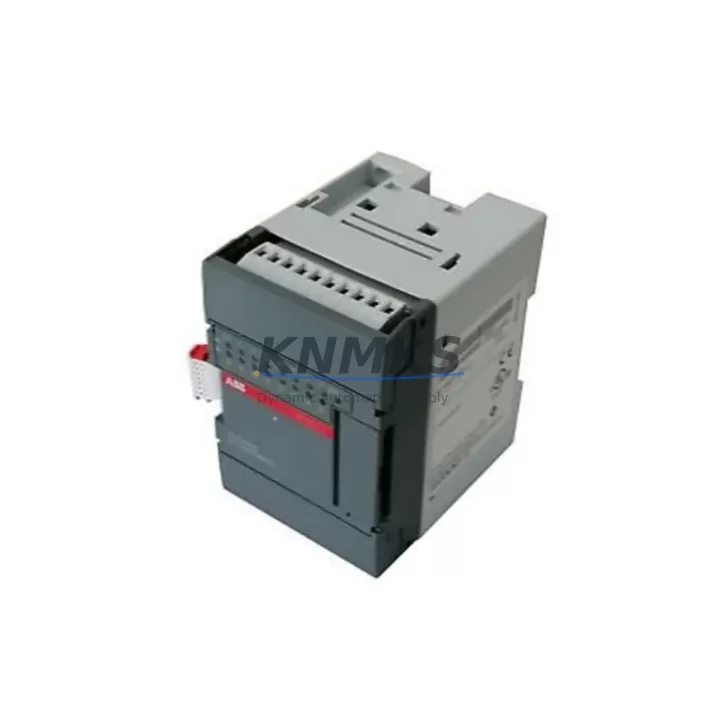
Overview
ABB XI16E1 1SBP260100R1001 Maintenance-Proven Spare Part for Factory Uptime
The ABB XI16E1 (part number 1SBP260100R1001) is a 16-channel digital input expansion module designed for the ABB AC500 PLC platform — one of the most widely deployed modular programmable logic controller families in industrial automation. Maintenance engineers and procurement teams across process industries, machine building, and factory automation rely on this module to sustain continuous production, reduce unplanned downtime, and maintain system integrity during scheduled and emergency maintenance events.
As an original spare part, the XI16E1 is engineered to slot directly into AC500 expansion racks without firmware reconfiguration or hardware adaptation. Its 24 VDC digital input channels interface with field sensors, proximity switches, push buttons, and safety interlocks — making it a critical node in any AC500-based control cabinet. When this module fails or degrades, the consequences range from partial I/O loss to complete line stoppage, which is why stocking a verified replacement is a standard practice in high-availability facilities.
KNMKS supplies the XI16E1 1SBP260100R1001 as a tested, original spare with a support terms confirmed by quotation. Every unit undergoes functional verification prior to shipment, ensuring that the module you receive is ready for immediate installation without additional bench testing on site.
Spare Maintenance Table
| Part Number | 1SBP260100R1001 |
| Model | XI16E1 |
| Brand | ABB |
| Series | AC500 |
| Module Type | 16-Channel Digital Input Expansion Module |
| Input Voltage | 24 VDC |
| Number of Inputs | 16 DI channels |
| Signal Standard | IEC 61131-2 Type 1/3 compatible |
| Backplane Interface | AC500 expansion bus (direct rack mount) |
| Operating Temperature | -25°C to +60°C |
| Protection Rating | IP20 (cabinet installation) |
| Country of Origin | Germany |
| Compatibility | ABB AC500 PM5xx / PM5xx-ETH CPU families |
| Installation | DIN rail, AC500 expansion rack |
| Maintenance Recommendation | Inspect every 12–24 months; replace on I/O fault or channel failure |
| Support terms | 12 Months — tested before shipment |
Maintenance Planning for Continuous Operation
Replacing the XI16E1 in a live AC500 control cabinet is rarely an isolated task. Experienced maintenance engineers know that a digital input module failure is often a symptom of broader electrical stress in the cabinet — and that a thorough replacement procedure should include inspection of adjacent components to prevent repeat failures and ensure long-term system stability.
When servicing the XI16E1, the following components in the same control cabinet or electrical circuit should be inspected or replaced as part of a complete maintenance cycle:
- AC500 CPU Module (e.g., PM564-ETH, PM573-ETH): Verify firmware version compatibility with the replacement XI16E1. A CPU with outdated firmware may not correctly enumerate the new module on the expansion bus.
- AC500 Power Supply Module (e.g., PS501-PROG): Measure output voltage under load. An aging or undersized power supply is a common root cause of intermittent I/O module faults. Confirm the 24 VDC rail is within ±1% tolerance before commissioning the replacement module.
- Terminal Blocks and Field Wiring: Inspect all 16 input terminal connections for corrosion, loose crimps, or insulation breakdown. Re-torque terminals to manufacturer specification. Degraded wiring is a frequent cause of false input signals that are misdiagnosed as module failure.
- AC500 Expansion Bus Connector and Backplane: Clean the expansion bus connector contacts with isopropyl alcohol. Inspect the backplane for physical damage, bent pins, or oxidation. A faulty backplane connection will cause the new XI16E1 to report communication errors immediately after installation.
- 24 VDC Field Power Distribution Fuses: Check all fuses supplying the digital input field circuits. Blown or weakened fuses cause partial channel loss that mimics module failure. Replace with correctly rated fuses (typically 2A fast-blow per group).
- Signal Isolators and Surge Protectors: For inputs connected to field devices in electrically noisy environments (motors, VFDs, solenoids), verify that signal isolators or surge protection modules on the input lines are functional. A failed isolator can inject noise or overvoltage that damages the replacement module within weeks of installation.
Procurement engineers should consider stocking one XI16E1 per AC500 system as a minimum buffer, particularly for systems running 24/7 production schedules. Lead times for original ABB spare parts can extend to 4–8 weeks through standard distribution channels; maintaining on-site stock eliminates this risk entirely.
Site Replacement Workflow
The XI16E1 1SBP260100R1001 is a direct replacement for any XI16E1 unit installed in an AC500 expansion rack. The module is hot-swap capable in systems configured for it, but standard practice recommends a controlled shutdown sequence to protect field devices and CPU state.
Step 1 — Pre-Replacement Verification: Confirm the replacement module’s part number (1SBP260100R1001) matches the installed unit. Check the AC500 CPU’s I/O configuration in the engineering tool (Automation Builder or PS501) to verify the slot assignment and channel mapping before removal.
Step 2 — Safe Isolation: De-energize the 24 VDC field supply to the affected input group. Do not rely solely on the CPU’s software disable — physically isolate the field power to prevent accidental actuation of connected devices during the swap.
Step 3 — Module Removal and Inspection: Remove the faulty XI16E1 and inspect the expansion bus connector and rack slot for damage. Document any visible signs of overheating, moisture ingress, or mechanical stress.
Step 4 — Installation and Commissioning: Insert the replacement XI16E1 into the same rack slot. Restore field power and CPU communication. Verify all 16 input channels report correct status in the SCADA or HMI display (e.g., ABB CP600 HMI panel or third-party SCADA). Perform a functional test by actuating each connected field device and confirming the corresponding input bit toggles correctly.
Step 5 — Documentation: Record the replacement in the maintenance log with the new module’s serial number, installation date, and test results. Update the spare parts inventory to trigger reorder of a replacement buffer unit.
This workflow minimizes downtime to under 30 minutes for a trained technician and ensures the AC500 system returns to full operational status with verified I/O integrity.
Spare Parts Support FAQ
Q1: Is the XI16E1 1SBP260100R1001 compatible with all AC500 CPU variants?
The XI16E1 is compatible with the full ABB AC500 PM5xx CPU family, including PM554, PM564, PM573, PM583, and PM592 variants, both standard and ETH versions. Compatibility with older PM5xx-DP (PROFIBUS) CPUs should be verified against the specific firmware version in use. KNMKS can provide compatibility confirmation before shipment upon request.
Q2: What testing is performed before shipment?
Every XI16E1 unit supplied by KNMKS undergoes functional verification on an AC500 test rack, confirming all 16 input channels respond correctly to 24 VDC signals, the expansion bus communication is error-free, and the module’s diagnostic LEDs operate as specified. A test report is available upon request.
Q3: What does the support terms confirmed by quotation cover?
The support terms confirmed by quotation cover manufacturing defects and functional failures under normal operating conditions. It does not cover damage caused by incorrect installation, overvoltage events, or physical mishandling. KNMKS provides direct replacement or documented resolution support for any unit that fails within the confirmed support period, with no requirement to return to the original manufacturer’s service center.
Q4: Can KNMKS support long-term or recurring supply of the XI16E1?
Yes. KNMKS maintains stock of the XI16E1 1SBP260100R1001 and can support blanket purchase orders, annual maintenance contracts, and emergency same-day dispatch for critical production facilities. Contact our team to discuss volume pricing and dedicated stock reservation for your site’s maintenance program.
© 2026 KNMKS. All rights reserved.
Original Source: https://knmks.com
Contact: admin@knmks.com | +86 18359268345
Product Identification
- Brand / Ecosystem
-
ABB
ABB - Model / Series
-
XI16E1 1SBP260100R1001
AC500 Series - Product Family
- PLCs & Controllers
- Availability Status
- Available on request after model and quantity confirmation
- Inquiry Type
- B2B RFQ, replacement inquiry and project spare-part request
- Pre-Quote Check
- Exact SKU, brand, series, quantity, nameplate photos and destination country are checked before quotation
System Path
Where this product fits in the KNMKS automation structure.
Specification & Inquiry Focus
- Control platform
- PLC, PAC and modular controllers
- Common needs
- CPU, rack, power and I/O expansion
- Project support
- Replacement, cabinet build and maintenance
Buyer Confirmation
Information KNMKS checks before replying.
- Exact model
- XI16E1 1SBP260100R1001
- Brand / ecosystem
- ABB
- Product family
- PLCs & Controllers
- Application note
- Replacement, maintenance, project build or spare-part list
- Useful photos
- Nameplate, installed unit, cabinet layout or connector side
- Delivery details
- Quantity, destination country and target schedule
Document Support
Files and notes can be confirmed during quotation.
- Product photos or nameplate confirmation when available
- Packing and delivery notes before quotation confirmation
- Support scope and delivery terms confirmed per inquiry
- Export document coordination for qualified B2B requests
Inquiry Support
- Model cross-checking before quotation
- CPU, power, rack and expansion module matching
- Support for replacement and project inquiry
What to Send Us
- Brand and exact model number: ABB XI16E1 1SBP260100R1001
- Quantity and required delivery time
- Application, replacement requirement or nameplate photo
- Destination country and shipping preference
RFQ Preparation
This is a product inquiry page built for RFQ communication.
Fast Model Check
Send this model to KNMKS for confirmation.
Include quantity, destination country and photos if this is a maintenance replacement. The inquiry will be saved with a reference number after submission.
Brand & Compatibility Note
KNMKS displays automation product information for well-known industrial brand ecosystems and compatible replacement references. Brand names are used for product identification and compatibility reference only; final availability and commercial terms are confirmed per quotation.
 Manufacturing
 Machine Tools
 Packaging
 Energy & Power



 HMI & Displays
 Servo Systems
 Variable Frequency Drives
 Sensors