
Overview
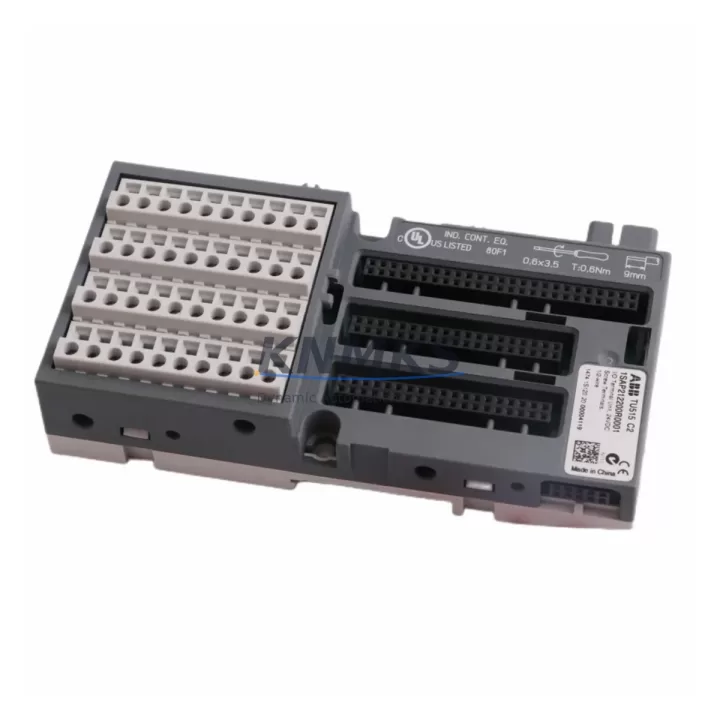
ABB TU515 1SAP212200R0001 Migration-Ready I/O Terminal: Legacy Control System Retrofit & Upgrade
The ABB TU515 (catalog number 1SAP212200R0001) is a compact, DIN rail-mounted I/O terminal unit designed for the AC500 modular PLC platform. As industrial facilities accelerate the retirement of aging S500 and earlier-generation control architectures, the TU515 has become a critical component in structured migration projects — providing a reliable, drop-in-compatible interface between field wiring and AC500 signal modules without requiring panel rewiring or backplane redesign.
For maintenance engineers and system integrators managing legacy control panel upgrades, the TU515 addresses one of the most time-sensitive challenges in brownfield automation: preserving existing terminal wiring while transitioning to a modern, supportable PLC platform. Its screw-terminal design accepts standard 0.2–2.5 mm² conductors, and its mechanical footprint aligns with the AC500 SM500 series signal modules, including the SM560-S, DI581, DO581, and AI531 — allowing direct module-to-terminal mating without adapter plates or custom brackets.
Migration Compatibility Table
| Parameter | Specification / Retrofit Note |
|---|---|
| Part Number | TU515 / 1SAP212200R0001 |
| Compatible Platform | ABB AC500 PLC Series (PM571, PM581, PM591, PM595) |
| Signal Module Interface | Direct plug-in for SM500 series I/O modules (DI, DO, AI, AO) |
| Terminal Type | Screw terminals, 0.2–2.5 mm² conductor range |
| Mounting | DIN rail (EN 60715 TS35), no panel drilling required |
| Communication Compatibility | PROFIBUS DP, PROFINET IO, Modbus RTU (via CPU module) |
| Backplane Interface | AC500 internal bus connector — no address switch required |
| Replacement Scope | Replaces legacy S500 terminal bases in AC500 upgrade paths |
| Retrofit Wiring Action | Field wiring re-terminated directly; no intermediate marshalling required |
| Firmware Dependency | None — passive terminal unit, firmware managed at CPU/module level |
| Installation Space | Compact profile; verify DIN rail segment length before ordering |
| Support terms | 12 months from shipment date, covered by KNMKS quality guarantee |
Retrofit Planning for Existing Automation Systems
A successful TU515 retrofit begins well before the maintenance window opens. The first step is a panel audit: document the existing terminal base model, confirm the DIN rail segment length available for the new TU515 footprint, and verify that the mating signal module — typically a DI581 digital input module or DO581 digital output module — is already installed or on order. In mixed-signal panels, engineers frequently combine TU515 units with AI531 analog input modules to consolidate legacy 4–20 mA loop wiring onto the AC500 backplane without introducing signal conditioning hardware.
Power budget verification is essential before commissioning. The AC500 PM581 or PM595 CPU module supplies backplane power to all connected I/O modules through the internal bus; adding TU515-based expansion segments must remain within the CPU’s rated I/O bus current. For larger panels with extended I/O counts, a TB521-ETH or TB541 bus terminal is typically inserted to segment the backplane and distribute power independently, preventing voltage droop across long DIN rail runs.
Communication link integrity is another pre-migration checkpoint. If the legacy system used PROFIBUS DP for field device communication, confirm that the replacement AC500 CPU module carries a PROFIBUS master port or that a CM572-DP communication module is included in the new rack configuration. For facilities transitioning to PROFINET IO, the CM575-DN or a PROFINET-capable PM595 CPU eliminates the need for protocol gateways, reducing latency and simplifying network topology documentation.
HMI screen mapping should be completed in parallel with hardware staging. If the existing operator interface was built on an ABB CP600 panel or a third-party HMI communicating via Modbus RTU, variable address mapping must be re-validated against the new AC500 program structure before go-live. Retaining the original variable naming convention in the replacement PLC program significantly reduces HMI rework time and minimizes the risk of operator confusion during the transition period.
For sites managing phased migrations — where only a subset of control loops are being upgraded in each maintenance window — the TU515 supports incremental deployment. Individual terminal bases can be installed and wired during planned shutdowns, with signal modules inserted and activated during subsequent windows, allowing the legacy system to remain operational on unaffected loops throughout the project timeline.
Downtime Control During System Migration
Minimizing unplanned downtime during a TU515-based retrofit requires a structured pre-staging and parallel-testing approach. Before the cutover window, the replacement AC500 rack — including the PM581 CPU, TU515 terminal bases, and all signal modules — should be fully assembled, wired on a bench, and loaded with the converted PLC program. Factory acceptance testing (FAT) at this stage catches wiring errors, module address conflicts, and program logic issues before the hardware reaches the production floor.
During the cutover itself, field wiring should be transferred loop by loop from the legacy terminal base to the TU515 screw terminals, with each loop verified for continuity and correct polarity before the next is disconnected. This sequential approach preserves control continuity on active loops and allows the commissioning engineer to isolate faults to individual channels rather than troubleshooting an entire panel simultaneously.
Original PLC program logic should be archived in its native format before any modifications are made. For AC500 systems, this means exporting the full project from Automation Builder with all variable declarations, function block libraries, and hardware configuration files preserved. This archive serves as the rollback baseline if the migration encounters unexpected compatibility issues during live commissioning.
Post-cutover, a structured loop check against the original I/O list confirms that all field signals are correctly mapped to the new TU515 terminal assignments. Signal isolation verification — particularly for analog loops sharing common ground references — prevents ground loop interference that can cause erratic readings on AI531 analog input channels. Once all loops are verified, the system is released for normal operation under a 24–48 hour monitoring period before the migration is formally closed.
Retrofit Support FAQ
Q1: Is the TU515 a direct replacement for older ABB S500 terminal bases?
The TU515 is designed for the AC500 platform and is not mechanically interchangeable with S500-series terminal bases. However, it is the correct terminal unit for AC500 SM500 signal modules used in AC500 upgrade projects replacing legacy S500 systems. Field wiring can be re-terminated directly to TU515 screw terminals during the cutover.
Q2: Does the TU515 require firmware configuration or address setting?
No. The TU515 is a passive terminal unit with no onboard firmware or address switches. All module addressing and I/O configuration is managed at the AC500 CPU level through Automation Builder. This simplifies replacement logistics — a spare TU515 can be installed without any pre-configuration steps.
Q3: What conductor sizes are compatible with TU515 screw terminals?
The TU515 accepts conductors from 0.2 mm² to 2.5 mm² (solid or stranded). For legacy panels using older 1.5 mm² or 2.5 mm² field wiring, no re-cabling is required — existing conductors can be re-terminated directly into the TU515 terminals using standard flat-blade or cross-head screwdrivers.
Q4: What support terms and pre-shipment testing does KNMKS provide for the TU515?
All TU515 units supplied by KNMKS carry a support terms confirmed by quotation from the shipment date. Each unit undergoes pre-shipment inspection including visual examination, terminal integrity check, and connector seating verification. In-stock units are available for same-week dispatch. For project orders requiring multiple TU515 units alongside signal modules or CPU components, consolidated shipment with full packing documentation is available on request.
© 2026 KNMKS. All rights reserved.
Original Source: https://knmks.com
Contact: admin@knmks.com | +86 18359268345
Product Identification
- Brand / Ecosystem
-
ABB
ABB - Model / Series
-
TU515 1SAP212200R0001
AC500 Series - Product Family
- PLCs & Controllers
- Availability Status
- Available on request after model and quantity confirmation
- Inquiry Type
- B2B RFQ, replacement inquiry and project spare-part request
- Pre-Quote Check
- Exact SKU, brand, series, quantity, nameplate photos and destination country are checked before quotation
System Path
Where this product fits in the KNMKS automation structure.
Specification & Inquiry Focus
- Control platform
- PLC, PAC and modular controllers
- Common needs
- CPU, rack, power and I/O expansion
- Project support
- Replacement, cabinet build and maintenance
Buyer Confirmation
Information KNMKS checks before replying.
- Exact model
- TU515 1SAP212200R0001
- Brand / ecosystem
- ABB
- Product family
- PLCs & Controllers
- Application note
- Replacement, maintenance, project build or spare-part list
- Useful photos
- Nameplate, installed unit, cabinet layout or connector side
- Delivery details
- Quantity, destination country and target schedule
Document Support
Files and notes can be confirmed during quotation.
- Product photos or nameplate confirmation when available
- Packing and delivery notes before quotation confirmation
- Support scope and delivery terms confirmed per inquiry
- Export document coordination for qualified B2B requests
Inquiry Support
- Model cross-checking before quotation
- CPU, power, rack and expansion module matching
- Support for replacement and project inquiry
What to Send Us
- Brand and exact model number: ABB TU515 1SAP212200R0001
- Quantity and required delivery time
- Application, replacement requirement or nameplate photo
- Destination country and shipping preference
RFQ Preparation
This is a product inquiry page built for RFQ communication.
Fast Model Check
Send this model to KNMKS for confirmation.
Include quantity, destination country and photos if this is a maintenance replacement. The inquiry will be saved with a reference number after submission.
Brand & Compatibility Note
KNMKS displays automation product information for well-known industrial brand ecosystems and compatible replacement references. Brand names are used for product identification and compatibility reference only; final availability and commercial terms are confirmed per quotation.
 Manufacturing
 Machine Tools
 Packaging
 Energy & Power



 HMI & Displays
 Servo Systems
 Variable Frequency Drives
 Sensors