
Overview
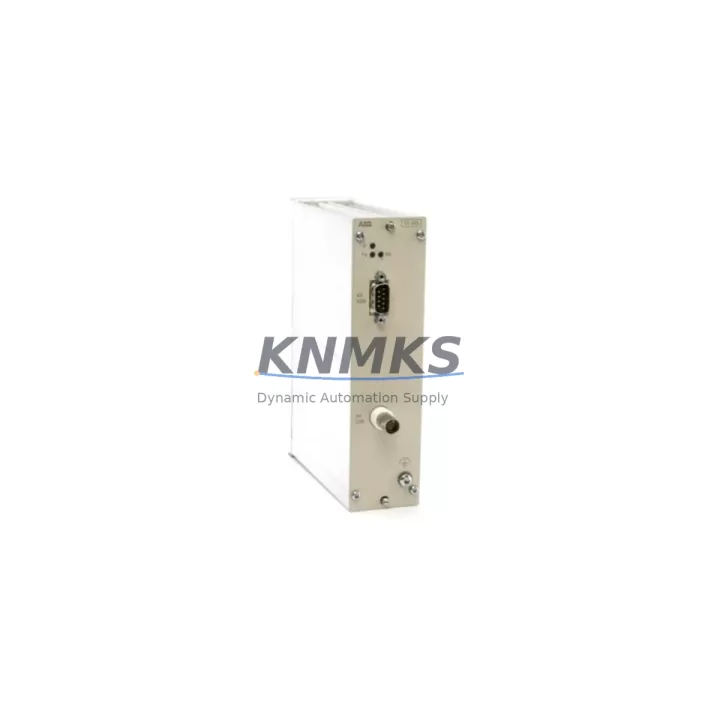
ABB TC513 Migration-Ready Relay Output Module for Legacy Control Systems
The ABB TC513 is an 8-channel relay output module engineered for the AC500 IDM (Intelligent Drive Module) platform, and it remains one of the most sought-after components in legacy system migration and control cabinet modernization projects. As automation engineers face increasing pressure to extend the operational life of installed AC500-based systems — or to execute structured migrations to newer control architectures — the TC513 provides a reliable, wiring-compatible, and drop-in replacement path that minimizes engineering rework and field commissioning time.
Sourced directly from ABB-authorized supply chains and subject to pre-shipment functional testing, each TC513 unit shipped by KNMKS is verified for relay contact integrity, coil actuation response, and terminal continuity before dispatch. With a support terms confirmed by quotation and confirmed in-stock availability, the TC513 is a dependable choice for maintenance teams managing spare parts lifecycle programs, emergency replacements, or phased system upgrades.
Migration Compatibility Table
| Parameter | ABB TC513 Specification | Migration / Retrofit Notes |
|---|---|---|
| Module Type | 8-Channel Relay Output | Direct replacement for legacy AC500 IDM relay output slots |
| Platform Compatibility | ABB AC500 IDM Series | Verify backplane slot assignment and rack addressing before installation |
| Terminal Wiring | Screw-terminal, field-wiring compatible | Existing field wiring can be reused; confirm terminal pitch matches original layout |
| Communication Interface | Internal IDM backplane bus | No protocol reconfiguration required for same-rack replacement |
| Installation Footprint | Standard AC500 IDM module width | Confirm available slot space in control cabinet; no panel modification needed |
| Firmware Compatibility | Compatible with existing AC500 IDM firmware | No firmware update required for direct replacement; verify CPU firmware version for expanded configurations |
| Replacement Recommendation | Drop-in replacement | Suitable for emergency swap, planned maintenance, and phased migration |
| Pre-Shipment Testing | Yes — relay contact, coil, terminal continuity | Each unit tested before dispatch |
| Support terms | 12 Months | Covered from date of shipment; applies to manufacturing defects |
Retrofit Planning for Existing Automation Systems
Successful integration of the ABB TC513 into an existing control system requires a structured pre-installation review. Engineers should begin by auditing the AC500 IDM rack configuration — confirming the number of occupied slots, the position of the CPU module (such as the PM573 or PM583 series), and the addressing scheme assigned to each I/O module. The TC513 occupies a defined slot address on the IDM backplane, and any mismatch between the physical slot and the address configured in the PLC program will result in I/O mapping errors that must be resolved before commissioning.
Power budget verification is equally critical. The AC500 IDM rack draws supply from a dedicated DC power supply module — typically a CP series unit — and adding or replacing relay output modules affects the total current draw on the backplane. Engineers should confirm that the installed power supply module has sufficient headroom to support the TC513’s relay coil current requirements, particularly in high-density racks where multiple output modules are active simultaneously.
For systems that include communication modules such as the CM572-DP (PROFIBUS DP) or CM577-ETH (Ethernet/IP), the relay output module’s I/O data is mapped through the CPU’s communication layer. When migrating from a failed or discontinued relay output module to the TC513, it is important to verify that the I/O variable mapping in the PLC program (typically managed in ABB Automation Builder or the legacy PS501 Control Builder) correctly references the new module’s slot address. In most same-rack replacement scenarios, no program changes are required — but this must be confirmed through a program review before the system is returned to service.
HMI screens connected to the AC500 system — whether via a CP600 series panel or a third-party SCADA interface — typically reference output status tags that are mapped to the relay module’s I/O addresses. A direct slot-for-slot replacement of the TC513 will not affect these tag mappings, but engineers should perform a live I/O test after installation to confirm that all relay outputs are correctly reflected in the HMI display and that any interlock logic dependent on relay feedback contacts is functioning as expected.
Where the retrofit involves expanding the system — for example, adding a TB523 digital input module or a AX521 analog I/O module alongside the TC513 — the rack’s total slot count and the CPU’s I/O capacity must be reviewed. Signal isolators may be required at the field wiring interface if the new relay outputs are driving loads with different voltage classes than the original installation. Installation space in the control cabinet should be confirmed before ordering additional modules, particularly in compact enclosures where DIN rail space is limited.
Downtime Control During System Migration
Minimizing unplanned downtime is the primary concern in any relay output module replacement on a live production system. For the ABB TC513, the recommended approach is a hot-standby swap procedure where the replacement module is pre-configured and verified offline before the system is taken out of service. This involves confirming the module’s slot address, reviewing the PLC program’s I/O mapping, and preparing the field wiring documentation so that reconnection can be completed within a defined maintenance window.
Before removing the failed or end-of-life module, engineers should capture a full backup of the PLC program from the CPU — using ABB Automation Builder’s online backup function or an equivalent tool — to ensure that the current program logic, including any relay output force commands or interlock overrides, is preserved. This backup also serves as the baseline for post-installation verification.
During the physical swap, field wiring should be labeled and photographed before disconnection. The TC513’s screw-terminal layout is compatible with the original AC500 IDM relay output module wiring, which means that reconnection can follow the original wiring diagram without modification. After reinstallation, the CPU should be restarted in RUN mode and a systematic I/O test performed — activating each relay output channel individually and confirming the corresponding field device response — before the system is returned to automatic operation.
For systems where continuous operation is required, a parallel commissioning approach can be used: the TC513 is installed in an adjacent slot (if available), the I/O mapping is updated in the PLC program, and the system is switched over to the new module without a full shutdown. This approach requires careful program management but can reduce effective downtime to under 15 minutes in well-prepared retrofit projects.
Retrofit Support FAQ
Q1: Is the ABB TC513 a direct replacement for the original AC500 IDM relay output module?
Yes. The TC513 is designed as a slot-compatible replacement for the AC500 IDM relay output position. In same-rack, same-slot replacement scenarios, no changes to the PLC program or field wiring are required. Engineers should confirm the slot address assignment in the CPU configuration before installation.
Q2: What pre-shipment testing is performed on TC513 units supplied by KNMKS?
Each TC513 unit undergoes functional testing covering relay contact integrity, coil actuation response, and terminal continuity before dispatch. A test record is available upon request. All units are covered by a support terms confirmed by quotation from the date of shipment.
Q3: Can the TC513 be used in a system that has been upgraded to a newer AC500 CPU?
The TC513 is compatible with the AC500 IDM backplane architecture. If the CPU has been upgraded within the AC500 family (for example, from a PM573 to a PM591), the TC513 will continue to function provided the IDM rack and backplane remain unchanged. Firmware version compatibility should be verified in ABB’s product documentation for cross-generation CPU upgrades.
Q4: What is the lead time and stock availability for the TC513?
KNMKS maintains in-stock inventory of the ABB TC513 to support emergency replacement and planned maintenance programs. Standard dispatch is within 1–3 business days. For bulk orders or long-term spare parts programs, contact our sales team to discuss reserved stock arrangements and extended supply agreements.
© 2026 KNMKS. All rights reserved.
Original Source: https://knmks.com
Contact: admin@knmks.com | +86 18359268345
Product Identification
- Brand / Ecosystem
-
ABB
ABB - Model / Series
-
TC513
AC500 Series - Product Family
- PLCs & Controllers
- Availability Status
- Available on request after model and quantity confirmation
- Inquiry Type
- B2B RFQ, replacement inquiry and project spare-part request
- Pre-Quote Check
- Exact SKU, brand, series, quantity, nameplate photos and destination country are checked before quotation
System Path
Where this product fits in the KNMKS automation structure.
Specification & Inquiry Focus
- Control platform
- PLC, PAC and modular controllers
- Common needs
- CPU, rack, power and I/O expansion
- Project support
- Replacement, cabinet build and maintenance
Buyer Confirmation
Information KNMKS checks before replying.
- Exact model
- TC513
- Brand / ecosystem
- ABB
- Product family
- PLCs & Controllers
- Application note
- Replacement, maintenance, project build or spare-part list
- Useful photos
- Nameplate, installed unit, cabinet layout or connector side
- Delivery details
- Quantity, destination country and target schedule
Document Support
Files and notes can be confirmed during quotation.
- Product photos or nameplate confirmation when available
- Packing and delivery notes before quotation confirmation
- Support scope and delivery terms confirmed per inquiry
- Export document coordination for qualified B2B requests
Inquiry Support
- Model cross-checking before quotation
- CPU, power, rack and expansion module matching
- Support for replacement and project inquiry
What to Send Us
- Brand and exact model number: ABB TC513
- Quantity and required delivery time
- Application, replacement requirement or nameplate photo
- Destination country and shipping preference
RFQ Preparation
This is a product inquiry page built for RFQ communication.
Fast Model Check
Send this model to KNMKS for confirmation.
Include quantity, destination country and photos if this is a maintenance replacement. The inquiry will be saved with a reference number after submission.
Brand & Compatibility Note
KNMKS displays automation product information for well-known industrial brand ecosystems and compatible replacement references. Brand names are used for product identification and compatibility reference only; final availability and commercial terms are confirmed per quotation.
 Manufacturing
 Machine Tools
 Packaging
 Energy & Power



 HMI & Displays
 Servo Systems
 Variable Frequency Drives
 Sensors