
Overview
ABB TB5610-2ETH Migration-Ready Ethernet Module for Legacy AC500 Control Systems
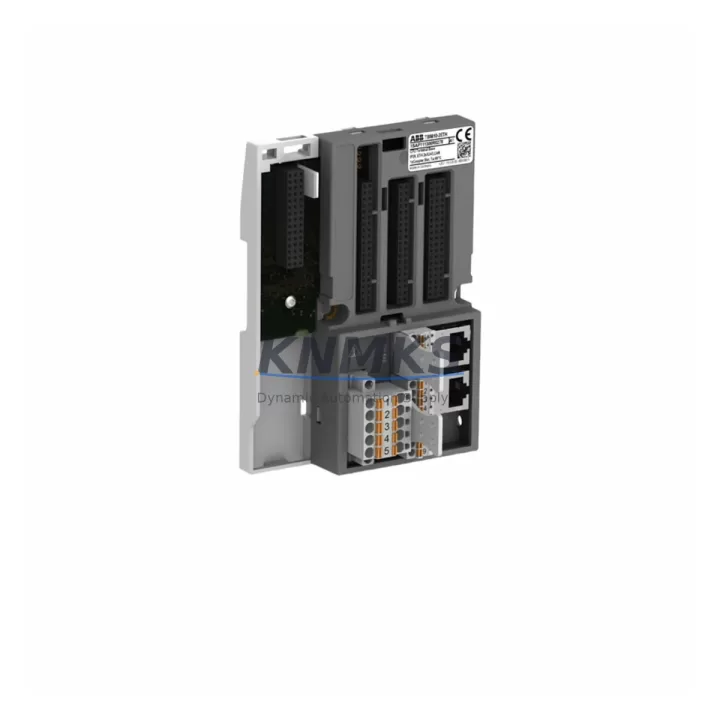
The ABB TB5610-2ETH is a dual-port Ethernet communication module engineered for the AC500 PLC platform, widely deployed across industrial automation, process control, and building management systems. As legacy AC500 installations approach end-of-service milestones, the TB5610-2ETH has become a critical component in retrofit and upgrade projects where maintaining Ethernet-based communication continuity is non-negotiable. Whether you are replacing a failed communication module, migrating from an older single-port Ethernet card, or expanding network redundancy in an existing control cabinet, the TB5610-2ETH delivers the compatibility, protocol support, and physical form factor required for a low-risk, minimum-downtime replacement.
Designed to slot directly into the AC500 CPU backplane, the TB5610-2ETH supports both Modbus TCP and PROFINET IO protocols, making it suitable for environments where mixed communication architectures are common. In retrofit scenarios, engineers frequently encounter control cabinets where the existing Ethernet module has degraded due to age, thermal cycling, or firmware incompatibility with updated SCADA or DCS host systems. The TB5610-2ETH addresses these failure modes with a current-production module that carries full ABB firmware compatibility for AC500 V2 and V3 CPU families, including the PM573, PM583, PM591, and PM595 processor modules.
Before committing to a replacement, retrofit planners should verify several key parameters: confirm the backplane slot assignment and module address configuration in the existing PLC program; check that the power supply module — typically a PS501 or PS560 series unit — can sustain the additional current draw of the dual-port Ethernet interface; and review the terminal wiring layout to ensure RJ45 port orientation and cable routing are compatible with the existing cabinet layout. In installations where the TB5610-2ETH replaces a single-port predecessor, the second Ethernet port can be leveraged for network segmentation, separating the SCADA communication link from the field device network without requiring additional hardware.
Communication migration is one of the most technically demanding phases of any AC500 retrofit. When the existing control program uses Modbus TCP function blocks referencing specific IP addresses and port assignments, those parameters must be preserved or systematically updated in the replacement module’s configuration. PROFINET IO device naming and IP assignment must also be re-validated against the engineering station’s hardware configuration file. Failure to align these parameters before power-up is a leading cause of extended commissioning delays. It is strongly recommended to export and archive the full hardware configuration from the ABB Automation Builder or Control Builder Plus environment before removing the original module.
For installations that also involve upgrading the HMI layer — for example, migrating from a CP600 panel to a CP620 or CP635 touchscreen — the TB5610-2ETH’s dual-port architecture simplifies the network topology by allowing the HMI communication link and the field network to operate on isolated subnets through the same module. This eliminates the need for an external managed switch in space-constrained control cabinets and reduces the overall component count in the retrofit bill of materials.
Signal isolation requirements should also be assessed during the retrofit planning phase. In environments with significant electrical noise — common in motor drive cabinets or high-current switching applications — the addition of a signal isolator or surge protection device on the Ethernet lines is advisable to protect the TB5610-2ETH’s communication ports. This is particularly relevant when the module is installed in close proximity to variable frequency drives or large contactors.
All TB5610-2ETH units supplied by KNMKS are sourced from verified distribution channels, subjected to pre-shipment functional testing, and covered by a support terms confirmed by quotation. Stock is maintained across multiple regional warehouses to support emergency replacement requirements with rapid global dispatch. Each unit is shipped with original packaging and documentation to support traceability requirements in regulated industries.
Migration Compatibility Table
| Parameter | Details |
|---|---|
| Compatible PLC Platform | ABB AC500 V2 / V3 (PM573, PM583, PM591, PM595) |
| Communication Protocols | Modbus TCP, PROFINET IO |
| Ethernet Ports | 2 × RJ45 (dual-port) |
| Backplane Interface | AC500 standard backplane slot (direct plug-in) |
| Replacement For | Single-port Ethernet modules in legacy AC500 configurations |
| Installation Space | Standard AC500 module width; verify cabinet rail clearance |
| Firmware Compatibility | Compatible with Automation Builder / Control Builder Plus |
| Power Requirement | Supplied via backplane; verify PS501/PS560 capacity |
| Commissioning Tool | ABB Automation Builder, Control Builder Plus |
| Pre-Shipment Testing | Yes — functional test performed before dispatch |
| Support terms | 12 Months |
| Origin | Germany (DE) |
Retrofit Planning for Existing Automation Systems
A successful TB5610-2ETH retrofit begins with a thorough audit of the existing AC500 control cabinet. The backplane rack — typically a TB523 or TB526 expansion rack — must be inspected for available slots and mechanical condition before the new module is installed. If the retrofit also involves replacing aging I/O modules such as DC532 digital input cards or AX522 analog output modules, the slot reassignment must be reflected in the updated hardware configuration to avoid address conflicts that would prevent the CPU from recognizing the new Ethernet module.
Power budget verification is a mandatory step. The PS501 or PS560 power supply module must have sufficient headroom to support the TB5610-2ETH alongside any other modules being added or upgraded in the same retrofit cycle. If the power budget is marginal, a parallel power supply or a higher-capacity PS560 unit should be considered before proceeding.
For sites where the retrofit includes a programming cable replacement — for example, transitioning from a serial programming interface to USB or Ethernet-based programming via the TK501 or TK503 cable — the new communication path must be validated against the Automation Builder project settings before the legacy cable is decommissioned. This is particularly important in remote or unmanned installations where on-site access for re-commissioning is costly.
In multi-cabinet installations, the TB5610-2ETH’s dual-port capability supports a daisy-chain or star network topology without requiring an external switch, reducing the number of active network components that must be maintained over the system lifecycle. This is a significant advantage in retrofit projects where minimizing new hardware introductions is a project constraint.
Downtime Control During System Migration
Minimizing unplanned downtime is the primary operational concern in any AC500 Ethernet module replacement. The recommended approach is to complete all pre-migration steps — hardware configuration export, IP address documentation, PROFINET device name recording, and Modbus TCP parameter archiving — before the maintenance window begins. This ensures that the replacement module can be configured and validated within the planned outage period without requiring extended troubleshooting.
Where process continuity is critical, a hot-standby or parallel commissioning approach should be considered: the TB5610-2ETH is configured and tested on a bench setup replicating the target rack configuration before being installed in the live cabinet. This approach allows firmware loading, IP assignment, and protocol configuration to be completed and verified offline, reducing the in-cabinet commissioning time to a module swap and network validation sequence.
Original program logic stored in the AC500 CPU’s non-volatile memory is not affected by the Ethernet module replacement, provided the CPU is not powered down during the swap in systems that support hot-swap module replacement. For systems that require a full power cycle, the program should be backed up to the Automation Builder project archive and to the CPU’s SD card slot before the maintenance window to protect against data loss.
Post-installation, the communication link should be validated using the Automation Builder online diagnostic tools before returning the system to automatic operation. PROFINET IO device status, Modbus TCP connection state, and network traffic indicators should all be confirmed as nominal before the maintenance window is closed.
Retrofit Support FAQ
Q: Is the TB5610-2ETH a direct drop-in replacement for older single-port Ethernet modules in the AC500 platform?
A: Yes, the TB5610-2ETH is physically and electrically compatible with the AC500 backplane. However, the hardware configuration in Automation Builder must be updated to reflect the new module type and its dual-port capability before downloading to the CPU.
Q: What commissioning steps are required after installing the TB5610-2ETH?
A: After physical installation, assign the module’s IP addresses via Automation Builder, configure PROFINET IO device names if applicable, validate Modbus TCP connection parameters, and perform a full communication test with all connected field devices and SCADA systems before returning to automatic operation.
Q: Does KNMKS provide pre-shipment testing for the TB5610-2ETH?
A: Yes. Every TB5610-2ETH unit undergoes functional testing prior to dispatch. Units are supplied with original packaging and are covered by a support terms confirmed by quotation from the date of shipment.
Q: What is the typical lead time and stock availability for the TB5610-2ETH?
A: KNMKS maintains multi-region stock of the TB5610-2ETH to support emergency and planned replacement requirements. Contact admin@knmks.com or call +86 18359268345 for current availability and expedited shipping options.
© 2026 KNMKS. All rights reserved.
Original Source: https://knmks.com
Contact: admin@knmks.com | +86 18359268345
Product Identification
- Brand / Ecosystem
-
ABB
ABB - Model / Series
-
TB5610-2ETH
AC500 Series - Product Family
- PLCs & Controllers
- Availability Status
- Available on request after model and quantity confirmation
- Inquiry Type
- B2B RFQ, replacement inquiry and project spare-part request
- Pre-Quote Check
- Exact SKU, brand, series, quantity, nameplate photos and destination country are checked before quotation
System Path
Where this product fits in the KNMKS automation structure.
Specification & Inquiry Focus
- Control platform
- PLC, PAC and modular controllers
- Common needs
- CPU, rack, power and I/O expansion
- Project support
- Replacement, cabinet build and maintenance
Buyer Confirmation
Information KNMKS checks before replying.
- Exact model
- TB5610-2ETH
- Brand / ecosystem
- ABB
- Product family
- PLCs & Controllers
- Application note
- Replacement, maintenance, project build or spare-part list
- Useful photos
- Nameplate, installed unit, cabinet layout or connector side
- Delivery details
- Quantity, destination country and target schedule
Document Support
Files and notes can be confirmed during quotation.
- Product photos or nameplate confirmation when available
- Packing and delivery notes before quotation confirmation
- Support scope and delivery terms confirmed per inquiry
- Export document coordination for qualified B2B requests
Inquiry Support
- Model cross-checking before quotation
- CPU, power, rack and expansion module matching
- Support for replacement and project inquiry
What to Send Us
- Brand and exact model number: ABB TB5610-2ETH
- Quantity and required delivery time
- Application, replacement requirement or nameplate photo
- Destination country and shipping preference
RFQ Preparation
This is a product inquiry page built for RFQ communication.
Fast Model Check
Send this model to KNMKS for confirmation.
Include quantity, destination country and photos if this is a maintenance replacement. The inquiry will be saved with a reference number after submission.
Brand & Compatibility Note
KNMKS displays automation product information for well-known industrial brand ecosystems and compatible replacement references. Brand names are used for product identification and compatibility reference only; final availability and commercial terms are confirmed per quotation.
 Manufacturing
 Machine Tools
 Packaging
 Energy & Power



 HMI & Displays
 Servo Systems
 Variable Frequency Drives
 Sensors