
Overview
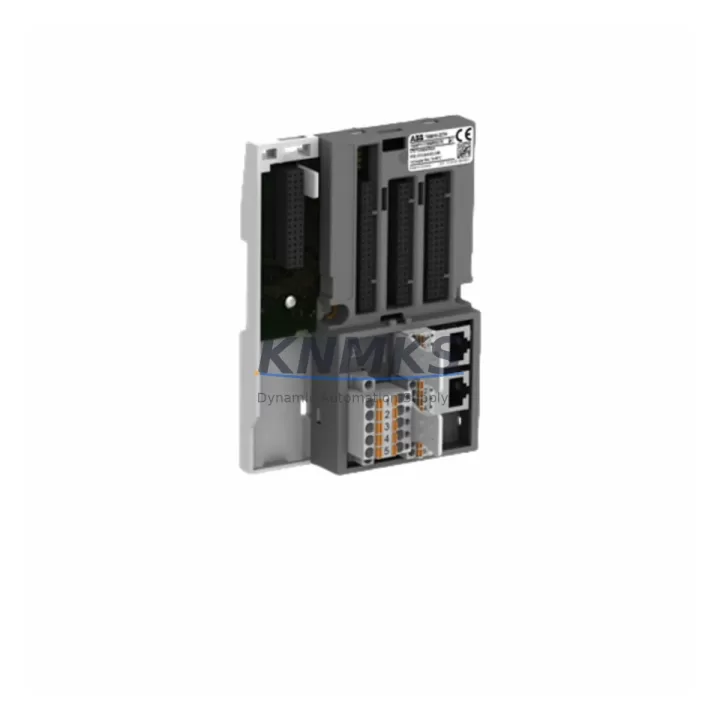
ABB TB5610-2ETH 1SAP111300R0278 Maintenance-Proven Spare Part for Factory Uptime
The ABB TB5610-2ETH (order reference 1SAP111300R0278) is a dual-port Ethernet communication module engineered for the ABB AC500 programmable logic controller platform. In process-critical environments — from continuous manufacturing lines and water treatment facilities to power distribution substations and chemical plant automation — this module serves as the primary Ethernet backbone connecting the AC500 CPU to SCADA systems, HMI panels, engineering workstations, and peer PLCs over standard 10/100 Mbit/s TCP/IP networks. When this module fails or degrades, the entire supervisory communication layer is severed, triggering unplanned downtime that can cost thousands of dollars per hour. Holding a verified, pre-tested TB5610-2ETH 1SAP111300R0278 spare on-site is the single most effective measure a maintenance team can take to compress mean time to repair (MTTR) and restore production within one shift.
This listing supplies an original ABB TB5610-2ETH 1SAP111300R0278 sourced from authorized channels, individually tested before shipment, and backed by a support terms confirmed by quotation. Every unit undergoes functional verification of both Ethernet ports, firmware integrity checks, and physical inspection of the backplane connector and housing before dispatch. Global express logistics ensure the module reaches your facility within the lead time agreed at order confirmation, supporting both planned annual overhauls and emergency breakdown recovery.
Spare Maintenance Table
| Parameter | Specification |
|---|---|
| Part Number | TB5610-2ETH |
| Order Reference | 1SAP111300R0278 |
| Manufacturer | ABB |
| Series | AC500 |
| Module Type | Dual-Port Ethernet Communication Module |
| Interface | 2 × RJ45, 10/100 Mbit/s, Full/Half Duplex |
| Protocols Supported | MODBUS TCP, EtherNet/IP, IEC 61850 (application-dependent) |
| Backplane Compatibility | AC500 CPU modules (PM5xx series) via TB5xx expansion bus |
| Supply Voltage | Powered via AC500 backplane (24 V DC bus) |
| Operating Temperature | -25 °C to +60 °C |
| Protection Rating | IP20 (panel-mount installation) |
| Country of Origin | Germany |
| Mounting | DIN rail via AC500 terminal base |
| Firmware | Compatible with Automation Builder / PS501 Control Builder Plus |
| Support terms | 12 Months — Covered from date of shipment |
| Pre-Shipment Test | Full functional test on both Ethernet ports; backplane connector verified |
| Condition | Original / New-equivalent, sourced from authorized supply chain |
Maintenance Planning for Continuous Operation
A TB5610-2ETH failure rarely occurs in isolation. Ethernet communication faults in an AC500 cabinet are frequently accompanied by — or misdiagnosed as — issues in adjacent components that maintenance engineers must systematically inspect during any corrective or preventive intervention.
Begin with the AC500 CPU module (PM573-ETH or PM591) itself: verify that the CPU’s onboard Ethernet port is not the actual fault source before condemning the TB5610-2ETH. Check the TB5xx terminal base that physically seats the communication module — cracked housings or oxidized backplane contacts are a common root cause of intermittent Ethernet faults that appear to originate in the module. Inspect the 24 V DC power supply module (CP502 or equivalent) feeding the AC500 rack; voltage sags below 21.6 V will cause communication modules to reset or fail to initialize, producing symptoms identical to a hardware fault.
Review the Ethernet patch cables and RJ45 connectors on both ports of the TB5610-2ETH: industrial environments subject cables to vibration, oil contamination, and repeated flexing that degrades contact integrity over 12–18 months. Replace with shielded Cat5e or Cat6 industrial-grade cables rated for the ambient temperature of the control cabinet. If the AC500 system communicates with a CP600 or CP400 series HMI panel, verify that the HMI’s Ethernet configuration still matches the IP address and subnet mask of the replacement module — firmware updates on the HMI side can silently reset network parameters.
For systems using MODBUS TCP or EtherNet/IP to interface with variable frequency drives, remote I/O racks, or third-party instruments, confirm that the replacement TB5610-2ETH carries the same firmware version as the failed unit, or that the connected devices are compatible with the firmware version shipped. Finally, inspect the DI/DO expansion modules (DC532 or DA501) in the same rack: a communication module fault can mask underlying I/O errors that will resurface after the Ethernet link is restored, causing nuisance trips on the first production run after maintenance.
Site Replacement Workflow
Step 1 — Isolate and document. Before removing the TB5610-2ETH 1SAP111300R0278, capture a full screenshot or export of the AC500 project configuration from Automation Builder, including the module address, IP settings, and any active MODBUS/EtherNet/IP device table. This eliminates re-commissioning guesswork and reduces replacement time from hours to minutes.
Step 2 — De-energize safely. Switch the AC500 rack to STOP mode via the CPU keyswitch or Automation Builder. Disconnect the 24 V DC supply to the rack before removing the TB5610-2ETH from its terminal base. The module is hot-swap capable in some firmware versions, but de-energizing is the recommended practice for safety-critical installations.
Step 3 — Physical swap. Slide the TB5610-2ETH out of the terminal base, noting the slot position. Insert the replacement unit — the 1SAP111300R0278 order reference confirms exact form-factor compatibility with all AC500 V2 and V3 terminal bases. No hardware jumpers or DIP switches require adjustment.
Step 4 — Restore and verify. Re-energize the rack and allow the CPU to complete its boot sequence (typically 15–30 seconds). Open Automation Builder and confirm the TB5610-2ETH appears in the hardware tree with a green status indicator. Ping the module’s IP address from the engineering workstation and verify round-trip latency is within normal bounds (<2 ms on a local LAN). Resume SCADA polling and confirm all data points are updating correctly before returning the system to AUTO mode.
Step 5 — Update maintenance records. Log the replacement date, serial number of the failed unit, and the new unit’s order reference (1SAP111300R0278) in your CMMS. Schedule the next inspection of the Ethernet cables and terminal base at the 12-month mark to align with the confirmed support period of the replacement module.
Spare Parts Support FAQ
Q1: Is the TB5610-2ETH 1SAP111300R0278 compatible with both AC500 V2 and AC500 V3 systems?
Yes. The TB5610-2ETH is designed for the AC500 platform and is compatible with V2 and V3 CPU modules including the PM573-ETH, PM591, and PM592 families, provided the Automation Builder project firmware is at a supported revision. Always verify the firmware compatibility matrix in the AC500 system manual (document 3ADR010066) before installation in a V3 system running the latest firmware baseline.
Q2: What pre-shipment testing is performed on each unit?
Every TB5610-2ETH 1SAP111300R0278 dispatched from our warehouse undergoes a full functional test: both Ethernet ports are verified for link negotiation and data throughput, the backplane connector is inspected for pin integrity, and the module firmware version is confirmed. A test report is available upon request for quality-assurance documentation purposes.
Q3: How should the TB5610-2ETH be stored if purchased as a strategic spare?
Store the module in its original anti-static packaging in a dry environment at 15–25 °C with relative humidity below 75% (non-condensing). Avoid proximity to strong magnetic fields or high-vibration areas. Inspect the module annually for any signs of oxidation on the backplane connector. Modules stored under these conditions retain full functionality well beyond the support terms confirmed by quotation period.
Q4: What is the long-term supply outlook for the TB5610-2ETH 1SAP111300R0278?
We maintain multi-region stock of the TB5610-2ETH 1SAP111300R0278 to support both emergency breakdown orders and planned annual procurement. For facilities operating large AC500 fleets, we recommend establishing a blanket purchase order or consignment stock arrangement to guarantee availability during peak demand periods or supply chain disruptions. Contact our team to discuss volume pricing and dedicated stock reservation for your site.
© 2026 KNMKS. All rights reserved.
Original Source: https://knmks.com
Contact: admin@knmks.com | +86 18359268345
Product Identification
- Brand / Ecosystem
-
ABB
ABB - Model / Series
-
TB5610-2ETH 1SAP111300R0278
AC500 Series - Product Family
- PLCs & Controllers
- Availability Status
- Available on request after model and quantity confirmation
- Inquiry Type
- B2B RFQ, replacement inquiry and project spare-part request
- Pre-Quote Check
- Exact SKU, brand, series, quantity, nameplate photos and destination country are checked before quotation
System Path
Where this product fits in the KNMKS automation structure.
Specification & Inquiry Focus
- Control platform
- PLC, PAC and modular controllers
- Common needs
- CPU, rack, power and I/O expansion
- Project support
- Replacement, cabinet build and maintenance
Buyer Confirmation
Information KNMKS checks before replying.
- Exact model
- TB5610-2ETH 1SAP111300R0278
- Brand / ecosystem
- ABB
- Product family
- PLCs & Controllers
- Application note
- Replacement, maintenance, project build or spare-part list
- Useful photos
- Nameplate, installed unit, cabinet layout or connector side
- Delivery details
- Quantity, destination country and target schedule
Document Support
Files and notes can be confirmed during quotation.
- Product photos or nameplate confirmation when available
- Packing and delivery notes before quotation confirmation
- Support scope and delivery terms confirmed per inquiry
- Export document coordination for qualified B2B requests
Inquiry Support
- Model cross-checking before quotation
- CPU, power, rack and expansion module matching
- Support for replacement and project inquiry
What to Send Us
- Brand and exact model number: ABB TB5610-2ETH 1SAP111300R0278
- Quantity and required delivery time
- Application, replacement requirement or nameplate photo
- Destination country and shipping preference
RFQ Preparation
This is a product inquiry page built for RFQ communication.
Fast Model Check
Send this model to KNMKS for confirmation.
Include quantity, destination country and photos if this is a maintenance replacement. The inquiry will be saved with a reference number after submission.
Brand & Compatibility Note
KNMKS displays automation product information for well-known industrial brand ecosystems and compatible replacement references. Brand names are used for product identification and compatibility reference only; final availability and commercial terms are confirmed per quotation.
 Manufacturing
 Machine Tools
 Packaging
 Energy & Power



 HMI & Displays
 Servo Systems
 Variable Frequency Drives
 Sensors