
Overview
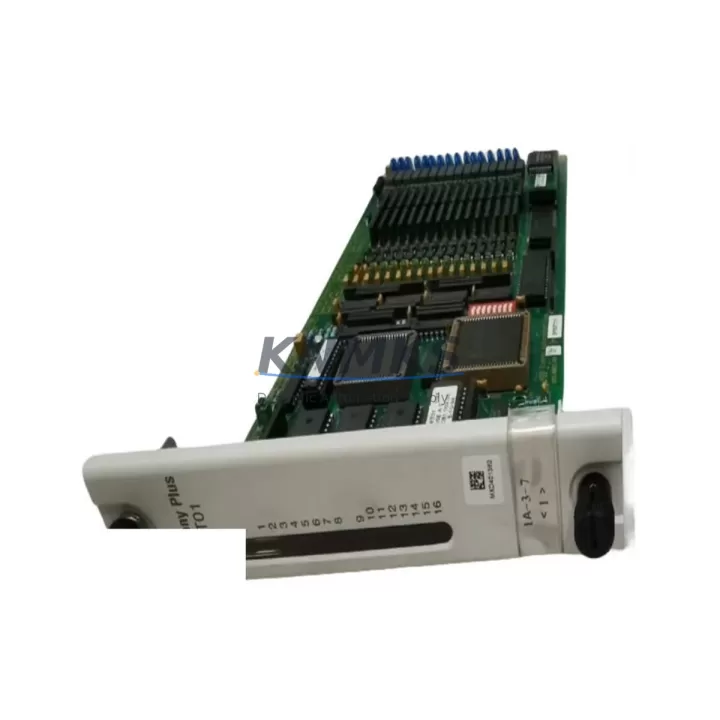
ABB SPSET01 Migration-Ready Digital I/O for Legacy Control Systems
The ABB SPSET01 is a digital I/O expansion module engineered for the AC500 PLC platform, purpose-built to serve as a direct, migration-ready replacement for discontinued or end-of-life digital I/O modules in legacy ABB control architectures. As industrial facilities accelerate the retirement of aging S500 and earlier-generation control hardware, the SPSET01 provides a validated upgrade path that preserves existing terminal wiring, maintains backplane compatibility, and eliminates the need for full panel redesign. Whether you are managing a phased retrofit of a multi-rack control cabinet or executing an emergency replacement of a failed I/O module on a critical production line, the SPSET01 delivers the signal integrity, channel density, and firmware compatibility required to restore and sustain operational continuity.
For engineers planning a migration from legacy ABB CS31 bus-based I/O systems or older S400-series distributed I/O nodes, the SPSET01 integrates directly into the AC500 backplane without requiring intermediate signal converters or custom wiring adapters. Its terminal block layout is designed to match the pitch and labeling conventions of predecessor modules, significantly reducing re-termination time during scheduled maintenance windows. When combined with the AC500 CPU modules such as the PM573 or PM591, the SPSET01 supports full I/O address mapping continuity, allowing existing CODESYS or Automation Builder programs to reference the same I/O tags without requiring logic rewrites. This is a critical advantage in facilities where the original PLC program is no longer actively maintained or where source code documentation is incomplete.
Migration Compatibility Table
| Parameter | SPSET01 Specification | Legacy Replacement Notes |
|---|---|---|
| Platform Compatibility | ABB AC500 Series | Replaces discontinued S500 / CS31 digital I/O nodes |
| Backplane Interface | AC500 S-Bus backplane connector | Verify slot position and rack generation before installation |
| Communication Protocol | S-Bus (internal), Modbus / PROFIBUS via CPU | CS31 bus adapters not required; direct backplane integration |
| Terminal Wiring | Screw-type terminal block, standard pitch | Existing field wiring can be retained in most retrofit scenarios |
| Power Supply Requirement | 24 VDC via backplane | Confirm PS501 or equivalent power supply capacity before adding modules |
| I/O Address Mapping | Configurable via Automation Builder | Re-map addresses if replacing non-equivalent legacy module slot |
| Firmware Compatibility | AC500 firmware V2.x and above | Update CPU firmware before commissioning if running legacy firmware |
| Installation Space | Standard AC500 module width | Confirm available rack slots; no additional DIN rail space required |
| Replacement Recommendation | Direct drop-in for compatible AC500 racks | Functional test recommended post-installation before live production |
| Support terms | support terms confirmed by quotation | Covers manufacturing defects; pre-shipment functional testing included |
Retrofit Planning for Existing Automation Systems
A successful SPSET01 retrofit begins well before the module arrives on-site. The first step is a thorough audit of the existing control cabinet to confirm available backplane slots in the AC500 rack, verify that the installed PS501 power supply module has sufficient current headroom to support the additional I/O load, and document all existing terminal assignments against the original wiring diagram. In many legacy installations, the wiring documentation has drifted from the as-built state, making a physical point-to-point verification essential before any module swap is attempted.
During the planning phase, engineers should also assess the communication architecture. If the legacy system relied on a CS31 remote I/O bus with distributed field stations, the migration to SPSET01 within a centralized AC500 rack may require reconfiguring the communication module — for example, replacing a CS31 bus coupler with an AC500 communication module such as the CM572-DP for PROFIBUS DP networks or the CM589-PNIO for PROFINET environments. This protocol migration step is often underestimated in project timelines and should be scoped as a discrete work package.
For systems where the HMI interface is tightly coupled to specific I/O tag addresses — particularly older CP600 or CP400 series operator panels — the retrofit plan must include an HMI screen audit to identify any hardcoded I/O references that will require updating after the SPSET01 is commissioned. In parallel, the programming engineer should prepare a backup of the existing CPU program using Automation Builder before any hardware changes are made, ensuring that the original logic can be restored if commissioning reveals unexpected compatibility issues.
Signal isolation requirements should also be evaluated during planning. In mixed-voltage environments or where long cable runs introduce noise, the addition of signal isolators between field devices and the SPSET01 input channels may be necessary to maintain signal integrity. Similarly, if the retrofit involves expanding the I/O count beyond the original design, additional expansion modules and a review of the rack’s backplane current budget will be required before the system can be safely energized.
Downtime Control During System Migration
Minimizing unplanned downtime is the primary operational constraint in any live-system retrofit. For the SPSET01 replacement, the recommended approach is to complete all pre-commissioning steps — firmware verification, I/O address configuration, and HMI tag updates — in a staging environment before the scheduled maintenance window begins. Where possible, the new module should be pre-configured and tested on a bench rack using the same Automation Builder project file as the production system, confirming that all digital input and output channels respond correctly before the module is transported to the production floor.
During the actual swap, the sequence should follow a defined lockout/tagout procedure with the control system placed in a safe state. The existing module should be removed only after confirming that all field devices connected to its output channels are in a known safe position. Once the SPSET01 is seated in the backplane and the rack is powered, the CPU should perform an automatic I/O configuration scan — verify that the module appears correctly in the Automation Builder hardware configuration tree before releasing the system to automatic mode.
Post-commissioning, a structured functional test covering all input and output channels should be completed before handing the system back to production. This test should be documented and retained as part of the retrofit record. For facilities operating under IEC 62443 or ISO 13849 compliance frameworks, the functional test documentation may also be required as part of the change management record. With pre-shipment functional testing completed at our facility and a support terms confirmed by quotation covering all units, the SPSET01 is supplied ready for immediate installation, reducing the on-site commissioning burden and supporting tighter maintenance window targets.
Retrofit Support FAQ
Q1: Is the SPSET01 a direct replacement for all legacy ABB digital I/O modules in the AC500 family?
The SPSET01 is designed for the AC500 platform and is compatible with AC500 racks and backplanes. It is not a universal replacement for all legacy ABB I/O modules — compatibility depends on the specific rack generation, slot configuration, and firmware version of the host CPU. We recommend confirming the target rack model and CPU firmware version before ordering. Our technical team can assist with compatibility verification based on your existing hardware list.
Q2: Can the existing field wiring be reused when replacing a legacy module with the SPSET01?
In most AC500 retrofit scenarios, existing 24 VDC field wiring can be retained without modification, provided the terminal block pitch and channel assignment of the legacy module match the SPSET01 layout. A point-to-point wiring check against the original I/O schedule is strongly recommended before energizing the system. Where wiring modifications are required, they should be completed and documented before the maintenance window begins to minimize downtime.
Q3: What firmware version is required on the AC500 CPU to support the SPSET01?
The SPSET01 is supported on AC500 CPU firmware V2.x and above. If the host CPU is running an earlier firmware version, a firmware update via Automation Builder should be completed before the SPSET01 is installed. Firmware updates should always be performed with a full program backup in place and tested in a non-production environment where possible.
Q4: What support terms and pre-shipment testing is included with the SPSET01?
Every SPSET01 unit is subject to pre-shipment functional testing covering digital input and output channel verification, backplane connector integrity, and power supply compatibility. All units are supplied with a support terms confirmed by quotation covering manufacturing defects from the date of shipment. In-stock units are available for immediate dispatch with global shipping support. For volume orders or urgent replacement requirements, please contact our sales team directly.
© 2026 KNMKS. All rights reserved.
Original Source: https://knmks.com
Contact: admin@knmks.com | +86 18359268345
Product Identification
- Brand / Ecosystem
-
ABB
ABB - Model / Series
-
SPSET01
AC500 Series - Product Family
- PLCs & Controllers
- Availability Status
- Available on request after model and quantity confirmation
- Inquiry Type
- B2B RFQ, replacement inquiry and project spare-part request
- Pre-Quote Check
- Exact SKU, brand, series, quantity, nameplate photos and destination country are checked before quotation
System Path
Where this product fits in the KNMKS automation structure.
Specification & Inquiry Focus
- Control platform
- PLC, PAC and modular controllers
- Common needs
- CPU, rack, power and I/O expansion
- Project support
- Replacement, cabinet build and maintenance
Buyer Confirmation
Information KNMKS checks before replying.
- Exact model
- SPSET01
- Brand / ecosystem
- ABB
- Product family
- PLCs & Controllers
- Application note
- Replacement, maintenance, project build or spare-part list
- Useful photos
- Nameplate, installed unit, cabinet layout or connector side
- Delivery details
- Quantity, destination country and target schedule
Document Support
Files and notes can be confirmed during quotation.
- Product photos or nameplate confirmation when available
- Packing and delivery notes before quotation confirmation
- Support scope and delivery terms confirmed per inquiry
- Export document coordination for qualified B2B requests
Inquiry Support
- Model cross-checking before quotation
- CPU, power, rack and expansion module matching
- Support for replacement and project inquiry
What to Send Us
- Brand and exact model number: ABB SPSET01
- Quantity and required delivery time
- Application, replacement requirement or nameplate photo
- Destination country and shipping preference
RFQ Preparation
This is a product inquiry page built for RFQ communication.
Fast Model Check
Send this model to KNMKS for confirmation.
Include quantity, destination country and photos if this is a maintenance replacement. The inquiry will be saved with a reference number after submission.
Brand & Compatibility Note
KNMKS displays automation product information for well-known industrial brand ecosystems and compatible replacement references. Brand names are used for product identification and compatibility reference only; final availability and commercial terms are confirmed per quotation.
 Manufacturing
 Machine Tools
 Packaging
 Energy & Power



 HMI & Displays
 Servo Systems
 Variable Frequency Drives
 Sensors