
Overview
ABB SPNIS21 Maintenance-Proven Spare Part for Factory Uptime
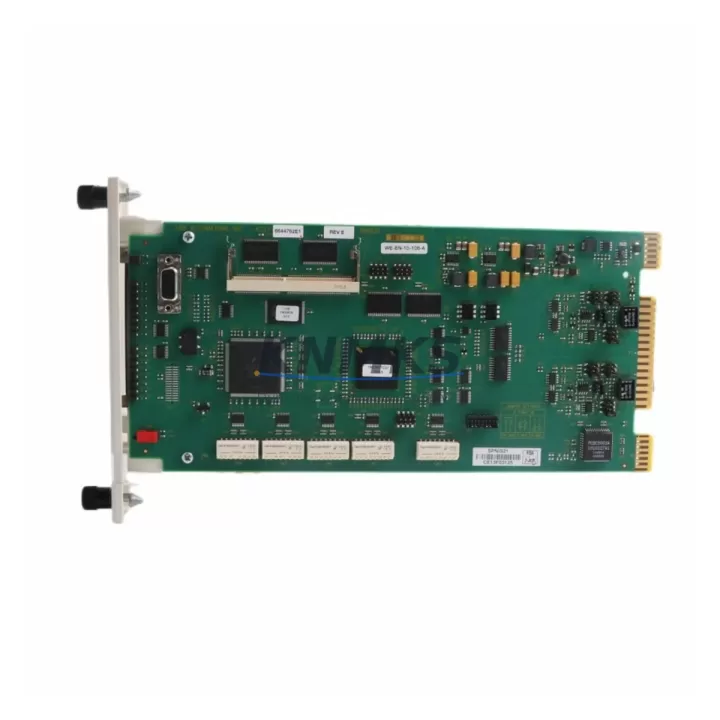
The ABB SPNIS21 is a network interface slave module engineered for the AC500 PLC platform, providing reliable PROFIBUS-DP and DeviceNet fieldbus connectivity in demanding industrial automation environments. As a maintenance-proven spare part, the SPNIS21 is a critical component for facilities that depend on continuous fieldbus communication between PLCs, distributed I/O, drives, and field devices. Holding a verified stock of the SPNIS21 is a fundamental element of any proactive maintenance strategy for AC500-based control systems.
For maintenance engineers managing aging AC500 installations, the SPNIS21 represents a direct-fit replacement that eliminates the need for firmware reconfiguration or hardware adaptation. Its plug-and-play compatibility with the AC500 CPU backplane means that site replacement can be completed within a single maintenance window, minimizing production downtime and restoring fieldbus communication rapidly. Procurement engineers sourcing this module should verify the firmware revision compatibility with the installed AC500 CPU generation to ensure seamless integration.
Each SPNIS21 unit dispatched from our warehouse undergoes pre-shipment functional testing, covering communication initialization, slave address configuration, and bus termination verification. This testing protocol ensures that the module arrives site-ready, reducing the risk of commissioning delays during emergency replacement scenarios. All units are covered by a support terms confirmed by quotation, providing procurement teams with the assurance required for long-term spare parts planning.
Spare Maintenance Table
| Parameter | Specification |
|---|---|
| Part Number | SPNIS21 |
| Brand | ABB |
| Series | AC500 |
| Module Type | Network Interface Slave Module |
| Fieldbus Protocols | PROFIBUS-DP, DeviceNet |
| Compatibility | ABB AC500 PLC CPU modules (PM5xx, PM5xx-ETH series) |
| Installation | Direct plug-in to AC500 CPU backplane slot |
| Country of Origin | Germany |
| Weight | 240 g |
| Application Environment | Industrial control cabinets, DIN-rail panels, process automation |
| Maintenance Role | Fieldbus slave communication, distributed I/O integration |
| Pre-Shipment Testing | Communication initialization, slave address, bus termination |
| Support terms | 12 Months |
| Supply Continuity | Long-term stock available for legacy AC500 systems |
Maintenance Planning for Continuous Operation
When replacing the SPNIS21 in an AC500 control cabinet, a thorough site inspection of adjacent components is essential to prevent repeat failures and ensure full system restoration. Maintenance engineers should begin by verifying the 24 VDC power supply rail feeding the AC500 CPU and communication modules — a degraded power supply module such as the CP-E 24/10.0 can cause intermittent fieldbus faults that are incorrectly attributed to the network interface module itself.
The PROFIBUS-DP cable termination resistors and bus connectors at both ends of the fieldbus segment should be inspected and replaced if oxidized or mechanically damaged. Faulty termination is a leading cause of SPNIS21 communication errors in high-vibration or high-humidity environments. Similarly, the DeviceNet trunk cable and drop lines should be checked for insulation integrity and correct impedance matching.
I/O modules installed in the same AC500 rack — such as the SM560-S or DC532 digital I/O modules — should be verified for correct addressing and communication status after the SPNIS21 is replaced, as a bus reset may temporarily disrupt I/O polling cycles. If the control system includes an ABB CP600 or CP400 series HMI panel communicating over the same fieldbus segment, the HMI communication parameters should be re-validated post-replacement to confirm tag mapping integrity.
For systems using signal isolators or relay output modules on the same control bus, verify that the fieldbus node count remains within the SPNIS21’s supported slave address range. Fuse protection on the 24 VDC supply to the communication module slot should also be inspected — a blown fuse on the terminal block assembly is a common and easily overlooked cause of module non-response. Maintaining a co-stocked spare of the SPNIS21 alongside the AC500 CPU module and the relevant fieldbus cables is the recommended approach for facilities with zero-tolerance downtime requirements.
Site Replacement Workflow
Step 1 — Isolation: Place the AC500 CPU in STOP mode via the programming tool (Automation Builder or PS501 Control Builder). Document the current PROFIBUS/DeviceNet slave address configured on the SPNIS21 before removal.
Step 2 — Power Down: De-energize the control cabinet 24 VDC supply. Discharge any residual voltage on the backplane before handling the module.
Step 3 — Module Removal: Release the SPNIS21 from the CPU backplane slot using the module ejector lever. Inspect the backplane connector for bent pins or contamination before installing the replacement unit.
Step 4 — Replacement Installation: Insert the new SPNIS21 into the same backplane slot. Confirm the module is fully seated and the locking tab is engaged.
Step 5 — Address Configuration: Set the slave address on the replacement SPNIS21 to match the documented value. Verify bus termination switch position matches the original module.
Step 6 — Power-Up and Verification: Re-energize the cabinet. Place the CPU in RUN mode and confirm fieldbus communication status via the diagnostic LEDs on the SPNIS21 and within the Automation Builder diagnostic view. Verify all slave nodes are online and I/O data exchange is active.
Step 7 — Documentation: Record the replacement date, new module serial number, and post-replacement test results in the equipment maintenance log. Update the spare parts inventory accordingly.
Spare Parts Support FAQ
Q1: Is the SPNIS21 compatible with all AC500 CPU generations?
The SPNIS21 is designed for the ABB AC500 PLC platform and is compatible with PM5xx series CPU modules. Compatibility with specific firmware versions should be confirmed against the AC500 hardware compatibility matrix. For legacy installations using earlier CPU generations, our technical team can assist with compatibility verification prior to dispatch.
Q2: What is the recommended spare parts inventory strategy for the SPNIS21?
For facilities operating multiple AC500 systems on PROFIBUS-DP or DeviceNet networks, maintaining a minimum of one SPNIS21 per control system cluster is recommended. High-criticality production lines should hold two units in local stock to cover both emergency replacement and scheduled maintenance scenarios without waiting for procurement lead times.
Q3: How is the SPNIS21 tested before shipment?
Each unit undergoes pre-shipment functional testing covering communication initialization, slave address configuration, and bus termination verification. Units that do not pass all test parameters are quarantined and not dispatched. A test report is available upon request for quality-critical procurement requirements.
Q4: What support terms and long-term supply support is available?
All SPNIS21 units are covered by a support terms confirmed by quotation from the date of dispatch, covering manufacturing defects and functional failures under normal operating conditions. We maintain long-term stock of AC500 series spare parts to support legacy system maintenance programs, ensuring supply continuity for facilities that cannot migrate to newer PLC platforms in the short term.
—
© 2026 KNMKS. All rights reserved.
Original Source: https://knmks.com
Contact: admin@knmks.com | +86 18359268345
Product Identification
- Brand / Ecosystem
-
ABB
ABB - Model / Series
-
SPNIS21
AC500 Series - Product Family
- PLCs & Controllers
- Availability Status
- Available on request after model and quantity confirmation
- Inquiry Type
- B2B RFQ, replacement inquiry and project spare-part request
- Pre-Quote Check
- Exact SKU, brand, series, quantity, nameplate photos and destination country are checked before quotation
System Path
Where this product fits in the KNMKS automation structure.
Specification & Inquiry Focus
- Control platform
- PLC, PAC and modular controllers
- Common needs
- CPU, rack, power and I/O expansion
- Project support
- Replacement, cabinet build and maintenance
Buyer Confirmation
Information KNMKS checks before replying.
- Exact model
- SPNIS21
- Brand / ecosystem
- ABB
- Product family
- PLCs & Controllers
- Application note
- Replacement, maintenance, project build or spare-part list
- Useful photos
- Nameplate, installed unit, cabinet layout or connector side
- Delivery details
- Quantity, destination country and target schedule
Document Support
Files and notes can be confirmed during quotation.
- Product photos or nameplate confirmation when available
- Packing and delivery notes before quotation confirmation
- Support scope and delivery terms confirmed per inquiry
- Export document coordination for qualified B2B requests
Inquiry Support
- Model cross-checking before quotation
- CPU, power, rack and expansion module matching
- Support for replacement and project inquiry
What to Send Us
- Brand and exact model number: ABB SPNIS21
- Quantity and required delivery time
- Application, replacement requirement or nameplate photo
- Destination country and shipping preference
RFQ Preparation
This is a product inquiry page built for RFQ communication.
Fast Model Check
Send this model to KNMKS for confirmation.
Include quantity, destination country and photos if this is a maintenance replacement. The inquiry will be saved with a reference number after submission.
Brand & Compatibility Note
KNMKS displays automation product information for well-known industrial brand ecosystems and compatible replacement references. Brand names are used for product identification and compatibility reference only; final availability and commercial terms are confirmed per quotation.
 Manufacturing
 Machine Tools
 Packaging
 Energy & Power



 HMI & Displays
 Servo Systems
 Variable Frequency Drives
 Sensors