
Overview
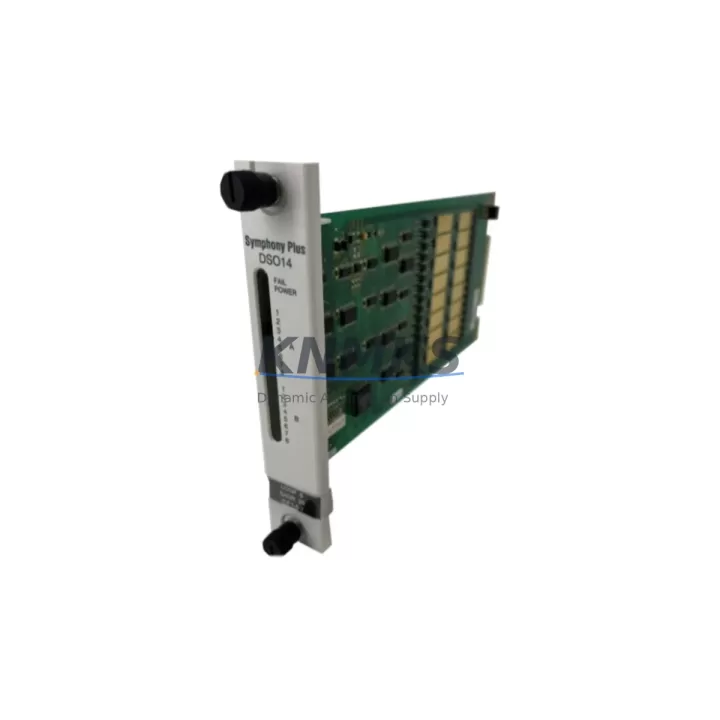
ABB SPDS014 Migration-Ready Digital Input for Legacy PLC Systems
The ABB SPDS014 is a 14-channel, 24 VDC digital input module engineered for the AC500 programmable logic controller platform. As legacy control architectures reach end-of-life and spare-part availability tightens, the SPDS014 has become a critical component in plant-wide retrofit programs across process automation, discrete manufacturing, and infrastructure control. Whether you are replacing a discontinued input module in an aging AC500 rack or expanding I/O capacity during a control cabinet upgrade, the SPDS014 delivers the electrical compatibility, firmware alignment, and physical form factor required to minimize engineering rework and reduce commissioning risk.
In retrofit scenarios, engineers must verify several parameters before swapping any digital input module. For the SPDS014, the 24 VDC nominal input voltage and IEC 61131-2 Type 1/3 compliance ensure backward compatibility with field wiring originally terminated for earlier AC500 I/O generations. Terminal pitch and connector type match the standard AC500 I/O bus, so existing cable harnesses and DIN-rail terminal blocks can be reused without rewiring. The module occupies a single slot on the AC500 I/O bus coupler — confirm available slot count and backplane power budget before installation, particularly in high-density cabinets where the PM573, PM583, or PM595 CPU modules are already drawing significant backplane current.
Address assignment follows the AC500 slot-based addressing scheme. When replacing a failed or discontinued module, the replacement SPDS014 must be assigned the same logical I/O address as the original to avoid program modifications. If the original module used a different channel count or address offset, a brief program patch in Automation Builder is required to remap the affected input variables. Retain a backup of the original project file before any hardware swap — this protects the existing ladder logic, function block diagrams, and structured text routines from accidental overwrite during the recommissioning cycle.
HMI screen updates are often overlooked during module replacement. If the legacy system uses a CP600 or CP620 operator panel linked to AC500 I/O status tags, verify that the input variable names and data types mapped to the SPDS014 channels match the HMI tag database. A mismatch between the PLC program variable and the HMI tag will cause status indicators to freeze or display incorrect states after the swap, requiring a panel project re-download. This step adds 30–60 minutes to the commissioning window but prevents post-startup diagnostic confusion.
Communication link integrity is equally important. In AC500 systems using the CS31 field bus or PROFIBUS DP for distributed I/O, the SPDS014 installed on a remote I/O station must be recognized by the bus master configuration. Update the GSD file or hardware configuration in Automation Builder to reflect the new module, then perform a full bus scan to confirm the station address and module type are correctly identified before restarting the control loop. For systems migrating from CS31 to Modbus TCP or EtherNet/IP, a TB521-ETH or TB541-ETH communication interface module may be required alongside the SPDS014 to bridge the protocol gap.
Installation space confirmation is a practical prerequisite in retrofit projects. The SPDS014 follows the standard AC500 I/O module footprint, but cabinet integrators should measure available rail space and verify that adjacent modules — such as the AO523 analog output module or the DC532 digital combined I/O module — do not obstruct the module locking tab or terminal cover. Firmware version compatibility between the SPDS014 and the installed CPU firmware should be confirmed against the ABB AC500 firmware compatibility matrix prior to energizing the rack. Mismatched firmware versions can cause the CPU to flag the module as unrecognized, preventing I/O initialization.
Each SPDS014 unit supplied by KNMKS undergoes pre-shipment functional testing covering channel continuity, input threshold verification, and bus communication handshake. Units are shipped with original packaging and are covered by a support terms confirmed by quotation against manufacturing defects and functional failure. Stock is maintained across regional warehouses to support urgent replacement orders with short lead times — a critical advantage when a production line is down and the original OEM lead time extends to 16–20 weeks.
Migration Compatibility Table
| Parameter | Specification / Recommendation |
|---|---|
| Module Type | 14-Channel Digital Input, 24 VDC |
| Platform Compatibility | ABB AC500 PLC Series (PM573 / PM583 / PM595 CPUs) |
| Input Standard | IEC 61131-2 Type 1 / Type 3 |
| Backplane Interface | AC500 I/O Bus — single slot, standard connector |
| Terminal Wiring | Compatible with existing AC500 I/O terminal blocks; no rewiring required for same-generation replacement |
| Address Assignment | Slot-based; must match original module address to avoid program remap |
| Firmware Compatibility | Verify against ABB AC500 firmware compatibility matrix before installation |
| Communication Protocols | CS31, PROFIBUS DP (via bus coupler); EtherNet/IP / Modbus TCP with TB541-ETH adapter |
| HMI Integration | CP600 / CP620 panels — verify tag mapping after module swap |
| Installation Footprint | Standard AC500 I/O module form factor; confirm rail space and adjacent module clearance |
| Replacement Scope | Direct replacement for discontinued or failed AC500 digital input modules of equivalent channel count |
| Pre-Shipment Testing | Channel continuity, input threshold, bus communication handshake |
| Support terms | 12 months against manufacturing defects and functional failure |
Retrofit Planning for Existing Automation Systems
A successful SPDS014 retrofit begins with a complete audit of the existing AC500 rack configuration. Document the slot positions of all installed modules — including the PM573 or PM583 CPU, the TB521 or TB541 communication interface, any AO523 analog output modules, and DC532 combined I/O modules — before removing the failed unit. This snapshot prevents slot reassignment errors during reinstallation and gives the commissioning engineer a reference baseline for the Automation Builder hardware configuration tree.
Power budget verification is non-negotiable. The AC500 backplane distributes 5 VDC logic power across all installed modules. Calculate the total current draw of all modules in the rack, including the replacement SPDS014, and confirm the figure falls within the rated output of the installed power supply module — typically a PS501 or PS560 unit. Exceeding the backplane power budget causes intermittent module faults and unpredictable I/O behavior that is difficult to diagnose under production pressure.
For systems that include signal isolators between field devices and the AC500 I/O bus, verify that the isolator output voltage and current sink/source characteristics remain compatible with the SPDS014 input thresholds. Some legacy installations used signal conditioning modules rated for older input specifications; these may require recalibration or replacement with updated isolator models to ensure reliable switching at the SPDS014 input stage.
If the retrofit scope includes a programming cable reconnection for firmware update or program verification, use the ABB TK501 USB programming cable or the recommended Ethernet direct-connect method supported by Automation Builder 2.x. Confirm that the laptop running Automation Builder has the correct firmware package installed for the target CPU version before initiating any online program transfer. A failed firmware update mid-transfer can leave the CPU in an unrecoverable boot state, extending downtime significantly.
Downtime Control During System Migration
Minimizing downtime during an AC500 digital input module replacement requires preparation that begins well before the maintenance window opens. Pre-stage the replacement SPDS014 alongside a printed copy of the current rack layout, the Automation Builder project backup, and the HMI project file. Confirm that the replacement unit has been bench-tested and that its firmware version is compatible with the installed CPU before the production line is taken offline.
During the swap, follow a structured sequence: isolate field power to the affected I/O channels, remove the failed module, insert the SPDS014, restore field power, and perform an online module recognition check in Automation Builder before releasing the control loop back to automatic mode. This sequence protects the original program logic from unintended modification and ensures that the CPU recognizes the new module without a full rack restart — a critical advantage in systems where other I/O modules must remain in service during the replacement.
For systems where a full rack restart cannot be avoided, coordinate the maintenance window with the operations team to align with a scheduled production break. Pre-load the verified Automation Builder project to the CPU immediately after restart, confirm all I/O channel states match expected field conditions, and perform a controlled handover to the operators with a documented sign-off checklist. This approach reduces the risk of post-restart anomalies and provides a clear audit trail for maintenance records.
KNMKS maintains regional stock of the SPDS014 to support emergency replacement orders. In-stock units can be dispatched within 24–48 hours, significantly reducing the gap between fault detection and hardware availability — a key factor in keeping total downtime within acceptable limits for continuous-process and high-availability discrete manufacturing environments.
Retrofit Support FAQ
Q1: Is the SPDS014 a direct drop-in replacement for other ABB AC500 digital input modules?
The SPDS014 is a direct replacement for AC500 digital input modules with equivalent channel count and 24 VDC input rating. For modules with different channel counts or input voltage ranges, a program address remap in Automation Builder is required. Contact our technical team with your existing module part number for a confirmed compatibility assessment before ordering.
Q2: What pre-shipment testing does each SPDS014 unit undergo?
Every unit is tested for channel continuity across all 14 input channels, input switching threshold verification at nominal 24 VDC, and AC500 bus communication handshake confirmation. Test records are available upon request. All units ship with a support terms confirmed by quotation covering manufacturing defects and functional failure under normal operating conditions.
Q3: Can the SPDS014 be used in a system currently running on CS31 fieldbus that is being migrated to EtherNet/IP?
Yes. The SPDS014 itself is bus-agnostic at the module level — it communicates via the AC500 I/O backplane. The fieldbus protocol is determined by the communication interface module installed in the rack. For a CS31-to-EtherNet/IP migration, replace the existing bus coupler with a TB541-ETH interface module. The SPDS014 requires no modification and will operate normally under the new communication architecture.
Q4: What is the lead time and stock availability for the SPDS014?
KNMKS maintains in-stock inventory of the SPDS014 across regional warehouses. Standard orders are dispatched within 1–3 business days. For urgent replacement requirements, same-day or next-day dispatch is available for confirmed in-stock units. Contact admin@knmks.com or call +86 18359268345 to confirm current stock levels and delivery timelines for your region.
© 2026 KNMKS. All rights reserved.
Original Source: https://knmks.com
Contact: admin@knmks.com | +86 18359268345
Product Identification
- Brand / Ecosystem
-
ABB
ABB - Model / Series
-
SPDS014
AC500 Series - Product Family
- PLCs & Controllers
- Availability Status
- Available on request after model and quantity confirmation
- Inquiry Type
- B2B RFQ, replacement inquiry and project spare-part request
- Pre-Quote Check
- Exact SKU, brand, series, quantity, nameplate photos and destination country are checked before quotation
System Path
Where this product fits in the KNMKS automation structure.
Specification & Inquiry Focus
- Control platform
- PLC, PAC and modular controllers
- Common needs
- CPU, rack, power and I/O expansion
- Project support
- Replacement, cabinet build and maintenance
Buyer Confirmation
Information KNMKS checks before replying.
- Exact model
- SPDS014
- Brand / ecosystem
- ABB
- Product family
- PLCs & Controllers
- Application note
- Replacement, maintenance, project build or spare-part list
- Useful photos
- Nameplate, installed unit, cabinet layout or connector side
- Delivery details
- Quantity, destination country and target schedule
Document Support
Files and notes can be confirmed during quotation.
- Product photos or nameplate confirmation when available
- Packing and delivery notes before quotation confirmation
- Support scope and delivery terms confirmed per inquiry
- Export document coordination for qualified B2B requests
Inquiry Support
- Model cross-checking before quotation
- CPU, power, rack and expansion module matching
- Support for replacement and project inquiry
What to Send Us
- Brand and exact model number: ABB SPDS014
- Quantity and required delivery time
- Application, replacement requirement or nameplate photo
- Destination country and shipping preference
RFQ Preparation
This is a product inquiry page built for RFQ communication.
Fast Model Check
Send this model to KNMKS for confirmation.
Include quantity, destination country and photos if this is a maintenance replacement. The inquiry will be saved with a reference number after submission.
Brand & Compatibility Note
KNMKS displays automation product information for well-known industrial brand ecosystems and compatible replacement references. Brand names are used for product identification and compatibility reference only; final availability and commercial terms are confirmed per quotation.
 Manufacturing
 Machine Tools
 Packaging
 Energy & Power



 HMI & Displays
 Servo Systems
 Variable Frequency Drives
 Sensors