
Overview
ABB SPBRC400 SPBRC4000000 Migration-Ready CPU for AC500 Legacy Control Systems
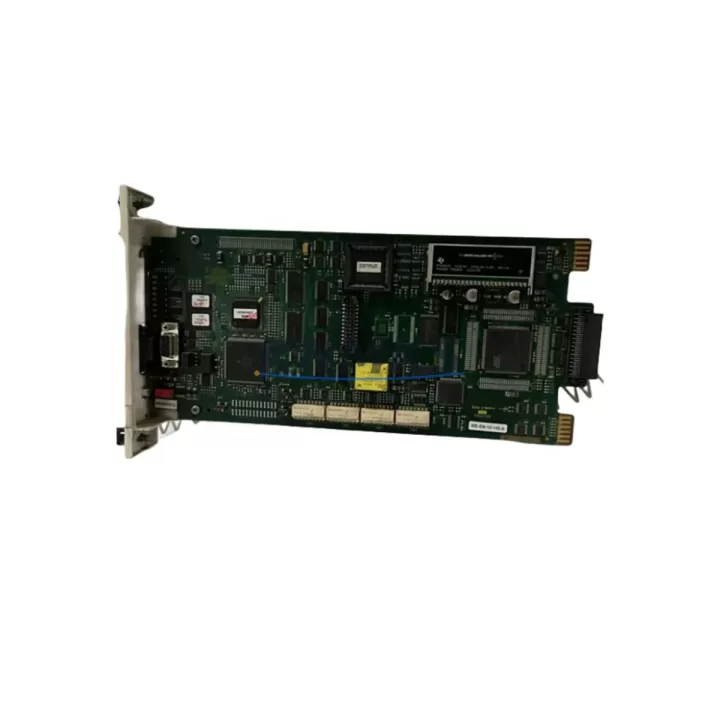
The ABB SPBRC400 (full order code: SPBRC4000000) is a high-performance central processing unit designed for the AC500 programmable logic controller platform. As a direct migration-ready replacement for discontinued SPBRC300 and SPBRC200 CPU modules, the SPBRC400 enables engineers and maintenance teams to modernize aging control architectures without redesigning the entire control cabinet. With native support for Modbus RTU/TCP, PROFIBUS DP, and CANopen communication protocols, this CPU module integrates seamlessly into existing fieldbus topologies, reducing the scope of protocol migration work during system upgrades.
When planning a retrofit from SPBRC300 or SPBRC200 to the SPBRC400, engineers must verify several critical compatibility parameters before committing to a cutover. Power supply capacity is the first checkpoint: the AC500 system power supply — typically an ABB CP-E series or TB511-ETH power module — must deliver sufficient current headroom for the SPBRC400’s increased processing load. Terminal wiring on the CPU backplane connector is pin-compatible with earlier AC500 CPU generations, but technicians should confirm that any custom wiring harnesses or DIN rail terminal blocks connected to the CPU slot have not been modified in ways that would conflict with the SPBRC400’s I/O addressing scheme.
Backplane interface compatibility is another key consideration. The SPBRC400 is designed for the AC500 standard backplane, and when installed alongside expansion I/O modules such as the ABB DC532 digital I/O module or the ABB AI531 analog input module, module addressing must be re-verified in the project configuration. If the legacy system used a TB511-ETH or TB521-ETH communication interface module for Ethernet connectivity, these modules remain compatible with the SPBRC400 and do not require replacement during the migration. However, firmware versions on these interface modules should be checked against the SPBRC400’s compatibility matrix to avoid communication handshake failures during commissioning.
Program compatibility is a central concern for any CPU migration. Projects developed in ABB Automation Builder or the legacy PS501 Control Builder environment can typically be recompiled and downloaded to the SPBRC400 with minimal modification, provided that the I/O variable mapping and hardware configuration tree are updated to reflect the new CPU type. Engineers should export a full project backup before initiating the migration and validate the recompiled program in simulation mode prior to live commissioning. HMI screens developed for CP600 or CP400 series operator panels connected via Modbus or PROFIBUS will generally continue to function without modification, as the SPBRC400 maintains backward-compatible register mapping for standard data exchange areas.
Communication link integrity must be confirmed across all connected devices. If the legacy system used an ABB CI590-CS31-HA CS31 communication interface or a CI501-PNIO PROFINET interface module, these modules should be tested for firmware compatibility with the SPBRC400 before the migration window opens. Installation space within the control cabinet should also be measured: the SPBRC400 occupies the same physical slot width as its predecessors on the AC500 backplane, but the increased connector depth may require minor cable management adjustments in tightly packed enclosures.
Each SPBRC400 unit supplied by KNMKS undergoes pre-shipment functional testing, including power-on verification, communication port diagnostics, and firmware version confirmation. All units are covered by a support terms confirmed by quotation from the date of shipment. Stock is maintained to support both immediate replacement orders and long-term spare parts agreements for multi-site industrial operations.
Migration Compatibility Table
| Parameter | SPBRC200 (Legacy) | SPBRC300 (Legacy) | SPBRC400 (Current) |
|---|---|---|---|
| Backplane Interface | AC500 Standard | AC500 Standard | AC500 Standard ✓ |
| Communication Protocols | Modbus RTU, CANopen | Modbus RTU/TCP, PROFIBUS DP, CANopen | Modbus RTU/TCP, PROFIBUS DP, CANopen ✓ |
| Terminal Wiring | Compatible | Compatible | Pin-compatible ✓ |
| Program Migration | Recompile required | Recompile required | Automation Builder / PS501 ✓ |
| HMI Compatibility | CP400/CP600 via Modbus | CP400/CP600 via Modbus/PROFIBUS | Backward-compatible ✓ |
| Installation Slot Width | Standard AC500 slot | Standard AC500 slot | Same slot width ✓ |
| Firmware Compatibility | Check interface modules | Check interface modules | Verify CI/TB module firmware ✓ |
| support terms confirmed by quotation | — | — | ✓ Included |
| Pre-Shipment Testing | — | — | ✓ Power-on + Comms verified |
| Retrofit Recommendation | Replace with SPBRC400 | Replace with SPBRC400 | Current recommended CPU |
Retrofit Planning for Existing Automation Systems
A successful SPBRC400 retrofit begins with a thorough audit of the existing AC500 control cabinet. The power budget must account for all installed modules: alongside the SPBRC400 CPU, a typical AC500 rack may include the ABB DC532 digital I/O module for discrete signal handling, the ABB AI531 analog input module for process variable acquisition, and a TB511-ETH or TB521-ETH Ethernet communication module for supervisory network connectivity. If the legacy system relied on a CI590-CS31-HA for CS31 remote I/O expansion, this interface module should be retained and its firmware updated to ensure compatibility with the SPBRC400’s communication stack.
For systems that require PROFIBUS DP master functionality, the CI501-PNIO or a dedicated PROFIBUS master interface module should be verified against the SPBRC400’s supported interface list. Signal isolation requirements should also be reviewed: where analog signals from field instruments pass through signal isolators before reaching the AI531 input module, the isolator output ranges must be confirmed to match the module’s configured input type. Programming cables and USB-to-serial adapters used for direct CPU programming should be tested for driver compatibility with the workstation running Automation Builder before the maintenance window begins.
Downtime Control During System Migration
Minimizing production downtime during a CPU migration requires a structured cutover plan. Before the maintenance window, the full project backup should be exported from the existing SPBRC300 or SPBRC200 CPU and archived. The recompiled project for the SPBRC400 should be validated offline in Automation Builder’s simulation environment, with particular attention to any I/O force tables or retain variable blocks that must be preserved across the CPU swap.
During the physical swap, the backplane power should be de-energized following the site’s lockout/tagout procedure. The SPBRC400 slides into the same CPU slot as its predecessor; no backplane modification is required. After power restoration, the updated project is downloaded to the SPBRC400, and communication links to HMI panels, SCADA systems, and remote I/O nodes are verified sequentially. Retain variable values should be confirmed against the pre-migration baseline to ensure process continuity. A staged restart — bringing up non-critical I/O zones before critical control loops — further reduces the risk of process upsets during the commissioning phase.
Retrofit Support FAQ
Q: Is the SPBRC400 a direct drop-in replacement for the SPBRC300?
A: Yes. The SPBRC400 is physically and electrically compatible with the AC500 standard backplane used by the SPBRC300. A project recompile in Automation Builder is required, and interface module firmware versions should be verified before commissioning.
Q: What pre-shipment testing is performed on each SPBRC400 unit?
A: Each unit undergoes power-on verification, communication port diagnostics (Modbus, PROFIBUS, CANopen), and firmware version confirmation before dispatch. A test report is available upon request.
Q: What is the support terms coverage for the SPBRC400?
A: All SPBRC400 units supplied by KNMKS are covered by a support terms confirmed by quotation from the date of shipment, covering manufacturing defects and functional failures under normal operating conditions.
Q: Can KNMKS support long-term spare parts supply for multi-site AC500 installations?
A: Yes. KNMKS maintains stock of SPBRC400 and related AC500 components to support both immediate replacement orders and structured spare parts agreements covering 12–36 month supply horizons for multi-site operations. Contact admin@knmks.com for volume pricing and availability.
© 2026 KNMKS. All rights reserved.
Original Source: https://knmks.com
Contact: admin@knmks.com | +86 18359268345
Product Identification
- Brand / Ecosystem
-
ABB
ABB - Model / Series
-
SPBRC400 SPBRC4000000
AC500 Series - Product Family
- PLCs & Controllers
- Availability Status
- Available on request after model and quantity confirmation
- Inquiry Type
- B2B RFQ, replacement inquiry and project spare-part request
- Pre-Quote Check
- Exact SKU, brand, series, quantity, nameplate photos and destination country are checked before quotation
System Path
Where this product fits in the KNMKS automation structure.
Specification & Inquiry Focus
- Control platform
- PLC, PAC and modular controllers
- Common needs
- CPU, rack, power and I/O expansion
- Project support
- Replacement, cabinet build and maintenance
Buyer Confirmation
Information KNMKS checks before replying.
- Exact model
- SPBRC400 SPBRC4000000
- Brand / ecosystem
- ABB
- Product family
- PLCs & Controllers
- Application note
- Replacement, maintenance, project build or spare-part list
- Useful photos
- Nameplate, installed unit, cabinet layout or connector side
- Delivery details
- Quantity, destination country and target schedule
Document Support
Files and notes can be confirmed during quotation.
- Product photos or nameplate confirmation when available
- Packing and delivery notes before quotation confirmation
- Support scope and delivery terms confirmed per inquiry
- Export document coordination for qualified B2B requests
Inquiry Support
- Model cross-checking before quotation
- CPU, power, rack and expansion module matching
- Support for replacement and project inquiry
What to Send Us
- Brand and exact model number: ABB SPBRC400 SPBRC4000000
- Quantity and required delivery time
- Application, replacement requirement or nameplate photo
- Destination country and shipping preference
RFQ Preparation
This is a product inquiry page built for RFQ communication.
Fast Model Check
Send this model to KNMKS for confirmation.
Include quantity, destination country and photos if this is a maintenance replacement. The inquiry will be saved with a reference number after submission.
Brand & Compatibility Note
KNMKS displays automation product information for well-known industrial brand ecosystems and compatible replacement references. Brand names are used for product identification and compatibility reference only; final availability and commercial terms are confirmed per quotation.
 Manufacturing
 Machine Tools
 Packaging
 Energy & Power



 HMI & Displays
 Servo Systems
 Variable Frequency Drives
 Sensors