
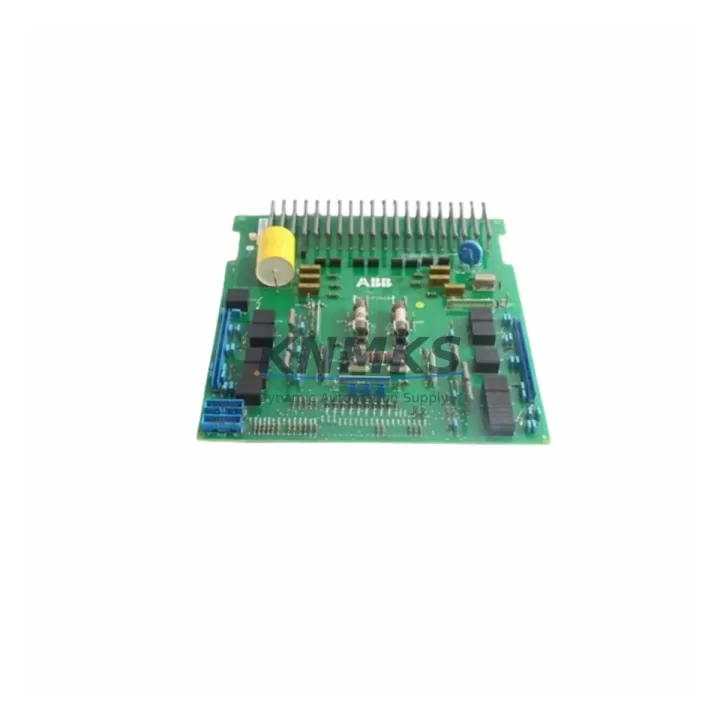
Overview
ABB SNAU4132 Maintenance-Proven Spare Part for Factory Uptime
The ABB SNAU4132 is a critical inverter drive board designed for the ACS800 series variable speed drives, widely deployed across heavy industry, process automation, and energy-intensive manufacturing environments. Sourced as an original spare part and pre-tested before shipment, the SNAU4132 supports rapid fault recovery and minimizes unplanned downtime in facilities where continuous motor control is essential. With a support terms confirmed by quotation and multi-region stock availability, this component is a reliable choice for both emergency replacement and planned maintenance inventory.
Maintenance engineers and procurement teams managing ACS800 drive systems recognize the SNAU4132 as a high-priority spare due to its role in the drive’s core control and power conversion architecture. Whether responding to a fault alarm, executing a scheduled overhaul, or building a site-level spare parts buffer, having a verified SNAU4132 on hand directly reduces mean time to repair (MTTR) and protects production continuity.
Spare Maintenance Table
| Parameter | Detail |
|---|---|
| Part Number / SKU | SNAU4132 |
| Brand | ABB |
| Compatible Series | ACS800 Variable Speed Drive |
| Component Type | Inverter Drive Board |
| Country of Origin | Germany (DE) |
| Condition | Original Spare — Pre-tested before shipment |
| Support terms | 12 Months |
| Application Environment | Industrial automation, motor drive control, process manufacturing |
| Compatibility Verification | Confirmed for ACS800 drive family; verify firmware revision and frame size before installation |
| Installation Notes | Follow ABB ACS800 hardware manual; observe ESD precautions; confirm DC bus discharge before handling |
| Maintenance Interval | Inspect annually or per drive fault log; replace on confirmed board-level fault |
| Stock Availability | Multi-region stock; ready for global dispatch |
| Lead Time | Contact sales for current availability: admin@knmks.com |
Maintenance Planning for Continuous Operation
When replacing the SNAU4132 inverter drive board in an ACS800 drive, a thorough site inspection of the surrounding electrical system is essential to prevent repeat failures and ensure safe recommissioning. Maintenance engineers should begin by verifying the integrity of the drive’s input power supply — including the 24 VDC auxiliary power supply board and the main AC input fuses or circuit breakers — before energizing the replacement board. A failed or degraded power supply is a common root cause of drive board damage and must be ruled out before installation.
The AINT (ACS800 Inverter Control Board) and APOW (Power Supply Board) are closely coupled to the SNAU4132 in the drive’s internal architecture. If the SNAU4132 has failed due to an overvoltage or overcurrent event, the AINT board and gate driver circuits should be inspected for secondary damage. Similarly, the RDCO (DDCS Communication Option Board) and RMIO (Motor Control and I/O Board) should be checked for communication faults or corrupted parameters that may have contributed to the failure event.
On the I/O and signal side, inspect all analog and digital I/O terminal connections for loose wiring, corrosion, or insulation breakdown — particularly in high-vibration or high-humidity environments. Signal isolators used on analog reference inputs (4–20 mA or 0–10 V) should be tested for drift, as degraded isolation can introduce noise that stresses drive control boards over time. Relay output modules connected to the drive’s fault and run signals should also be verified for contact wear.
For drives integrated into a fieldbus or PROFIBUS network, confirm that the communication adapter module (e.g., RPBA-01 PROFIBUS Adapter) is functioning correctly and that the network address and baud rate settings are intact after the board replacement. Parameter backup via the ACS800 control panel (ACS-CP-C or ACS-CP-D) or DriveStudio software is strongly recommended before and after any board-level intervention to protect against parameter loss.
Procurement engineers building a site-level spare parts inventory for ACS800 systems should consider stocking the SNAU4132 alongside the AINT board, APOW power supply board, and a set of input fuses rated for the specific drive frame size. This combination covers the most common board-level failure modes and supports rapid recovery without waiting for extended lead times on individual components.
Site Replacement Workflow
Step 1 — Fault Isolation: Retrieve the active fault code from the ACS800 control panel. Cross-reference with the ACS800 firmware manual to confirm the fault is board-level (e.g., fault codes related to DC bus, gate driver, or internal communication). Rule out external causes such as motor insulation failure or supply voltage disturbance before proceeding.
Step 2 — Safe Isolation: Isolate the drive from the main supply and allow the DC bus to fully discharge (minimum 5 minutes; verify with a calibrated multimeter). Follow site LOTO (Lockout/Tagout) procedures. Observe ESD precautions when handling the SNAU4132 board.
Step 3 — Parameter Backup: If the control panel or DriveStudio connection is still functional, back up all drive parameters before removing the faulty board. This ensures rapid recommissioning of the replacement SNAU4132 without manual parameter re-entry.
Step 4 — Board Replacement: Remove the faulty SNAU4132 following the ACS800 hardware manual procedure. Install the replacement board, ensuring all ribbon cables, connectors, and mounting hardware are correctly seated. Verify that the board revision is compatible with the installed firmware version.
Step 5 — Recommissioning: Restore parameters from backup. Perform a no-load test run to verify drive operation before reconnecting the motor load. Monitor the drive’s fault log for the first 24 hours of operation to confirm stable performance.
Step 6 — Documentation: Record the replacement in the site maintenance log, including the date, fault code, replaced part number (SNAU4132), and post-replacement test results. Update the spare parts inventory to trigger reorder of a replacement SNAU4132 for the site buffer stock.
Spare Parts Support FAQ
Q1: Is the SNAU4132 compatible with all ACS800 drive frame sizes?
The SNAU4132 is designed for the ACS800 series, but compatibility can vary by frame size and firmware revision. Always verify the part number against your specific drive’s hardware revision label and the ABB ACS800 spare parts list before ordering. Our technical team can assist with compatibility confirmation — contact admin@knmks.com.
Q2: What testing is performed before shipment?
Every SNAU4132 unit is functionally tested prior to dispatch to verify board-level integrity. Units are shipped with ESD-protective packaging to prevent handling damage in transit. A support terms confirmed by quotation is provided from the date of shipment, covering manufacturing defects and verified functional failures.
Q3: How should I manage long-term supply risk for the SNAU4132?
The ACS800 series is a mature platform, and original spare parts availability can tighten over time. We recommend establishing a standing inventory agreement or blanket order arrangement to secure stock at current pricing and avoid emergency procurement premiums. Multi-region stock is maintained to support both planned maintenance cycles and unplanned emergency replacements.
Q4: What is the recommended spare parts holding strategy for an ACS800 site?
For sites operating multiple ACS800 drives, a minimum buffer of one SNAU4132 per drive family, combined with an AINT board and APOW power supply board, provides coverage for the most common board-level failure scenarios. This strategy supports a target MTTR of under four hours for drive-related production stoppages, without dependence on expedited freight or extended supplier lead times.
© 2026 KNMKS. All rights reserved.
Original Source: https://knmks.com
Contact: admin@knmks.com | +86 18359268345
Product Identification
- Brand / Ecosystem
-
ABB
ABB - Model / Series
-
SNAU4132
S800 Series - Product Family
- Variable Frequency Drives
- Availability Status
- Available on request after model and quantity confirmation
- Inquiry Type
- B2B RFQ, replacement inquiry and project spare-part request
- Pre-Quote Check
- Exact SKU, brand, series, quantity, nameplate photos and destination country are checked before quotation
System Path
Where this product fits in the KNMKS automation structure.
Specification & Inquiry Focus
- Drive range
- AC drives, VFDs and accessories
- Common needs
- Voltage, kW/HP and load type
- Project support
- Motor control, energy saving and spares
Buyer Confirmation
Information KNMKS checks before replying.
- Exact model
- SNAU4132
- Brand / ecosystem
- ABB
- Product family
- Variable Frequency Drives
- Application note
- Replacement, maintenance, project build or spare-part list
- Useful photos
- Nameplate, installed unit, cabinet layout or connector side
- Delivery details
- Quantity, destination country and target schedule
Document Support
Files and notes can be confirmed during quotation.
- Product photos or nameplate confirmation when available
- Packing and delivery notes before quotation confirmation
- Support scope and delivery terms confirmed per inquiry
- Export document coordination for qualified B2B requests
Inquiry Support
- Input/output voltage and kW/HP confirmation
- Energy-saving motor control inquiry
- Accessory and spare-unit support
What to Send Us
- Brand and exact model number: ABB SNAU4132
- Quantity and required delivery time
- Application, replacement requirement or nameplate photo
- Destination country and shipping preference
RFQ Preparation
This is a product inquiry page built for RFQ communication.
Fast Model Check
Send this model to KNMKS for confirmation.
Include quantity, destination country and photos if this is a maintenance replacement. The inquiry will be saved with a reference number after submission.
Brand & Compatibility Note
KNMKS displays automation product information for well-known industrial brand ecosystems and compatible replacement references. Brand names are used for product identification and compatibility reference only; final availability and commercial terms are confirmed per quotation.
 Manufacturing
 Machine Tools
 Packaging
 Energy & Power
 PLCs & Controllers
 HMI & Displays
 Servo Systems
 Sensors