
Overview
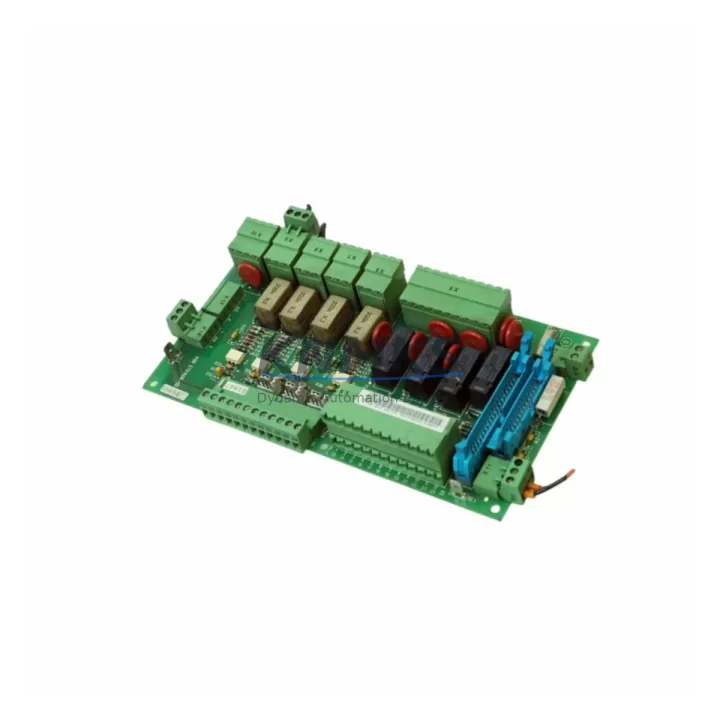
ABB SNAT602 TAC Migration-Ready Relay Output Module: Legacy System Retrofit & Compatibility Upgrade
The ABB SNAT602 TAC is a relay output module engineered for seamless integration into ABB ACS-series variable frequency drive systems. As legacy ACS400, ACS600, and ACS800 platforms approach end-of-life, the SNAT602 TAC has become a critical component in retrofit projects where engineers must maintain relay-based output signaling without redesigning the entire control architecture. Whether you are replacing a failed module in a running production line or planning a phased migration from an obsolete drive platform, the SNAT602 TAC delivers the electrical compatibility and mechanical fit required to minimize downtime and protect existing wiring investments.
Before committing to a replacement, engineers should verify several key parameters: the relay contact rating (voltage and current capacity), the terminal block pitch and wiring gauge compatibility with existing field cables, the backplane connector type and slot position within the drive’s I/O expansion rack, and the module address configuration required by the drive’s parameter set. In ACS600 and ACS800 systems, relay output modules are typically addressed through the drive’s parameter group 14 (relay outputs), and any mismatch between the physical module slot and the parameter assignment will result in incorrect output behavior during commissioning. Confirming these settings before powering up the replacement module is essential to avoid unplanned shutdowns.
For sites running ABB’s DriveWindow or DriveStudio commissioning software, the SNAT602 TAC is recognized automatically once seated in the correct backplane slot. Engineers migrating from older SNAT-series modules — such as the SNAT601 or SNAT603 — should cross-reference the relay contact specifications and confirm that the HMI panel (CDP312R or equivalent) displays the correct I/O status after module swap. In systems where the RDCO-02 or RDCO-03 communication adapter is installed for PROFIBUS or DeviceNet connectivity, relay output behavior may be mapped to fieldbus process data words; verifying this mapping in the drive’s parameter list before and after replacement prevents logic errors in the supervisory PLC program.
Retrofit planning for control cabinets housing ACS drive systems must also account for physical installation space. The SNAT602 TAC occupies a standard option slot on the ACS drive’s option board rack. If the target cabinet has been retrofitted with a newer AINT-series interface board or an RDNA-01 DeviceNet adapter, confirm that the relay output slot remains available and that no firmware update to the drive’s main control board (RMIO or AINT) is required to support the module. Firmware version mismatches between the main control board and the relay output module are a common source of commissioning delays in field retrofit projects.
Migration Compatibility Table
| Parameter | Details |
|---|---|
| Compatible Drive Series | ABB ACS400, ACS600, ACS800 |
| Module Type | Relay Output Module (SNAT-series) |
| Backplane Interface | Standard ACS option board slot connector |
| Relay Contact Rating | Per ABB SNAT602 TAC datasheet (verify before installation) |
| Terminal Block Compatibility | Standard screw-type terminals; verify existing cable gauge |
| Parameter Group (ACS800) | Group 14 – Relay Outputs |
| Commissioning Software | DriveWindow 2, DriveStudio |
| Communication Adapter Compatibility | RDCO-02 (PROFIBUS), RDCO-03 (DeviceNet), RDNA-01 |
| HMI Panel Compatibility | CDP312R, ACS800 standard panel |
| Replacement Path | Direct drop-in for SNAT601, SNAT603 (verify contact ratings) |
| Installation Space | Standard ACS option slot; confirm slot availability before order |
| Firmware Requirement | Verify RMIO/AINT firmware version compatibility |
| Support terms | support terms confirmed by quotation | Post-shipment functional testing included |
Retrofit Planning for Existing Automation Systems
A successful SNAT602 TAC retrofit begins well before the module arrives on site. Start by auditing the existing ACS drive cabinet to identify all installed option modules: power supply boards, communication adapters (such as the RDCO-02 for PROFIBUS DP or the RDNA-01 for DeviceNet), I/O extension modules, and any signal isolators mounted on DIN rail within the same cabinet. Document the wiring of each relay output terminal — fault relay, run relay, and any application-specific relay assignments — so that the replacement module can be wired identically without referencing the original drive parameter printout.
In multi-drive systems where an ACS800 master drive coordinates several ACS400 or ACS600 slave drives via a DDCS fiber optic link, relay output changes on one drive can affect the entire line control logic. Coordinate with the PLC programmer to freeze the supervisory program (typically running on a Siemens S7-300 or Allen-Bradley ControlLogix controller) before swapping the module, and confirm that the relay output addresses in the PLC I/O table match the physical wiring after reinstallation. If the system uses a Modbus RTU link between the drive and a remote I/O panel, verify that the relay output status words are correctly mapped in the Modbus register table after the module replacement.
For cabinets where installation space is constrained, confirm the slot position of the SNAT602 TAC relative to adjacent modules such as the AINT-series interface board or a RAIO-01 analog I/O extension. Mechanical interference between option boards is rare but has been observed in densely populated ACS800 cabinets. If the drive’s main control board (RMIO) requires a firmware update to support the replacement module, schedule this update during the same maintenance window to avoid a second planned outage.
Downtime Control During System Migration
Minimizing downtime during a relay output module replacement requires a structured pre-swap checklist. Before removing the SNAT602 TAC or its predecessor, export the full drive parameter set using DriveWindow or DriveStudio and save it to a secure location. This backup allows rapid restoration of relay output assignments (parameter group 14), fault relay logic, and any application macros that reference relay outputs, without manual re-entry of dozens of parameters under time pressure.
During the physical swap, de-energize the drive and lock out the main power supply before accessing the option board rack. Label each relay output terminal wire before disconnecting to prevent miswiring during reinstallation. After seating the new SNAT602 TAC module, restore power and allow the drive to complete its self-diagnostic sequence before loading the saved parameter set. Verify relay output status on the CDP312R panel or via DriveWindow before releasing the drive back to automatic control. If the system includes a signal isolator between the relay output and the field device (motor contactor, alarm annunciator, or safety relay), test the complete signal path — from drive parameter to field device response — before declaring the retrofit complete.
For production lines where even a brief unplanned stop carries significant cost, consider pre-staging the replacement SNAT602 TAC module with the correct parameter set loaded (where the drive firmware supports offline parameter transfer) and testing it on a spare drive or test bench before the scheduled maintenance window. This approach, combined with a pre-written commissioning checklist covering power capacity verification, terminal wiring, module addressing, HMI screen validation, communication link confirmation, and firmware version check, consistently reduces field commissioning time and protects the original control program logic.
Retrofit Support FAQ
Q1: Is the SNAT602 TAC a direct drop-in replacement for the SNAT601 or SNAT603?
The SNAT602 TAC shares the same backplane connector and option slot form factor as other SNAT-series relay output modules. However, relay contact ratings and the number of relay outputs may differ between variants. Always cross-reference the relay contact specifications in the ABB SNAT602 TAC datasheet against the original module before installation to confirm electrical compatibility with existing field wiring.
Q2: What commissioning steps are required after installing the SNAT602 TAC?
After physical installation, restore the drive parameter set from backup (particularly parameter group 14 for relay output assignments). Verify relay output status via the CDP312R panel or DriveWindow. Test each relay output through its full operating cycle — energized and de-energized — and confirm correct response at the connected field device. If a PROFIBUS or DeviceNet adapter (RDCO-02 or RDNA-01) is installed, verify that relay output status is correctly reflected in the fieldbus process data.
Q3: Does the SNAT602 TAC ship with post-shipment functional testing?
Yes. Each SNAT602 TAC unit is functionally tested before shipment to verify relay contact operation and backplane interface integrity. A support terms confirmed by quotation is included from the date of shipment, covering manufacturing defects and functional failures under normal operating conditions. In-stock units are available for immediate dispatch to support urgent replacement requirements.
Q4: What should I verify regarding power supply capacity before installing the SNAT602 TAC?
Confirm that the ACS drive’s internal 24 VDC auxiliary power supply has sufficient capacity to support the SNAT602 TAC in addition to all other installed option modules (communication adapters, I/O extensions, interface boards). Overloading the auxiliary supply is a common cause of intermittent module faults in densely configured ACS800 systems. Refer to the drive’s hardware manual for option module power consumption budgets.
© 2026 KNMKS. All rights reserved.
Original Source: https://knmks.com
Contact: admin@knmks.com | +86 18359268345
Product Identification
- Brand / Ecosystem
-
ABB
ABB - Model / Series
- SNAT602 TAC
- Product Family
- PLCs & Controllers
- Availability Status
- Available on request after model and quantity confirmation
- Inquiry Type
- B2B RFQ, replacement inquiry and project spare-part request
- Pre-Quote Check
- Exact SKU, brand, series, quantity, nameplate photos and destination country are checked before quotation
System Path
Where this product fits in the KNMKS automation structure.
Specification & Inquiry Focus
- Control platform
- PLC, PAC and modular controllers
- Common needs
- CPU, rack, power and I/O expansion
- Project support
- Replacement, cabinet build and maintenance
Buyer Confirmation
Information KNMKS checks before replying.
- Exact model
- SNAT602 TAC
- Brand / ecosystem
- ABB
- Product family
- PLCs & Controllers
- Application note
- Replacement, maintenance, project build or spare-part list
- Useful photos
- Nameplate, installed unit, cabinet layout or connector side
- Delivery details
- Quantity, destination country and target schedule
Document Support
Files and notes can be confirmed during quotation.
- Product photos or nameplate confirmation when available
- Packing and delivery notes before quotation confirmation
- Support scope and delivery terms confirmed per inquiry
- Export document coordination for qualified B2B requests
Inquiry Support
- Model cross-checking before quotation
- CPU, power, rack and expansion module matching
- Support for replacement and project inquiry
What to Send Us
- Brand and exact model number: ABB SNAT602 TAC
- Quantity and required delivery time
- Application, replacement requirement or nameplate photo
- Destination country and shipping preference
RFQ Preparation
This is a product inquiry page built for RFQ communication.
Fast Model Check
Send this model to KNMKS for confirmation.
Include quantity, destination country and photos if this is a maintenance replacement. The inquiry will be saved with a reference number after submission.
Brand & Compatibility Note
KNMKS displays automation product information for well-known industrial brand ecosystems and compatible replacement references. Brand names are used for product identification and compatibility reference only; final availability and commercial terms are confirmed per quotation.
 Manufacturing
 Machine Tools
 Packaging
 Energy & Power



 HMI & Displays
 Servo Systems
 Variable Frequency Drives
 Sensors