
Overview
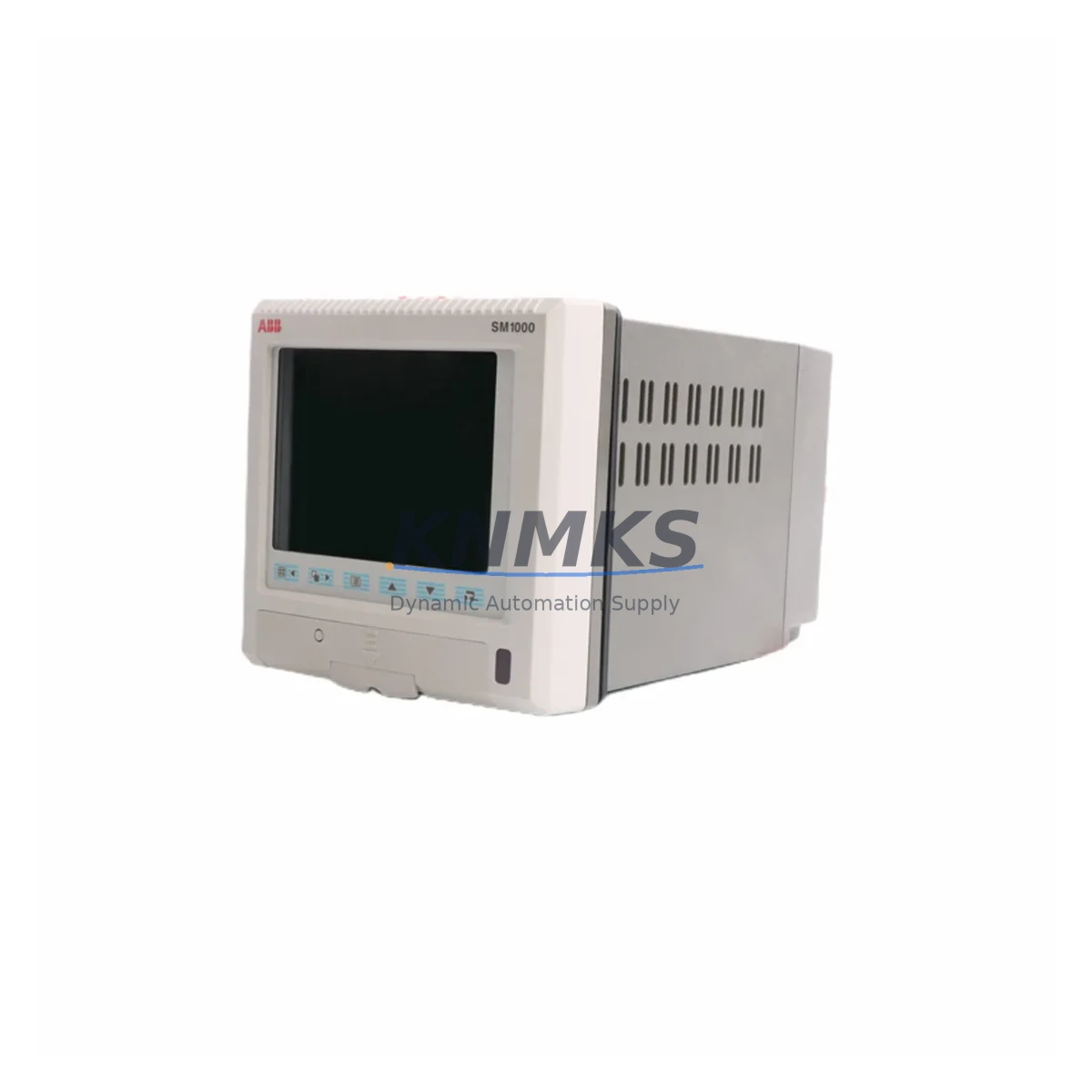
ABB SM1006S/B12/0000/32/STD Maintenance-Proven Spare Part for Factory Uptime
The ABB SM1006S/B12/0000/32/STD is a factory-original 6-channel Chartmaster videographic recorder module from ABB’s SM1000 series, engineered for continuous process monitoring in demanding industrial environments. Designed for chemical plants, power generation facilities, oil & gas installations, and water treatment operations, this recorder delivers reliable multi-channel analog signal capture, real-time trend display, and long-term data archiving — all critical functions for maintaining regulatory compliance and process visibility. Sourced directly from authorized supply chains, each unit undergoes pre-shipment functional testing and ships with a support terms confirmed by quotation, ensuring your maintenance team can restore operations with confidence.
For maintenance engineers managing aging SM1000 installations, the SM1006S/B12/0000/32/STD represents a direct, drop-in replacement that eliminates the need for costly system redesigns or panel modifications. Its compatibility with existing SM1000 series wiring harnesses, signal conditioners, and chart drive mechanisms means that field replacement can be completed within a standard maintenance window — minimizing unplanned downtime and protecting production continuity.
Spare Maintenance Table
| Parameter | Specification |
|---|---|
| Part Number / SKU | SM1006S/B12/0000/32/STD |
| Brand | ABB |
| Series | SM1000 Chartmaster Videographic Recorder |
| Channels | 6-Channel Analog Input |
| Input Signal Types | Thermocouple, RTD, mV, mA (4–20 mA), V |
| Display | Color LCD with real-time trend and bar graph |
| Recording Medium | Compact Flash / Internal memory |
| Communication | RS-232 / RS-485 / Ethernet (model-dependent) |
| Power Supply | 100–240 V AC, 50/60 Hz |
| Operating Temperature | 0°C to +50°C |
| Protection Rating | IP54 (front panel) |
| Country of Origin | Germany (DE) |
| Compatibility | ABB SM1000 series installations |
| Mounting | Panel mount, 1/4 DIN cutout |
| Weight | Approx. 2.38 kg |
| Support terms | 12 Months — Tested before shipment |
| Condition | Original spare, new or refurbished-to-spec |
Maintenance Planning for Continuous Operation
When replacing the SM1006S/B12/0000/32/STD in the field, a thorough inspection of the surrounding electrical infrastructure is essential to prevent repeat failures and ensure long-term system stability. Maintenance engineers should begin by verifying the integrity of the panel power supply — typically a 24 V DC rail feeding the recorder and associated signal conditioning equipment. A failing or undersized power supply is a common root cause of recorder malfunction and should be tested under load before the new unit is commissioned.
Signal wiring to all six input channels should be inspected for insulation degradation, loose terminations, and ground loops. Where thermocouple or RTD inputs are used, the associated ABB SM1000 series signal conditioners and input terminal blocks should be checked for oxidation and proper torque. If the installation uses 4–20 mA transmitters, loop integrity and transmitter output should be verified with a calibrated loop calibrator before reconnecting to the new recorder.
The communication interface — whether RS-485 Modbus or Ethernet — should be tested end-to-end after replacement. If the SM1006S/B12/0000/32/STD is integrated into a SCADA or DCS network, confirm that the IP address, baud rate, and device ID are correctly configured to match the existing network topology. ABB System 800xA and compatible DCS platforms may require a device re-registration step after hardware replacement.
For installations where the recorder interfaces with ABB AO2000 series analyzers or process gas analyzers via analog output, verify that the analog output scaling and alarm setpoints are correctly restored from the configuration backup. It is strongly recommended to maintain a current configuration export on a USB drive stored in the control cabinet for exactly this scenario.
Additionally, inspect the panel’s circuit protection components — including fuses on the power input rail and any surge protection devices on signal lines. Replacing a recorder without checking upstream fuse condition risks premature failure of the new unit. Where the SM1000 recorder is part of a larger control cabinet, a visual inspection of the terminal strips, DIN rail mounting hardware, and cable duct integrity should be included in the replacement workflow. Procurement engineers should also consider stocking a secondary SM1006S/B12/0000/32/STD unit alongside compatible ABB SM1000 chart drive assemblies and compact flash memory cards to support rapid recovery during unplanned outages.
Site Replacement Workflow
Step 1 — Pre-Replacement Preparation: Download and archive the current recorder configuration (channel setup, alarm limits, communication parameters, display preferences) using the SM1000 configuration software or front-panel export function. Label all signal cables before disconnection.
Step 2 — Power Isolation: Isolate the recorder from the AC power supply at the panel isolator. Verify zero energy state with a voltage tester before proceeding. Do not rely solely on the front-panel power switch.
Step 3 — Removal: Disconnect all signal input terminals, power connections, and communication cables. Release the panel mounting clamps and carefully extract the SM1006S/B12/0000/32/STD from the panel cutout. Inspect the cutout gasket for damage and replace if necessary to maintain IP54 sealing.
Step 4 — Installation of Replacement Unit: Insert the new SM1006S/B12/0000/32/STD, secure the mounting clamps, and reconnect all cables in reverse order. Verify terminal torque values against the SM1000 installation manual.
Step 5 — Configuration Restore and Commissioning: Power up the unit and restore the saved configuration. Verify all six channels are reading correctly against known reference signals. Confirm communication link status and alarm relay outputs before returning the system to service.
Step 6 — Documentation: Update the maintenance log with the replacement date, unit serial number, and technician details. Retain the removed unit for failure analysis if applicable.
Spare Parts Support FAQ
Q1: Is the SM1006S/B12/0000/32/STD a direct replacement for all SM1000 series recorders?
The SM1006S/B12/0000/32/STD is specifically configured for 6-channel SM1000 Chartmaster installations with the B12 input board and STD firmware variant. Before ordering, confirm your existing unit’s full part number to ensure configuration compatibility. Our technical team can assist with cross-referencing if you provide the nameplate data from your installed unit.
Q2: What pre-shipment testing is performed on each unit?
Every SM1006S/B12/0000/32/STD is functionally tested prior to dispatch. Testing covers power-on self-test, channel input verification across all six inputs, display functionality, and communication port response. Units that do not pass all test criteria are not shipped. A test report is available upon request for quality-critical applications.
Q3: Can you support long-term supply for ongoing maintenance programs?
Yes. KNMKS maintains dedicated stock of SM1000 series spare parts to support planned maintenance schedules and emergency replacement requirements. We offer framework supply agreements for customers with recurring demand, ensuring priority allocation and consistent lead times. Contact admin@knmks.com to discuss your annual consumption requirements.
Q4: What is covered under the support terms confirmed by quotation?
The support terms confirmed by quotation cover manufacturing defects and functional failures under normal operating conditions. It does not cover damage resulting from incorrect installation, overvoltage events, or physical mishandling. In the event of a support terms claim, KNMKS will arrange replacement or repair at no additional cost. Support terms support is available globally with return logistics coordinated by our team.
© 2026 KNMKS. All rights reserved.
Original Source: https://knmks.com
Contact: admin@knmks.com | +86 18359268345
Product Identification
- Brand / Ecosystem
-
ABB
ABB - Model / Series
- SM1006S/B12/0000/32/STD
- Product Family
- Other Components
- Availability Status
- Available on request after model and quantity confirmation
- Inquiry Type
- B2B RFQ, replacement inquiry and project spare-part request
- Pre-Quote Check
- Exact SKU, brand, series, quantity, nameplate photos and destination country are checked before quotation
System Path
Where this product fits in the KNMKS automation structure.
Specification & Inquiry Focus
- Component range
- Breakers, terminals and cabinet accessories
- Common needs
- Model, photo and installation requirement
- Project support
- Maintenance and mixed spare-part inquiry
Buyer Confirmation
Information KNMKS checks before replying.
- Exact model
- SM1006S/B12/0000/32/STD
- Brand / ecosystem
- ABB
- Product family
- Other Components
- Application note
- Replacement, maintenance, project build or spare-part list
- Useful photos
- Nameplate, installed unit, cabinet layout or connector side
- Delivery details
- Quantity, destination country and target schedule
Document Support
Files and notes can be confirmed during quotation.
- Product photos or nameplate confirmation when available
- Packing and delivery notes before quotation confirmation
- Support scope and delivery terms confirmed per inquiry
- Export document coordination for qualified B2B requests
Inquiry Support
- Mixed automation spare parts inquiry
- Cabinet component and accessory support
- Model identification from photos or labels
What to Send Us
- Brand and exact model number: ABB SM1006S/B12/0000/32/STD
- Quantity and required delivery time
- Application, replacement requirement or nameplate photo
- Destination country and shipping preference
RFQ Preparation
This is a product inquiry page built for RFQ communication.
Fast Model Check
Send this model to KNMKS for confirmation.
Include quantity, destination country and photos if this is a maintenance replacement. The inquiry will be saved with a reference number after submission.
Brand & Compatibility Note
KNMKS displays automation product information for well-known industrial brand ecosystems and compatible replacement references. Brand names are used for product identification and compatibility reference only; final availability and commercial terms are confirmed per quotation.
 Manufacturing
 Machine Tools
 Packaging
 Energy & Power

 PLCs & Controllers
 HMI & Displays
 Servo Systems
 Variable Frequency Drives