
Overview
ABB SDCS-PIN-48-COAT 3ADT220090R0043 Migration-Ready Power Interface for Legacy Control Systems
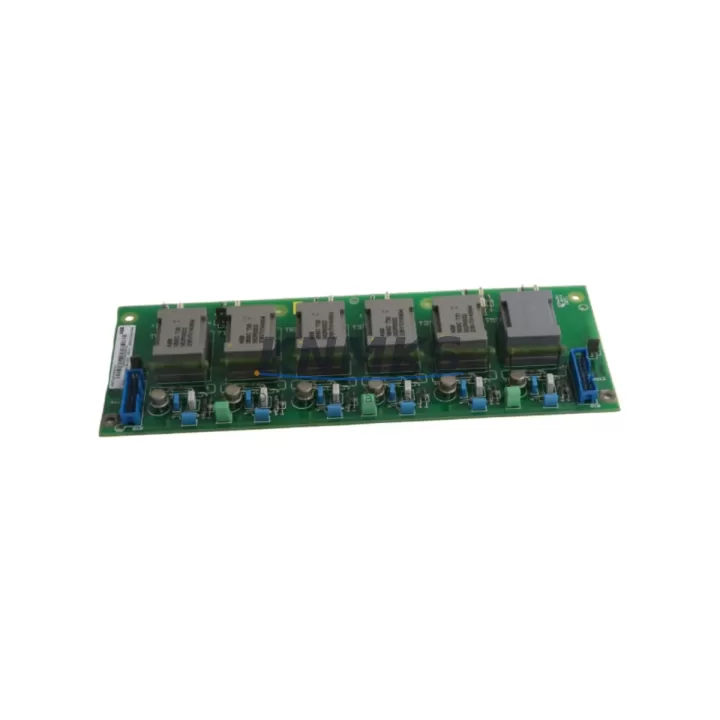
The ABB SDCS-PIN-48-COAT (part number 3ADT220090R0043) is a DC drive power interface board engineered for the ABB DCS800 series DC drive platform. As legacy DCS500 and older Mentor II-era DC drive systems reach end-of-life, the SDCS-PIN-48-COAT has become a critical retrofit component for engineers managing controlled migrations to the DCS800 architecture. This board serves as the primary power interface between the drive’s control electronics and the power stage, handling gate pulse distribution, feedback signal conditioning, and protective interlock logic that are essential for stable DC motor control in demanding industrial environments.
For maintenance teams operating paper mills, steel rolling lines, extruder drives, crane hoists, and winding systems, sourcing a verified SDCS-PIN-48-COAT with confirmed firmware compatibility and pre-shipment testing is the difference between a planned outage and an uncontrolled production stoppage. KNMKS maintains ready stock of this board with full traceability, pre-shipment functional verification, and a support terms confirmed by quotation covering both component integrity and operational performance under rated conditions.
Migration Compatibility Table
| Parameter | SDCS-PIN-48-COAT (3ADT220090R0043) | Retrofit Notes |
|---|---|---|
| Compatible Drive Platform | ABB DCS800 Series | Verify drive firmware version before installation; DCS800 firmware ≥ V7.x recommended |
| Predecessor / Legacy Replacement | DCS500 power interface boards (SDCS-PIN-41, SDCS-PIN-48) | Direct mechanical fit in DCS800 chassis; confirm backplane connector pinout revision |
| Mounting Interface | DCS800 internal backplane slot | Check rack rail spacing and board retention clip compatibility before ordering |
| Communication Compatibility | Internal drive bus (not fieldbus-dependent) | Fieldbus adapters (RDCO, RPBA, RCAN) remain unaffected by board swap |
| Terminal / Wiring Adaptation | Matches DCS800 standard power terminal layout | Re-verify gate pulse cable routing and shielding after installation |
| Firmware Dependency | DCS800 control board SDCS-CON-F firmware | Do not mix firmware versions across SDCS-CON-F and SDCS-PIN-48-COAT revisions |
| Installation Space | Standard DCS800 internal board bay | No external enclosure modification required for like-for-like replacement |
| Pre-Shipment Testing | Yes — functional verification performed | Test report available on request |
| Support terms | 12 Months | Covers component and operational performance under rated conditions |
Retrofit Planning for Existing Automation Systems
A successful SDCS-PIN-48-COAT replacement begins well before the board arrives on site. Engineers should start by auditing the existing DCS800 drive configuration: pull the current parameter set using the DriveWindow Light or DriveWindow 2 PC tool connected via the SDCS-CON-F control board’s RS-232 or USB port, and save a full parameter backup. This protects the motor tuning, speed reference scaling, current limit settings, and fault history that represent years of commissioning effort.
Next, confirm the revision level of the installed SDCS-CON-F control board. The SDCS-PIN-48-COAT interfaces directly with the CON-F via the internal backplane, and mismatched hardware revisions between the control board and the power interface board are a known source of gate pulse timing errors after replacement. If the CON-F is running an older firmware build, a coordinated firmware update using the SDCS-AMC-DC memory card or a direct flash via DriveWindow should be planned as part of the same maintenance window.
For sites where the DCS800 is integrated into a larger automation cell — for example, coordinated with an ABB AC500 PLC over Modbus RTU or PROFIBUS DP via an RPBA-01 PROFIBUS adapter — the retrofit plan must include a communication link verification step. After the board swap, cycle the drive through a controlled start sequence at reduced speed reference before returning to full production load. This confirms that the speed feedback from the motor’s tachogenerator or encoder, routed through the drive’s I/O terminal block, is correctly scaled and that the PLC’s drive status word is reading correctly.
In control cabinets where the DCS800 shares a panel with SDCS-DSL-4 digital signal level boards or SDCS-FEX-2 field excitation modules, inspect all inter-board ribbon cables and backplane connectors for oxidation or mechanical damage before closing the cabinet. A board replacement is an ideal opportunity to clean connectors and replace any degraded cable assemblies that could cause intermittent faults after the drive returns to service. Also verify that the 24 VDC auxiliary power supply feeding the control electronics is within tolerance — a marginal PSU is a common root cause of unexplained board failures in aging DCS800 installations.
For HMI integration, if the site uses an ABB CP600 panel or a third-party SCADA system reading drive status via OPC or Modbus, confirm that the drive’s communication node address and baud rate settings are preserved in the parameter backup and re-applied after the board swap. HMI screen elements tied to drive fault codes or status bits should be tested against the live drive before the maintenance window closes.
Downtime Control During System Migration
Minimizing unplanned downtime during a DCS800 power interface board replacement requires a structured approach to both preparation and execution. The single most effective measure is completing all pre-work — parameter backup, spare parts staging, firmware version confirmation, and wiring documentation — before the production line is taken offline. A well-prepared team can complete a like-for-like SDCS-PIN-48-COAT swap in under two hours; an unprepared team facing a firmware mismatch or missing documentation can extend that outage to a full shift.
Protect the original program logic by storing the parameter backup on both the DriveWindow PC and a dedicated SDCS-AMC-DC memory card seated in the drive. This provides a hardware-level restore path that does not depend on a laptop connection if the drive needs to be re-initialized during commissioning. For drives running custom application macros or adaptive programming blocks, export the full macro file separately and document the macro activation parameter (parameter 99.02 in standard DCS800 firmware).
During the physical swap, follow ABB’s recommended ESD precautions for the SDCS-PIN-48-COAT: ground the technician, use an ESD mat, and avoid touching the gate pulse output connectors directly. After seating the new board, perform a visual inspection of all backplane connector engagement points before applying power. On first power-up, monitor the drive’s fault log via the panel display or DriveWindow for any hardware identification faults that would indicate a board revision mismatch.
Once the drive passes its no-load self-test, run a controlled ramp at 10–20% speed reference with the motor uncoupled from the load if possible, or at minimum with the process in a safe hold state. Verify current feedback symmetry across all thyristor firing phases before returning to full load. This step catches gate pulse asymmetry issues that would not appear during static testing but would cause motor torque ripple or thyristor stress under load. KNMKS pre-shipment testing covers static gate pulse verification; site commissioning must cover the dynamic load test to complete the validation cycle.
Retrofit Support FAQ
Q1: Is the SDCS-PIN-48-COAT (3ADT220090R0043) a direct replacement for the SDCS-PIN-48 used in earlier DCS800 builds?
The SDCS-PIN-48-COAT is the conformal-coated variant of the SDCS-PIN-48, providing enhanced protection against humidity and conductive dust in harsh industrial environments. It is mechanically and electrically compatible with the same DCS800 backplane slot. Confirm the hardware revision suffix on the existing board label before ordering to ensure full compatibility with your installed CON-F firmware version.
Q2: What wiring checks are required after installing the replacement board?
After seating the SDCS-PIN-48-COAT, re-verify the gate pulse cable connections between the power interface board and the thyristor firing circuits. Check that all ribbon cable connectors are fully engaged and that no pins are bent or displaced. Re-torque any terminal block connections that were disturbed during the swap. Confirm that the 24 VDC auxiliary supply voltage at the board’s power input connector is within the specified ±10% tolerance before applying main power.
Q3: How do I confirm firmware compatibility before installation?
Record the firmware version displayed on the DCS800 panel (parameter 33.01 in standard firmware) and the hardware revision code printed on the SDCS-CON-F control board label. Cross-reference these against ABB’s DCS800 hardware compatibility matrix (available in the DCS800 Hardware Manual, document 3ADW000193). KNMKS can assist with compatibility verification if you provide the CON-F revision and current firmware version at the time of inquiry.
Q4: What does the support terms confirmed by quotation cover, and is a test report available?
The support terms confirmed by quotation cover component integrity and operational performance of the SDCS-PIN-48-COAT under rated operating conditions from the date of shipment. Pre-shipment functional testing is performed on every unit; a test report confirming gate pulse output verification and power stage interface checks is available on request. Support requests are processed through KNMKS directly — contact admin@knmks.com with the order reference and fault description.
© 2026 KNMKS. All rights reserved.
Original Source: https://knmks.com
Contact: admin@knmks.com | +86 18359268345
Product Identification
- Brand / Ecosystem
-
ABB
ABB - Model / Series
-
SDCS-PIN-48-COAT??3ADT220090R0043
S800 Series - Product Family
- Variable Frequency Drives
- Availability Status
- Available on request after model and quantity confirmation
- Inquiry Type
- B2B RFQ, replacement inquiry and project spare-part request
- Pre-Quote Check
- Exact SKU, brand, series, quantity, nameplate photos and destination country are checked before quotation
System Path
Where this product fits in the KNMKS automation structure.
Specification & Inquiry Focus
- Drive range
- AC drives, VFDs and accessories
- Common needs
- Voltage, kW/HP and load type
- Project support
- Motor control, energy saving and spares
Buyer Confirmation
Information KNMKS checks before replying.
- Exact model
- SDCS-PIN-48-COAT??3ADT220090R0043
- Brand / ecosystem
- ABB
- Product family
- Variable Frequency Drives
- Application note
- Replacement, maintenance, project build or spare-part list
- Useful photos
- Nameplate, installed unit, cabinet layout or connector side
- Delivery details
- Quantity, destination country and target schedule
Document Support
Files and notes can be confirmed during quotation.
- Product photos or nameplate confirmation when available
- Packing and delivery notes before quotation confirmation
- Support scope and delivery terms confirmed per inquiry
- Export document coordination for qualified B2B requests
Inquiry Support
- Input/output voltage and kW/HP confirmation
- Energy-saving motor control inquiry
- Accessory and spare-unit support
What to Send Us
- Brand and exact model number: ABB SDCS-PIN-48-COAT??3ADT220090R0043
- Quantity and required delivery time
- Application, replacement requirement or nameplate photo
- Destination country and shipping preference
RFQ Preparation
This is a product inquiry page built for RFQ communication.
Fast Model Check
Send this model to KNMKS for confirmation.
Include quantity, destination country and photos if this is a maintenance replacement. The inquiry will be saved with a reference number after submission.
Brand & Compatibility Note
KNMKS displays automation product information for well-known industrial brand ecosystems and compatible replacement references. Brand names are used for product identification and compatibility reference only; final availability and commercial terms are confirmed per quotation.
 Manufacturing
 Machine Tools
 Packaging
 Energy & Power
 PLCs & Controllers
 HMI & Displays
 Servo Systems
 Sensors