
Overview
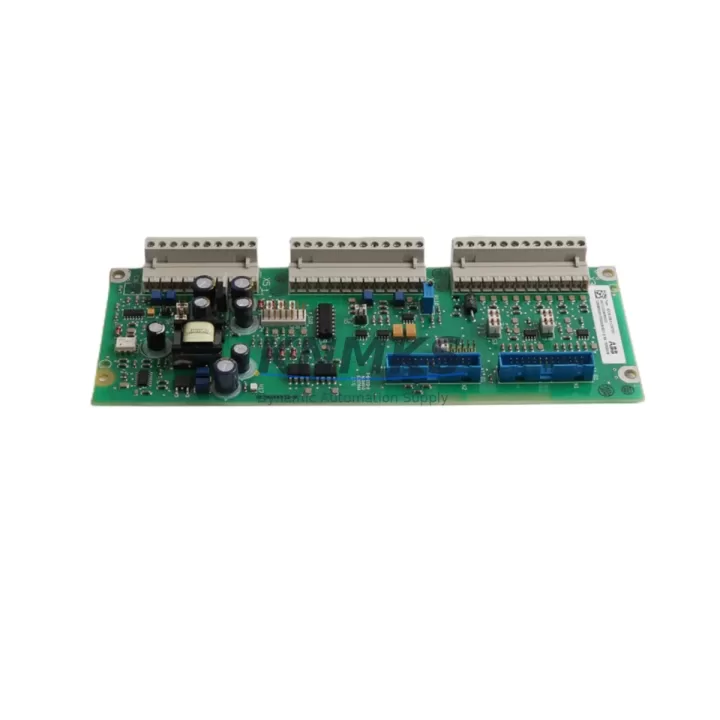
ABB SDCS-IOE-2C Spare Part for DCS800 Factory Uptime
The ABB SDCS-IOE-2C is a dedicated I/O extension board designed for the DCS800 series DC drive platform — one of ABB’s most widely deployed variable-speed DC drive families in heavy industrial environments. Whether you are managing a steel rolling mill, a paper machine, a crane drive, or a large extruder line, the SDCS-IOE-2C plays a critical role in expanding the digital and analog I/O capacity of the DCS800 control board assembly. Maintaining a verified spare of this board in your local inventory is one of the most cost-effective strategies for protecting continuous production and avoiding unplanned downtime.
The SDCS-IOE-2C mounts directly onto the DCS800 main control board (SDCS-CON-4 or compatible variants) via the dedicated expansion connector. It provides additional analog input channels, digital I/O lines, and encoder feedback interfaces that are essential for closed-loop speed regulation, torque control, and process feedback in demanding DC drive applications. When this board fails — typically due to surge damage, connector fatigue, or component aging — the entire drive may lose critical feedback signals, triggering fault codes such as F507, F508, or A505 in the DCS800 diagnostics. Prompt replacement with a tested, compatible SDCS-IOE-2C unit is the fastest path to restoring full drive functionality.
From a maintenance engineering perspective, the SDCS-IOE-2C should be treated as a Tier-1 critical spare. Its failure mode is often sudden rather than gradual, meaning predictive maintenance intervals alone are insufficient. Facilities running continuous processes — three-shift operations, 24/7 production lines, or remote installations with long lead times for parts — should hold at least one verified spare on-site. Procurement engineers sourcing this board should confirm the hardware revision level against the installed SDCS-CON-4 board to ensure full compatibility, particularly for drives manufactured before 2010 where earlier board revisions may apply.
Spare Maintenance Table
| Parameter | Specification / Recommendation |
|---|---|
| SKU / Part Number | SDCS-IOE-2C |
| Brand | ABB |
| Series | DCS800 DC Drive |
| Board Type | I/O Extension Board |
| Mounting Interface | Direct plug-in to SDCS-CON-4 main control board |
| I/O Channels | Analog inputs/outputs + digital I/O + encoder interface |
| Compatible Drive | DCS800 series (all frame sizes) |
| Origin | Germany (DE) |
| Weight | 180 g |
| Operating Environment | Industrial control cabinet, DIN rail enclosure |
| Replacement Compatibility | Direct replacement for SDCS-IOE-2C; verify hardware revision vs. SDCS-CON-4 |
| Pre-Shipment Testing | Functional test performed before dispatch |
| Support terms | support terms confirmed by quotation from date of shipment |
| Lead Time | In-stock units dispatched within 1–3 business days |
Maintenance Planning for Continuous Operation
When scheduling a replacement of the SDCS-IOE-2C, maintenance engineers should treat the intervention as an opportunity to inspect the broader DCS800 control board assembly. The SDCS-CON-4 main control board, which hosts the SDCS-IOE-2C, should be checked for connector pin condition, solder joint integrity, and any signs of thermal stress or contamination. If the drive has been in service for more than five years, it is prudent to inspect the SDCS-POW-1 power supply board simultaneously, as power supply degradation is a common secondary cause of I/O board failures in the DCS800 platform.
The SDCS-FEX-2 field excitation board, if installed, should also be verified during the same maintenance window. Excitation faults and I/O faults often co-occur in aging DCS800 installations, and replacing only the SDCS-IOE-2C without checking the excitation circuit may result in a repeat fault within weeks. Similarly, the SDCS-DSL-4 serial link board — used for fieldbus communication in many DCS800 configurations — should be inspected for firmware version compatibility if the drive is connected to a PROFIBUS, DeviceNet, or Modbus network.
At the cabinet level, maintenance teams should verify the condition of the terminal blocks connecting the I/O wiring to the DCS800 control board assembly. Loose or corroded terminals on analog input channels are a frequent source of intermittent faults that are misdiagnosed as board failures. Signal isolators on 4–20 mA feedback loops should be tested for drift, and any shielded cables connected to encoder inputs should be checked for continuity and grounding integrity. If the installation includes an ACS800 or ACS600 series AC drive in the same control cabinet, the shared 24 VDC auxiliary power rail should be load-tested to confirm it can support the restored I/O board without voltage sag.
For facilities that use ABB’s DriveWindow or DriveWindow Light software for drive commissioning and parameter backup, it is strongly recommended to export a full parameter set from the DCS800 before removing the SDCS-IOE-2C. This ensures that I/O channel assignments, scaling factors, and encoder pulse counts are preserved and can be reloaded after the replacement board is installed, minimizing the risk of misconfiguration during restart.
Site Replacement Workflow
Replacing the SDCS-IOE-2C on-site is a straightforward procedure when the correct preparation steps are followed. Begin by isolating the DCS800 drive from the AC supply and confirming that the DC bus capacitors have fully discharged — typically a minimum of five minutes after power-off, verified with a calibrated voltmeter. Document the existing I/O wiring connections using photographs or a wiring diagram before disconnecting any terminals, as the SDCS-IOE-2C connector pinout must be reproduced exactly on the replacement board.
Remove the SDCS-CON-4 assembly from the drive chassis if required by the frame size, then carefully disengage the SDCS-IOE-2C from its expansion connector. Inspect the connector pins on both the board and the mating socket for damage or oxidation. Install the replacement SDCS-IOE-2C by aligning the connector carefully and pressing firmly until fully seated — partial seating is a common installation error that causes intermittent faults after restart.
After reassembly, restore power and navigate to the DCS800 parameter menu to verify that all I/O channels are recognized and reporting correctly. Reload the saved parameter set if available. Perform a no-load test run to confirm speed feedback, torque reference, and digital I/O status before returning the drive to production. This structured workflow typically allows a trained maintenance engineer to complete the replacement and return the drive to service within two to four hours, keeping unplanned downtime to a minimum.
Spare Parts Support FAQ
Q1: Is the SDCS-IOE-2C compatible with all DCS800 frame sizes?
Yes. The SDCS-IOE-2C is designed for use across the full DCS800 drive range, from compact frame sizes to large industrial frames. However, you should confirm the hardware revision of your installed SDCS-CON-4 board against the replacement SDCS-IOE-2C to ensure full compatibility, particularly for older drives manufactured before 2008.
Q2: How is the SDCS-IOE-2C tested before shipment?
Every SDCS-IOE-2C unit we supply undergoes a functional test prior to dispatch. This includes connector integrity checks, I/O channel verification, and visual inspection for component damage. Units that do not pass testing are not shipped. A support terms confirmed by quotation is provided from the date of shipment.
Q3: Can you supply the SDCS-IOE-2C on a long-term basis for multi-site maintenance contracts?
Yes. We support long-term spare parts supply agreements for facilities managing multiple DCS800 installations across different sites. Blanket orders and scheduled delivery programs are available. Contact our sales team to discuss volume pricing and inventory reservation options.
Q4: What should I check if the DCS800 still shows I/O faults after replacing the SDCS-IOE-2C?
If faults persist after replacement, the most common causes are: (1) incorrect parameter settings for I/O channel assignments — reload the saved parameter backup; (2) wiring errors on the I/O terminal connections — recheck against the original wiring documentation; (3) a secondary fault on the SDCS-CON-4 main board or SDCS-POW-1 power supply board; or (4) a firmware version mismatch if the replacement board carries a different hardware revision. Contact our technical support team for remote diagnostics assistance.
© 2026 KNMKS. All rights reserved.
Original Source: https://knmks.com
Contact: admin@knmks.com | +86 18359268345
Product Identification
- Brand / Ecosystem
-
ABB
ABB - Model / Series
-
SDCS-IOE-2C
S800 Series - Product Family
- Variable Frequency Drives
- Availability Status
- Available on request after model and quantity confirmation
- Inquiry Type
- B2B RFQ, replacement inquiry and project spare-part request
- Pre-Quote Check
- Exact SKU, brand, series, quantity, nameplate photos and destination country are checked before quotation
System Path
Where this product fits in the KNMKS automation structure.
Specification & Inquiry Focus
- Drive range
- AC drives, VFDs and accessories
- Common needs
- Voltage, kW/HP and load type
- Project support
- Motor control, energy saving and spares
Buyer Confirmation
Information KNMKS checks before replying.
- Exact model
- SDCS-IOE-2C
- Brand / ecosystem
- ABB
- Product family
- Variable Frequency Drives
- Application note
- Replacement, maintenance, project build or spare-part list
- Useful photos
- Nameplate, installed unit, cabinet layout or connector side
- Delivery details
- Quantity, destination country and target schedule
Document Support
Files and notes can be confirmed during quotation.
- Product photos or nameplate confirmation when available
- Packing and delivery notes before quotation confirmation
- Support scope and delivery terms confirmed per inquiry
- Export document coordination for qualified B2B requests
Inquiry Support
- Input/output voltage and kW/HP confirmation
- Energy-saving motor control inquiry
- Accessory and spare-unit support
What to Send Us
- Brand and exact model number: ABB SDCS-IOE-2C
- Quantity and required delivery time
- Application, replacement requirement or nameplate photo
- Destination country and shipping preference
RFQ Preparation
This is a product inquiry page built for RFQ communication.
Fast Model Check
Send this model to KNMKS for confirmation.
Include quantity, destination country and photos if this is a maintenance replacement. The inquiry will be saved with a reference number after submission.
Brand & Compatibility Note
KNMKS displays automation product information for well-known industrial brand ecosystems and compatible replacement references. Brand names are used for product identification and compatibility reference only; final availability and commercial terms are confirmed per quotation.
 Manufacturing
 Machine Tools
 Packaging
 Energy & Power
 PLCs & Controllers
 HMI & Displays
 Servo Systems
 Sensors