
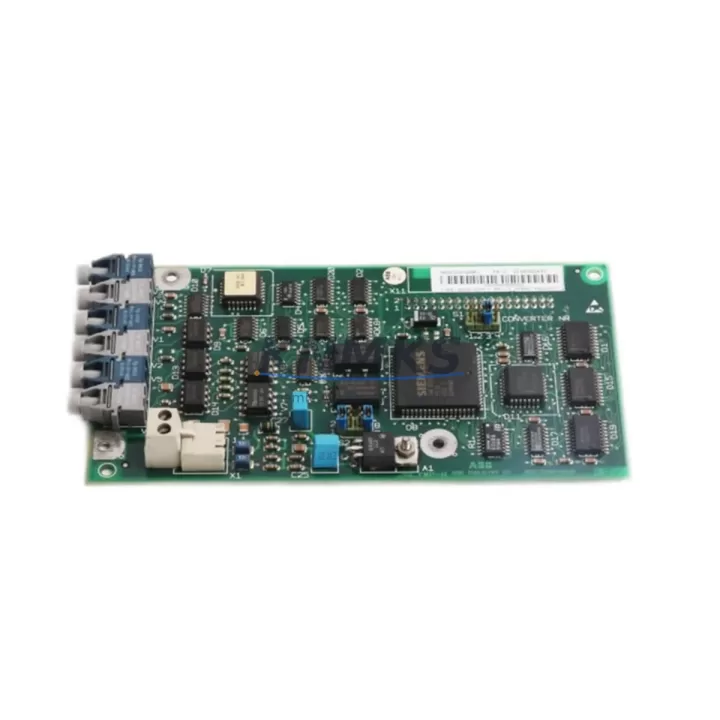
Overview
ABB SDCS-COM-1 3BSE005028R1 Migration-Ready Drive Link Module: Legacy DC Drive System Upgrade
The ABB SDCS-COM-1 (part number 3BSE005028R1) is a Drive Link communication module designed for the ABB DCS800 series DC drive platform. As legacy DC drive systems approach end-of-life and original spare parts become increasingly scarce, the SDCS-COM-1 serves as a critical enabler for control system modernization — allowing engineers to extend the operational life of existing drive cabinets, migrate communication architectures, and maintain production continuity without full drive replacement.
This module provides the Drive Link interface between the DCS800 drive and higher-level automation controllers, enabling coordinated multi-drive operation, speed reference transmission, and status feedback across the control network. For facilities running legacy ABB DC drive lines — including older DCS500 installations being migrated to DCS800 — the SDCS-COM-1 is a direct-fit replacement that preserves existing wiring topology and minimizes re-engineering effort.
Each unit is sourced from verified supply channels, pre-tested prior to shipment, and backed by a support terms confirmed by quotation. In-stock inventory ensures rapid dispatch to support urgent retrofit and breakdown recovery scenarios.
Migration Compatibility Table
| Parameter | Details |
|---|---|
| Compatible Drive Platform | ABB DCS800 Series DC Drives |
| Part Number | SDCS-COM-1 / 3BSE005028R1 |
| Communication Protocol | Drive Link (ABB proprietary fieldbus) |
| Mounting Interface | DCS800 control board slot (SDCS-CON-4 compatible) |
| Legacy Replacement Path | DCS500 → DCS800 migration; SDCS-COM-1 replaces legacy SDCS-COM-x variants |
| Wiring Compatibility | Verify terminal pitch and connector type against existing cabinet layout |
| Firmware Requirement | Confirm DCS800 firmware version supports SDCS-COM-1 module revision |
| Installation Space | Standard DCS800 option slot; confirm cabinet depth and clearance |
| Commissioning Tool | ABB DriveWindow or DriveStudio via SDCS-COM-8 PC interface cable |
| Support terms | 12 Months from date of shipment |
| Pre-Shipment Testing | Yes — functional verification performed before dispatch |
| Stock Status | availability confirmed by RFQ — available for immediate shipment |
Retrofit Planning for Existing Automation Systems
Successful integration of the SDCS-COM-1 into a legacy control environment requires systematic pre-retrofit assessment. Engineers should begin by auditing the existing DCS800 control board — specifically the SDCS-CON-4 — to confirm the option slot assignment and verify that no conflicting module occupies the Drive Link position. Where the original installation used an older SDCS-COM-3 or SDCS-COM-5 variant, dimensional and connector compatibility must be confirmed before substitution.
Power supply capacity within the drive cabinet is a key checkpoint. The SDCS-POW-1 or SDCS-POW-4 auxiliary power supply modules must deliver stable 24 VDC to the control section under all load conditions, including during communication initialization. Any marginal power budget should be resolved before the new module is installed to prevent intermittent faults during commissioning.
For multi-drive systems, the Drive Link topology — whether point-to-point or ring — must be documented and the SDCS-COM-1 node address configured to match the original drive’s position in the chain. This is particularly important in coordinated winder, crane, or conveyor applications where drive sequencing is program-controlled. The master controller — often an ABB AC500 PLC or a third-party Modbus/Profibus master via an RDCO-02 or RPBA-01 adapter — must recognize the replacement module without requiring full re-parameterization.
I/O signal mapping should be reviewed in parallel. Analog input and output terminals on the SDCS-IOB-3 or SDCS-IOB-21 I/O extension boards connected to the same control section must remain undisturbed during module swap. Terminal block labeling and wire tagging prior to any disconnection is strongly recommended to eliminate re-wiring errors.
HMI screens referencing drive status tags linked through the Drive Link network should be validated post-replacement. If the facility uses an ABB Panel 800 or legacy CP600 HMI, confirm that drive parameter addresses and communication object mappings remain consistent with the replacement module’s firmware baseline.
Downtime Control During System Migration
Minimizing production downtime during a drive communication module replacement requires a structured changeover plan. Before any physical intervention, a full parameter backup of the DCS800 drive should be captured using DriveWindow or DriveStudio via the SDCS-COM-8 PC interface cable. This backup preserves motor tuning data, speed reference scaling, ramp settings, and all application-specific parameters — ensuring rapid restoration if commissioning issues arise.
Where possible, the replacement should be staged during a planned maintenance window rather than a breakdown response. Pre-staging the SDCS-COM-1 with the correct node address and verifying firmware compatibility offline reduces on-site intervention time significantly. If the drive is part of a synchronized multi-drive line, coordinate the changeover sequence with the control room to ensure the master drive or PLC is placed in manual hold before the module is swapped.
After physical installation, re-establish the Drive Link connection and confirm communication status via the drive’s diagnostic LEDs and parameter monitoring. Run the drive in local control mode first to verify speed response and current feedback before returning to network-controlled operation. Document all commissioning steps, parameter changes, and test results for the site maintenance record — this supports future audits and accelerates any subsequent service interventions.
With pre-tested stock, a structured backup procedure, and a clear commissioning sequence, most SDCS-COM-1 replacements can be completed within a single shift, keeping unplanned downtime to a minimum and protecting the continuity of the production process.
Retrofit Support FAQ
Q1: Is the SDCS-COM-1 3BSE005028R1 a direct replacement for older SDCS-COM variants in DCS800 drives?
The SDCS-COM-1 is the standard Drive Link option module for the DCS800 platform. Compatibility with specific older SDCS-COM variants depends on the drive’s firmware version and control board revision. Confirm the SDCS-CON-4 firmware level and option slot assignment before ordering. Our technical team can assist with compatibility verification based on your drive nameplate data.
Q2: What commissioning steps are required after installing the SDCS-COM-1?
After physical installation, set the Drive Link node address via the drive’s parameter set (typically parameter group 70 in DCS800). Verify communication status using DriveWindow connected via the SDCS-COM-8 cable. Confirm that the master controller recognizes the drive on the network, then validate speed reference and status feedback signals before returning the drive to automatic operation.
Q3: How is the unit tested before shipment, and what support terms is provided?
Each SDCS-COM-1 unit undergoes functional verification prior to dispatch, including communication interface checks. All units are supplied with a support terms confirmed by quotation covering manufacturing defects and functional failures under normal operating conditions. Support terms support includes technical assistance and replacement dispatch.
Q4: What is the typical lead time, and do you maintain stock for urgent breakdown requirements?
The SDCS-COM-1 3BSE005028R1 is maintained availability confirmed by RFQ for immediate shipment. For urgent breakdown and production recovery scenarios, expedited dispatch is available. Contact our sales team with your site requirements and we will confirm availability and shipping timeline promptly.
© 2026 KNMKS. All rights reserved.
Original Source: https://knmks.com
Contact: admin@knmks.com | +86 18359268345
Product Identification
- Brand / Ecosystem
-
ABB
ABB - Model / Series
-
SDCS-COM-1 3BSE005028R1
S800 Series - Product Family
- Variable Frequency Drives
- Availability Status
- Available on request after model and quantity confirmation
- Inquiry Type
- B2B RFQ, replacement inquiry and project spare-part request
- Pre-Quote Check
- Exact SKU, brand, series, quantity, nameplate photos and destination country are checked before quotation
System Path
Where this product fits in the KNMKS automation structure.
Specification & Inquiry Focus
- Drive range
- AC drives, VFDs and accessories
- Common needs
- Voltage, kW/HP and load type
- Project support
- Motor control, energy saving and spares
Buyer Confirmation
Information KNMKS checks before replying.
- Exact model
- SDCS-COM-1 3BSE005028R1
- Brand / ecosystem
- ABB
- Product family
- Variable Frequency Drives
- Application note
- Replacement, maintenance, project build or spare-part list
- Useful photos
- Nameplate, installed unit, cabinet layout or connector side
- Delivery details
- Quantity, destination country and target schedule
Document Support
Files and notes can be confirmed during quotation.
- Product photos or nameplate confirmation when available
- Packing and delivery notes before quotation confirmation
- Support scope and delivery terms confirmed per inquiry
- Export document coordination for qualified B2B requests
Inquiry Support
- Input/output voltage and kW/HP confirmation
- Energy-saving motor control inquiry
- Accessory and spare-unit support
What to Send Us
- Brand and exact model number: ABB SDCS-COM-1 3BSE005028R1
- Quantity and required delivery time
- Application, replacement requirement or nameplate photo
- Destination country and shipping preference
RFQ Preparation
This is a product inquiry page built for RFQ communication.
Fast Model Check
Send this model to KNMKS for confirmation.
Include quantity, destination country and photos if this is a maintenance replacement. The inquiry will be saved with a reference number after submission.
Brand & Compatibility Note
KNMKS displays automation product information for well-known industrial brand ecosystems and compatible replacement references. Brand names are used for product identification and compatibility reference only; final availability and commercial terms are confirmed per quotation.
 Manufacturing
 Machine Tools
 Packaging
 Energy & Power
 PLCs & Controllers
 HMI & Displays
 Servo Systems
 Sensors