
Overview
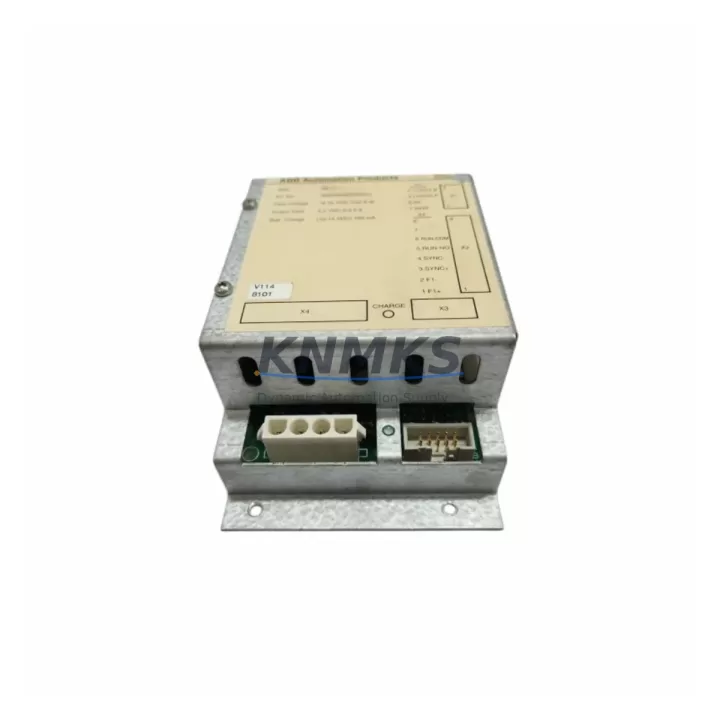
ABB SB510 3BSE000860R1 Migration-Ready Battery Backup for Legacy Control Systems
The ABB SB510 (3BSE000860R1) is a dedicated battery backup module engineered for the ABB AC500 PLC platform, providing sustained SRAM data retention and real-time clock support during power interruptions. As legacy AC500 installations age and original backup modules reach end-of-life, the SB510 3BSE000860R1 has become a critical spare part for maintenance engineers managing long-running automation lines, process control cabinets, and distributed I/O architectures across manufacturing, energy, and infrastructure sectors.
Whether you are replacing a failed backup module on an existing PM571, PM581, or PM591 CPU, or planning a phased retrofit of an older AC500 control system, the SB510 integrates directly into the AC500 CPU slot without firmware modification or hardware rework. Its compact form factor and standardized connector interface ensure that installation space constraints common in legacy control cabinets are not a barrier to a successful upgrade.
Before installing the SB510 3BSE000860R1 as a replacement, engineers should verify the following: the CPU firmware version running on the target PM5xx module, the current SRAM battery voltage reported in the AC500 diagnostic interface, and whether the existing battery holder contacts show corrosion or mechanical wear. In multi-rack AC500 configurations using TB511 or TB521 terminal base units, confirm that the CPU rack address and I/O module addressing remain intact after power cycling, as SRAM data loss during a failed battery swap can corrupt stored program variables and force a cold restart.
For systems that also rely on the AC500 communication modules — such as the CM572-DP PROFIBUS master or the CM577-ETH Ethernet module — it is important to verify that communication parameters stored in non-volatile memory are backed up to the programming tool (Automation Builder or PS501 Control Builder) before removing the old battery module. This prevents communication link reconfiguration downtime after the swap.
Migration Compatibility Table
| Parameter | Details |
|---|---|
| SKU / Part Number | SB510 / 3BSE000860R1 |
| Compatible CPU Modules | PM571, PM581, PM591, PM592 (AC500 Series) |
| Terminal Base Compatibility | TB511, TB521, TB541 |
| Connector Interface | Direct plug-in to AC500 CPU battery slot — no adapter required |
| Communication Module Impact | CM572-DP, CM577-ETH — backup comm parameters before swap |
| Firmware Requirement | No firmware update required; verify CPU firmware ≥ baseline release for PM5xx |
| Installation Space | Standard AC500 CPU slot; no additional DIN rail space required |
| Replacement Scope | Direct drop-in replacement for legacy SB510 units; no wiring changes |
| Commissioning Steps | Power down CPU → remove old module → insert SB510 → power up → verify RTC and SRAM status in diagnostic display |
| Origin | Germany (DE) |
| Support terms | support terms confirmed by quotation — pre-shipment tested and verified |
Retrofit Planning for Existing Automation Systems
A successful SB510 3BSE000860R1 retrofit begins with a thorough audit of the existing AC500 control cabinet. In most legacy installations, the AC500 CPU is mounted alongside a PS501 or PS560 power supply module, which must be confirmed to deliver stable 24 VDC within tolerance before the battery swap is performed. Voltage fluctuations during the replacement window — even brief ones — can trigger unintended CPU resets and corrupt the SRAM-backed data blocks that store PID tuning parameters, recipe data, and production counters.
For I/O-intensive systems using DA501 analog input modules or DI524 digital input modules on extended racks, engineers should document the current I/O module slot assignments and verify that the rack configuration file in Automation Builder matches the physical hardware layout. After the SB510 replacement, a forced I/O scan and diagnostic read from the HMI — typically a CP600 or CP620 panel connected via Ethernet or serial — will confirm that all field signals are correctly mapped and that no I/O address conflicts have been introduced.
In retrofit projects where the AC500 system is being upgraded from an older PROFIBUS-based architecture to Ethernet/IP or Modbus TCP, the SB510 battery module plays a supporting role in preserving the transition-period program logic stored in SRAM while the new CM577-ETH communication module is configured and tested in parallel. This approach allows the legacy PROFIBUS network to remain operational during the migration window, minimizing production downtime.
Where control cabinets are being physically relocated or consolidated as part of a broader plant modernization, the SB510’s compact dimensions and tool-free installation make it straightforward to transfer the CPU assembly to a new enclosure without disrupting the battery-backed memory state — provided the CPU remains powered throughout the move or the battery is freshly replaced immediately before relocation.
Downtime Control During System Migration
Minimizing unplanned downtime during an SB510 battery module replacement requires a structured pre-maintenance checklist. Before initiating the swap, use Automation Builder or PS501 Control Builder to perform a full program upload from the target CPU, saving the current project file with a timestamped backup. This ensures that if an unexpected cold start occurs — due to SRAM data loss from a deeply discharged battery — the program can be reloaded within minutes rather than hours.
For production lines where even a brief CPU restart is unacceptable, consider scheduling the SB510 replacement during a planned maintenance window and coordinating with the HMI operator to place the system in manual mode. On AC500 systems with redundant CPU configurations, the standby CPU can maintain control continuity while the primary CPU’s battery module is replaced, effectively reducing the changeover impact to zero.
After installation, verify the real-time clock value displayed on the CP600 or CP620 HMI panel matches the current plant time, and confirm that all SRAM-backed data blocks — including recipe parameters and production totals — have been correctly retained. A brief functional test of the CM572-DP PROFIBUS link or CM577-ETH Ethernet connection will confirm that communication with field devices and SCADA systems has not been interrupted. Pre-shipment testing of each SB510 3BSE000860R1 unit ensures that the module arrives ready for immediate installation, reducing on-site commissioning time and the risk of receiving a defective component.
Retrofit Support FAQ
Q: Is the SB510 3BSE000860R1 a direct replacement for the original ABB AC500 battery backup module?
A: Yes. The SB510 3BSE000860R1 is a direct drop-in replacement for the original SB510 battery module used in AC500 PM571, PM581, PM591, and PM592 CPU units. No wiring changes, adapter plates, or firmware updates are required. The module plugs directly into the CPU battery slot and is immediately operational after power-up.
Q: What commissioning steps are required after installing the SB510?
A: After installation, power up the AC500 CPU and check the diagnostic display for SRAM battery status and RTC accuracy. Verify that all I/O module addresses are correctly recognized and that communication modules (CM572-DP, CM577-ETH) have re-established their links. If the CPU performed a cold start due to prior SRAM data loss, reload the program from Automation Builder and re-enter any runtime parameters that were not stored in non-volatile memory.
Q: How is each SB510 3BSE000860R1 unit tested before shipment?
A: Every SB510 3BSE000860R1 unit undergoes pre-shipment functional testing to verify battery charge capacity, connector integrity, and module identification. Units are shipped with a support terms confirmed by quotation covering manufacturing defects and premature capacity loss. Test records are available upon request for quality-critical applications.
Q: What is the typical lead time and inventory availability for the SB510 3BSE000860R1?
A: We maintain stock inventory of the SB510 3BSE000860R1 to support urgent maintenance and planned retrofit projects. Standard orders ship within 1–3 business days. For long-term spare parts agreements covering 12–36 months of supply, contact our sales team to discuss volume pricing and reserved inventory arrangements.
© 2026 KNMKS. All rights reserved.
Original Source: https://knmks.com
Contact: admin@knmks.com | +86 18359268345
Product Identification
- Brand / Ecosystem
-
ABB
ABB - Model / Series
-
SB510 3BSE000860R1
AC500 Series - Product Family
- PLCs & Controllers
- Availability Status
- Available on request after model and quantity confirmation
- Inquiry Type
- B2B RFQ, replacement inquiry and project spare-part request
- Pre-Quote Check
- Exact SKU, brand, series, quantity, nameplate photos and destination country are checked before quotation
System Path
Where this product fits in the KNMKS automation structure.
Specification & Inquiry Focus
- Control platform
- PLC, PAC and modular controllers
- Common needs
- CPU, rack, power and I/O expansion
- Project support
- Replacement, cabinet build and maintenance
Buyer Confirmation
Information KNMKS checks before replying.
- Exact model
- SB510 3BSE000860R1
- Brand / ecosystem
- ABB
- Product family
- PLCs & Controllers
- Application note
- Replacement, maintenance, project build or spare-part list
- Useful photos
- Nameplate, installed unit, cabinet layout or connector side
- Delivery details
- Quantity, destination country and target schedule
Document Support
Files and notes can be confirmed during quotation.
- Product photos or nameplate confirmation when available
- Packing and delivery notes before quotation confirmation
- Support scope and delivery terms confirmed per inquiry
- Export document coordination for qualified B2B requests
Inquiry Support
- Model cross-checking before quotation
- CPU, power, rack and expansion module matching
- Support for replacement and project inquiry
What to Send Us
- Brand and exact model number: ABB SB510 3BSE000860R1
- Quantity and required delivery time
- Application, replacement requirement or nameplate photo
- Destination country and shipping preference
RFQ Preparation
This is a product inquiry page built for RFQ communication.
Fast Model Check
Send this model to KNMKS for confirmation.
Include quantity, destination country and photos if this is a maintenance replacement. The inquiry will be saved with a reference number after submission.
Brand & Compatibility Note
KNMKS displays automation product information for well-known industrial brand ecosystems and compatible replacement references. Brand names are used for product identification and compatibility reference only; final availability and commercial terms are confirmed per quotation.
 Manufacturing
 Machine Tools
 Packaging
 Energy & Power



 HMI & Displays
 Servo Systems
 Variable Frequency Drives
 Sensors