
Overview
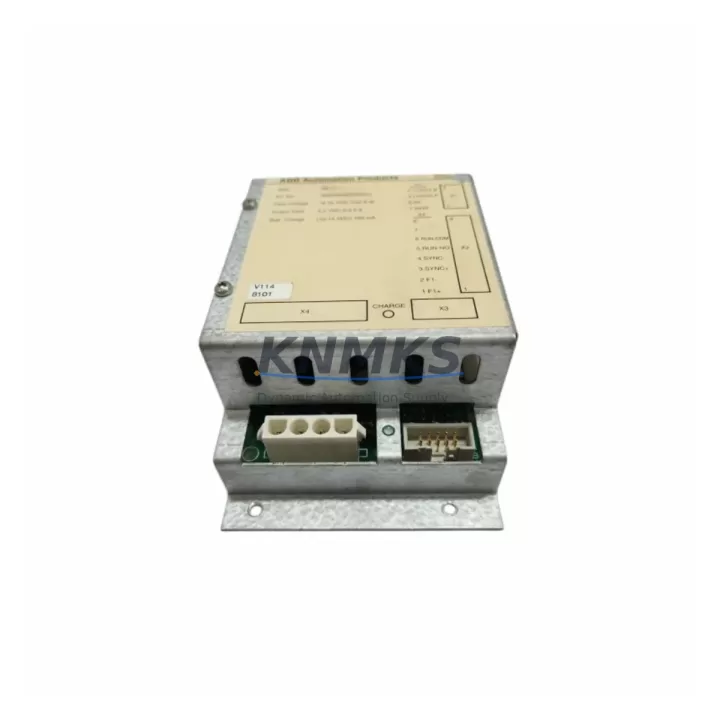
ABB SB171 3BSE004802R0001 Migration-Ready Backup Power Module for Legacy Control Systems
The ABB SB171 (part number 3BSE004802R0001) is a dedicated backup power module engineered for the AC500 PLC platform, providing uninterrupted power continuity during mains interruptions, planned shutdowns, and control cabinet upgrades. As legacy automation systems approach end-of-life and OEM support windows close, the SB171 has become a critical component in retrofit projects where maintaining program integrity and field control continuity is non-negotiable. Whether you are replacing a failed unit in an existing AC500 rack or planning a phased migration from an older Advant or S500 control architecture, the SB171 delivers the electrical compatibility and mechanical fit required for a low-risk, minimum-downtime changeover.
Before installing the SB171 into a retrofit application, engineers should verify the power budget of the existing AC500 rack. The module interfaces directly with the PM5xx CPU modules and draws from the same backplane bus as connected I/O modules such as the DC532 digital input/output module and the AI523 analog input module. Confirm that the total current draw across all installed modules does not exceed the rated capacity of the primary power supply — typically the PS501 or PS502 — before commissioning the SB171 as a secondary backup source. Failure to account for cumulative load can result in undervoltage faults during switchover events.
Terminal wiring for the SB171 follows the standard AC500 24 VDC input convention. When migrating from an older backup arrangement using discrete UPS modules or relay-based hold-up circuits, technicians should map existing terminal assignments against the SB171 wiring diagram before disconnecting any field cables. Pay particular attention to the common ground reference shared with the TB511 terminal base and any connected CI501 communication interface modules, as ground loop differences between legacy and new wiring schemes can introduce noise on analog signal channels.
Backplane slot assignment must be confirmed prior to installation. The SB171 occupies a dedicated slot position within the AC500 rack and is not hot-swappable in all firmware revisions. Check the installed firmware version on the PM5xx CPU against the compatibility matrix published for the SB171 before proceeding. If the CPU firmware predates the SB171’s supported release, a firmware update via the PS501 programming port or through Automation Builder software is required. This step is frequently overlooked during emergency replacements and can result in the module being recognized but not activated by the CPU’s power management subsystem.
For projects involving communication protocol migration — for example, transitioning from PROFIBUS DP to PROFINET IO — the SB171 installation should be coordinated with the replacement of the CI590 PROFIBUS adapter or the addition of a CI501-PNIO PROFINET interface module. The backup power module must remain operational throughout the communication reconfiguration to prevent loss of the CPU’s retentive memory block, which stores PID tuning parameters, recipe data, and fieldbus node address assignments. Losing this data during a protocol migration can extend commissioning time significantly.
HMI screen updates are another consideration during SB171-based retrofit projects. If the control system includes a CP600 operator panel communicating over Modbus TCP or OPC UA, verify that the panel’s tag database references the correct CPU memory addresses after any program reorganization triggered by the hardware change. A mismatch between HMI tag addresses and the updated PLC program can cause false alarm displays or loss of process visibility during the critical post-installation verification phase.
Installation space within the control cabinet should be measured before ordering. The SB171 conforms to the standard AC500 module form factor, but retrofit cabinets originally designed for S500 or older Advant hardware may have restricted DIN rail depth or reduced clearance around the backplane connector area. Confirm available depth, ventilation clearance, and cable routing space before finalizing the retrofit bill of materials.
All units supplied are pre-shipment tested under load conditions to verify output voltage stability, switchover response time, and backplane communication handshake. Each module ships with a support terms confirmed by quotation covering manufacturing defects and functional failures under normal operating conditions. Inventory is maintained for immediate dispatch to support emergency maintenance scenarios and planned shutdown windows.
Migration Compatibility Table
| Parameter | Detail |
|---|---|
| Compatible Platform | ABB AC500 PLC Series (PM551, PM554, PM556, PM564, PM566, PM572, PM581, PM582, PM591, PM592) |
| Input Voltage | 24 VDC (nominal), compatible with standard AC500 power supply rails |
| Backplane Interface | AC500 standard backplane bus; slot position per rack configuration |
| Terminal Wiring | 24 VDC input terminals; compatible with TB511 terminal base wiring conventions |
| Communication Compatibility | Transparent to PROFIBUS DP, PROFINET IO, Modbus TCP, CANopen, DeviceNet |
| Firmware Requirement | Verify PM5xx CPU firmware version against SB171 compatibility matrix before installation |
| Replacement Path | Direct replacement for failed SB171 units; retrofit alternative for discrete UPS hold-up circuits in legacy S500 and Advant cabinets |
| Installation Space | Standard AC500 module form factor; confirm DIN rail depth and ventilation clearance in retrofit cabinets |
| Pre-Shipment Testing | Load test, switchover response verification, backplane communication handshake |
| Support terms | 12 months from date of shipment, covering manufacturing defects and functional failures |
Retrofit Planning for Existing Automation Systems
A successful SB171 retrofit begins with a complete audit of the existing AC500 rack configuration. Document the slot positions of all installed modules — including the PM5xx CPU, any DC532 or DC522 digital I/O modules, AI523 or AO523 analog modules, and CI501 or CI590 communication adapters — before removing any hardware. This baseline record is essential for restoring the system to a known state if the retrofit encounters unexpected compatibility issues.
Power budget calculation is the next critical step. Sum the current consumption figures for every module in the rack, including the CPU and all I/O modules, and compare the total against the rated output of the installed PS501 or PS502 power supply. The SB171 adds a small parasitic load during standby operation; include this in the budget to avoid marginal supply conditions that may not trigger immediate faults but will reduce system reliability over time.
If the retrofit involves expanding I/O capacity — for example, adding a DC532 module to accommodate new field instruments — the SB171 installation should be sequenced after the I/O expansion is complete and the power budget has been recalculated. Adding modules after the backup power system is commissioned without rechecking the power budget is a common source of intermittent faults in expanded AC500 systems.
For cabinets that include a CP600 HMI panel, coordinate the SB171 installation with a scheduled HMI tag database review. The backup module does not alter PLC program logic, but any CPU firmware update performed as part of the SB171 commissioning process may require a corresponding update to the Automation Builder project file and a re-download to the CPU. Confirm that the HMI communication link — whether Modbus TCP, OPC UA, or a direct serial connection — remains active throughout the firmware update sequence to avoid losing operator visibility during the transition.
Signal isolation requirements should also be reviewed during retrofit planning. In cabinets where the SB171 is being installed alongside new analog I/O modules, consider whether signal isolators are needed between field transmitters and the AI523 inputs to prevent ground-referenced noise from affecting measurement accuracy after the power architecture change.
Downtime Control During System Migration
Minimizing downtime during an SB171 installation requires a structured pre-work sequence completed before the planned maintenance window. Upload and archive the current PLC program from the PM5xx CPU using Automation Builder before any hardware is disturbed. Verify that the archived program compiles without errors on the engineering workstation and that all retentive variable values are captured in a data log. This backup is the primary recovery asset if the installation encounters an unexpected fault.
During the physical installation, maintain 24 VDC supply to the rack from the primary PS501 or PS502 power supply throughout the module swap if the system design permits hot-work under controlled conditions. If the CPU must be de-energized, coordinate with the process control team to place all field actuators in a safe, defined state before removing power. Document the pre-shutdown state of all digital outputs and analog setpoints so that the system can be restored to the correct operating condition after the SB171 is commissioned.
After installation, perform a structured commissioning sequence: power up the rack, confirm that the CPU recognizes the SB171 on the backplane, verify the module status LED, and check the Automation Builder diagnostic view for any hardware configuration mismatches. Simulate a mains interruption under controlled conditions to confirm that the SB171 switches over within the specified response time and that the CPU program continues executing without a restart. Document the switchover test result as part of the installation record.
For systems with CI501 or CI590 communication modules, verify that the fieldbus network recovers correctly after the switchover test. Some PROFIBUS DP networks require a master re-initialization cycle after a power event; confirm that the network master — whether a separate controller or the AC500 CPU itself — handles this automatically or that the restart procedure is documented for the operations team.
Retrofit Support FAQ
Q: Is the ABB SB171 3BSE004802R0001 a direct replacement for an existing SB171 unit?
A: Yes. The 3BSE004802R0001 is the standard part number for the SB171 backup power module. It is a direct slot-for-slot replacement for any existing SB171 installed in an AC500 rack. No program changes or rack reconfiguration are required for a like-for-like replacement.
Q: What firmware version is required on the PM5xx CPU for the SB171 to operate correctly?
A: Firmware compatibility depends on the specific CPU variant. As a general guideline, PM5xx CPUs running firmware version 2.x or later support the SB171 without modification. For CPUs on earlier firmware, an update via Automation Builder is recommended before installing the module. Contact our technical team with your CPU part number for a specific compatibility confirmation.
Q: How is the SB171 tested before shipment?
A: Each unit undergoes a pre-shipment functional test covering input voltage acceptance, output stability under load, switchover response time measurement, and backplane communication handshake verification. Test records are retained and available upon request. All units are covered by a support terms confirmed by quotation from the date of shipment.
Q: Is inventory available for immediate dispatch to support emergency maintenance?
A: Yes. Stock is maintained for priority dispatch to support unplanned outages and emergency maintenance windows. Orders placed before the daily cut-off are processed for same-day or next-business-day shipment depending on destination. Contact admin@knmks.com or +86 18359268345 to confirm current stock levels and lead time for your location.
© 2026 KNMKS. All rights reserved.
Original Source: https://knmks.com
Contact: admin@knmks.com | +86 18359268345
Product Identification
- Brand / Ecosystem
-
ABB
ABB - Model / Series
-
SB171 3BSE004802R0001
AC500 Series - Product Family
- PLCs & Controllers
- Availability Status
- Available on request after model and quantity confirmation
- Inquiry Type
- B2B RFQ, replacement inquiry and project spare-part request
- Pre-Quote Check
- Exact SKU, brand, series, quantity, nameplate photos and destination country are checked before quotation
System Path
Where this product fits in the KNMKS automation structure.
Specification & Inquiry Focus
- Control platform
- PLC, PAC and modular controllers
- Common needs
- CPU, rack, power and I/O expansion
- Project support
- Replacement, cabinet build and maintenance
Buyer Confirmation
Information KNMKS checks before replying.
- Exact model
- SB171 3BSE004802R0001
- Brand / ecosystem
- ABB
- Product family
- PLCs & Controllers
- Application note
- Replacement, maintenance, project build or spare-part list
- Useful photos
- Nameplate, installed unit, cabinet layout or connector side
- Delivery details
- Quantity, destination country and target schedule
Document Support
Files and notes can be confirmed during quotation.
- Product photos or nameplate confirmation when available
- Packing and delivery notes before quotation confirmation
- Support scope and delivery terms confirmed per inquiry
- Export document coordination for qualified B2B requests
Inquiry Support
- Model cross-checking before quotation
- CPU, power, rack and expansion module matching
- Support for replacement and project inquiry
What to Send Us
- Brand and exact model number: ABB SB171 3BSE004802R0001
- Quantity and required delivery time
- Application, replacement requirement or nameplate photo
- Destination country and shipping preference
RFQ Preparation
This is a product inquiry page built for RFQ communication.
Fast Model Check
Send this model to KNMKS for confirmation.
Include quantity, destination country and photos if this is a maintenance replacement. The inquiry will be saved with a reference number after submission.
Brand & Compatibility Note
KNMKS displays automation product information for well-known industrial brand ecosystems and compatible replacement references. Brand names are used for product identification and compatibility reference only; final availability and commercial terms are confirmed per quotation.
 Manufacturing
 Machine Tools
 Packaging
 Energy & Power



 HMI & Displays
 Servo Systems
 Variable Frequency Drives
 Sensors