
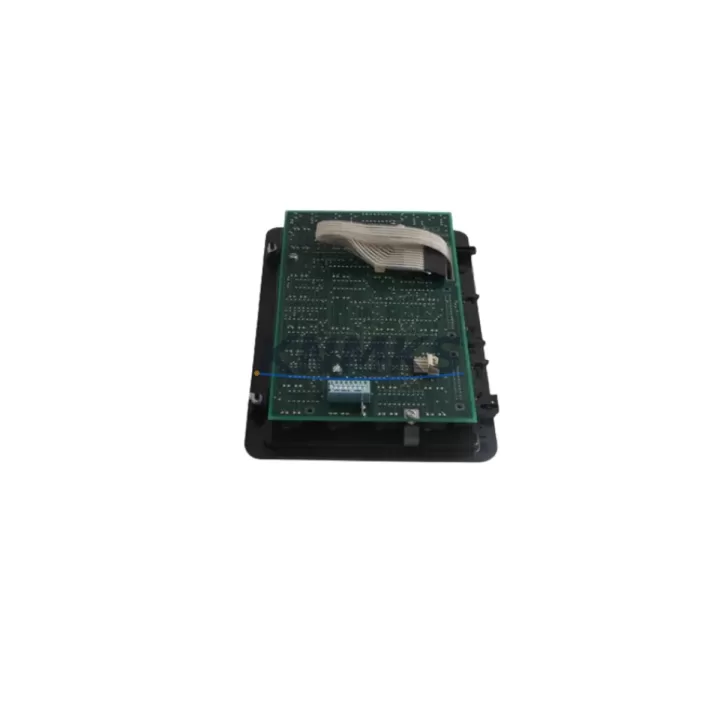
Overview
ABB RLM02 Migration-Ready Redundancy Module for AC500 Legacy Control Systems
The ABB RLM02 is a hot-standby redundancy module engineered for the AC500 PLC platform, providing a direct upgrade path from the discontinued RLM01 and enabling mission-critical control continuity across legacy automation architectures. Whether you are modernizing an aging process control cabinet, extending the service life of an existing AC500 rack, or replacing end-of-life redundancy hardware in a continuous production environment, the RLM02 delivers verified compatibility, reduced commissioning risk, and a support terms confirmed by quotation backed by pre-shipment functional testing.
The RLM02 is designed to mount directly into the AC500 CPU rack alongside compatible CPUs including the PM571, PM581, PM591, and PM595 series. It synchronizes program logic, I/O states, and communication link status between the primary and standby CPU modules in real time, ensuring seamless bumpless transfer in the event of a primary controller fault. For engineers managing legacy installations where the original RLM01 is no longer available through standard distribution channels, the RLM02 represents the manufacturer-recommended replacement with no firmware downgrade required.
Before initiating a redundancy module swap, engineers should verify several critical parameters. Power budget within the existing TB511 or TB521 terminal base must accommodate the RLM02’s supply draw without exceeding the rack’s total capacity. Backplane slot assignment must be confirmed against the existing hardware configuration file in Automation Builder, as incorrect slot addressing can prevent the redundancy link from initializing. Firmware versions on both the primary and standby PM595 or PM581 CPUs must be at a compatible release level — ABB recommends aligning both CPUs to the same firmware revision before inserting the RLM02 to avoid synchronization handshake failures during first power-on.
Communication link integrity between the two CPU modules is established via the dedicated redundancy port on the RLM02. Engineers should inspect the existing fiber or copper redundancy cable — typically used with the CM589-PNIO or CM578-CN communication modules in the same rack — and confirm cable continuity and connector seating before closing the cabinet. HMI screens connected via CP600 or CP400 operator panels should be reviewed to ensure that the redundancy status tags are correctly mapped and that switchover events will be logged without generating spurious alarms.
Migration Compatibility Table
| Parameter | RLM01 (Legacy) | RLM02 (Replacement) | Notes |
|---|---|---|---|
| Compatible CPUs | PM571, PM581, PM591 | PM571, PM581, PM591, PM595 | RLM02 extends support to PM595 |
| Rack Slot | Fixed slot per CPU type | Same slot assignment | No rack modification required |
| Redundancy Link | Copper / Fiber | Copper / Fiber | Existing cable reusable |
| Firmware Requirement | Legacy AB firmware | Automation Builder 2.x+ | Align both CPUs before swap |
| Hot-Standby Switchover | Supported | Supported (improved) | Bumpless transfer confirmed |
| Communication Modules | CM578-CN, CM589-PNIO | CM578-CN, CM589-PNIO, CM592-DP | Broader protocol support |
| Installation Space | 1 slot (standard AC500 rack) | 1 slot (standard AC500 rack) | Direct physical replacement |
| Pre-Shipment Testing | N/A (OEM) | Yes — functional test included | KNMKS verified before dispatch |
| Support terms | OEM standard | 12 Months | Covers full module functionality |
| Retrofit Recommendation | — | Direct drop-in replacement | No program changes required |
Retrofit Planning for Existing Automation Systems
A successful RLM02 retrofit begins well before the module arrives on site. Start by exporting the current Automation Builder project file and archiving it with a version timestamp — this protects the original program logic and variable mapping in the event that any configuration adjustment is needed during commissioning. Next, document the existing rack layout: note the positions of the PM595 or PM581 CPU, the SD502 or SD503 power supply module, and any CM589-PNIO or CM578-CN communication modules installed in adjacent slots. The RLM02 must occupy the designated redundancy slot immediately adjacent to the primary CPU; confirm this against the AC500 hardware configuration guide before ordering.
During the physical swap, power down the standby CPU first while keeping the primary controller live — this approach maintains process output continuity and avoids a full plant shutdown. Remove the RLM01 from the standby rack, insert the RLM02, and restore power to the standby side. Automation Builder will detect the new module during the next online scan. If the project uses a CI590-CS31-HA coupler for CS31 field bus expansion, verify that the coupler’s redundancy parameters are still aligned after the module swap, as some legacy configurations store redundancy group IDs locally on the coupler. For installations that include a TA521 or TA526 terminal adapter for I/O wiring, no rewiring is required — the RLM02 does not alter the I/O terminal assignment on the rack.
Engineers working on sites with CP600 HMI panels should perform a brief switchover test after commissioning: force a manual switchover from the Automation Builder redundancy diagnostics view and confirm that the CP600 screen refreshes without freezing and that all process values remain stable. This test should be logged as part of the site acceptance record.
Downtime Control During System Migration
Minimizing unplanned downtime during a redundancy module replacement is the primary concern for any continuous process operation. The RLM02 swap procedure is designed to be executed with the primary controller remaining in RUN mode throughout, provided the existing redundancy link is intact and the standby CPU is healthy before the swap begins. This live-swap approach eliminates the need for a full process shutdown and allows the replacement to be completed during a scheduled maintenance window — typically under 30 minutes for an experienced engineer familiar with the AC500 platform.
To protect original program logic, never overwrite the Automation Builder project during the swap procedure. Keep the downloaded program on the primary CPU intact and use the redundancy synchronization function to push the program to the standby CPU after the RLM02 is installed and the redundancy link is re-established. If the site uses a CM592-DP PROFIBUS communication module for field device connectivity, verify that the PROFIBUS master remains active on the primary CPU during the entire swap sequence — loss of the PROFIBUS master during switchover can cause field devices to enter fault state and require individual reset.
For sites where a full shutdown cannot be avoided, pre-stage the RLM02 with the correct firmware and configuration parameters before the maintenance window begins. This reduces on-site commissioning time to a module swap and a single online download, keeping the outage window as short as possible. KNMKS ships all RLM02 units with a pre-shipment functional test report, confirming that the redundancy link, CPU synchronization handshake, and hot-standby switchover have been verified before dispatch.
Retrofit Support FAQ
Q: Is the RLM02 a direct replacement for the RLM01 in all AC500 configurations?
A: Yes. The RLM02 is the manufacturer-designated successor to the RLM01 and occupies the same rack slot with identical physical dimensions. It is compatible with PM571, PM581, PM591, and PM595 CPUs. No program changes or rack modifications are required for a standard replacement.
Q: What firmware version is required on the AC500 CPUs before installing the RLM02?
A: ABB recommends that both the primary and standby CPUs run the same firmware revision, compatible with Automation Builder 2.x or later. Mismatched firmware versions between the two CPUs can prevent the redundancy synchronization handshake from completing. Firmware can be updated via Automation Builder before the module swap.
Q: Does KNMKS test the RLM02 before shipment?
A: Yes. Every RLM02 unit supplied by KNMKS undergoes a pre-shipment functional test that verifies redundancy link initialization, CPU synchronization, and hot-standby switchover. A test report is included with each shipment. All units are covered by a support terms confirmed by quotation from the date of dispatch.
Q: What is the lead time and stock availability for the RLM02?
A: KNMKS maintains stock of the RLM02 for immediate dispatch. Standard lead time for in-stock units is 3–7 business days for international shipments. For urgent requirements or multi-unit orders, contact admin@knmks.com or call +86 18359268345 to confirm availability and arrange priority shipping.
© 2026 KNMKS. All rights reserved.
Original Source: https://knmks.com
Contact: admin@knmks.com | +86 18359268345
Product Identification
- Brand / Ecosystem
-
ABB
ABB - Model / Series
-
RLM02
AC500 Series - Product Family
- PLCs & Controllers
- Availability Status
- Available on request after model and quantity confirmation
- Inquiry Type
- B2B RFQ, replacement inquiry and project spare-part request
- Pre-Quote Check
- Exact SKU, brand, series, quantity, nameplate photos and destination country are checked before quotation
System Path
Where this product fits in the KNMKS automation structure.
Specification & Inquiry Focus
- Control platform
- PLC, PAC and modular controllers
- Common needs
- CPU, rack, power and I/O expansion
- Project support
- Replacement, cabinet build and maintenance
Buyer Confirmation
Information KNMKS checks before replying.
- Exact model
- RLM02
- Brand / ecosystem
- ABB
- Product family
- PLCs & Controllers
- Application note
- Replacement, maintenance, project build or spare-part list
- Useful photos
- Nameplate, installed unit, cabinet layout or connector side
- Delivery details
- Quantity, destination country and target schedule
Document Support
Files and notes can be confirmed during quotation.
- Product photos or nameplate confirmation when available
- Packing and delivery notes before quotation confirmation
- Support scope and delivery terms confirmed per inquiry
- Export document coordination for qualified B2B requests
Inquiry Support
- Model cross-checking before quotation
- CPU, power, rack and expansion module matching
- Support for replacement and project inquiry
What to Send Us
- Brand and exact model number: ABB RLM02
- Quantity and required delivery time
- Application, replacement requirement or nameplate photo
- Destination country and shipping preference
RFQ Preparation
This is a product inquiry page built for RFQ communication.
Fast Model Check
Send this model to KNMKS for confirmation.
Include quantity, destination country and photos if this is a maintenance replacement. The inquiry will be saved with a reference number after submission.
Brand & Compatibility Note
KNMKS displays automation product information for well-known industrial brand ecosystems and compatible replacement references. Brand names are used for product identification and compatibility reference only; final availability and commercial terms are confirmed per quotation.
 Manufacturing
 Machine Tools
 Packaging
 Energy & Power



 HMI & Displays
 Servo Systems
 Variable Frequency Drives
 Sensors