
Overview
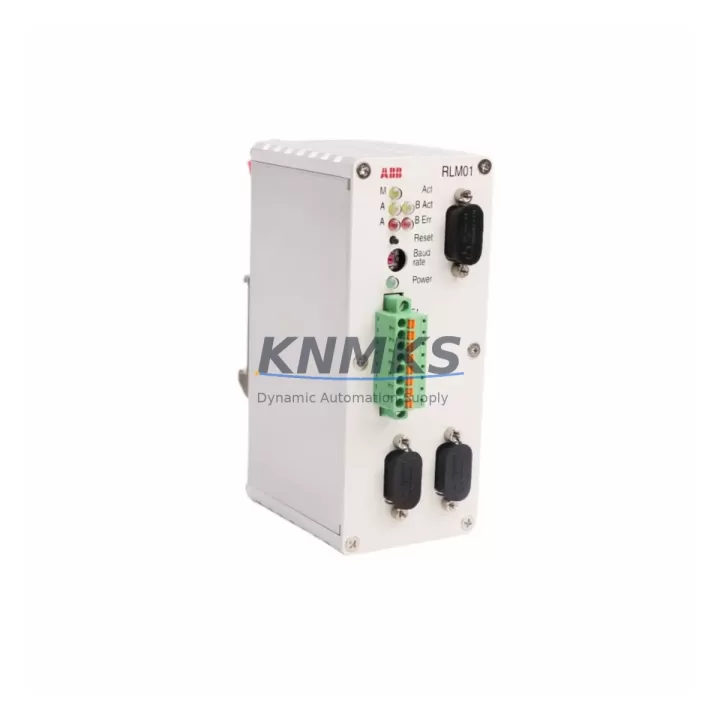
ABB RLM01 3BDZ000398R1 Migration-Ready Link Module for Legacy AC500 Control Systems
The ABB RLM01 (part number 3BDZ000398R1) is a migration-ready link module engineered for direct replacement and retrofit integration within ABB AC500 PLC platforms. As legacy AC500 installations approach end-of-support milestones, engineering teams managing scheduled outages, emergency replacements, and phased control system upgrades rely on pre-tested, support terms-backed modules to minimize downtime and protect existing program logic. The RLM01 serves as a critical communication bridge between the AC500 CPU and field-level devices, supporting PROFIBUS DP and Ethernet-based topologies that remain prevalent across process industries, utilities, and discrete manufacturing environments.
Each unit supplied by KNMKS is sourced from verified channels, subjected to pre-shipment functional testing, and covered by a support terms confirmed by quotation. Multi-region stock availability ensures fast global dispatch for both planned maintenance windows and unplanned failures. Whether you are executing a Phase 1 like-for-like swap or a Phase 2 platform migration toward a newer AC500 V3 architecture, the RLM01 3BDZ000398R1 provides a reliable, cost-controlled entry point that preserves your existing backplane, terminal wiring, and communication addressing.
Migration Compatibility Table
| Parameter | Detail |
|---|---|
| SKU / Part Number | RLM01 / 3BDZ000398R1 |
| Brand / Series | ABB / AC500 |
| Module Function | Link Module — CPU-to-fieldbus communication bridge |
| Supported Protocols | PROFIBUS DP, Ethernet (AC500 internal bus) |
| Backplane Interface | AC500 standard backplane slot — direct plug-in, no adapter required |
| Power Supply Compatibility | Draws power from AC500 backplane; verify PM5xx/PM5xx-ETH CPU power budget before installation |
| Terminal / Wiring Adaptation | No field wiring changes required for like-for-like swap; confirm PROFIBUS cable shielding and termination resistor status |
| Module Address / Slot Config | Slot address inherited from backplane position; re-confirm in PS501 Control Builder after replacement |
| Firmware Compatibility | Compatible with AC500 firmware V2.x and V3.x; verify CPU firmware version before commissioning |
| HMI / SCADA Impact | No HMI screen rebuild required for like-for-like swap; validate tag mapping if upgrading CPU simultaneously |
| Installation Space | Standard AC500 module footprint; fits TB5xx terminal base |
| Pre-Shipment Testing | Yes — functional test performed before dispatch |
| Support terms | 12 months from date of delivery |
| Replacement Recommendation | Direct drop-in for failed or end-of-life RLM01 units; suitable for Phase 1 swap and Phase 2 platform upgrade paths |
Retrofit Planning for Existing Automation Systems
Successful retrofit of the RLM01 3BDZ000398R1 begins well before the maintenance window opens. Engineering teams should audit the full AC500 rack configuration, documenting each occupied slot and its associated module address. In a typical AC500 control cabinet, the RLM01 sits adjacent to the CPU module — commonly a PM554-T or PM564-R — and shares the backplane with I/O expansion modules such as the DC532 digital input/output module and the AX522 analog I/O module. Confirming the power budget across all installed modules is essential: the AC500 power supply module (PS501 or PS560) must have sufficient headroom to support the replacement RLM01 without triggering undervoltage faults on adjacent modules.
For installations where the RLM01 manages a PROFIBUS DP segment, engineers must verify bus termination at both ends of the segment before powering down. Removing an active terminator without a plan will cause communication faults across all slave devices on that segment. Where the RLM01 interfaces with a CI590-CS31-HA CS31 communication interface or a CI501-PNIO PROFINET I/O module on the same rack, the replacement sequence must account for the communication restart time of each dependent module. Signal isolators installed between the RLM01 PROFIBUS port and field transmitters should be checked for impedance compatibility with the replacement unit.
If the retrofit is part of a broader migration from an older AC500 V1 platform to AC500 V3, the programming environment shift from PS501 Control Builder to Automation Builder 2.x introduces additional considerations. Program export, variable mapping verification, and library version alignment must be completed before the physical swap. In parallel, any CP600 HMI panels connected to the AC500 CPU via Ethernet should have their communication parameters backed up, as a CPU firmware upgrade performed alongside the RLM01 replacement may reset Ethernet port settings.
Downtime Control During System Migration
Minimizing downtime during an RLM01 replacement requires a structured pre-outage checklist and a clear rollback plan. Before the maintenance window, perform a full program backup from the AC500 CPU using PS501 Control Builder or Automation Builder, and document the current module configuration including slot assignments, I/O addresses, and PROFIBUS node addresses. Photograph or export the existing wiring layout at the TB5xx terminal base to eliminate reconnection errors during reassembly.
During the swap, power down the AC500 rack in the correct sequence: disable field outputs first, then halt the CPU, then remove backplane power. The RLM01 module releases from the TB5xx terminal base with a single latch mechanism — no tools required. Insert the replacement 3BDZ000398R1 into the same slot, reconnect the terminal base, and restore power in reverse order. On first power-up, the AC500 CPU will perform a module recognition scan; confirm that the RLM01 appears correctly in the hardware configuration tree within PS501 or Automation Builder before enabling field outputs.
If the PROFIBUS segment managed by the RLM01 serves critical field devices — such as variable frequency drives, safety relays, or remote I/O stations — coordinate with the process control team to place those devices in local manual mode before the outage begins. This preserves field-level control continuity and prevents process upsets caused by communication loss during the swap. Post-replacement, run a full PROFIBUS diagnostic scan to confirm all slave devices have re-established communication before returning the system to automatic mode. Document the completed replacement in the site maintenance log, including the new module serial number and the support terms confirmed by quotation expiry date.
Retrofit Support FAQ
Q1: Is the ABB RLM01 3BDZ000398R1 a direct replacement for all RLM01 variants?
The 3BDZ000398R1 is the standard production part number for the RLM01 link module and is compatible with all AC500 racks using the TB5xx terminal base family. If your existing installation uses an earlier RLM01 variant with a different suffix, confirm the terminal base model before ordering. KNMKS technical support can assist with cross-reference verification prior to dispatch.
Q2: What commissioning steps are required after installing the replacement module?
After physical installation, open PS501 Control Builder or Automation Builder and perform a hardware scan to confirm the RLM01 is recognized in the correct slot. Download the existing program to the CPU and verify that all PROFIBUS slave devices appear online in the diagnostic view. Check I/O force tables and ensure no forced values remain active from the previous maintenance session. Run a short functional test cycle before returning the system to automatic operation.
Q3: Does KNMKS provide pre-shipment testing for the RLM01 3BDZ000398R1?
Yes. Every RLM01 3BDZ000398R1 unit dispatched by KNMKS undergoes pre-shipment functional testing to verify communication interface integrity and backplane connector condition. Units are shipped with protective packaging to prevent ESD damage and physical connector damage in transit. A support terms confirmed by quotation is included from the date of delivery, covering manufacturing defects and functional failures under normal operating conditions.
Q4: What is the typical lead time and stock availability?
KNMKS maintains multi-region stock of the RLM01 3BDZ000398R1 to support emergency replacement and scheduled outage requirements. Standard orders are dispatched within 1–3 business days. For urgent requirements, contact the sales team directly to confirm real-time stock levels and expedited shipping options. Long-term supply agreements are available for customers managing multi-site AC500 fleets with recurring spare part needs.
© 2026 KNMKS. All rights reserved.
Original Source: https://knmks.com
Contact: admin@knmks.com | +86 18359268345
Product Identification
- Brand / Ecosystem
-
ABB
ABB - Model / Series
-
RLM01/3BDZ000398R1
AC500 Series - Product Family
- PLCs & Controllers
- Availability Status
- Available on request after model and quantity confirmation
- Inquiry Type
- B2B RFQ, replacement inquiry and project spare-part request
- Pre-Quote Check
- Exact SKU, brand, series, quantity, nameplate photos and destination country are checked before quotation
System Path
Where this product fits in the KNMKS automation structure.
Specification & Inquiry Focus
- Control platform
- PLC, PAC and modular controllers
- Common needs
- CPU, rack, power and I/O expansion
- Project support
- Replacement, cabinet build and maintenance
Buyer Confirmation
Information KNMKS checks before replying.
- Exact model
- RLM01/3BDZ000398R1
- Brand / ecosystem
- ABB
- Product family
- PLCs & Controllers
- Application note
- Replacement, maintenance, project build or spare-part list
- Useful photos
- Nameplate, installed unit, cabinet layout or connector side
- Delivery details
- Quantity, destination country and target schedule
Document Support
Files and notes can be confirmed during quotation.
- Product photos or nameplate confirmation when available
- Packing and delivery notes before quotation confirmation
- Support scope and delivery terms confirmed per inquiry
- Export document coordination for qualified B2B requests
Inquiry Support
- Model cross-checking before quotation
- CPU, power, rack and expansion module matching
- Support for replacement and project inquiry
What to Send Us
- Brand and exact model number: ABB RLM01/3BDZ000398R1
- Quantity and required delivery time
- Application, replacement requirement or nameplate photo
- Destination country and shipping preference
RFQ Preparation
This is a product inquiry page built for RFQ communication.
Fast Model Check
Send this model to KNMKS for confirmation.
Include quantity, destination country and photos if this is a maintenance replacement. The inquiry will be saved with a reference number after submission.
Brand & Compatibility Note
KNMKS displays automation product information for well-known industrial brand ecosystems and compatible replacement references. Brand names are used for product identification and compatibility reference only; final availability and commercial terms are confirmed per quotation.
 Manufacturing
 Machine Tools
 Packaging
 Energy & Power



 HMI & Displays
 Servo Systems
 Variable Frequency Drives
 Sensors