
Overview
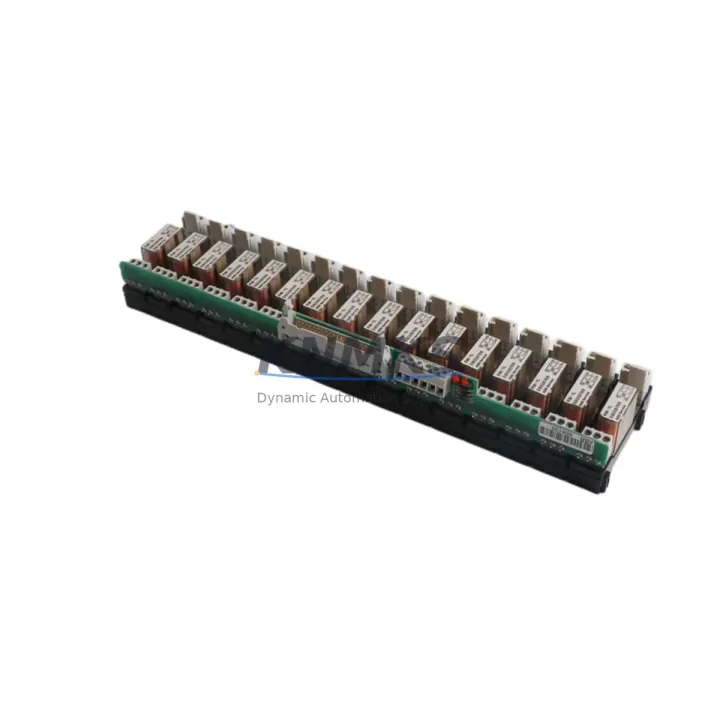
ABB RDO86-16L Retrofit-Ready Relay Output for AC500: Legacy Control System Migration & Compatibility Upgrade
The ABB RDO86-16L is a 16-channel relay output module engineered for the AC500 PLC platform, and it remains one of the most sought-after components in legacy control system retrofit projects. As industrial facilities continue to operate aging automation infrastructure built around first- and second-generation AC500 racks, the RDO86-16L serves as a direct, wiring-compatible replacement for discontinued relay output modules that are no longer available through standard distribution channels. Whether you are managing a planned system upgrade or responding to an unplanned module failure, the RDO86-16L provides a reliable path forward without requiring full panel redesign or PLC program rewrite.
In retrofit scenarios, engineers frequently encounter situations where the original relay output module has reached end-of-life, spare parts inventory has been exhausted, and the control cabinet must remain operational with minimal downtime. The RDO86-16L addresses this challenge directly. Its terminal wiring layout is compatible with standard AC500 I/O wiring conventions, meaning existing field cables — including those connected to motor contactors, solenoid valves, alarm annunciators, and interlock circuits — can typically be reconnected without modification. Before installation, it is essential to verify the backplane slot assignment, confirm the module address in the PLC configuration, and cross-check the output load ratings against the connected field devices to ensure relay contact capacity is not exceeded.
Power budget verification is a critical step in any AC500 rack migration. The RDO86-16L draws its logic power from the AC500 backplane bus, and when replacing modules in a populated rack alongside components such as the ABB AI810 analog input module or the ABB DI810 digital input module, the total rack current consumption must be recalculated. Exceeding the power supply module’s rated output — for example, when using the ABB PM573-ETH CPU module in a high-density I/O configuration — can cause intermittent faults or prevent the rack from initializing correctly. Always consult the AC500 system configuration tool to validate power margins before commissioning.
Communication link integrity is another area requiring careful attention during migration. In systems where the AC500 CPU communicates with SCADA or DCS layers via PROFIBUS DP or Modbus TCP, the relay output module’s logical address must match the address configured in the original program. If the legacy program was developed in Control Builder Plus and the module address has shifted due to rack reconfiguration, the output mapping in the POU (Program Organization Unit) must be updated accordingly. Failure to align the hardware address with the software configuration is one of the most common causes of commissioning delays in retrofit projects.
HMI screen updates are often overlooked during relay output module replacements. In facilities running ABB CP600 series operator panels or third-party HMI systems connected via OPC-UA or Modbus, the output status tags linked to the relay channels must be verified against the new module’s I/O mapping. If the original module used a different channel numbering convention or if the rack slot position has changed, HMI tag addresses may need to be remapped to maintain accurate process visualization and alarm management.
Installation space confirmation is straightforward for the RDO86-16L, as it occupies a standard AC500 I/O slot and does not require additional mounting hardware. However, in retrofit scenarios involving older S500 I/O racks or mixed-generation cabinets, it is important to confirm that the backplane connector type and slot pitch are compatible. In some legacy installations, the rack may require a firmware update on the ABB TB511-ETH communication interface module to recognize the RDO86-16L correctly during the hardware scan at startup.
Firmware compatibility should be confirmed before deployment. The RDO86-16L is supported across a range of AC500 firmware versions, but installations running older CPU firmware may require an update to ensure full feature support and stable operation. KNMKS performs pre-shipment functional testing on all relay output modules, verifying relay coil actuation, contact continuity, and backplane communication before dispatch. Each unit ships with a test report and is covered by a support terms confirmed by quotation from the date of delivery.
For facilities managing long-term spare parts lifecycle planning, maintaining a buffer stock of the RDO86-16L is a practical strategy. As the AC500 platform transitions toward newer generations, availability of legacy-compatible relay output modules through standard channels will continue to decline. KNMKS maintains inventory specifically to support customers with extended production horizons and multi-year maintenance contracts.
Migration Compatibility Table
| Parameter | Details |
|---|---|
| Module Type | 16-Channel Relay Output Module |
| Platform Compatibility | ABB AC500 PLC Series (S500 I/O) |
| Backplane Interface | AC500 Standard I/O Backplane Connector |
| Installation Slot | Standard AC500 I/O Slot (no adapter required) |
| Wiring Compatibility | Compatible with existing AC500 terminal wiring conventions |
| Communication Protocol | AC500 Internal I/O Bus (PROFIBUS DP / Modbus TCP via CPU) |
| Replacement Recommendation | Direct replacement for discontinued AC500 relay output modules |
| Commissioning Notes | Verify module address, rack power budget, and HMI tag mapping |
| Firmware Requirement | Confirm CPU and communication module firmware compatibility |
| Pre-Shipment Testing | Relay actuation, contact continuity, backplane communication verified |
| Support terms | 12 Months from date of delivery |
| Country of Origin | Germany |
Retrofit Planning for Existing Automation Systems
A successful retrofit begins with a complete audit of the existing control cabinet. In AC500-based systems, this means documenting every occupied rack slot, recording the current module addresses, and capturing the existing terminal wiring diagrams before any hardware is removed. The RDO86-16L slots directly into the AC500 I/O rack, but the surrounding modules — including analog output modules, digital input modules, and the CPU itself — must remain undisturbed during the swap to avoid triggering a full system restart.
In multi-rack configurations, the ABB TB511-ETH or similar expansion interface modules manage communication between the CPU rack and remote I/O stations. When replacing a relay output module in a remote rack, the communication link must be verified after installation to confirm that the remote I/O station is correctly enumerated by the CPU. In some installations, a cold restart of the remote rack is required to force re-enumeration.
Signal isolation requirements should also be reviewed during retrofit planning. In applications where the relay outputs switch high-voltage field devices or where electrical noise is a concern, adding a signal isolator or surge protection terminal block between the RDO86-16L output contacts and the field wiring is a recommended practice. This protects the module from transient voltages and extends service life in demanding industrial environments.
For systems that include ABB CP600 HMI panels or third-party SCADA interfaces, the retrofit plan should include a dedicated HMI tag verification step. Output channel tags must be confirmed against the updated I/O mapping, and any alarm setpoints or interlock logic tied to relay output states should be re-validated in simulation mode before live commissioning.
Programming cable availability is a practical consideration that is often overlooked. Ensure that a compatible USB programming cable for Control Builder Plus is available on-site during commissioning, as firmware updates or program modifications may be required during the final verification phase.
Downtime Control During System Migration
Minimizing downtime during a relay output module replacement requires a structured approach. The most effective strategy is to pre-configure the replacement RDO86-16L offline — confirming its module address and verifying its compatibility with the existing program — before the scheduled maintenance window begins. This eliminates the need for on-site configuration work and reduces the time the control system is offline.
Where process continuity is critical, a hot-swap procedure may be possible depending on the AC500 CPU configuration and the rack’s power supply capacity. In systems where hot-swap is not supported, the shutdown sequence should be carefully planned to ensure that all field devices connected to the relay outputs are placed in a safe state before power is removed from the rack. Interlock circuits, motor starters, and safety-critical outputs must be manually isolated before the module is removed.
Original program logic should be backed up to a secure location before any hardware changes are made. Control Builder Plus allows the full project — including hardware configuration, POU logic, and HMI variable tables — to be exported and archived. This backup serves as the recovery baseline if commissioning issues arise and a rollback is required.
After the RDO86-16L is installed and the system is powered up, a structured commissioning sequence should be followed: verify rack enumeration, confirm module address recognition in the hardware configuration, perform a channel-by-channel output test using the forcing function in Control Builder Plus, and validate HMI status displays before returning the system to automatic operation. KNMKS technical support is available to assist with commissioning queries for all modules supplied.
Retrofit Support FAQ
Q1: Is the ABB RDO86-16L a direct replacement for discontinued AC500 relay output modules?
Yes. The RDO86-16L is designed for the AC500 S500 I/O platform and is compatible with the standard AC500 backplane. It can replace discontinued relay output modules in the same series without requiring rack modification, provided the module address and wiring are correctly configured.
Q2: What commissioning steps are required after installing the RDO86-16L?
After installation, verify that the module is correctly recognized in the AC500 hardware configuration in Control Builder Plus. Confirm the module address matches the program configuration, perform a channel-by-channel output forcing test, and validate HMI tag mapping before returning the system to automatic operation.
Q3: Does KNMKS perform pre-shipment testing on the RDO86-16L?
Yes. Every RDO86-16L supplied by KNMKS undergoes pre-shipment functional testing, including relay coil actuation verification, contact continuity measurement, and backplane communication confirmation. A test report is included with each shipment.
Q4: What support terms coverage is provided?
All RDO86-16L modules supplied by KNMKS are covered by a support terms confirmed by quotation from the date of delivery. Support terms coverage includes module defects and functional failures under normal operating conditions. KNMKS maintains inventory to support rapid replacement in the event of a support terms claim.
© 2026 KNMKS. All rights reserved.
Original Source: https://knmks.com
Contact: admin@knmks.com | +86 18359268345
Product Identification
- Brand / Ecosystem
-
ABB
ABB - Model / Series
-
RDO86-16L
AC500 Series - Product Family
- PLCs & Controllers
- Availability Status
- Available on request after model and quantity confirmation
- Inquiry Type
- B2B RFQ, replacement inquiry and project spare-part request
- Pre-Quote Check
- Exact SKU, brand, series, quantity, nameplate photos and destination country are checked before quotation
System Path
Where this product fits in the KNMKS automation structure.
Specification & Inquiry Focus
- Control platform
- PLC, PAC and modular controllers
- Common needs
- CPU, rack, power and I/O expansion
- Project support
- Replacement, cabinet build and maintenance
Buyer Confirmation
Information KNMKS checks before replying.
- Exact model
- RDO86-16L
- Brand / ecosystem
- ABB
- Product family
- PLCs & Controllers
- Application note
- Replacement, maintenance, project build or spare-part list
- Useful photos
- Nameplate, installed unit, cabinet layout or connector side
- Delivery details
- Quantity, destination country and target schedule
Document Support
Files and notes can be confirmed during quotation.
- Product photos or nameplate confirmation when available
- Packing and delivery notes before quotation confirmation
- Support scope and delivery terms confirmed per inquiry
- Export document coordination for qualified B2B requests
Inquiry Support
- Model cross-checking before quotation
- CPU, power, rack and expansion module matching
- Support for replacement and project inquiry
What to Send Us
- Brand and exact model number: ABB RDO86-16L
- Quantity and required delivery time
- Application, replacement requirement or nameplate photo
- Destination country and shipping preference
RFQ Preparation
This is a product inquiry page built for RFQ communication.
Fast Model Check
Send this model to KNMKS for confirmation.
Include quantity, destination country and photos if this is a maintenance replacement. The inquiry will be saved with a reference number after submission.
Brand & Compatibility Note
KNMKS displays automation product information for well-known industrial brand ecosystems and compatible replacement references. Brand names are used for product identification and compatibility reference only; final availability and commercial terms are confirmed per quotation.
 Manufacturing
 Machine Tools
 Packaging
 Energy & Power



 HMI & Displays
 Servo Systems
 Variable Frequency Drives
 Sensors