
Overview
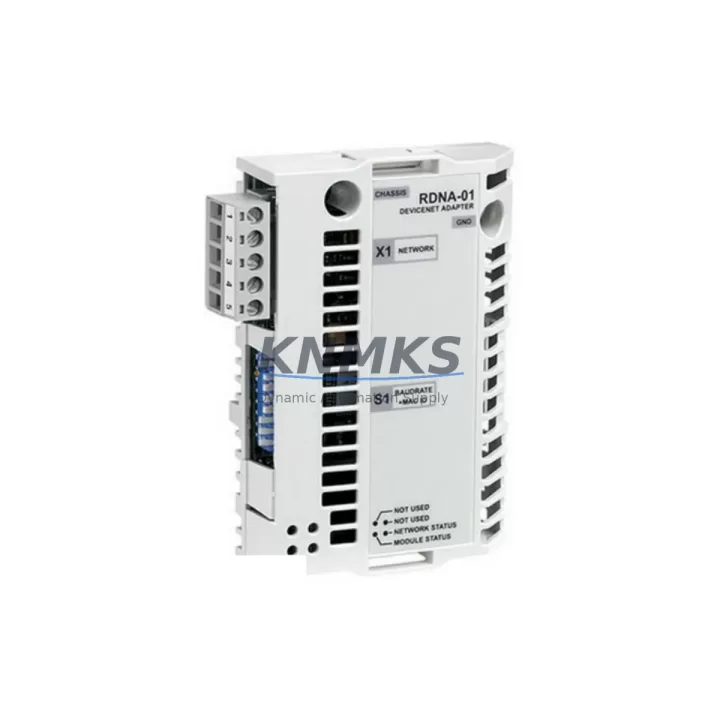
ABB RDNA-01 64606891 DeviceNet Adapter for ACS800: Legacy Control System Migration & Compatibility Upgrade
The ABB RDNA-01 (part number 64606891) is a DeviceNet fieldbus adapter module designed for integration with ABB ACS800 series variable frequency drives. As industrial facilities transition away from aging control architectures, the RDNA-01 remains a critical interface component for plants that rely on DeviceNet-based PLCs, scanners, and master controllers to manage drive speed references, torque commands, and process feedback signals. Whether you are replacing a failed unit, restoring a decommissioned line, or executing a phased migration from legacy DeviceNet infrastructure to a hybrid communication topology, the RDNA-01 provides a verified drop-in solution with minimal re-engineering overhead.
Before installing the RDNA-01 into an existing ACS800 drive, engineers should confirm the drive’s firmware version supports the adapter slot assignment. The RDNA-01 mounts into the option slot of the ACS800 control board and communicates via the drive’s internal DDCS-based option bus. Verify that the ACS800 application program — whether using Standard Application, System Application, or a custom DriveSPC configuration — has the correct fieldbus parameter group (Group 51: COMM MODULE DATA) mapped to the DeviceNet node address and baud rate configured on the RDNA-01 rotary switches. Mismatched node addresses between the adapter and the DeviceNet master scanner are among the most common commissioning errors during retrofit projects.
Terminal wiring for the DeviceNet network connection follows the standard CAN-based pinout: V+ (red), V− (black), CAN_H (white), CAN_L (blue), and shield (bare). Confirm that the network segment termination resistors (120 Ω) are correctly placed at both physical ends of the DeviceNet trunk. When replacing an RDNA-01 in a live panel, document the existing node address and baud rate settings before removal to avoid reconfiguration delays during the maintenance window. If the ACS800 drive is installed in a multi-drive cabinet alongside an ACS800-04 or ACS800-07 configuration, ensure that the RDNA-01 adapter is assigned to the correct drive unit’s option slot and that the DeviceNet scanner’s I/O mapping table is updated to reflect any address changes.
Power supply requirements for the RDNA-01 are drawn from the ACS800 control board’s internal 5 V and 24 V rails via the option slot connector — no external fieldbus power supply is required for the adapter itself. However, the DeviceNet network segment must be powered by a dedicated 24 VDC DeviceNet power supply with adequate current capacity for all nodes on the segment. During retrofit planning, audit the existing DeviceNet power supply capacity, particularly if additional I/O nodes such as a 1756-DNB DeviceNet bridge module or a third-party DeviceNet I/O block have been added to the segment since the original installation.
For facilities migrating from older ABB drive generations — such as the ACS600 series with NDNA-01 or NIBA-01 adapters — the RDNA-01 is not a direct pin-compatible replacement for those earlier platforms. The ACS800 option slot connector and parameter structure differ from the ACS600 architecture. In such migration scenarios, the drive itself must be upgraded to an ACS800 unit before the RDNA-01 can be deployed. Coordinate the drive replacement with updates to the HMI display panels (such as ABB CDP312R or Panel Bus-connected operator panels) to ensure that drive status words, fault codes, and speed feedback signals are correctly remapped in the HMI tag database.
In multi-axis or coordinated motion applications, the RDNA-01 enables the ACS800 to participate as a DeviceNet slave device under a Rockwell Automation ControlLogix or CompactLogix PLC acting as the DeviceNet master. The RSNetWorx for DeviceNet EDS file for the RDNA-01 must be installed in the engineering workstation before the scanner module can recognize the adapter during online configuration. Confirm that the I/O connection size (polled I/O, change-of-state, or cyclic) matches the scanner’s allocated connection resources. For systems using a 1771-SDN or 1747-SDN scanner in legacy PLC-5 or SLC 500 racks, verify that the scanner’s I/O map has sufficient available words to accommodate the RDNA-01’s process data object (PDO) size.
Migration Compatibility Table
| Parameter | Details |
|---|---|
| Compatible Drive Platform | ABB ACS800 series (all power ratings) |
| Fieldbus Protocol | DeviceNet (CAN-based, ISO 11898) |
| Option Slot Interface | ACS800 internal DDCS option bus connector |
| Node Address Range | 0–63 (set via rotary switches on module) |
| Supported Baud Rates | 125 kbps, 250 kbps, 500 kbps |
| I/O Data Format | Polled I/O, COS, Cyclic (configurable) |
| EDS File Required | Yes — install in RSNetWorx for DeviceNet |
| Power Source | Internal from ACS800 option slot (5 V / 24 V) |
| Replaces / Supersedes | Earlier RDNA-01 revisions; not compatible with ACS600 NDNA-01 |
| Installation Space | Single option slot on ACS800 control board |
| Firmware Compatibility | Verify ACS800 firmware supports option slot assignment |
| Commissioning Tool | DriveWindow, DriveWindow Light, or CDP312R panel |
| Pre-Shipment Testing | Yes — function and communication verified before dispatch |
| Support terms | 12 months from date of shipment |
Retrofit Planning for Existing Automation Systems
A successful RDNA-01 retrofit begins with a thorough audit of the existing control cabinet. Identify the ACS800 drive’s current option slot occupancy — if an RAIO-01 analog I/O extension module or an RTAC-01 pulse encoder interface is already installed in one of the available slots, confirm that the RDNA-01 can be accommodated in the remaining slot without conflicting with the drive’s parameter configuration. In cabinets where the ACS800 is paired with an ACH550 or ACS550 drive on the same DeviceNet segment, note that those drives use different fieldbus adapter families (FDNA-01 for ACS550) and will require separate EDS file entries in the scanner configuration.
For the PLC side of the retrofit, update the DeviceNet scanner’s I/O map to reflect the RDNA-01’s PDO structure. In ControlLogix systems, use the 1756-DNB module’s RSNetWorx configuration to add the RDNA-01 as a new device, assign the correct node address, and define the input and output assembly sizes. If the existing ladder logic or Function Block Diagram program references the old drive’s DeviceNet node by address, verify that the address assignment is preserved or update all cross-references in the program before going live. For facilities using a PROFIBUS-DP backbone with a DeviceNet sub-network, a PROFIBUS-to-DeviceNet gateway may be in the signal path — confirm that the gateway’s routing table is updated to include the new RDNA-01 node.
Cable routing and connector integrity are frequently overlooked during adapter replacements. Inspect the DeviceNet trunk cable and drop cable connectors (Micro or Mini style) for corrosion, damaged pins, or improper seating. Replace any suspect connectors before commissioning the new RDNA-01 to avoid intermittent communication faults that are difficult to diagnose after the panel is closed. Confirm that the overall DeviceNet segment length and number of nodes remain within the specification limits for the selected baud rate.
Downtime Control During System Migration
Minimizing production downtime during an RDNA-01 replacement requires preparation before the maintenance window opens. Export the ACS800 drive’s full parameter set using DriveWindow or the CDP312R panel’s parameter backup function. Store the backup file on a laptop or USB drive that will be available at the panel during the swap. This ensures that if the drive’s parameter memory is disrupted during the adapter change, the full configuration — including motor data, control mode, speed references, and fieldbus parameter group settings — can be restored in minutes rather than hours.
Before removing the old RDNA-01, photograph or document the rotary switch positions for node address and baud rate. Power down the ACS800 drive and wait for the DC bus voltage to discharge (confirm with a voltmeter at the DC bus terminals) before accessing the control board option slot. The RDNA-01 module is secured by a locking tab on the option slot connector — release the tab carefully to avoid damaging the connector housing on the control board. Install the replacement RDNA-01, confirm the rotary switches match the documented settings, and restore drive power.
After power-up, use the CDP312R operator panel or DriveWindow to verify that the RDNA-01 is recognized in the drive’s option slot (parameter 98.02 should display DEVICENET or the corresponding fieldbus type code). Initiate a DeviceNet network scan from the PLC engineering workstation to confirm that the RDNA-01 node is online and responding. Monitor the drive’s fieldbus status word and verify that the PLC is receiving valid process data before releasing the drive back to automatic control. Total swap time for a prepared team is typically 30–60 minutes, keeping unplanned downtime well within a single shift maintenance window.
Retrofit Support FAQ
Q: Is the RDNA-01 64606891 a direct replacement for all RDNA-01 revisions?
A: Yes. The part number 64606891 is the current production revision of the RDNA-01 and is backward compatible with all earlier hardware revisions of the same module. No parameter changes are required when swapping between RDNA-01 revisions in the same ACS800 drive.
Q: What commissioning steps are required after installing the RDNA-01?
A: After installation, verify the node address and baud rate rotary switch settings, confirm the drive recognizes the adapter in parameter 98.02, perform a DeviceNet network scan from the master scanner, and validate process data exchange (speed reference, status word, actual value) between the PLC and the drive before returning to automatic operation.
Q: Can the RDNA-01 be used in an ACS800 drive that also has an RAIO-01 or RTAC-01 installed?
A: Yes, provided the ACS800 control board has a free option slot. The ACS800 supports multiple option modules simultaneously, and the RDNA-01 operates independently of analog I/O extension or encoder interface modules installed in other slots.
Q: What support terms and testing coverage is provided?
A: Every RDNA-01 unit is function-tested and communication-verified prior to shipment. A support terms confirmed by quotation from the date of shipment covers defects in materials and workmanship. In-stock units are available for same-week dispatch to minimize production downtime for urgent replacement requirements.
© 2026 KNMKS. All rights reserved.
Original Source: https://knmks.com
Contact: admin@knmks.com | +86 18359268345
Product Identification
- Brand / Ecosystem
-
ABB
ABB - Model / Series
-
RDNA-01 64606891
S800 Series - Product Family
- Variable Frequency Drives
- Availability Status
- Available on request after model and quantity confirmation
- Inquiry Type
- B2B RFQ, replacement inquiry and project spare-part request
- Pre-Quote Check
- Exact SKU, brand, series, quantity, nameplate photos and destination country are checked before quotation
System Path
Where this product fits in the KNMKS automation structure.
Specification & Inquiry Focus
- Drive range
- AC drives, VFDs and accessories
- Common needs
- Voltage, kW/HP and load type
- Project support
- Motor control, energy saving and spares
Buyer Confirmation
Information KNMKS checks before replying.
- Exact model
- RDNA-01 64606891
- Brand / ecosystem
- ABB
- Product family
- Variable Frequency Drives
- Application note
- Replacement, maintenance, project build or spare-part list
- Useful photos
- Nameplate, installed unit, cabinet layout or connector side
- Delivery details
- Quantity, destination country and target schedule
Document Support
Files and notes can be confirmed during quotation.
- Product photos or nameplate confirmation when available
- Packing and delivery notes before quotation confirmation
- Support scope and delivery terms confirmed per inquiry
- Export document coordination for qualified B2B requests
Inquiry Support
- Input/output voltage and kW/HP confirmation
- Energy-saving motor control inquiry
- Accessory and spare-unit support
What to Send Us
- Brand and exact model number: ABB RDNA-01 64606891
- Quantity and required delivery time
- Application, replacement requirement or nameplate photo
- Destination country and shipping preference
RFQ Preparation
This is a product inquiry page built for RFQ communication.
Fast Model Check
Send this model to KNMKS for confirmation.
Include quantity, destination country and photos if this is a maintenance replacement. The inquiry will be saved with a reference number after submission.
Brand & Compatibility Note
KNMKS displays automation product information for well-known industrial brand ecosystems and compatible replacement references. Brand names are used for product identification and compatibility reference only; final availability and commercial terms are confirmed per quotation.
 Manufacturing
 Machine Tools
 Packaging
 Energy & Power
 PLCs & Controllers
 HMI & Displays
 Servo Systems
 Sensors